OrangePi cm5-tablet RAW-MIPI-SC132M
-
@veye_xumm got it.
but why do you recommend flash eMMC ?
i burned SD with your image provided and there veye presented. what`s the difference ? -
@zoldaten said in OrangePi cm5-tablet RAW-MIPI-SC132M:
i burned SD with your image provided and there veye presented. what`s the difference ?
Sorry, I misunderstood you earlier. I thought you meant that following the steps to compile wasn't working at all. So, now that you've successfully compiled it, the veyecamera has appeared, correct?
What you should do now is modify the source code of the DTS. For different MIPI interfaces, use different dtsi configurations to set it up for the specific camera or sensor model you want.
-
@veye_xumm veye appears only on image you provided via download link.
the image i built has no veye on board.should i change the main dts after decompilation ...tablet.dbt > ...tablet.dts?
or use somehow dtsi (https://github.com/veyeimaging/rk35xx_orangepi/tree/main/linux/drivers/cm5/cm5-mvcam-dts) to link with your ...tablet.dbt ? -
@zoldaten
As long as you follow the steps and place our driver and DTS files into the Orange Pi source tree, then compile the image according to the official Orange Pi instructions and flash this image onto the board, the VEYE camera driver should appear correctly.Essentially, this operation just adds the driver to the original standard Orange Pi system. No additional steps are required after flashing the image. I suspect that you may not have fully applied the modifications in all the necessary parts of the source code.
Questions will be answered as soon as possible, please be patient.
如果你使用中文,请直接用中文提问。
May the force be with YOU. (This is the translation of the mysterious Chinese symbol above.) -
@veye_xumm hi. i`m trying to build Kernel itself left alone the full image.
and see this error in compile the veye driver:
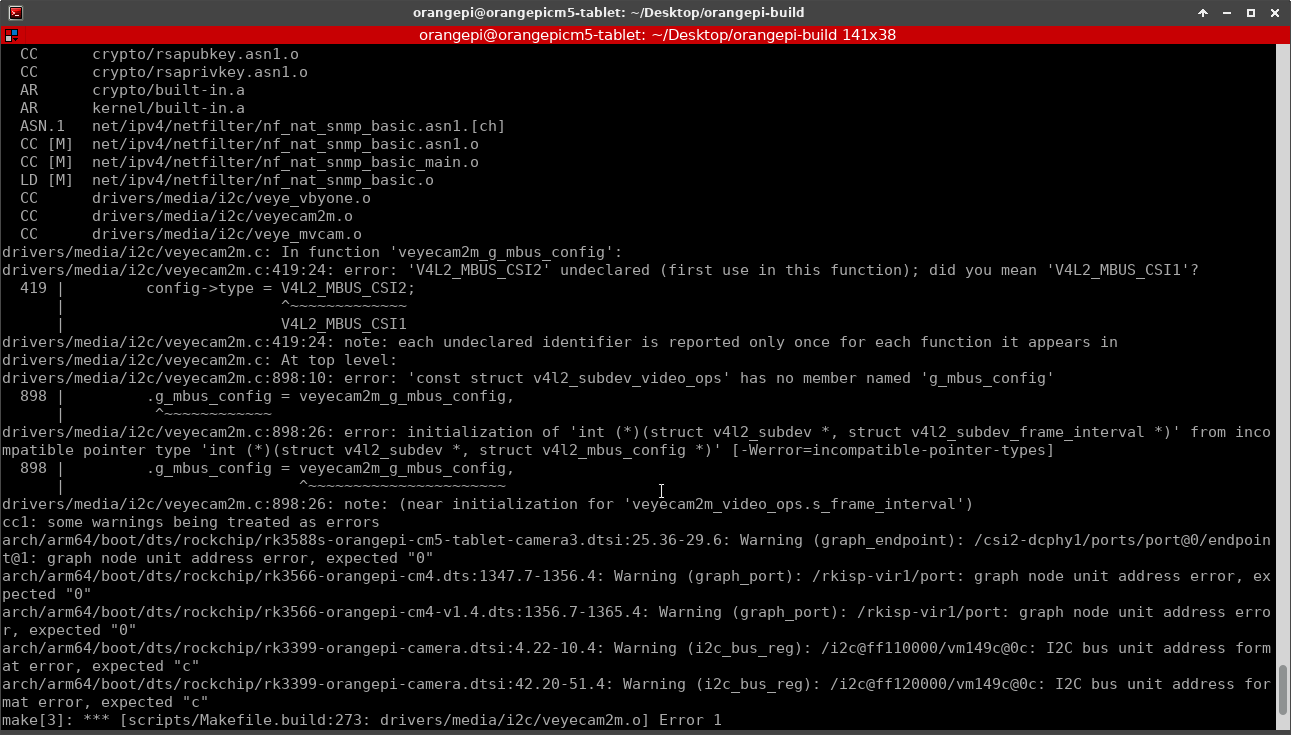
so the problem in driver file - [0_1772540181473_veyecam2m.zip](Загрузка 100%)
-
@veye_xumm and could you check steps it did before start build process:
sudo cp -r rk35xx_orangepi/linux/drivers/cm5/cm5-mvcam-dts orangepi-build/kernel/orange-pi-5.10-rk35xx/arch/arm64/boot/dts/rockchip/
sudo cp rk35xx_orangepi/linux/drivers/cm5/config/linux-rockchip-rk3588-legacy.config orangepi-build/external/config/kernel/linux-rockchip-rk3588-legacy.config
sudo cp -r rk35xx_veye_bsp/linux/drivers/kernel_v5.10 orangepi-build/kernel/orange-pi-5.10-rk35xx/drivers/media/i2c/

sudo nano orangepi-build/kernel/orange-pi-5.10-rk35xx/drivers/media/i2c/Kconfig
config VIDEO_DS90UB954
       tristate "TI FDPLINK III support."
       depends on I2C && VIDEO_V4L2 && VIDEO_V4L2_SUBDEV_API
       help
            Driver for TI FDPLINK III .

config VIDEO_VEYECAM2M
       tristate "VEYE 2M camera support."
       depends on I2C && VIDEO_V4L2 && VIDEO_V4L2_SUBDEV_API
       depends on MEDIA_CAMERA_SUPPORT
       help
               Driver for veye 2m camera.

config VIDEO_VEYEMVCAM
       tristate "VEYE MV series camera support."
       depends on I2C && VIDEO_V4L2 && VIDEO_V4L2_SUBDEV_API
       depends on MEDIA_CAMERA_SUPPORT
       help
               Driver for veye mv series camera.

config VIDEO_VEYEVBYONE
       tristate "VEYE V-by-One hs toolkit support."
       depends on I2C && VIDEO_V4L2 && VIDEO_V4L2_SUBDEV_API
       depends on MEDIA_CAMERA_SUPPORT
       help
               Driver for vV-by-One hs toolkit .

sudo nano orangepi-build/kernel/orange-pi-5.10-rk35xx/drivers/media/i2c/Makefile
obj-$(CONFIG_VIDEO_DS90UB954) += ds90ub954.o
obj-$(CONFIG_VIDEO_VEYEVBYONE) += veye_vbyone.o
obj-$(CONFIG_VIDEO_VEYECAM2M) += veyecam2m.o
obj-$(CONFIG_VIDEO_VEYEMVCAM) += veye_mvcam.o
may be i miss something leads to empty image ?
-
@zoldaten
In the source code of veyecam2m.c, please comment out this function.
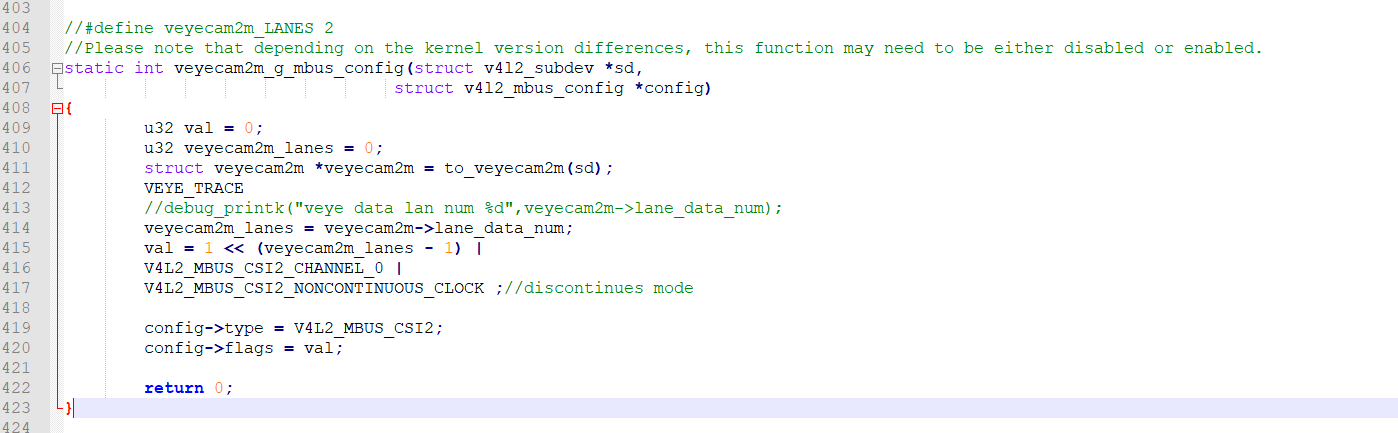
Additionally, since you are using the RAW-MIPI-SC132M camera, you only need the mvcam driver and its corresponding dtb. -
@veye_xumm ok. i just del it and remove from Makefile.
and changed in main dts - uncomment camera-1.
build kernel package without full image.
installed to jammy 20.04 via dpkg.
and... my mixed cams start working !later i`ll tried to repair broken driver for veye you provided.
thanks for help!
-
@zoldaten looking forward to your good news.
-
@veye_xumm hi. could you provide link to image kernel 6.* image with cameras integrated ?
as far as i saw there are only kernel 5.10 links... -
@zoldaten Sorry, we currently only provide kernel version 5.x images for Orange Pi. If you need version 6.x, you will need to compile it yourself based on our open-source code.
Questions will be answered as soon as possible, please be patient.
如果你使用中文,请直接用中文提问。
May the force be with YOU. (This is the translation of the mysterious Chinese symbol above.) -
@veye_xumm got it. i tried to do that but have segmentation fault - something wrong with mali drivers. at the same time drivers for cameras built correctly.
-
@veye_xumm said in OrangePi cm5-tablet RAW-MIPI-SC132M:
@zoldaten Sorry, we currently only provide kernel version 5.x images for Orange Pi. If you need version 6.x, you will need to compile it yourself based on our open-source code.
hi. i built kernel 6.1.99 - but the errors almost the same as in start of the spoiler to this topic:
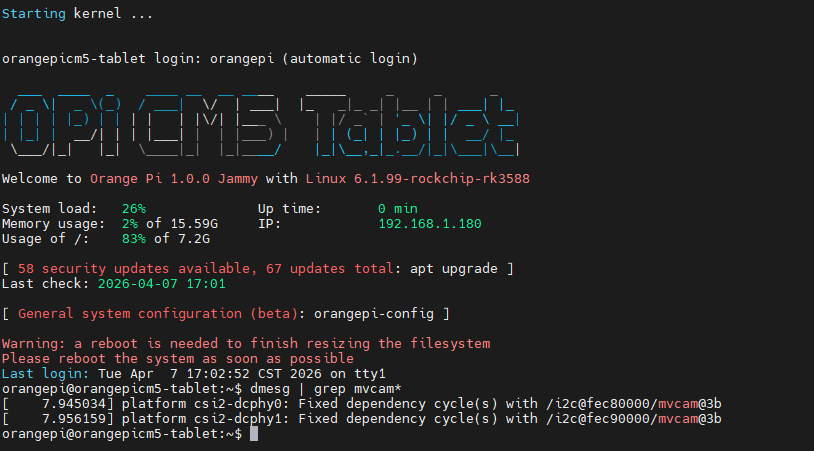
in build progress i saw strange missing packages errors.
could your check your instructions ? may be them got obsolete ? -
@zoldaten You can ignore the warning shown in your screenshot. However, your probe information is incomplete; it seems that the mvcam probe function has not been triggered.
-
@veye_xumm i think so.
please see screens attached:
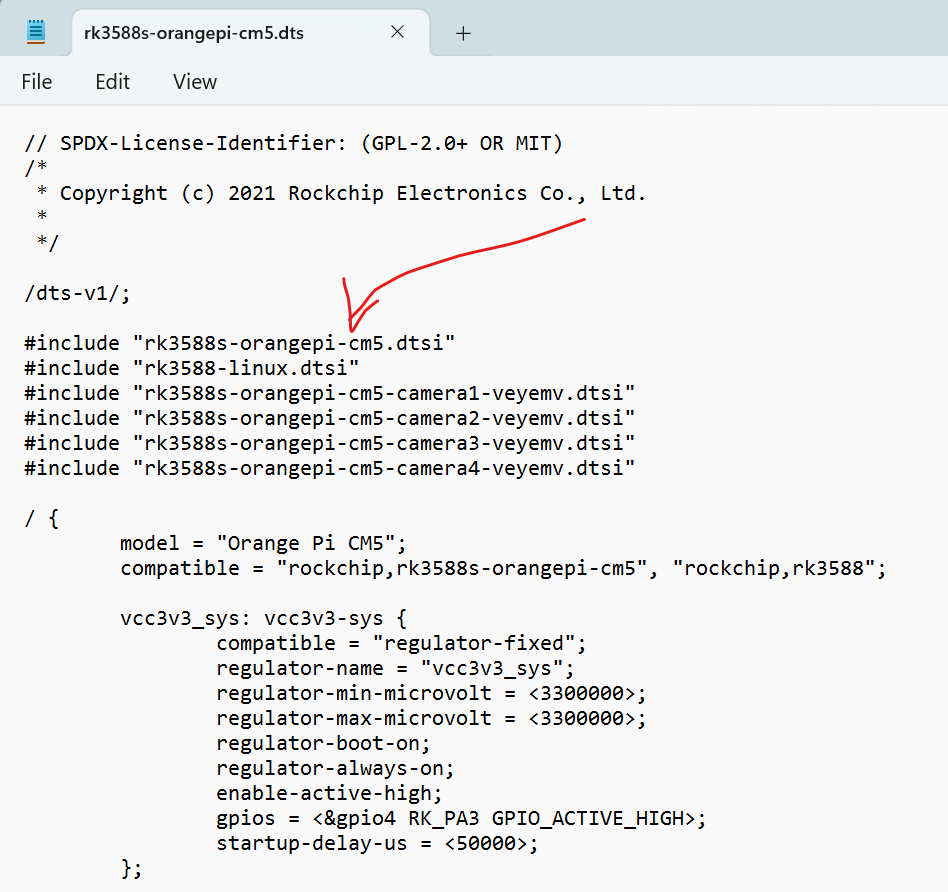
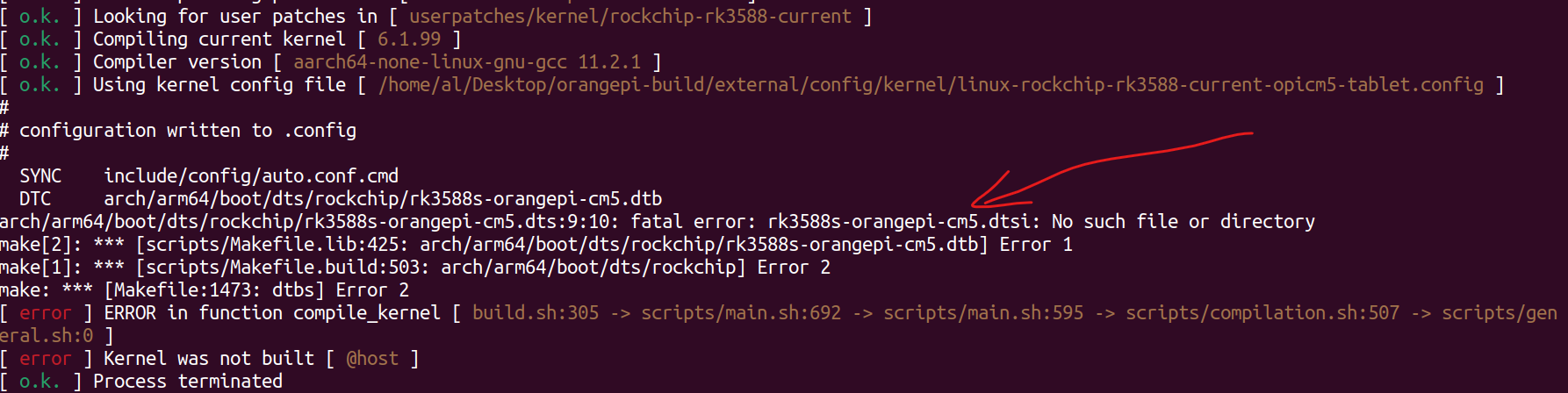
when i copied .dts files from veye i saw errors building missing files.i tried to build on:
- orange pi 5 tablet
- VM machine with Ubuntu 22.04 installed
got the same errors.
please check your files.


Hello! It looks like you're interested in this conversation, but you don't have an account yet.
Getting fed up of having to scroll through the same posts each visit? When you register for an account, you'll always come back to exactly where you were before, and choose to be notified of new replies (either via email, or push notification). You'll also be able to save bookmarks and upvote posts to show your appreciation to other community members.
With your input, this post could be even better 💗
Register Login