VEYE IMAGING Forum
    • Categories
    • Tags
    • Recent
    • Popular
    • Users
    • WIKI
    • veye.cc
    • Register
    • Login

    IMX307使用抓拍模式pipeline启动失败

    Scheduled Pinned Locked Moved CS MIPI camera
    11 Posts 2 Posters 3.2k Views 1 Watching
    Loading More Posts
    • Oldest to Newest
    • Newest to Oldest
    • Most Votes
    Reply
    • Reply as topic
    Log in to reply
    This topic has been deleted. Only users with topic management privileges can see it.
    • L Offline
      lyj
      last edited by

      IMX307,使用以下参数 v4l2src num-buffers=1 /dev/video0! "video/x-raw,format=(string)UYVY, width=(int)1920, height=(int)1080" ! nvvidconv ! "video/x-raw(memory:NVMM),format=(string)I420" ! nvjpegenc ! filesink location=1.jpg 启动pipeline,提示cannot find appsink in maanual pipeline,开启失败

      veye_xummV 1 Reply Last reply Reply Quote 0
      • veye_xummV Offline
        veye_xumm @lyj
        last edited by

        @lyj
        请直接执行:

        gst-launch-1.0 v4l2src num-buffers=1 ! "video/x-raw,format=(string)UYVY, width=(int)2560, height=(int)1440" ! nvvidconv ! "video/x-raw(memory:NVMM),format=(string)I420" ! nvjpegenc ! filesink location=jpgname.jpg
        

        把你这边的提示信息发出来看看。

        Questions will be answered as soon as possible, please be patient.
        如果你使用中文,请直接用中文提问。
        May the force be with YOU. (This is the translation of the mysterious Chinese symbol above.)

        L 1 Reply Last reply Reply Quote 0
        • L Offline
          lyj @veye_xumm
          last edited by

          @veye_xumm 可我是双相机呢,我有两个相机,我要指定一下吧

          veye_xummV 1 Reply Last reply Reply Quote 0
          • veye_xummV Offline
            veye_xumm @lyj
            last edited by

            @lyj
            取video0

            gst-launch-1.0 v4l2src -d /dev/video0 num-buffers=1 ! "video/x-raw,format=(string)UYVY, width=(int)2560, height=(int)1440" ! nvvidconv ! "video/x-raw(memory:NVMM),format=(string)I420" ! nvjpegenc ! filesink location=jpgname.jpg
            

            取video1

            gst-launch-1.0 v4l2src -d /dev/video1 num-buffers=1 ! "video/x-raw,format=(string)UYVY, width=(int)2560, height=(int)1440" ! nvvidconv ! "video/x-raw(memory:NVMM),format=(string)I420" ! nvjpegenc ! filesink location=jpgname.jpg
            

            Questions will be answered as soon as possible, please be patient.
            如果你使用中文,请直接用中文提问。
            May the force be with YOU. (This is the translation of the mysterious Chinese symbol above.)

            L 2 Replies Last reply Reply Quote 0
            • L Offline
              lyj @veye_xumm
              last edited by

              @veye_xumm 我试试

              1 Reply Last reply Reply Quote 0
              • L Offline
                lyj @veye_xumm
                last edited by

                @veye_xumm

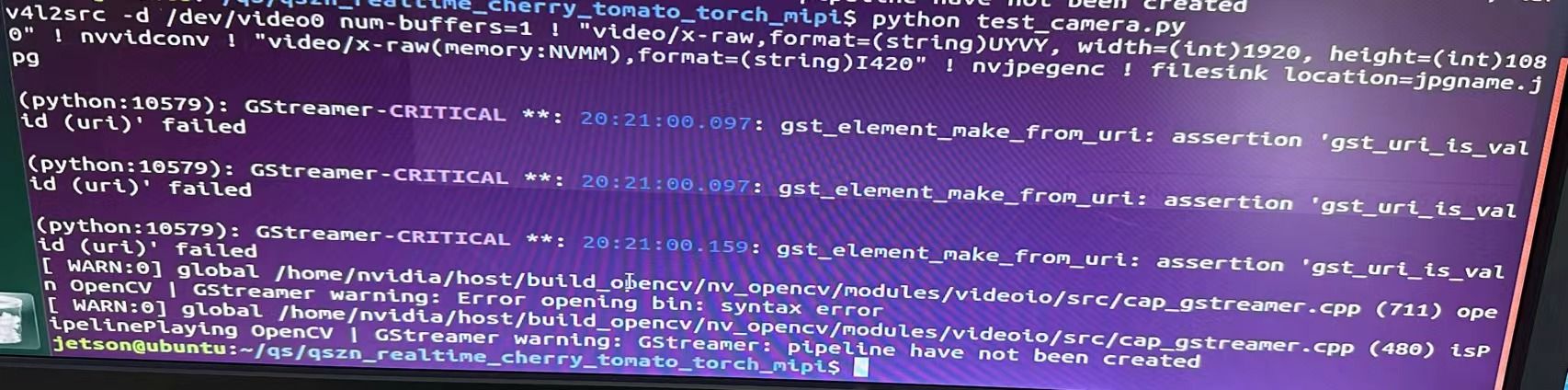
                cap = cv2.VideoCapture('v4l2src -d /dev/video0 num-buffers=1 ! \"video/x-raw,format=(string)UYVY, width=(int)1920, height=(int)1080\" ! nvvidconv ! \"video/x-raw(memory:NVMM),format=(string)I420\" ! nvjpegenc ! filesink location=jpgname.jpg')
                

                我使用这段代码,提示错误如下微信图片_20231025112341.jpg

                veye_xummV 1 Reply Last reply Reply Quote 0
                • veye_xummV Offline
                  veye_xumm @lyj
                  last edited by

                  @lyj
                  这脚本不是直接这样扔到python代码里面的啊。
                  你如果一定要用python去调用shell脚本。可以参考:

                  import subprocess
                  
                  # 定义要执行的GStreamer命令
                  gstreamer_command = "gst-launch-1.0 v4l2src -d /dev/video0 num-buffers=1 ! 'video/x-raw,format=(string)UYVY, width=(int)2560, height=(int)1440' ! nvvidconv ! 'video/x-raw(memory:NVMM),format=(string)I420' ! nvjpegenc ! filesink location=jpgname.jpg"
                  
                  # 使用subprocess运行GStreamer命令
                  try:
                      subprocess.run(gstreamer_command, shell=True, check=True)
                      print("GStreamer command executed successfully.")
                  except subprocess.CalledProcessError as e:
                      print(f"Error executing GStreamer command: {e}")


                  Questions will be answered as soon as possible, please be patient.
                  如果你使用中文,请直接用中文提问。
                  May the force be with YOU. (This is the translation of the mysterious Chinese symbol above.)

                  L 3 Replies Last reply Reply Quote 0
                  • L Offline
                    lyj @veye_xumm
                    last edited by

                    @veye_xumm 为啥视频预览可以用python调用,这个不行呢

                    1 Reply Last reply Reply Quote 0
                    • L Offline
                      lyj @veye_xumm
                      last edited by

                      @veye_xumm 还得是大佬出手,我还有个问题,这个图片只能保存成jpg吗?能不能是bmp格式

                      veye_xummV 1 Reply Last reply Reply Quote 0
                      • L Offline
                        lyj @veye_xumm
                        last edited by

                        @veye_xumm 请问这个抓拍的图片可以弄成视频流吗?必须保存成图片吗?

                        1 Reply Last reply Reply Quote 0
                        • veye_xummV Offline
                          veye_xumm @lyj
                          last edited by

                          @lyj 这个本质上是gstreamer的一个命令行,你可以上网上或者上英伟达的资料网站上查一下是否有压缩成视频流的,或者压缩成bmp的相关gstreamer plugin。

                          Questions will be answered as soon as possible, please be patient.
                          如果你使用中文,请直接用中文提问。
                          May the force be with YOU. (This is the translation of the mysterious Chinese symbol above.)

                          1 Reply Last reply Reply Quote 0

                          Hello! It looks like you're interested in this conversation, but you don't have an account yet.

                          Getting fed up of having to scroll through the same posts each visit? When you register for an account, you'll always come back to exactly where you were before, and choose to be notified of new replies (either via email, or push notification). You'll also be able to save bookmarks and upvote posts to show your appreciation to other community members.

                          With your input, this post could be even better 💗

                          Register Login
                          • First post
                            Last post