Get high framerate V4L2 in python/opencv?
-
I'm trying to get 720p@50fps into python with a IMX307 with the V4L2 driver installed. Somehow, I can't get above about 43fps, with the following code:
from time import time
import cv2

cap = cv2.VideoCapture(0, cv2.CAP_V4L2)

t0 = time()

for i in range(256):
    _, frame = cap.read()

t1 = time()

print("FPS:", 256/(t1-t0))
print("Frame shape:", frame.shape)
This outputs:
FPS: 44.038153429151514
Frame shape: (720, 1280, 3)
(To get the right width/height/fps in opencv, I hardcoded them into OpenCV as suggested here.)
I'm running on a Raspberry Pi 4 with 4GB RAM. Now my question: how can I get more than 44 fps into python? Should I throw opencv out and look at pure python implementations (1, 2)? Why is this so hard?
-
Expanding a bit, I tried the gstreamer-command, and this may not be a python problem:
gst-launch-1.0 v4l2src device=/dev/video0 ! "video/x-raw,format=(string)UYVY, width=(int)1280, height=(int)720,framerate=(fraction)50/1" ! videoconvert ! fpsdisplaysink video-sink=fakesink -v
/GstPipeline:pipeline0/GstFPSDisplaySink:fpsdisplaysink0: last-message = rendered: 495, dropped: 0, current: 41.52, average: 48.30
/GstPipeline:pipeline0/GstFPSDisplaySink:fpsdisplaysink0/GstTextOverlay:fps-display-text-overlay: text = rendered: 520, dropped: 0, current: 49.69, average: 48.37
/GstPipeline:pipeline0/GstFPSDisplaySink:fpsdisplaysink0: last-message = rendered: 520, dropped: 0, current: 49.69, average: 48.37
/GstPipeline:pipeline0/GstFPSDisplaySink:fpsdisplaysink0/GstTextOverlay:fps-display-text-overlay: text = rendered: 546, dropped: 0, current: 49.99, average: 48.44
/GstPipeline:pipeline0/GstFPSDisplaySink:fpsdisplaysink0: last-message = rendered: 546, dropped: 0, current: 49.99, average: 48.44
/GstPipeline:pipeline0/GstFPSDisplaySink:fpsdisplaysink0/GstTextOverlay:fps-display-text-overlay: text = rendered: 572, dropped: 0, current: 50.33, average: 48.53
/GstPipeline:pipeline0/GstFPSDisplaySink:fpsdisplaysink0: last-message = rendered: 572, dropped: 0, current: 50.33, average: 48.53
/GstPipeline:pipeline0/GstFPSDisplaySink:fpsdisplaysink0/GstTextOverlay:fps-display-text-overlay: text = rendered: 597, dropped: 0, current: 49.92, average: 48.58
/GstPipeline:pipeline0/GstFPSDisplaySink:fpsdisplaysink0: last-message = rendered: 597, dropped: 0, current: 49.92, average: 48.58
/GstPipeline:pipeline0/GstFPSDisplaySink:fpsdisplaysink0/GstTextOverlay:fps-display-text-overlay: text = rendered: 618, dropped: 0, current: 41.27, average: 48.29
/GstPipeline:pipeline0/GstFPSDisplaySink:fpsdisplaysink0: last-message = rendered: 618, dropped: 0, current: 41.27, average: 48.29
/GstPipeline:pipeline0/GstFPSDisplaySink:fpsdisplaysink0/GstTextOverlay:fps-display-text-overlay: text = rendered: 643, dropped: 0, current: 49.78, average: 48.35
/GstPipeline:pipeline0/GstFPSDisplaySink:fpsdisplaysink0: last-message = rendered: 643, dropped: 0, current: 49.78, average: 48.35
/GstPipeline:pipeline0/GstFPSDisplaySink:fpsdisplaysink0/GstTextOverlay:fps-display-text-overlay: text = rendered: 669, dropped: 0, current: 50.22, average: 48.42
Is this a hardware problem? Or a driver problem?
-
I'm diving into this a bit more. Thanks to Yevhenii I'm now using the gstreamer backend to opencv.
I've tested the time it takes to capture individual frames, with Now at 60fps, so a single frame should take 16.7ms. This works out for most frames, but there's a strange pattern of frames that take a lot longer:
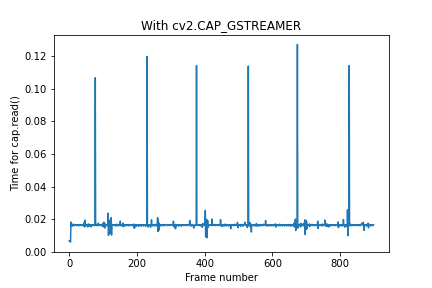
The number of frames between the frame that stalls is 153, 146, 153, 145, 153, 146, 153, 146, ... (this goes on for at least 100 times, so it's a real pattern).The opencv v4l2 backend gives a similar result:
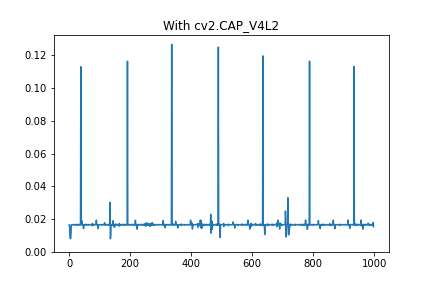
I have not tried to make this plot with the D_mipicamera python library, but I suspect a very similar behavior.
This is probably also the reason the average goes below 50 in the above questions. Does this ring a bell?
-
@tj
You have done very nice work.- The current driver only supports 720p@60fps, but it doesn't support 720p@50ps yet. But we have plans to support flexible frame rate configuration.
- This is indeed a bug, that seems to lose a few frames in a while. I'll arrange to fix it.
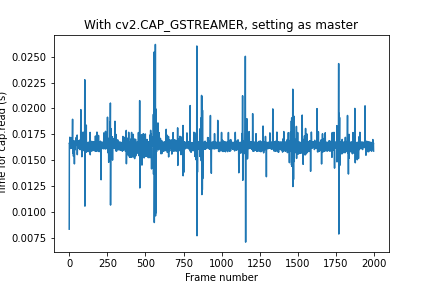
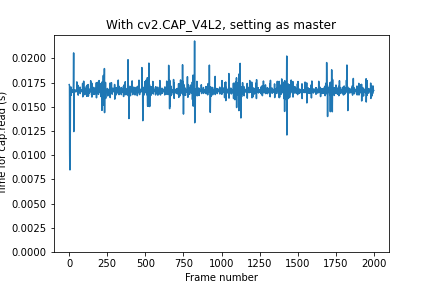
- There is now a temporary solution.Configure the camera as the master of sync mode.
./cs_mipi_i2c.sh -w -f streammode -p1 1 -p2 0Questions will be answered as soon as possible, please be patient.
如果你使用中文,请直接用中文提问。
May the force be with YOU. (This is the translation of the mysterious Chinese symbol above.) -
We have fixed this bug. Please upgrade the camera firmware and test.
http://wiki.veye.cc/index.php/CS-MIPI-IMX307_version_logRegards!
-
@veye_xumm Thanks for the quick reply and the workaround!
I tried setting the camera to master and redid the experiments. It seems that the cv2.CAP_V4L2 gives a slightly more constant framerate, so I'll skip gstreamer.
-
We have fixed this bug. Please upgrade the camera firmware and test.
http://wiki.veye.cc/index.php/CS-MIPI-IMX307_version_logRegards!
-
@veye_xumm Thanks for the quick fix! I've installed 2.39 and tested; the regular pattern of missed frames is now gone.

I've also tried with 2.39 in master mode, it gives a similar pattern. The regular pattern sometimes a somewhat longer read time (this pattern appears about every 48 frames) is very acceptable. Also, missing one frame in 2000 frames isn't a big problem.
Thanks again! Next problem in a next topic

-
@tj You are welcome.

Hello! It looks like you're interested in this conversation, but you don't have an account yet.
Getting fed up of having to scroll through the same posts each visit? When you register for an account, you'll always come back to exactly where you were before, and choose to be notified of new replies (either via email, or push notification). You'll also be able to save bookmarks and upvote posts to show your appreciation to other community members.
With your input, this post could be even better 💗
Register Login