CS-MIPI-IMX307 not working on XAVIER NX release 32.6.1
-
I followed the instructions found in http://wiki.veye.cc/index.php/VEYE_CS_Camera_for_Jetson_TX2
My environment:
cat /etc/nv_tegra_releaseR32 (release), REVISION: 6.1, GCID: 27863751, BOARD: t186ref, EABI: aarch64, DATE: Mon Jul 26 19:36:31 UTC 2021
- There seems to be a typo in the Image copy: it says,
sudo cp <path to your Image dir>/Image /boot/Image -f
sudo cp <path to your Image dir>/Image.sig /boot/Image -f
I believe it should be:
sudo cp <path to your Image dir>/Image /boot/Image -f
sudo cp <path to your Image dir>/Image.sig /boot/Image.sig -fIn other words, the SIG file should be copied to the SIG file in /boot
- So I copied the correct Image and Image.sig files from Git to /boot, then I updated the extlinux.conf file:
LABEL primary
MENU LABEL primary kernel
LINUX /boot/arducam/Image
FDT /boot/tegra194-p3668-all-p3509-0000.dtb
INITRD /boot/initrd
APPEND ${cbootargs} quiet root=/dev/mmcblk0p1 rw rootwait rootfstype=ext4 console=ttyTCU0,115200n8 console=tty0 fbcon=map:0 net.ifnames=0
I didn't work! After reboot, ls /sys/bus/i2c/drivers/ does not show the new driver and ls /proc/device-tree/cam_i2cmux/i2c@* does not show the camera model.
Please let me know what is the solution!
- There seems to be a typo in the Image copy: it says,
-
@techies P.S. The text editor reformatted the extlinux.conf but the formatting on the Xavier NX is correct.
LABEL primary
-
@techies said in CS-MIPI-IMX307 not working on XAVIER NX release 32.6.1:
sudo cp <path to your Image dir>/Image.sig /boot/Image.sig -f
In other words, the SIG file should be copied to the SIG file in /bootYes,Thanks.
Please write the following line to the end of the file.
FDT /boot/tegra194-p3668-all-p3509-0000.dtbDid you use these files?
Image_l4t_r32.6.1_veyecam_signed_4_xavier.tgz
JetPack_4.6_Linux_JETSON_XAVIER_NX_TARGETS/*****//boot/tegra194-p3668-all-p3509-0000.dtb?
-
@veye_xumm Yes, I made sure to use the signed version and used the file you mentioned. I made sure that the signed DTB file tegra194-p3668-all-p3509-0000.dtb was in the /boot directory.
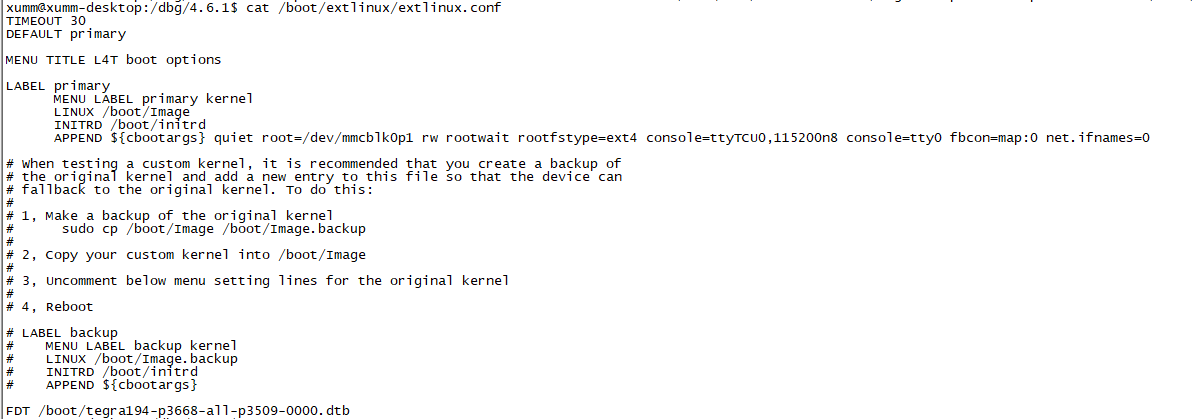
Also I edited the extlinux.conf file and the FDT line to the end, so it looks like this:
TIMEOUT 30
DEFAULT primaryMENU TITLE L4T boot options
LABEL primary
I did a reboot but it didn't work. I ran the command "ls /sys/bus/i2c/drivers/" but there was no imx307 directory present. Also I ran the command "ls /proc/device-tree/cam_i2cmux/i2c@*" but the camera model was not listed.
Please let me know. Thanks!
-
@techies
Sorry reply finished. China took a 7 day holiday. We just got back to work.There is no tab in front of FDT.


Hello! It looks like you're interested in this conversation, but you don't have an account yet.
Getting fed up of having to scroll through the same posts each visit? When you register for an account, you'll always come back to exactly where you were before, and choose to be notified of new replies (either via email, or push notification). You'll also be able to save bookmarks and upvote posts to show your appreciation to other community members.
With your input, this post could be even better 💗
Register Login