VEYE IMAGING Forum
    • Categories
    • Tags
    • Recent
    • Popular
    • Users
    • WIKI
    • veye.cc
    • Register
    • Login

    Jetson Nano按照wiki教程配置环境,但是无法连接到SC132 MIPI相机

    Scheduled Pinned Locked Moved CS MIPI camera
    5 Posts 2 Posters 1.4k Views 1 Watching
    Loading More Posts
    • Oldest to Newest
    • Newest to Oldest
    • Most Votes
    Reply
    • Reply as topic
    Log in to reply
    This topic has been deleted. Only users with topic management privileges can see it.
    • P Offline
      promise
      last edited by

      我按照这个网址配置环境:http://wiki.veye.cc/index.php/VEYE_CS_Camera_for_Jetson_TX2#Upgrade_Jetson_Nano.2C_Jetson_TX2.2C_TX2_NX.2CAGX_Xavier_and_Xavier_NX_system
      每一步都验证正确,但是最后却无法识别的MIPI相机,我因为板子之前烧录过,所以教程里面和烧录相关的步骤都没做,我学长在别的板子上也没烧录,但是却可以识别相机,请问这是什么问题呢

      P 1 Reply Last reply Reply Quote 0
      • P Offline
        promise @promise
        last edited by

        @promise 版本是36.6.1, Jetson Nano B01

        veye_xummV 1 Reply Last reply Reply Quote 0
        • veye_xummV Offline
          veye_xumm @promise
          last edited by

          @promise
          请参考
          http://wiki.veye.cc/index.php/VEYE_CS_Camera_for_Jetson_TX2/zh#Image.E5.92.8CDTB.E6.9B.B4.E6.96.B0.E6.88.90.E5.8A.9F.E4.BA.86.E5.90.97.EF.BC.9F
          3.7章节,把结果贴上来我看一眼。

          Questions will be answered as soon as possible, please be patient.
          如果你使用中文,请直接用中文提问。
          May the force be with YOU. (This is the translation of the mysterious Chinese symbol above.)

          P 1 Reply Last reply Reply Quote 0
          • P Offline
            promise @veye_xumm
            last edited by

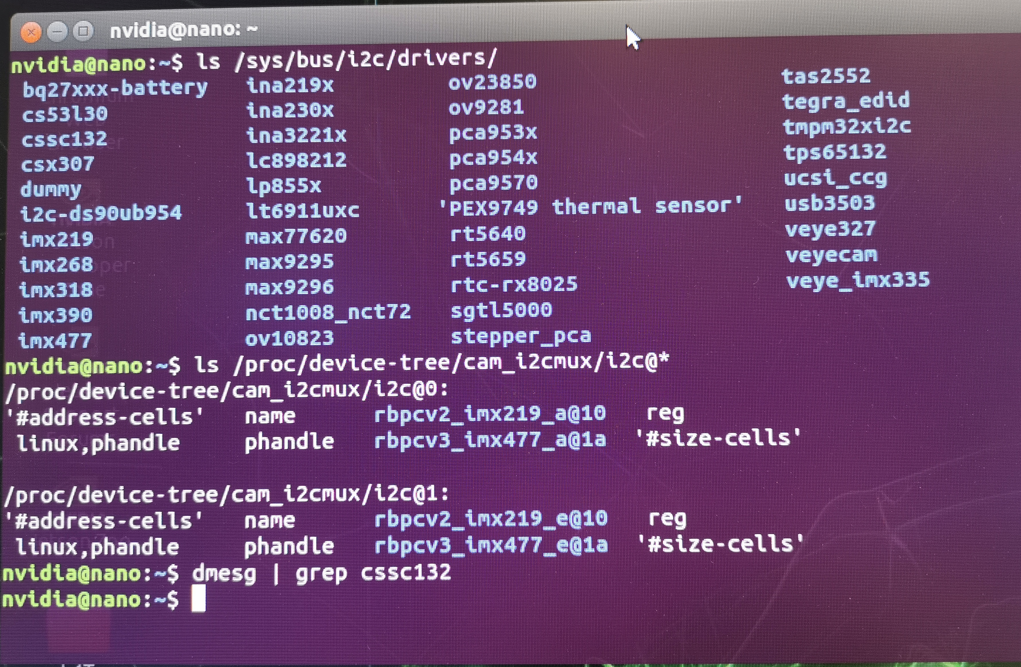
            @veye_xumm result.png
            这是结果,我输入前两条命令都正常执行,但是输入第三条命令却没有正常执行,同时我执行 ls /dev/video* 也无法检测设备

            veye_xummV 1 Reply Last reply Reply Quote 0
            • veye_xummV Offline
              veye_xumm @promise
              last edited by

              @promise
              你的dtb file没有弄对,你看device-tree目录下并没有132这个。

              Questions will be answered as soon as possible, please be patient.
              如果你使用中文,请直接用中文提问。
              May the force be with YOU. (This is the translation of the mysterious Chinese symbol above.)

              1 Reply Last reply Reply Quote 0

              Hello! It looks like you're interested in this conversation, but you don't have an account yet.

              Getting fed up of having to scroll through the same posts each visit? When you register for an account, you'll always come back to exactly where you were before, and choose to be notified of new replies (either via email, or push notification). You'll also be able to save bookmarks and upvote posts to show your appreciation to other community members.

              With your input, this post could be even better 💗

              Register Login
              • First post
                Last post