VEYE IMAGING Forum
    • Categories
    • Tags
    • Recent
    • Popular
    • Users
    • WIKI
    • veye.cc
    • Register
    • Login

    CS132 Mipi csi global shutter camera not working on jetson Nano

    Scheduled Pinned Locked Moved CS MIPI camera
    12 Posts 2 Posters 3.1k Views 1 Watching
    Loading More Posts
    • Oldest to Newest
    • Newest to Oldest
    • Most Votes
    Reply
    • Reply as topic
    Log in to reply
    This topic has been deleted. Only users with topic management privileges can see it.
    • J Offline
      jetsonnano
      last edited by

      Hello, the new kernel is loaded and new BSP file has been inserted, but the camera is not detected on jetson nano module

      Thanks in advance for any help that you could provide.

      veye_xummV 1 Reply Last reply Reply Quote 0
      • veye_xummV Offline
        veye_xumm @jetsonnano
        last edited by

        @jetsonnano
        Hi,
        http://wiki.veye.cc/index.php/VEYE_CS_Camera_for_Jetson_TX2#Are_Image_and_DTB_upgrade_successful_.3F

        1. please check your status following part 3.8.
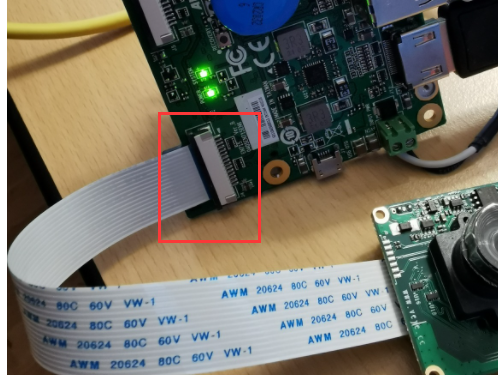
        2. please check your hardware connection ,especially the FFC cable direction.

        Questions will be answered as soon as possible, please be patient.
        如果你使用中文,请直接用中文提问。
        May the force be with YOU. (This is the translation of the mysterious Chinese symbol above.)

        1 Reply Last reply Reply Quote 0
        • J Offline
          jetsonnano
          last edited by

          ls /proc/device-tree/cam_i2cmux/i2c@*
          /proc/device-tree/cam_i2cmux/i2c@0:
          '#address-cells' phandle rbpcv2_veye327_a@3b '#size-cells'
          ds90ub954_a@30 rbpcv2_csimx307_a@3b rbpcv2_veyecam_a@3b status
          linux,phandle rbpcv2_cssc132_a@3b rbpcv3_imx477_a@1a
          name rbpcv2_imx219_a@10 reg

          /proc/device-tree/cam_i2cmux/i2c@1:
          '#address-cells' phandle rbpcv2_veye327_e@3b '#size-cells'
          ds90ub954_b@30 rbpcv2_csimx307_e@3b rbpcv2_veyecam_e@3b status
          linux,phandle rbpcv2_cssc132_e@3b rbpcv3_imx477_e@1a
          name rbpcv2_imx219_e@10 reg

          1 Reply Last reply Reply Quote 0
          • J Offline
            jetsonnano
            last edited by

            FCC cable connection has been double checked, everything seems to be ok

            dmesg | grep cssc132
            [ 1.356320] cssc132 7-003b: probing v4l2 sensor
            [ 1.356852] cssc132 7-003b: tegracam sensor driver:cssc132_v2.0.6
            [ 1.357098] cssc132 7-003b: cs_sc132_board_setup: error during i2c read probe (-121)
            [ 1.357101] cssc132 7-003b: board setup failed
            [ 1.357159] cssc132: probe of 7-003b failed with error -121
            [ 1.357205] cssc132 8-003b: probing v4l2 sensor
            [ 1.357602] cssc132 8-003b: tegracam sensor driver:cssc132_v2.0.6
            [ 1.357831] cssc132 8-003b: cs_sc132_board_setup: error during i2c read probe (-121)
            [ 1.357835] cssc132 8-003b: board setup failed
            [ 1.357884] cssc132: probe of 8-003b failed with error -121

            veye_xummV 1 Reply Last reply Reply Quote 0
            • veye_xummV Offline
              veye_xumm @jetsonnano
              last edited by

              @jetsonnano said in CS132 Mipi csi global shutter camera not working on jetson Nano:

              cssc132

              please take a photo of your FFC cable connection and post here. I think may be the direction is wrong.

              Questions will be answered as soon as possible, please be patient.
              如果你使用中文,请直接用中文提问。
              May the force be with YOU. (This is the translation of the mysterious Chinese symbol above.)

              1 Reply Last reply Reply Quote 0
              • J Offline
                jetsonnano
                last edited by

                [photo](file:///home/philippe/pCloudDrive/projet_drones/multimedia/2021/novembre/IMG_20211129_103747.jpg)

                J 1 Reply Last reply Reply Quote 0
                • J Offline
                  jetsonnano @jetsonnano
                  last edited by

                  https://e1.pcloud.link/publink/show?code=XZqglJZzVIX8mPQCgRtRLz3wH7Cnf61lPNX
                  https://e1.pcloud.link/publink/show?code=XZ6glJZD5yEGWmd3B5QBr5odRlsVJAE9ggk

                  veye_xummV 1 Reply Last reply Reply Quote 0
                  • veye_xummV Offline
                    veye_xumm @jetsonnano
                    last edited by

                    @jetsonnano
                    2ea18c61-0bfa-4132-a631-c2eee3cfb6d9-image.png

                    You need to check the manual of this base board, to confirm the wire sequence of this connector, and the wire sequence of our module, whether it is correct.

                    http://wiki.veye.cc/index.php/CS-MIPI-SC132_Data_Sheet#Interface_.26_Pin_list

                    Questions will be answered as soon as possible, please be patient.
                    如果你使用中文,请直接用中文提问。
                    May the force be with YOU. (This is the translation of the mysterious Chinese symbol above.)

                    J 1 Reply Last reply Reply Quote 0
                    • J Offline
                      jetsonnano @veye_xumm
                      last edited by

                      @veye_xumm we use this carrier board
                      we use the J4 connector, please check https://storage.avermedia.com/web_release_www/EN715/AVerAI_UM_EN715_VB_CB_BPC_20210519_.pdf

                      the pinout is the same as per your documentation

                      veye_xummV 1 Reply Last reply Reply Quote 0
                      • veye_xummV Offline
                        veye_xumm @jetsonnano
                        last edited by

                        @jetsonnano
                        I don't think you have a problem with the wiring.
                        But avermedia base board, will it work with nvidia nano b01 dts? That is, do they have the same hardware design?

                        I think you'd better check with avermedia first if avermdia base board is consistent with the official development board in terms of camera interface and i2c design.

                        Usually you need to do a driver migration.

                        Questions will be answered as soon as possible, please be patient.
                        如果你使用中文,请直接用中文提问。
                        May the force be with YOU. (This is the translation of the mysterious Chinese symbol above.)

                        J 1 Reply Last reply Reply Quote 0
                        • J Offline
                          jetsonnano @veye_xumm
                          last edited by

                          @veye_xumm
                          Hello We don't get any support from avermedia except that they say your camera is not supported.

                          What other option do I have except than changing carrier board?

                          which one do you advice to use for a jetson nano module?

                          Thanks

                          veye_xummV 1 Reply Last reply Reply Quote 0
                          • veye_xummV Offline
                            veye_xumm @jetsonnano
                            last edited by

                            @jetsonnano
                            What a bummer, they should have open the code.
                            We have customers who use avermedia and avermedia helped with the driver porting work. They probably do it for volume customers only!

                            If you have the ability, you can try to decompile avermedia's dtb file, get the dts and then modify it into our module. But it will be more troublesome.

                            Questions will be answered as soon as possible, please be patient.
                            如果你使用中文,请直接用中文提问。
                            May the force be with YOU. (This is the translation of the mysterious Chinese symbol above.)

                            1 Reply Last reply Reply Quote 0

                            Hello! It looks like you're interested in this conversation, but you don't have an account yet.

                            Getting fed up of having to scroll through the same posts each visit? When you register for an account, you'll always come back to exactly where you were before, and choose to be notified of new replies (either via email, or push notification). You'll also be able to save bookmarks and upvote posts to show your appreciation to other community members.

                            With your input, this post could be even better 💗

                            Register Login
                            • First post
                              Last post