sc132相机图片读取失败
-
我使用sc132相机,videofmt设置的是freerunning,然后设置的分辨率是1280 720
./cs_mipi_i2c.sh -w -f videofmt -pa 1280 -p2 720 -p3 60 ,出现的现象是,一个相机一开始的时候出现了一帧图像就闪退,然后再另外一个相机虽然第一次可以打开,但是第二次的时候,获得的图像就是黑屏,我使用的是gst-launch-1.0 nvv4l2camerasrc device=/dev/video0 ! "video/x-raw(memory:NVMM),format=(string)UYVY, width=(int)1280, height=(int)720" ! nvvidconv ! "video/x-raw(memory:NVMM),format=(string)I420" ! nvoverlaysink sync=false 命令去获取图像 -
@zjutony said in sc132相机图片读取失败:
./cs_mipi_i2c.sh -w -f videofmt -pa 1280 -p2 720 -p3 60
应该是p1,不是pa。
另外需要确认一下你的streammode。 -
@veye_xumm 那个pa是打错了,我后来测试了下,发现是曝光模式的问题,我用那个直接手动曝光模式就不行,改成手动曝光模式就有图像了,是因为那个直接手动曝光模式他必须要对应那个外触发的streammode吗
-
@zjutony 请先确认一下你用的摄像头的固件版本号
-
@veye_xumm 查询hdver 的结果是0x 2,firmware的版本是 2.38
-
This post is deleted! -
@zjutony
为防万一我这边测试了一下。用的jetson nx,jetpack4.6.
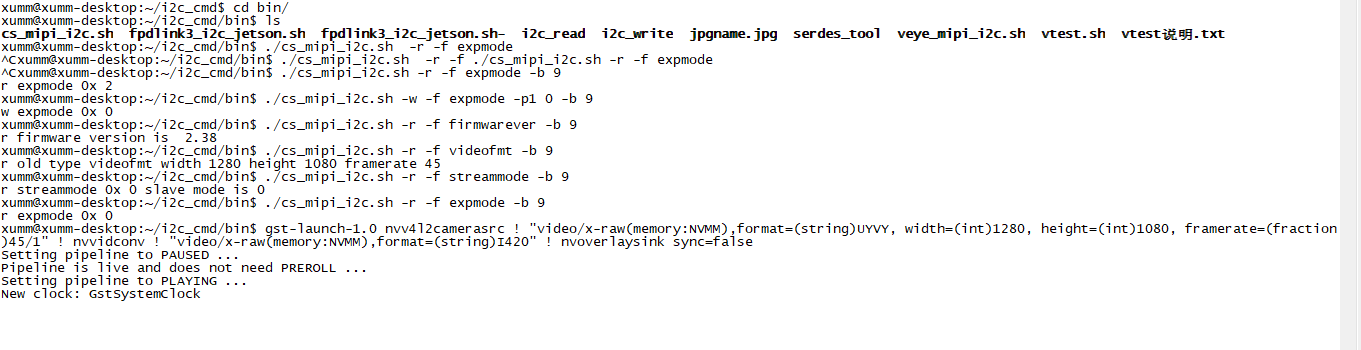
图像是正常的啊。
请你检查一下我上面列出的模式相关的内容,看一下结果。

Hello! It looks like you're interested in this conversation, but you don't have an account yet.
Getting fed up of having to scroll through the same posts each visit? When you register for an account, you'll always come back to exactly where you were before, and choose to be notified of new replies (either via email, or push notification). You'll also be able to save bookmarks and upvote posts to show your appreciation to other community members.
With your input, this post could be even better 💗
Register Login