VEYE IMAGING Forum
    • Categories
    • Tags
    • Recent
    • Popular
    • Users
    • WIKI
    • veye.cc
    • Register
    • Login

    树莓派CM4+IMX462 树莓派/dev下找不到设备

    Scheduled Pinned Locked Moved Raspberry Pi App Software
    7 Posts 2 Posters 2.3k Views 1 Watching
    Loading More Posts
    • Oldest to Newest
    • Newest to Oldest
    • Most Votes
    Reply
    • Reply as topic
    Log in to reply
    This topic has been deleted. Only users with topic management privileges can see it.
    • Y Offline
      yhb
      last edited by

      树莓派配置i2c引脚使用./camera_i2c_config命令给摄像头供电失败。 连接摄像头在树莓派设备列表找不到设备。
      ba1ec0aa-04ee-4eb1-ba4c-94bb8d5835fd-image.png
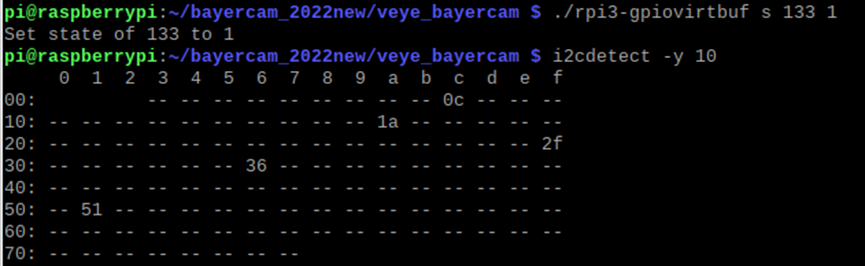
      使用(./rpi3-gpiovirtbuf s 133 1)能够给摄像头供电,但是树莓派每次重启都需要重新给摄像头供电,
      1c2abf29-fb06-4486-8605-eb133501ff6b-image.png
      成功供电后,树莓派设备列表还是没有连接的摄像头设备,使用命令获取不到图像。
      723d19d2-da97-47b0-a14d-dcf860e45c45-image.png

      veye_xummV 1 Reply Last reply Reply Quote 0
      • veye_xummV Offline
        veye_xumm @yhb
        last edited by

        @yhb

        使用(./rpi3-gpiovirtbuf s 133 1)能够给摄像头供电,但是树莓派每次重启都需要重新给摄像头供电,

        是的。就是这样的。

        成功供电后,树莓派设备列表还是没有连接的摄像头设备。

        你这个是raw版本的imx462,支持legacy mode,就是不会有/dev/video0的。

        使用命令获取不到图像。

        看你的命令,没有看出错误。使用i2c-10是没错的,-c 1对应使用板子上的camera1。只是-t 1000只有1秒时间有点短。

        题外话:
        以上考虑都是基于官方CM4底板进行的。如果使用微雪的CM4-IO-BASE-B底板,我们帮你们公司搞过一次了。印象里微雪这个板子的i2c跟mipi接口的对应关系是反的。请问一下之前同事的经验。
        现在我们手上的样品上次被你们公司要求,全部买走了。所以我们无法复现验证。

        Questions will be answered as soon as possible, please be patient.
        如果你使用中文,请直接用中文提问。
        May the force be with YOU. (This is the translation of the mysterious Chinese symbol above.)

        Y 1 Reply Last reply Reply Quote 0
        • Y Offline
          yhb @veye_xumm
          last edited by

          @veye_xumm 找不到摄像头设备的情况下要怎么去调用呢?

          veye_xummV 1 Reply Last reply Reply Quote 0
          • veye_xummV Offline
            veye_xumm @yhb
            last edited by

            @yhb 不是提供了veye_bayercam程序吗

            Questions will be answered as soon as possible, please be patient.
            如果你使用中文,请直接用中文提问。
            May the force be with YOU. (This is the translation of the mysterious Chinese symbol above.)

            1 Reply Last reply Reply Quote 0
            • Y Offline
              yhb
              last edited by

              使用一些第三方库(如opencv)去调用摄像头时,无法调用成功

              veye_xummV 1 Reply Last reply Reply Quote 0
              • veye_xummV Offline
                veye_xumm @yhb
                last edited by

                @yhb 本来就没说支持。
                我们有带isp的版本。 VEYE-MIPI-IMX462是可以的。 你现在用的这个是raw的。

                Questions will be answered as soon as possible, please be patient.
                如果你使用中文,请直接用中文提问。
                May the force be with YOU. (This is the translation of the mysterious Chinese symbol above.)

                1 Reply Last reply Reply Quote 0
                • Y Offline
                  yhb
                  last edited by

                  懂了懂了,谢谢啦

                  1 Reply Last reply Reply Quote 0

                  Hello! It looks like you're interested in this conversation, but you don't have an account yet.

                  Getting fed up of having to scroll through the same posts each visit? When you register for an account, you'll always come back to exactly where you were before, and choose to be notified of new replies (either via email, or push notification). You'll also be able to save bookmarks and upvote posts to show your appreciation to other community members.

                  With your input, this post could be even better 💗

                  Register Login
                  • First post
                    Last post
