VEYE IMAGING Forum
    • Categories
    • Tags
    • Recent
    • Popular
    • Users
    • WIKI
    • veye.cc
    • Register
    • Login

    MV-MIPI-SC130驱动

    Scheduled Pinned Locked Moved VEYE MIPI camera
    12 Posts 3 Posters 2.3k Views 1 Watching
    Loading More Posts
    • Oldest to Newest
    • Newest to Oldest
    • Most Votes
    Reply
    • Reply as topic
    Log in to reply
    This topic has been deleted. Only users with topic management privileges can see it.
    • Y Offline
      yang
      last edited by

      我们买了MV-MIPI-SC130模组,但是在github上没有找到相应的驱动,请问哪里可以下载到?

      veye_xummV 1 Reply Last reply Reply Quote 0
      • veye_xummV Offline
        veye_xumm @yang
        last edited by

        @yang 请问用到什么平台?可以从下面这个链接part3去找。
        http://wiki.veye.cc/index.php/MV-MIPI-SC130M_Index

        Questions will be answered as soon as possible, please be patient.
        如果你使用中文,请直接用中文提问。
        May the force be with YOU. (This is the translation of the mysterious Chinese symbol above.)

        Y 1 Reply Last reply Reply Quote 0
        • Y Offline
          yang @veye_xumm
          last edited by

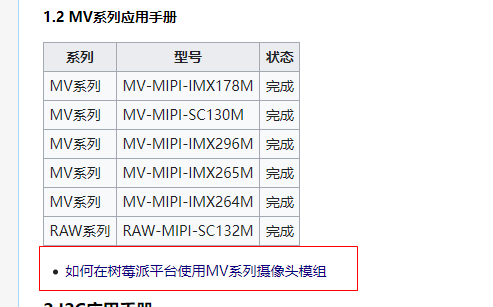
          @veye_xumm 我们用的是树莓派module 4B,目前就是参考您的这个链接,最后跳转到http://wiki.veye.cc/index.php/Raspberry_Pi_Application_Note_Index/zh这个链接,![41004dd5-baa9-434e-9e0f-21c28260ec5a-image.png](/assets/uploads/files/1672908743417-41004dd5-baa9-434e-9e0f-21c28260ec5a-image.png) ,最后跳转到https://github.com/veyeimaging/raspberrypi_v4l2这个github地址,但是没有找到130的驱动,我们树莓派的板子kernel版本是Linux raspberrypi 5.4.79-v7l+ #1373 SMP Mon Nov 23 13:27:40 GMT 2020 armv7l GNU/Linux
          veye_xummV 1 Reply Last reply Reply Quote 0
          • veye_xummV Offline
            veye_xumm @yang
            last edited by

            @yang 已经编译过的版本我们放在github的release中了。我看来一下现在没有对应你kernel版本的编译好的驱动。
            参考github的readme或者
            http://wiki.veye.cc/index.php/Build_drivers_from_source_for_rpi/zh
            从源码编译一下吧!

            Questions will be answered as soon as possible, please be patient.
            如果你使用中文,请直接用中文提问。
            May the force be with YOU. (This is the translation of the mysterious Chinese symbol above.)

            S 1 Reply Last reply Reply Quote 0
            • S Offline
              simonpi @veye_xumm
              last edited by

              This post is deleted!
              veye_xummV 1 Reply Last reply Reply Quote 0
              • veye_xummV Offline
                veye_xumm @simonpi
                last edited by

                @simonpi
                请确认一下1.1 和1.2 步骤有没有执行?

                Questions will be answered as soon as possible, please be patient.
                如果你使用中文,请直接用中文提问。
                May the force be with YOU. (This is the translation of the mysterious Chinese symbol above.)

                S 1 Reply Last reply Reply Quote 0
                • S Offline
                  simonpi @veye_xumm
                  last edited by

                  This post is deleted!
                  veye_xummV 1 Reply Last reply Reply Quote 0
                  • veye_xummV Offline
                    veye_xumm @simonpi
                    last edited by

                    @simonpi said in MV-MIPI-SC130驱动:

                    如图一:红色框内操作具体指的是哪个文件放到那个目录下?(文件目录见图二)

                    就是mkdir创建的目录。

                    @simonpi said in MV-MIPI-SC130驱动:

                    如图三:黄色框内具体应填什么模块(我的相机型号:MV-MIPI-IMX265M)

                    veye_mvcan

                    Questions will be answered as soon as possible, please be patient.
                    如果你使用中文,请直接用中文提问。
                    May the force be with YOU. (This is the translation of the mysterious Chinese symbol above.)

                    S 1 Reply Last reply Reply Quote 0
                    • S Offline
                      simonpi @veye_xumm
                      last edited by

                      This post is deleted!
                      veye_xummV 1 Reply Last reply Reply Quote 0
                      • veye_xummV Offline
                        veye_xumm @simonpi
                        last edited by

                        @simonpi 你好,python读取raw数据的我们现在还暂时没有提供。提供的资料都在wiki那个文章上了。

                        Questions will be answered as soon as possible, please be patient.
                        如果你使用中文,请直接用中文提问。
                        May the force be with YOU. (This is the translation of the mysterious Chinese symbol above.)

                        S 1 Reply Last reply Reply Quote 0
                        • S Offline
                          simonpi @veye_xumm
                          last edited by

                          This post is deleted!
                          veye_xummV 1 Reply Last reply Reply Quote 0
                          • veye_xummV Offline
                            veye_xumm @simonpi
                            last edited by

                            @simonpi 不明白你的意思,wiki上都有啊~

                            Questions will be answered as soon as possible, please be patient.
                            如果你使用中文,请直接用中文提问。
                            May the force be with YOU. (This is the translation of the mysterious Chinese symbol above.)

                            1 Reply Last reply Reply Quote 0

                            Hello! It looks like you're interested in this conversation, but you don't have an account yet.

                            Getting fed up of having to scroll through the same posts each visit? When you register for an account, you'll always come back to exactly where you were before, and choose to be notified of new replies (either via email, or push notification). You'll also be able to save bookmarks and upvote posts to show your appreciation to other community members.

                            With your input, this post could be even better 💗

                            Register Login
                            • First post
                              Last post

