VEYE IMAGING Forum
    • Categories
    • Tags
    • Recent
    • Popular
    • Users
    • WIKI
    • veye.cc
    • Register
    • Login

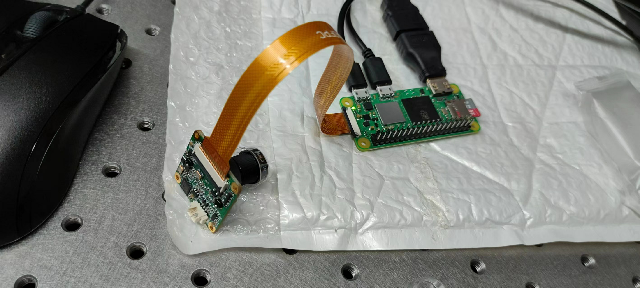
    树莓派Zero 2w开发板 识别不到SC132 设备
    Scheduled Pinned Locked Moved CS MIPI camera
    16 Posts 2 Posters 4.6k Views 1 Watching
    Loading More Posts
    • Oldest to Newest
    • Newest to Oldest
    • Most Votes
    Reply
    • Reply as topic
    Log in to reply
    This topic has been deleted. Only users with topic management privileges can see it.
    • M Offline
      MJYC @veye_xumm
      last edited by

      @veye_xumm https://wiki.veye.cc/index.php/Mv_series_camera_appnotes_4_rpi/zh我是按照这个链接,操作的,应该没有问题吧

      veye_xummV 2 Replies Last reply Reply Quote 0
      • veye_xummV Offline
        veye_xumm @MJYC
        last edited by

        @mjyc 按照这个操作没问题。

        Questions will be answered as soon as possible, please be patient.
        如果你使用中文,请直接用中文提问。
        May the force be with YOU. (This is the translation of the mysterious Chinese symbol above.)

        1 Reply Last reply Reply Quote 0
        • veye_xummV Offline
          veye_xumm @MJYC
          last edited by

          @mjyc
          你试一下

          raspi-gpio set 40 dh
          

          完成之后,就可以在i2c-10总线上检测到摄像头了。如下:

          i2cdetect -y 10
          

          看看能否发现0x3b设备。

          Questions will be answered as soon as possible, please be patient.
          如果你使用中文,请直接用中文提问。
          May the force be with YOU. (This is the translation of the mysterious Chinese symbol above.)

          M 2 Replies Last reply Reply Quote 0
          • M Offline
            MJYC @veye_xumm
            last edited by

            1ac0a5ff-9499-497b-b4e0-4b926baf5939-微信图片_20231104205304.jpg
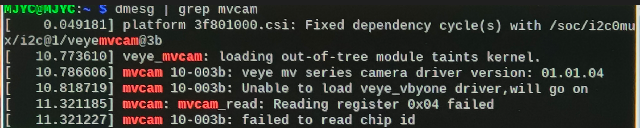
            树莓派4b能够识别到sc132相机,zero 2w在安装veye_mvcam时候,报了两个文件找不到,

            M 1 Reply Last reply Reply Quote 0
            • M Offline
              MJYC @MJYC
              last edited by

              @mjyc said in 树莓派Zero 2w开发板 识别不到SC132 设备:

              1ac0a5ff-9499-497b-b4e0-4b926baf5939-微信图片_20231104205304.jpg
              树莓派4b能够识别到sc132相机,zero 2w在安装veye_mvcam时候,报了两个文件找不到,

              能不能更新一下驱动,

              M 1 Reply Last reply Reply Quote 0
              • M Offline
                MJYC @MJYC
                last edited by

                @mjyc a8dc107c-6d8a-4ed8-b261-1583febbeae5-微信图片_20231104231748.jpg
                我重新烧录了一个新系统,在安装veye_mvcam 的时候,报了上面那张两个文件找不到的错误(veye_mvcam.dtbo和veye_mvcam.ko的错误)

                1 Reply Last reply Reply Quote 0
                • M Offline
                  MJYC @veye_xumm
                  last edited by

                  @veye_xumm
                  请问,你们树莓哦zero 2w开发板 有没有适配sc132的 方案,因为我们的设备受限于大小,只能用比较小的开发板,看到你们官网,有用zero系列接摄像头。麻烦您再帮忙看一下,谢谢啦

                  veye_xummV 1 Reply Last reply Reply Quote 0
                  • veye_xummV Offline
                    veye_xumm @MJYC
                    last edited by

                    @mjyc 肯定是适配过的啦。

                    • 关于判断你的zero
                      2w是否损坏的问题:
                    raspi-gpio set 40 dh
                    i2cdetect -y 10
                    

                    看一下是否有0x3b出现。如果有,则表明i2c是通的。

                    • 驱动的问题
                      树莓派本身的kernel版本非常多。你参考一下这个链接
                      https://wiki.veye.cc/index.php/Build_drivers_from_source_for_rpi/zh
                      的part1 和part3, 编译一下然后安装一下即可。

                    Questions will be answered as soon as possible, please be patient.
                    如果你使用中文,请直接用中文提问。
                    May the force be with YOU. (This is the translation of the mysterious Chinese symbol above.)

                    M 1 Reply Last reply Reply Quote 0
                    • M Offline
                      MJYC @veye_xumm
                      last edited by

                      @veye_xumm a7d0992c-3e13-49aa-b3a3-8367663a31b4-微信图片_20231105134415.jpg
                      您好,我想按照您的方式make一下,但是报了两个错误。

                      veye_xummV 1 Reply Last reply Reply Quote 0
                      • veye_xummV Offline
                        veye_xumm @MJYC
                        last edited by

                        @mjyc 板子寄过来我们帮你看看。我这边bulleye是正常用的。建议你也更新到bulleye系统。

                        Questions will be answered as soon as possible, please be patient.
                        如果你使用中文,请直接用中文提问。
                        May the force be with YOU. (This is the translation of the mysterious Chinese symbol above.)

                        1 Reply Last reply Reply Quote 0

                        Hello! It looks like you're interested in this conversation, but you don't have an account yet.

                        Getting fed up of having to scroll through the same posts each visit? When you register for an account, you'll always come back to exactly where you were before, and choose to be notified of new replies (either via email, or push notification). You'll also be able to save bookmarks and upvote posts to show your appreciation to other community members.

                        With your input, this post could be even better 💗

                        Register Login
                        • First post
                          Last post