VEYE IMAGING Forum
    • Categories
    • Tags
    • Recent
    • Popular
    • Users
    • WIKI
    • veye.cc
    • Register
    • Login

    怎么通过V4L2直读摄像头内存,现在按常规的操作ioctl无法实现

    Scheduled Pinned Locked Moved VEYE MIPI camera
    18 Posts 2 Posters 4.3k Views 1 Watching
    Loading More Posts
    • Oldest to Newest
    • Newest to Oldest
    • Most Votes
    Reply
    • Reply as topic
    Log in to reply
    This topic has been deleted. Only users with topic management privileges can see it.
    • veye_xummV Offline
      veye_xumm @张志伟
      last edited by

      @张志伟
      驱动装好之后,就是用常规方法获取图片即可。
      具体可以参考yavta的代码。
      https://wiki.veye.cc/index.php/MV_Camera_on_Firfly_Boards/zh#yavta.E5.BA.94.E7.94.A8.E8.8C.83.E4.BE.8B

      Questions will be answered as soon as possible, please be patient.
      如果你使用中文,请直接用中文提问。
      May the force be with YOU. (This is the translation of the mysterious Chinese symbol above.)

      1 Reply Last reply Reply Quote 0
      • 张 Offline
        张志伟
        last edited by

        这种方法,取图速度太慢了,发挥不出来sensor的特性,我想一秒取60张图片,请问有别的方法可以提高速率吗?

        veye_xummV 1 Reply Last reply Reply Quote 0
        • veye_xummV Offline
          veye_xumm @张志伟
          last edited by

          @张志伟 这个方法一点都不慢。保存文件会消耗时间,你去掉保存文件就可以看到,实际总是能达到设置帧率。

          Questions will be answered as soon as possible, please be patient.
          如果你使用中文,请直接用中文提问。
          May the force be with YOU. (This is the translation of the mysterious Chinese symbol above.)

          1 Reply Last reply Reply Quote 0
          • 张 Offline
            张志伟
            last edited by

            @veye_xumm said in 怎么通过V4L2直读摄像头内存,现在按常规的操作ioctl无法实现:

            这个方法一点都不慢。保存文件会消耗时间,你去掉保存文件就可以看到,实际总是能达到设置帧率。
            请问去掉存储后,如何取图片数据呢?

            veye_xummV 1 Reply Last reply Reply Quote 0
            • veye_xummV Offline
              veye_xumm @张志伟
              last edited by

              @张志伟
              你通过编程直接从内存里面取图啊。现在之所以显得慢,是因为下面这个命令要把图片写到flash里面。
              ./yavta -c1 -Fy8-${WIDTH}x${HEIGHT}.raw --skip 0 -f Y8 -s ${WIDTH}x${HEIGHT} /dev/video0

              Questions will be answered as soon as possible, please be patient.
              如果你使用中文,请直接用中文提问。
              May the force be with YOU. (This is the translation of the mysterious Chinese symbol above.)

              1 Reply Last reply Reply Quote 0
              • 张 Offline
                张志伟
                last edited by

                @veye_xumm said in 怎么通过V4L2直读摄像头内存,现在按常规的操作ioctl无法实现:

                编程直接从内存里面取图

                那就找到我们问题根源了,那请问,如何编程直接从内存里面取图呢,我们以前linux是通过ioctl方式,但是现在行不通,请问有别的方法吗?

                veye_xummV 1 Reply Last reply Reply Quote 0
                • veye_xummV Offline
                  veye_xumm @张志伟
                  last edited by

                  @张志伟 yavta 我们wiki上有代码链接的。其实就是标准v4l2 buffer的方式。你可以参考一下yavta代码。

                  Questions will be answered as soon as possible, please be patient.
                  如果你使用中文,请直接用中文提问。
                  May the force be with YOU. (This is the translation of the mysterious Chinese symbol above.)

                  1 Reply Last reply Reply Quote 0
                  • 张 Offline
                    张志伟
                    last edited by

                    能发个参考链接吗,谢谢!

                    veye_xummV 1 Reply Last reply Reply Quote 0
                    • veye_xummV Offline
                      veye_xumm @张志伟
                      last edited by

                      @张志伟
                      7.4.4.1

                      Questions will be answered as soon as possible, please be patient.
                      如果你使用中文,请直接用中文提问。
                      May the force be with YOU. (This is the translation of the mysterious Chinese symbol above.)

                      1 Reply Last reply Reply Quote 0
                      • 张 Offline
                        张志伟
                        last edited by

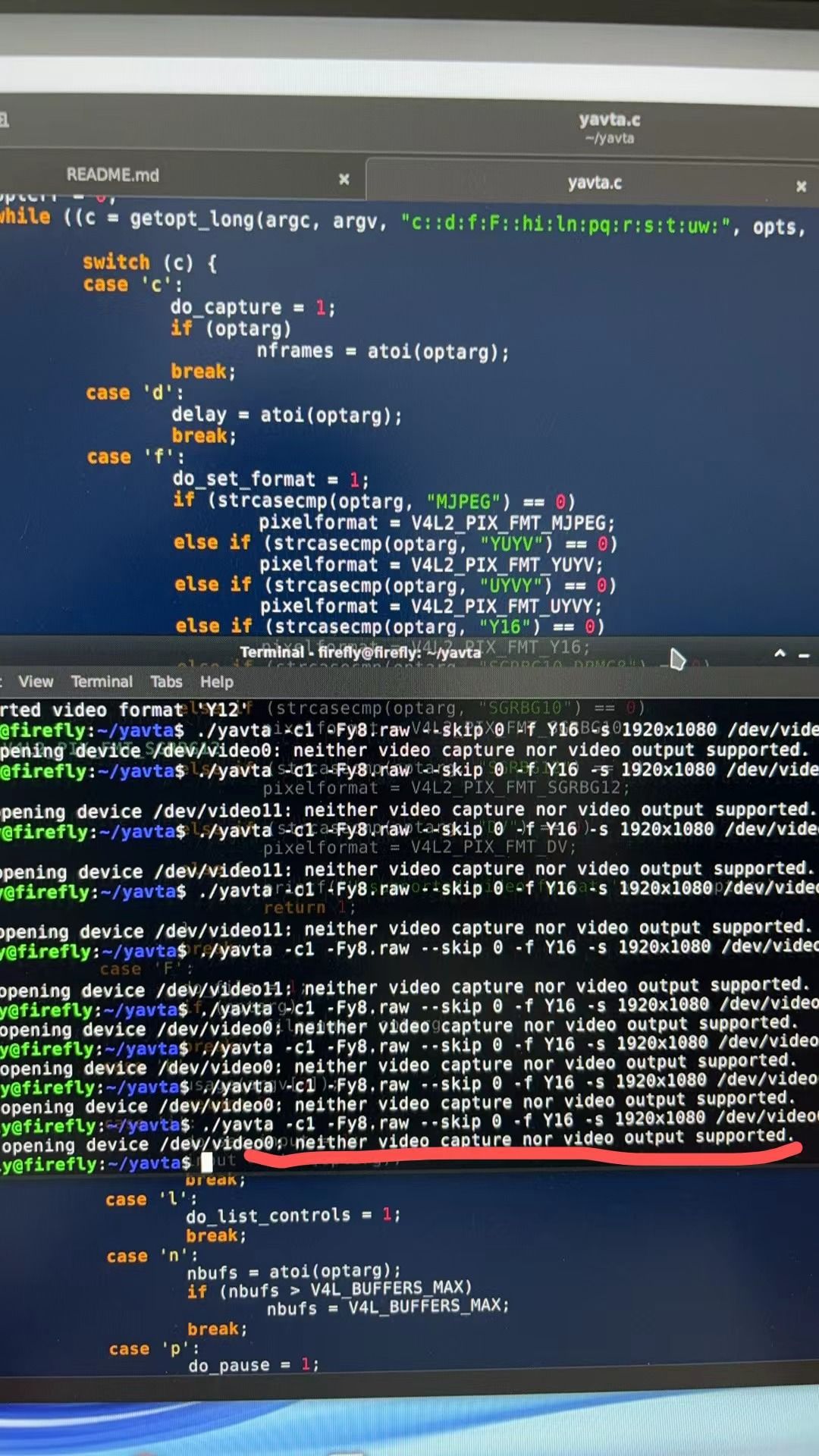
                        你好,按照你推荐的方法试了,也是不支持capture
                        bdfade03-456c-421d-bab2-a2f2e36c33c2-78358bb3504eab086b03905e9e3eab7.jpg

                        veye_xummV 1 Reply Last reply Reply Quote 0
                        • veye_xummV Offline
                          veye_xumm @张志伟
                          last edited by

                          @张志伟 你现在驱动装好了吗?参考我们的wiki文档,可以直接保存图片了吗

                          Questions will be answered as soon as possible, please be patient.
                          如果你使用中文,请直接用中文提问。
                          May the force be with YOU. (This is the translation of the mysterious Chinese symbol above.)

                          1 Reply Last reply Reply Quote 0
                          • 张 Offline
                            张志伟
                            last edited by

                            用7.5.3.2中的命令是可以取图的
                            8cd9d697-2489-4a4a-b0c7-a5f5d6aaee0c-32e4ca37b685c00b17abf4a2b6a8ea1.png

                            veye_xummV 1 Reply Last reply Reply Quote 0
                            • veye_xummV Offline
                              veye_xumm @张志伟
                              last edited by

                              @张志伟
                              试一下7.4.4.2 保存图片到文件

                              Questions will be answered as soon as possible, please be patient.
                              如果你使用中文,请直接用中文提问。
                              May the force be with YOU. (This is the translation of the mysterious Chinese symbol above.)

                              1 Reply Last reply Reply Quote 0
                              • 张 Offline
                                张志伟
                                last edited by

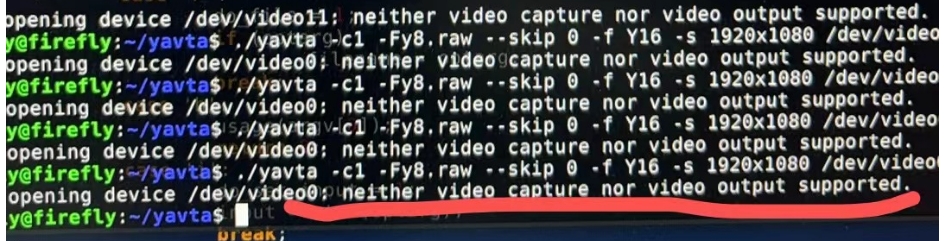
                                现在就是7.4.4.2保存图片不行。7933fbb0-bcdf-4c27-abc0-dc2aa0c1a0dc-image.png

                                veye_xummV 1 Reply Last reply Reply Quote 0
                                • veye_xummV Offline
                                  veye_xumm @张志伟
                                  last edited by

                                  @张志伟 我意思是你先严格按照7.4.4.2的命令试试,用Y8,而不是Y16

                                  Questions will be answered as soon as possible, please be patient.
                                  如果你使用中文,请直接用中文提问。
                                  May the force be with YOU. (This is the translation of the mysterious Chinese symbol above.)

                                  1 Reply Last reply Reply Quote 0
                                  • 张 Offline
                                    张志伟
                                    last edited by

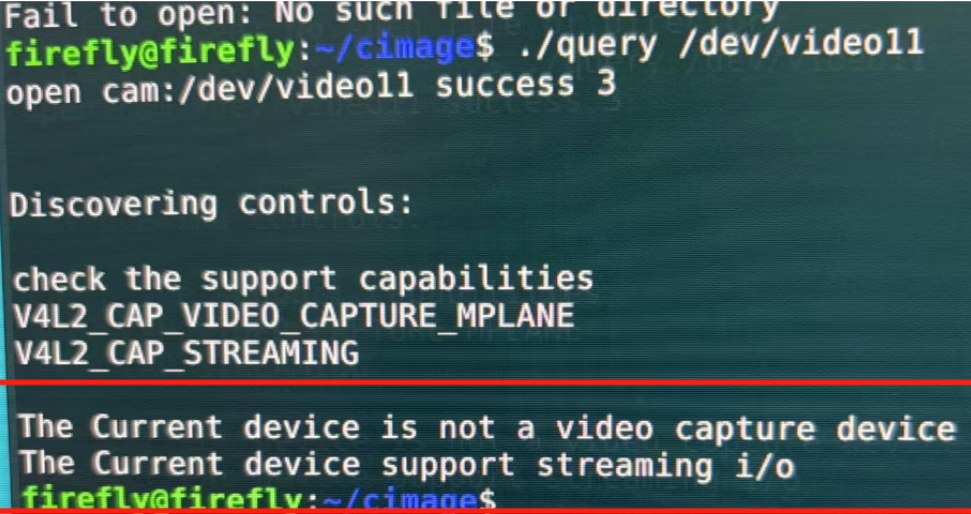
                                    用Y8替代Y16也不行,然后调用设备,出现如下信息
                                    54adaf39-64e4-45bd-9140-dfaf37c6081c-image.png
                                    目前调用图像都是通过gstreamer这个方法调用的,我们软件工程师怀疑你们的驱动是不是不完善,或者我们用的驱动不完善。或者说你们的驱动不适用于MV-MIPI-IMX265M这个摄像头?

                                    veye_xummV 1 Reply Last reply Reply Quote 0
                                    • veye_xummV Offline
                                      veye_xumm @张志伟
                                      last edited by

                                      @张志伟 按照我我们wiki上步骤去调用yavta存图一定是可以的。你把你用的命令发出来我看看。

                                      Questions will be answered as soon as possible, please be patient.
                                      如果你使用中文,请直接用中文提问。
                                      May the force be with YOU. (This is the translation of the mysterious Chinese symbol above.)

                                      1 Reply Last reply Reply Quote 0

                                      Hello! It looks like you're interested in this conversation, but you don't have an account yet.

                                      Getting fed up of having to scroll through the same posts each visit? When you register for an account, you'll always come back to exactly where you were before, and choose to be notified of new replies (either via email, or push notification). You'll also be able to save bookmarks and upvote posts to show your appreciation to other community members.

                                      With your input, this post could be even better 💗

                                      Register Login
                                      • First post
                                        Last post