VEYE IMAGING Forum
    • Categories
    • Tags
    • Recent
    • Popular
    • Users
    • WIKI
    • veye.cc
    • Register
    • Login

    树莓派连接CS-MIPI-SC-132问题

    Scheduled Pinned Locked Moved Raspberry Pi App Software
    10 Posts 2 Posters 2.3k Views 1 Watching
    Loading More Posts
    • Oldest to Newest
    • Newest to Oldest
    • Most Votes
    Reply
    • Reply as topic
    Log in to reply
    This topic has been deleted. Only users with topic management privileges can see it.
    • L Offline
      lujiawen
      last edited by

      由于第一次使用树莓派没什么经验,连接相机时,出现几个问题;
      第一个:找到相机调整曝光的代码,但手动调节曝光时间程序有好几种,不太明白用哪一个,或者这几个之间的差异;同时如果我需要不断地调整曝光时间,是否都需要再i2c那个库下进行操作调整;
      第二个:想通过matlab调用图像,在电脑中增加网络驱动器,但保存图像至网络驱动器中时,有的时候能保存上图像,有的时候保存图片内容0k,无法显示,即使保存在shm下也偶尔会出现这个问题;
      第三个:树莓派连接这个摄像头经常性的断开,需要重连,重连也比较复杂,是否有便捷的启动方式?
      第四个:该相机除官网外,有无其他的教程指导文件,及命令代码合集?
      以上,谢谢大家。

      veye_xummV 2 Replies Last reply Reply Quote 0
      • veye_xummV Offline
        veye_xumm @lujiawen
        last edited by

        @lujiawen
        你好,你的几个问题挨个说。
        第一个: SC132默认是相机内部自动调整曝光的,不需要你在树莓派端额外控制。
        第二个:网络驱动器这种不是完全可靠的文件系统,尤其是涉及到缓存之类的跨windows和linux平台。建议你在树莓派端脚本上增加sync类的刷数据到文件系统的操作,应该有帮助。
        第三个:这个没太懂你的意思,怎么个经常性断开?
        第四个:现在提供的资料就是wiki.veye.cc上的相关文章和github上的例程。没有其他。

        Questions will be answered as soon as possible, please be patient.
        如果你使用中文,请直接用中文提问。
        May the force be with YOU. (This is the translation of the mysterious Chinese symbol above.)

        L 1 Reply Last reply Reply Quote 0
        • veye_xummV Offline
          veye_xumm @lujiawen
          last edited by

          @lujiawen
          这个问题提出已经很久了,一直没有更新状态。 我会将状态标记为解决,如果需要,可以再次跟帖,或者直接打开问题。

          Questions will be answered as soon as possible, please be patient.
          如果你使用中文,请直接用中文提问。
          May the force be with YOU. (This is the translation of the mysterious Chinese symbol above.)

          1 Reply Last reply Reply Quote 0
          • L Offline
            lujiawen @veye_xumm
            last edited by

            @veye_xumm
            抱歉,刚看到回复,
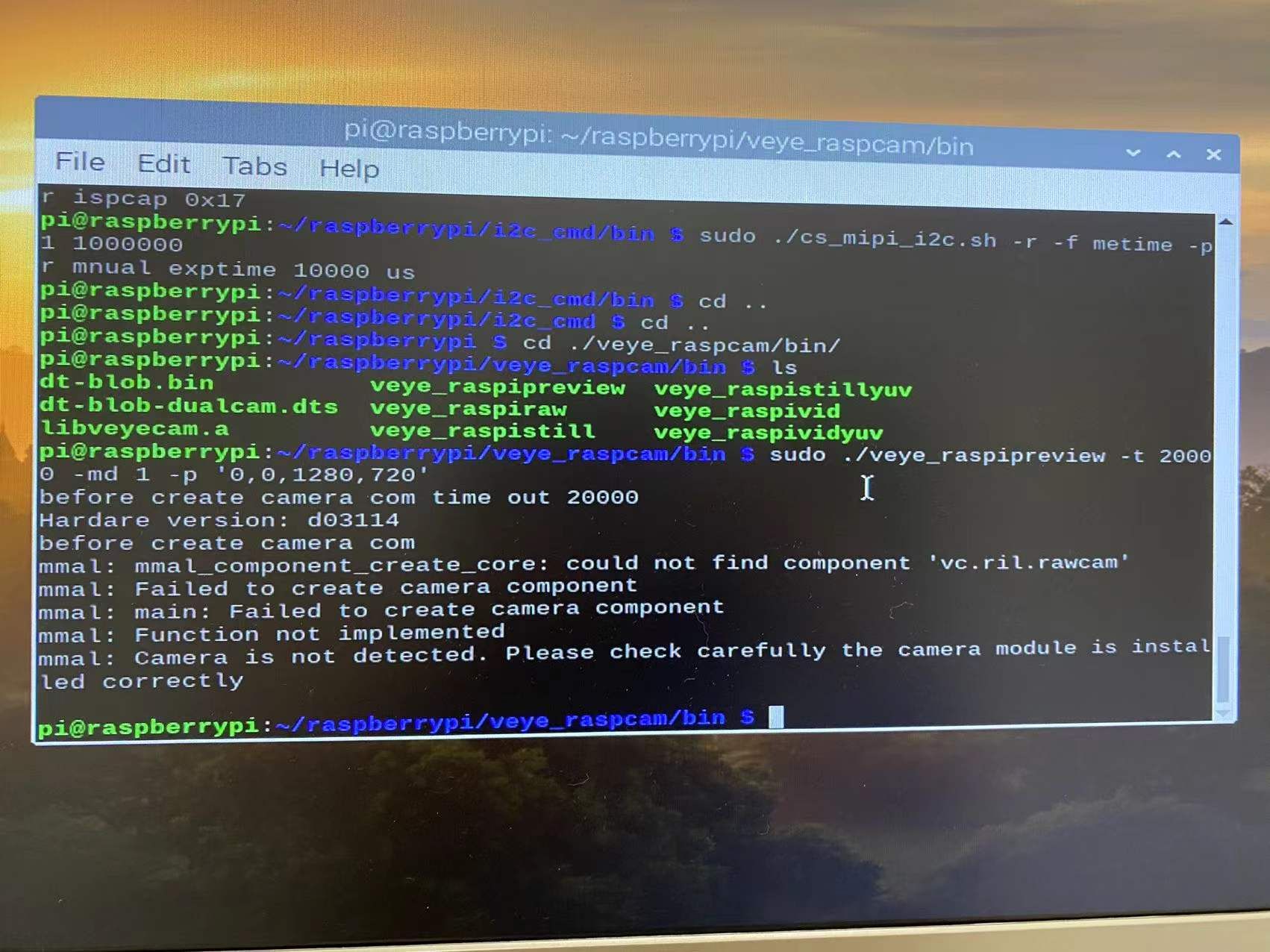
            想再咨询一下,树莓派链接该款相机后,无法识别该相机,也无法对相机进行操作是什么原因?
            比如输入指令拍照,更改曝光时间,识别相机型号等都无法成功。

            veye_xummV 1 Reply Last reply Reply Quote 0
            • veye_xummV Offline
              veye_xumm @lujiawen
              last edited by

              @lujiawen
              你好,可能你没有看过这篇文章?
              http://wiki.veye.cc/index.php/CS-MIPI-X_for_Raspberry_Pi/zh

              Questions will be answered as soon as possible, please be patient.
              如果你使用中文,请直接用中文提问。
              May the force be with YOU. (This is the translation of the mysterious Chinese symbol above.)

              L 2 Replies Last reply Reply Quote 0
              • L Offline
                lujiawen @veye_xumm
                last edited by

                ![0_1642390682068_2.bmp](正在上传 100%) @veye_xumm 你好,已根据文档所述进行了相机通信,但无法识别相机;希望尽快得到您的回复;
                !![0_1642390643571_1.bmp](正在上传 100%) ![0_1642390838429_3.bmp](正在上传 100%)

                1 Reply Last reply Reply Quote 0
                • L Offline
                  lujiawen @veye_xumm
                  last edited by

                  @veye_xumm 您好,我看了一下图片无法上传,请问有什么别的方式可以上传图片咨询呢?

                  veye_xummV 1 Reply Last reply Reply Quote 0
                  • veye_xummV Offline
                    veye_xumm @lujiawen
                    last edited by

                    @lujiawen 可以上传的,你把图片压缩一下试试。

                    Questions will be answered as soon as possible, please be patient.
                    如果你使用中文,请直接用中文提问。
                    May the force be with YOU. (This is the translation of the mysterious Chinese symbol above.)

                    L 1 Reply Last reply Reply Quote 0
                    • L Offline
                      lujiawen @veye_xumm
                      last edited by

                      @veye_xumm a56436a78ac90b995f7fac786306f2e.jpg

                      veye_xummV 1 Reply Last reply Reply Quote 0
                      • veye_xummV Offline
                        veye_xumm @lujiawen
                        last edited by

                        @lujiawen
                        应该是系统版本的问题,请看一下part2
                        http://wiki.veye.cc/index.php/VEYE_MIPI_290/327_for_Raspberry_Pi/zh#.E5.85.B3.E4.BA.8EpiOS.E7.89.88.E6.9C.AC---Bullseye

                        Questions will be answered as soon as possible, please be patient.
                        如果你使用中文,请直接用中文提问。
                        May the force be with YOU. (This is the translation of the mysterious Chinese symbol above.)

                        1 Reply Last reply Reply Quote 0

                        Hello! It looks like you're interested in this conversation, but you don't have an account yet.

                        Getting fed up of having to scroll through the same posts each visit? When you register for an account, you'll always come back to exactly where you were before, and choose to be notified of new replies (either via email, or push notification). You'll also be able to save bookmarks and upvote posts to show your appreciation to other community members.

                        With your input, this post could be even better 💗

                        Register Login
                        • First post
                          Last post