VEYE IMAGING Forum
    • Categories
    • Tags
    • Recent
    • Popular
    • Users
    • WIKI
    • veye.cc
    • Register
    • Login

    Problem installing the driver for the SC132.

    Scheduled Pinned Locked Moved CS MIPI camera
    11 Posts 2 Posters 3.5k Views 1 Watching
    Loading More Posts
    • Oldest to Newest
    • Newest to Oldest
    • Most Votes
    Reply
    • Reply as topic
    Log in to reply
    This topic has been deleted. Only users with topic management privileges can see it.
    • veye_xummV Offline
      veye_xumm @esjeeybi
      last edited by

      @esjeeybi
      We do not provide the corresponding version of your piOS release file for the time being. You can try to compile the driver from the source code, or upgrade your piOS.
      e7d8b90f-b9dc-40b5-8cc5-f781deca0937-image.png

      Questions will be answered as soon as possible, please be patient.
      如果你使用中文,请直接用中文提问。
      May the force be with YOU. (This is the translation of the mysterious Chinese symbol above.)

      E 1 Reply Last reply Reply Quote 0
      • E Offline
        esjeeybi @veye_xumm
        last edited by

        @veye_xumm
        Hi, I have updated and still no file. Unfortunately, I can't compile.

        install: cannot stat './driver_bin/5.10.52-v7l+/cssc132.ko': No such file or directory
        install: cannot stat './driver_bin/5.10.52-v7l+/cssc132.dtbo': No such file or directory

        veye_xummV 2 Replies Last reply Reply Quote 0
        • veye_xummV Offline
          veye_xumm @esjeeybi
          last edited by

          @esjeeybi
          OK, I will try compile this version for you.

          Questions will be answered as soon as possible, please be patient.
          如果你使用中文,请直接用中文提问。
          May the force be with YOU. (This is the translation of the mysterious Chinese symbol above.)

          1 Reply Last reply Reply Quote 0
          • veye_xummV Offline
            veye_xumm @esjeeybi
            last edited by

            @esjeeybi
            Done, please check github.

            Questions will be answered as soon as possible, please be patient.
            如果你使用中文,请直接用中文提问。
            May the force be with YOU. (This is the translation of the mysterious Chinese symbol above.)

            E 1 Reply Last reply Reply Quote 0
            • E Offline
              esjeeybi @veye_xumm
              last edited by

              @veye_xumm After installing the drivers, unfortunately I cannot start the preview 😞

              pi@raspberrypi:~ $ dmesg | grep 132
              [ 1.411321] fe201000.serial: ttyAMA0 at MMIO 0xfe201000 (irq = 36, base_baud = 0) is a PL011 rev2
              [ 7.138793] cssc132 10-003b: supply VANA not found, using dummy regulator
              [ 7.139100] cssc132 10-003b: supply VDIG not found, using dummy regulator
              [ 7.139228] cssc132 10-003b: supply VDDL not found, using dummy regulator
              [ 7.149421] cssc132 10-003b: read sensor id 0132
              [ 7.149442] cssc132 10-003b: camera id is cs-mipi-sc132
              [ 7.150884] cssc132 10-003b: camera cssc132_mipi is found
              pi@raspberrypi:~ $ ls /dev/video0
              /dev/video0
              pi@raspberrypi:~ $ v4l2-ctl --list-formats-ext
              ioctl: VIDIOC_ENUM_FMT
              Type: Video Capture

              [0]: 'UYVY' (UYVY 4:2:2)
              	Size: Discrete 1280x1080
              	Size: Discrete 1080x1280
              	Size: Discrete 1280x720
              	Size: Discrete 720x1280
              	Size: Discrete 640x480
              	Size: Discrete 480x640
              

              pi@raspberrypi:~ $ export DISPLAY=:0
              pi@raspberrypi:~ $ gst-launch-1.0 v4l2src device=/dev/video0 ! "video/x-raw,format=(string)UYVY, width=(int)1280, height=(int)1080,framerate=(fraction)45/1" ! videoconvert ! autovideosink sync=false -v
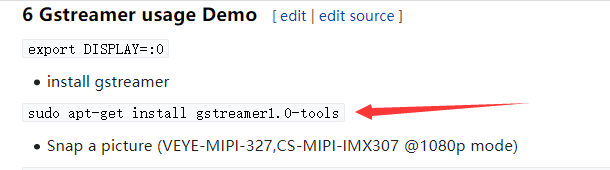
              bash: gst-launch-1.0: command not found

              veye_xummV 1 Reply Last reply Reply Quote 0
              • veye_xummV Offline
                veye_xumm @esjeeybi
                last edited by

                @esjeeybi
                http://wiki.veye.cc/index.php/V4L2_mode_for_Raspberry_Pi#Gstreamer_usage_Demo
                03ac9142-49a5-4beb-a1f6-94e77db4d44e-image.png

                Questions will be answered as soon as possible, please be patient.
                如果你使用中文,请直接用中文提问。
                May the force be with YOU. (This is the translation of the mysterious Chinese symbol above.)

                1 Reply Last reply Reply Quote 0
                • E Offline
                  esjeeybi
                  last edited by

                  Hey I have a problem again I have updated raspbian and I need the following files.

                  usage: sudo ./install_driver.sh veyecam2m/veye327/csimx307/cssc132

                  Enable i2c0 adapter...

                  Add dtoverlay=cssc132 to /boot/config.txt

                  Add gpu=400M to /boot/config.txt
                  Add cma=128M to /boot/cmdline.txt

                  Installing the cssc132.ko driver

                  install: cannot stat './driver_bin/5.10.60-v7l+/cssc132.ko': No such file or directory
                  install: cannot stat './driver_bin/5.10.60-v7l+/cssc132.dtbo': No such file or directory

                  I bought this webcam because it has good UV sensitivity. And he wants to photograph the sun through a UV transmitting filter. If I have to compile each time after the update, you have to show me how to do it, I will be very thankful and I will not bother you.

                  I also have a second problem, as the webcam worked for me before, the webcam in the oacapture program detects the image but does not work contrast, brightness, etc.

                  https://www.openastroproject.org/oacapture/

                  I care about this program because I want to record videos in the .SER format
                  Unless you have another idea that you can set the FPS, Gain, Brightness, Contrast and record in .SER format?

                  regards

                  veye_xummV 1 Reply Last reply Reply Quote 0
                  • veye_xummV Offline
                    veye_xumm @esjeeybi
                    last edited by

                    @esjeeybi
                    About how to compile our drivers on rpi:
                    http://wiki.veye.cc/index.php/V4L2_mode_for_Raspberry_Pi#Source_code_cross_compilation

                    You can get/set FPS, Gain, Brightness, Contrast via:
                    http://wiki.veye.cc/index.php/CS-MIPI-X_i2c

                    Questions will be answered as soon as possible, please be patient.
                    如果你使用中文,请直接用中文提问。
                    May the force be with YOU. (This is the translation of the mysterious Chinese symbol above.)

                    1 Reply Last reply Reply Quote 1
                    • E Offline
                      esjeeybi
                      last edited by

                      astroberry@astroberry:~ $ uname -a
                      Linux astroberry 5.10.60-v7l+ #1449 SMP Wed Aug 25 15:00:44 BST 2021 armv7l GNU/Linux
                      

                      9.2.2 There are two ways to get the source code of the version you want:
                      using git to clone the corresponding branch and checkout the corresponding tag.

                      git clone --branch rpi-5.4.y https://github.com/raspberrypi/linux
                      

                      I did this step 9.2.2 up to this point, I hope I entered the numbers correctly in the code

                      --branch rpi-5.4.y    
                      

                      And from that moment on, below, I have a problem, as I entered, an error popped up, do you need other numbers?

                      git checkout raspberrypi-kernel_1.20201022-1
                      

                      Will you write the rest of the code as you compile by yourself so that I can understand? I have a raspberry pi 4 and a camera sc132 module. It would be nice if you added 5.10.60-v7l + builds to gitgub.

                      And in my spare time I will learn to compile as you write step by step.

                      Have a nice day

                      veye_xummV 1 Reply Last reply Reply Quote 0
                      • veye_xummV Offline
                        veye_xumm @esjeeybi
                        last edited by

                        @esjeeybi
                        I have compiled the version you need, please check GitHub.

                        Questions will be answered as soon as possible, please be patient.
                        如果你使用中文,请直接用中文提问。
                        May the force be with YOU. (This is the translation of the mysterious Chinese symbol above.)

                        1 Reply Last reply Reply Quote 0

                        Hello! It looks like you're interested in this conversation, but you don't have an account yet.

                        Getting fed up of having to scroll through the same posts each visit? When you register for an account, you'll always come back to exactly where you were before, and choose to be notified of new replies (either via email, or push notification). You'll also be able to save bookmarks and upvote posts to show your appreciation to other community members.

                        With your input, this post could be even better 💗

                        Register Login
                        • First post
                          Last post