RAW-MIPI-AR0234M配置为4lane模式
-
@veye_xumm 刚刚我又把mipi放到树莓派上了。树莓派是正常的。但是在jetson上就还是出现那个问题。那如果不是排线方向的问题,还可能是什么硬件上的问题吗?

-
@lizi 可能是你的板子坏了,也有可能是你板子上的i2c不是9 和 10。你最好问问你板子的供应商这个i2c扩展功能是不是跟官方的开发板一致。
-
@veye_xumm said in RAW-MIPI-AR0234M配置为4lane模式:
i2c不是9 和 10
我使用的英伟达是创乐博的,然后他这里写的CSI摄像头是有,2个MIPI CSI-2 D-PHY 通道。这个是支持的吗
-
@veye_xumm 是和官方的一致的,还有什么可能的原因吗?
-
@veye_xumm 有没有可能是驱动的问题。因为这个自带的摄像头是可以的。
-
-
@lizi 你现在这个状态显示i2c是通的啊。
-
@veye_xumm 那是什么原因呢?驱动没装对吗?
-
@lizi

你第一次的这个提示,显示i2c-9和i2c-10上面,都尝试去读取摄像头寄存器,但是失败。这个表示硬件连接有问题。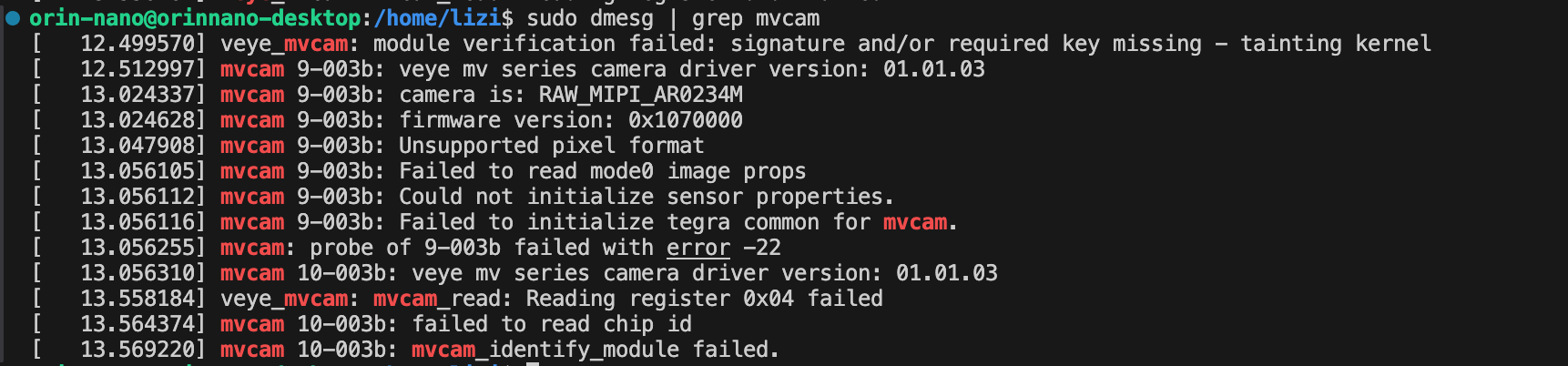
昨天晚上发的这个,已经读取到了摄像头型号和版本号,证明i2c是通的。那么硬件基本可以确定没问题了。
不过,提示Unsupported pixel format,说明Image不支持相机的数据格式。 你少做了一步——使用我们打了patch的Image镜像。 -
This post is deleted! -
-
-
@veye_xumm
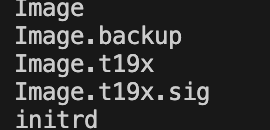 boot里面没有Image.sig有影响吗,修改了这个会影响原来的相机吗?
 -
@lizi 我们发布的压缩包里面,应该是同时有Image和Image.sig的。
你注意一下版本,千万别搞错了。 -
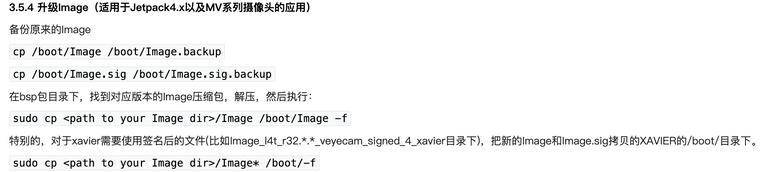
@veye_xumm 压缩包里是有的,但是boot下没有Image.sig文件。这里也是只用cp一个Image吧?我的板子是orin-nano。是xavier才要复制Image.sig。没理解错吧
-
@lizi orin跟xavier一致,都拷过去
-
@veye_xumm 还是不行
-
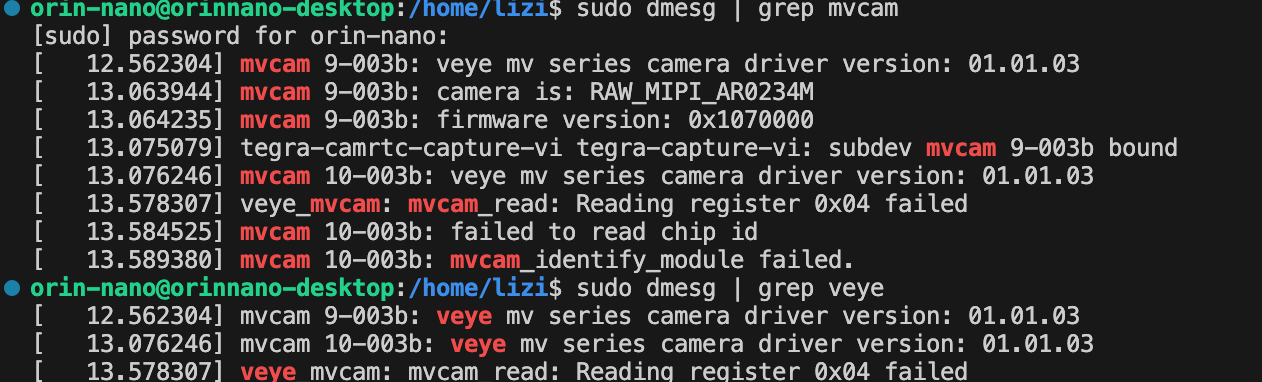
@lizi 如上图显示,你在i2c-9上接了一个摄像头。而且一切正常。
-
@veye_xumm ok了可以读到摄像头。但是在跑i2c.sh的时候又出现了问题。上面的dmesg | grep mvcam 就有显示veye_mvcam: mvcam_read: Reading register 0x04 failed 寄存器读不到

-



Hello! It looks like you're interested in this conversation, but you don't have an account yet.
Getting fed up of having to scroll through the same posts each visit? When you register for an account, you'll always come back to exactly where you were before, and choose to be notified of new replies (either via email, or push notification). You'll also be able to save bookmarks and upvote posts to show your appreciation to other community members.
With your input, this post could be even better 💗
Register Login