IMX296在RK3588上不出图
-
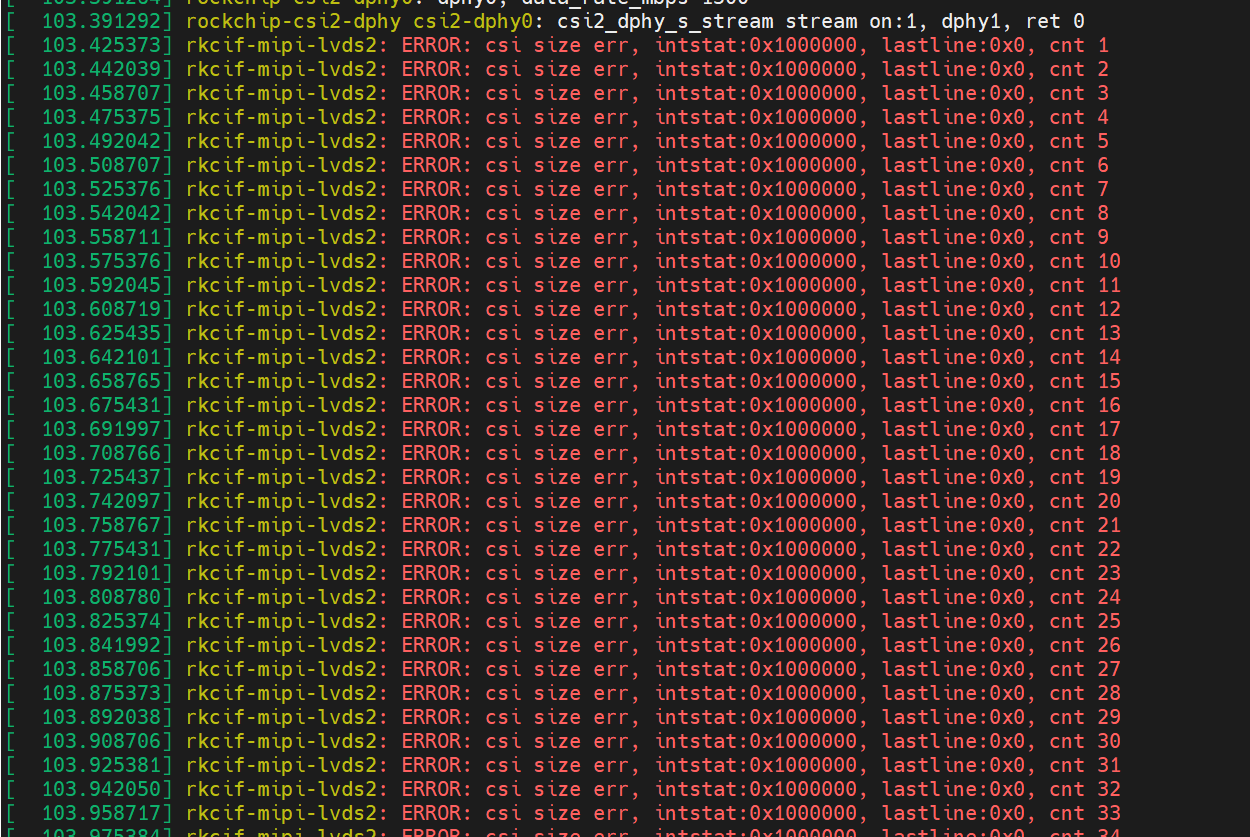
你好,我有成功在我的板子上点亮了IMX178,并且可以使用gst-launch-1.0正常获取到相机画面。当我将IMX178模组换成IMX296模组,并且调整gst-launch-1.0的分辨率为1440x1088后,无法正常出图,且dmesg有如下的报错
这个是我的driver probe时的日志
[    4.167431] mvcam 3-003b: veye mv series camera driver version: 01.01.04
[    5.171059] mvcam 3-003b: camera is:MV-MIPI-IMX296M
[    5.172022] mvcam 3-003b: firmware version: 0x1430141
[    5.175809] mvcam 3-003b: mvcam_get_mipifeature: lane num 2, datarate 1500000000 bps
[    5.175853] mvcam 3-003b: Success to get mvcam endpoint data lanes, dts uses 2 lanes
[    5.187290] mvcam 3-003b: mvcam_enum_controls success
我的IMX296 模组的固件版本是 version is C 01.43 and L 01.41
有尝试以下操作,皆无法出图,错误和之前的一样。- 恢复初始化参数 sudo ./mv_mipi_i2c.sh -w -f factoryparam -b 3
- 获取roi size,为r roi is 0,0,1440,1088
-
@xym
你参考这个脚本试试:export I2C_BUS=7 export WIDTH=1456 export HEIGHT=1088 export FPS=60 v4l2-ctl -d /dev/v4l-subdev2 --set-ctrl roi_x=0 v4l2-ctl -d /dev/v4l-subdev2 --set-ctrl roi_y=0 media-ctl -d /dev/media0 --set-v4l2 '"m00_b_mvcam '"$I2C_BUS"'-003b":0[fmt:Y8_1X8/'"$WIDTH"'x'"$HEIGHT"'@1/'"$FPS"']' v4l2-ctl -d /dev/video0 --set-fmt-video=width=$WIDTH,height=$HEIGHT,pixelformat=GREY --stream-mmap --stream-count=-1 --stream-to=/dev/null -
使用脚本可以,感谢

Hello! It looks like you're interested in this conversation, but you don't have an account yet.
Getting fed up of having to scroll through the same posts each visit? When you register for an account, you'll always come back to exactly where you were before, and choose to be notified of new replies (either via email, or push notification). You'll also be able to save bookmarks and upvote posts to show your appreciation to other community members.
With your input, this post could be even better 💗
Register Login