VEYE IMAGING Forum
    • Categories
    • Tags
    • Recent
    • Popular
    • Users
    • WIKI
    • veye.cc
    • Register
    • Login

    I want to synchronize the two cameras in sync mode.

    Scheduled Pinned Locked Moved FPD LINK III Camera
    9 Posts 2 Posters 4.7k Views 1 Watching
    Loading More Posts
    • Oldest to Newest
    • Newest to Oldest
    • Most Votes
    Reply
    • Reply as topic
    Log in to reply
    This topic has been deleted. Only users with topic management privileges can see it.
    • O Offline
      octa_yk
      last edited by

      Hi,

      I want to synchronize the two cameras in sync mode.
      However, I don't think the sync signal is being sent correctly.
      Please let me know what I am doing wrong.

      1. It works fine before the synchronization setting.
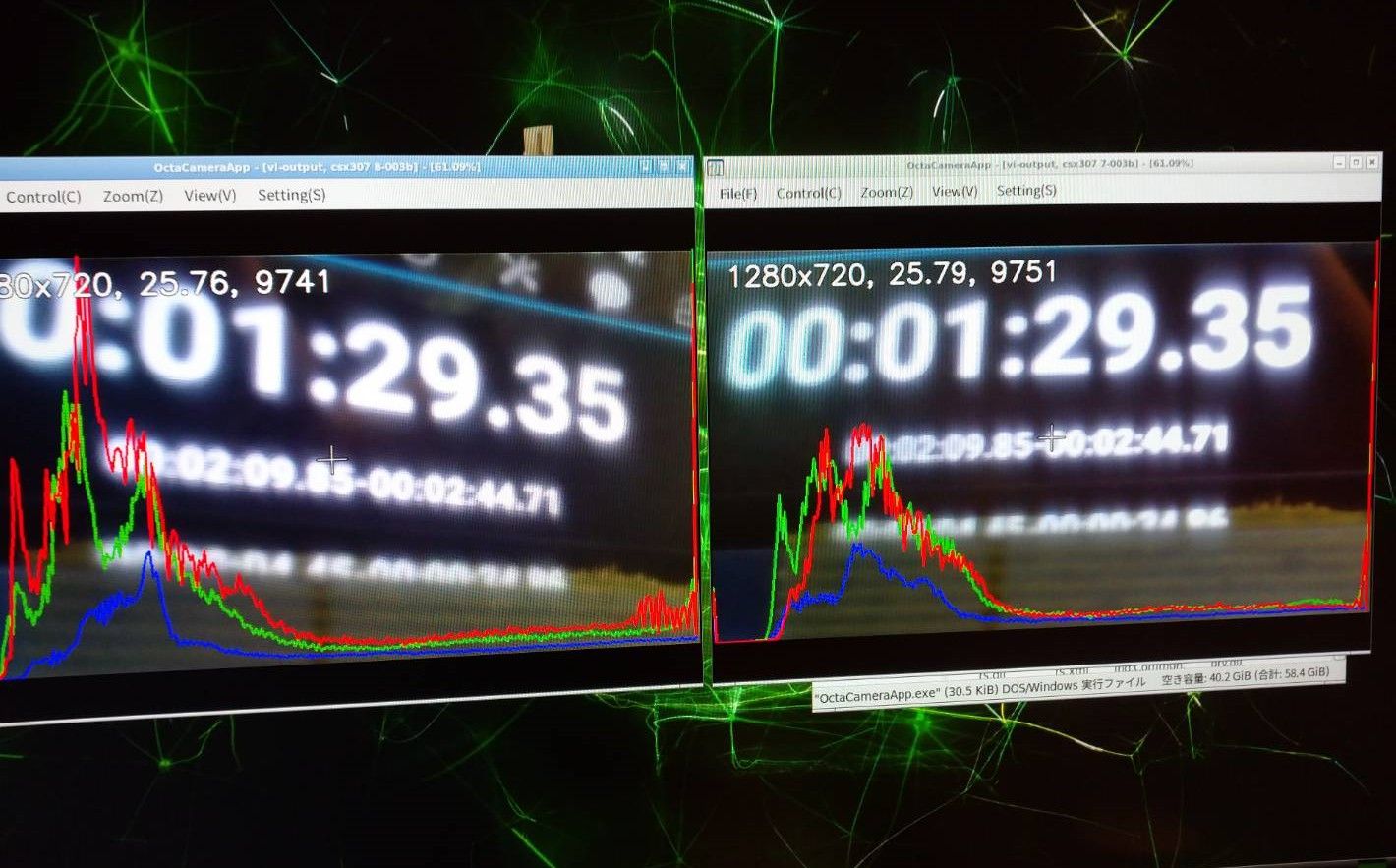
      9774.jpg

      1. The slave side captures a blue image when the synchronization is set as follows.
      # 配置cam0为主
      ./fpdlink3_i2c_jetson.sh -f sync_init -p 0 -p1 0 -b 7
      ./cs_mipi_i2c.sh -w -f streammode -p1 1 -p2 0 -b 7 -d 0x3b
      
      # 配置cam1为从
      ./fpdlink3_i2c_jetson.sh -f sync_init -p 0 -p1 1 -b 8
      ./cs_mipi_i2c.sh -w -f streammode -p1 1 -p2 1 -b 8 -d 0x3b
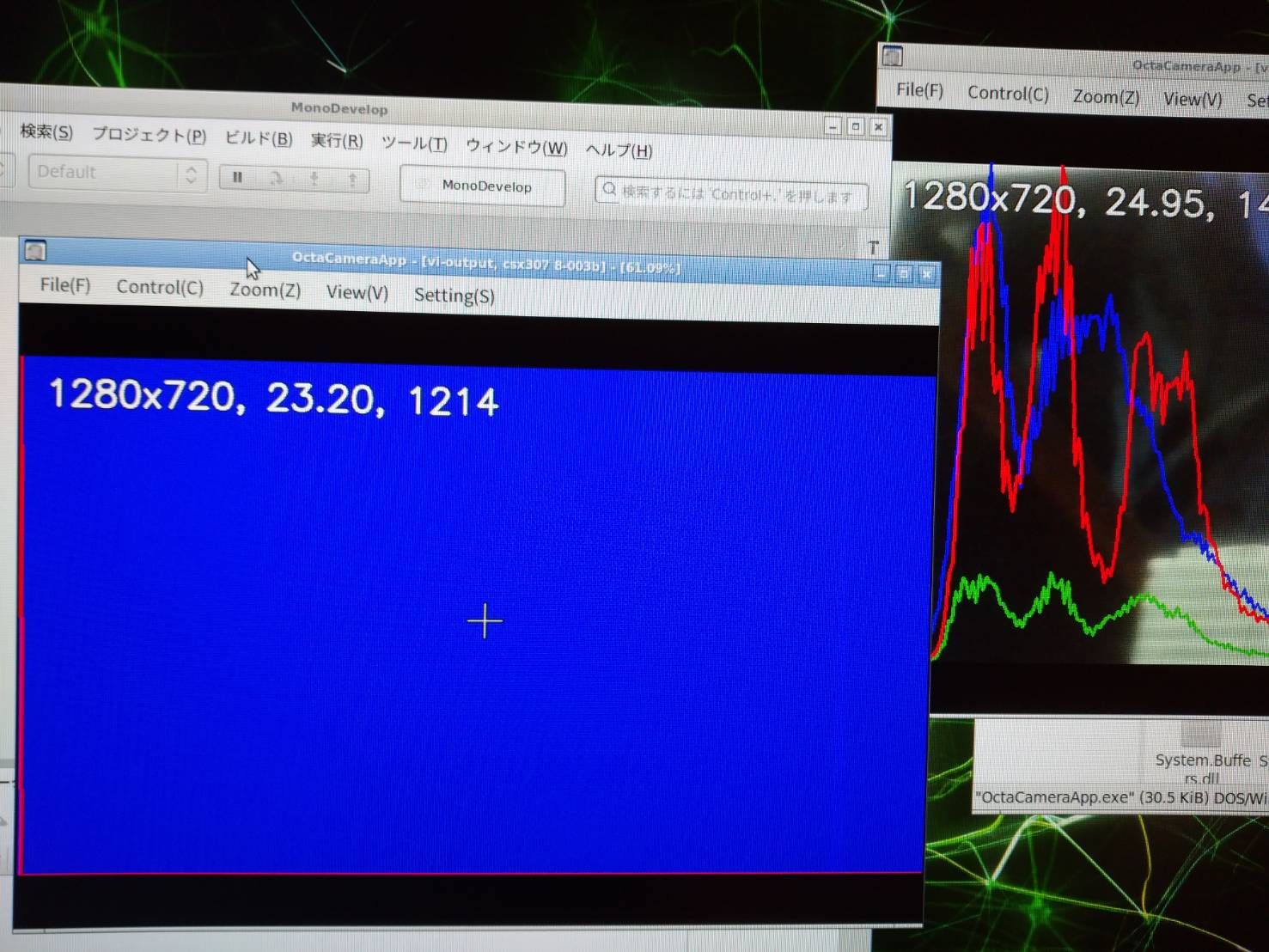
      

      9543.jpg

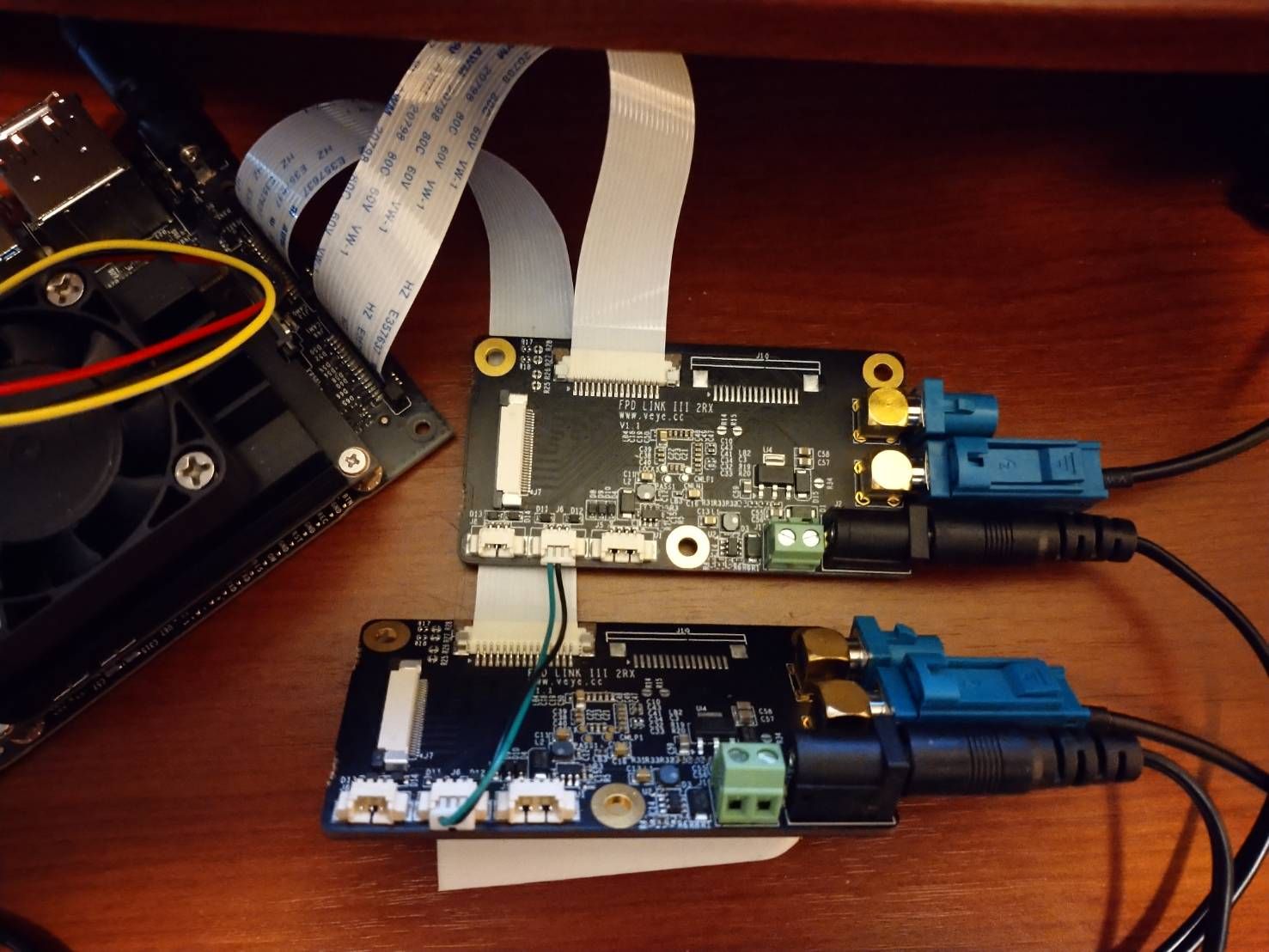
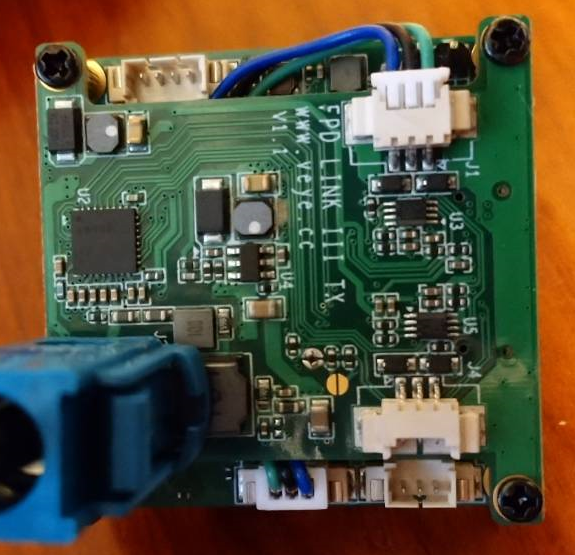
      1. The wiring is as follows.

      9573.jpg

      Environment:
      JetPack 4.4.1
      Jetson Nano B01
      CS-MIPI-IMX307-fpdlink

      veye_xummV 1 Reply Last reply Reply Quote 0
      • veye_xummV Offline
        veye_xumm @octa_yk
        last edited by

        @octa_yk

        1. please check your camera firmware version first, refer to this:
          http://wiki.veye.cc/index.php/CS-MIPI-IMX307_version_log
        2. I think you are following this part,
          http://wiki.veye.cc/index.php/FPD_LINK_III_for_Jetson#CS-FPD-CAM-IMX307_sync_mode.EF.BC.8Cconnnect_to_Jetson_Nano_B01.2FNX
          Please check these connection:
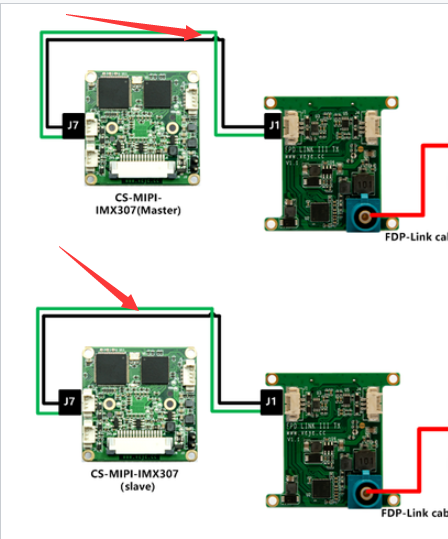
          835800be-39f2-4ffd-84a8-7285188fb5d2-image.png

        Questions will be answered as soon as possible, please be patient.
        如果你使用中文,请直接用中文提问。
        May the force be with YOU. (This is the translation of the mysterious Chinese symbol above.)

        O 1 Reply Last reply Reply Quote 0
        • O Offline
          octa_yk @veye_xumm
          last edited by

          @veye_xumm

          1. Camera firmware version
          $ sudo ./veye_mipi_i2c.sh -r -f hdver
          ====I2C write:<0x3b> <0x7> <0xfe>====
          hardware version is 0x 2
          $ ./cs_mipi_i2c.sh -r -f firmwarever
          r firmware version is  2.27
          
          1. Wiring (J1-J7)
            3f23af97-cf76-4603-98b3-62358c95cdb5-image.png

          Is it likely that updating the firmware on the camera will fix the problem?

          veye_xummV 1 Reply Last reply Reply Quote 0
          • veye_xummV Offline
            veye_xumm @octa_yk
            last edited by

            @octa_yk
            YES.
            http://wiki.veye.cc/index.php/USB_firmware_update_app_note

            Questions will be answered as soon as possible, please be patient.
            如果你使用中文,请直接用中文提问。
            May the force be with YOU. (This is the translation of the mysterious Chinese symbol above.)

            O 1 Reply Last reply Reply Quote 0
            • O Offline
              octa_yk @veye_xumm
              last edited by

              @veye_xumm

              I upgraded the version using the following file, but I still get the same blue image.

              https://www.mediafire.com/file/ellhe2jtv32bh1o/CS-MIPI-IMX307_FV2.36_LV3.3_20210303.bin/file

              Is there any other place to check?

              $ sudo ./veye_mipi_i2c.sh -r -f hdver -b 7
              ====I2C write:<0x3b> <0x7> <0xfe>====
              hardware version is 0x 2
              $ ./cs_mipi_i2c.sh -r -f firmwarever -b 7
              r firmware version is  2.36
              
              $ sudo ./veye_mipi_i2c.sh -r -f hdver -b 8
              ====I2C write:<0x3b> <0x7> <0xfe>====
              hardware version is 0x 2
              $ ./cs_mipi_i2c.sh -r -f firmwarever -b 8
              r firmware version is  2.36
              
              veye_xummV 1 Reply Last reply Reply Quote 0
              • veye_xummV Offline
                veye_xumm @octa_yk
                last edited by

                @octa_yk
                I think you use the wrong pin for SYNC signal. You should use J7-3 and J1-3, not J7-1 and J1-1.

                SYNC signal connect J7-3 to J1-3,J7-2 to J1-2.
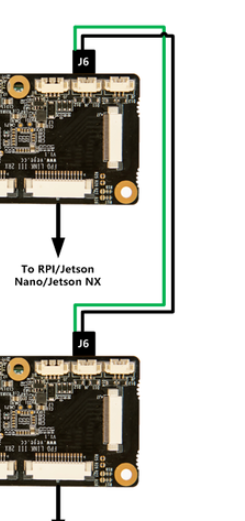
                7a28781c-e953-4632-915c-3d818e3a32fb-image.png

                Questions will be answered as soon as possible, please be patient.
                如果你使用中文,请直接用中文提问。
                May the force be with YOU. (This is the translation of the mysterious Chinese symbol above.)

                O 1 Reply Last reply Reply Quote 0
                • O Offline
                  octa_yk @veye_xumm
                  last edited by

                  @veye_xumm

                  Thank you very much.
                  I fixed the wiring and was able to import the video successfully.

                  Please tell me one point.
                  I know that the synchronized images do not have exactly the same timing, but how many milliseconds is the accuracy of the synchronization?
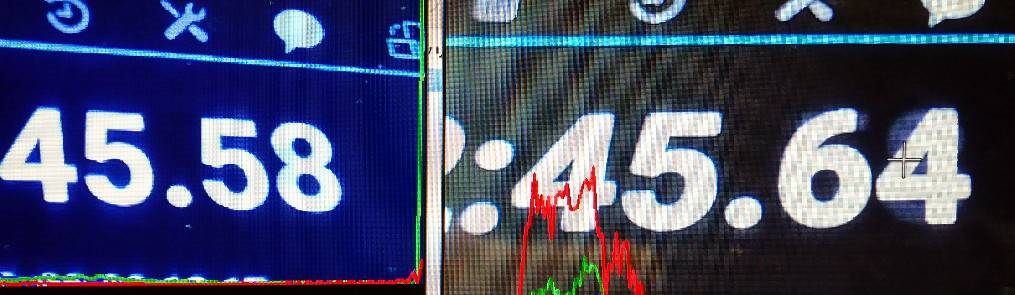
                  b0bc41ec-4a6f-46df-bfd5-e7d39137d0a4-image.png

                  veye_xummV 1 Reply Last reply Reply Quote 0
                  • veye_xummV Offline
                    veye_xumm @octa_yk
                    last edited by

                    @octa_yk
                    Hi,
                    The sync signal is very accurate.
                    The difference timing your pictures show is actually because of the v4l2 buffer + gstreamer pipline buffer+HDMI display refresh rate . In addition, be careful not to introduce new errors because the sensor of the phone you are taking photos is rolling shutter.
                    Here are my suggestions for measurement.

                    1. Find a stopwatch with sufficient precision. Using the computer screen to display the stopwatch, due to the refresh rate, the accuracy is very poor.
                    2. Set the exposure time manually to a very small value, which is recommended 1ms.
                    3. Recording for both cameras at the same time. Generate two video files.
                    4. Use the player to play two videos frame by frame, and you will find pairs of pictures that match the time.
                      Note that the gstreamer video record may lose a small number of frames.
                      Among them, 2+3+ 4 must be done.

                    Here is my suggestion, you'd better not use gstreamer for application development, if you do, be sure to pay attention to buffer.It is recommended that you directly call the v4l2 API to get the data.

                    Questions will be answered as soon as possible, please be patient.
                    如果你使用中文,请直接用中文提问。
                    May the force be with YOU. (This is the translation of the mysterious Chinese symbol above.)

                    O 1 Reply Last reply Reply Quote 0
                    • O Offline
                      octa_yk @veye_xumm
                      last edited by

                      @veye_xumm

                      I understood that the synchronization signal is very accurate in an environment close to hardware.

                      We will check the details from time to time.

                      1 Reply Last reply Reply Quote 0

                      Hello! It looks like you're interested in this conversation, but you don't have an account yet.

                      Getting fed up of having to scroll through the same posts each visit? When you register for an account, you'll always come back to exactly where you were before, and choose to be notified of new replies (either via email, or push notification). You'll also be able to save bookmarks and upvote posts to show your appreciation to other community members.

                      With your input, this post could be even better 💗

                      Register Login
                      • First post
                        Last post