MV-MIPI-SC130M on RPi4 Ubuntu Server 20.04 LTI(arm64)

-
请问如何在Ubuntu上配置MV-MIPI-SC130摄像头的驱动?
项目需要在树莓派4B(64位Ubuntu20.04LTI)上配置MV-MIPI-SC130摄像头的驱动,因为未找到对应预编译版本,故而在PC上尝试搭建交叉编译系统。
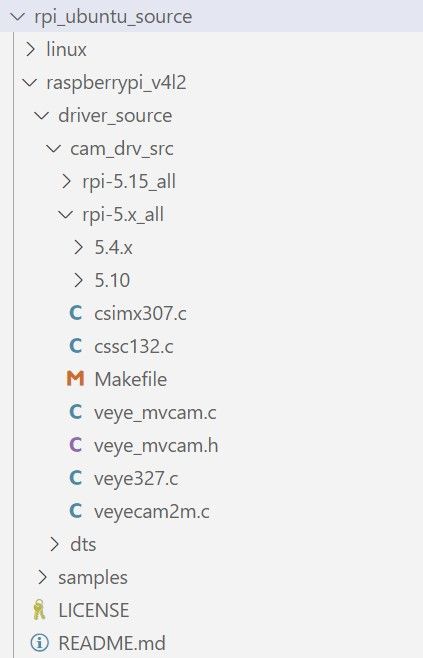
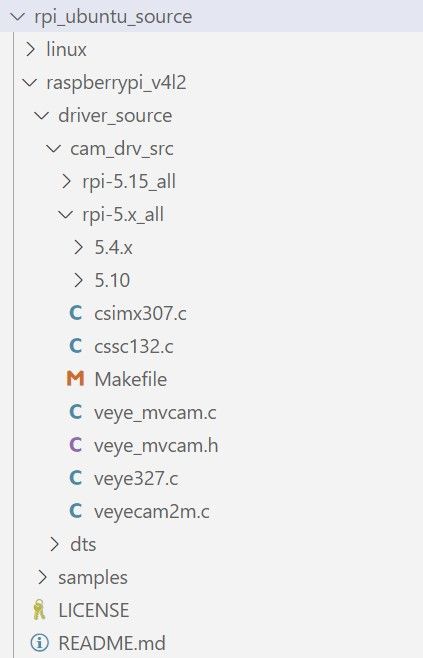
根据教程从源代码构建 rpi/zh 驱动程序,我需要在修改同路径下的KConfig和Makefile,增加对应camera驱动,由于缺乏详细说明或针对MV相机的相关示例,我不确定如何进行修改,同时我无法找到版本匹配的dts文件。想请教一下Kconfig等配置文件的修改方法以及安装适配摄像头驱动的解决方案(由于系统上已经配置了开发环境,希望尽可能避免重装系统) -
@skyhorizon
最简单的办法是在树莓派上直接编译,而不是在pc上交叉编译。
从树莓派上直接编译吧,简单很多。 -
@veye_xumm 我已经尝试了在本地编译驱动程序,我在raspberrypi_v4l2/driver_source/cam_drv_src/rpi-5.x_all目录下使用5.4.0-1080-raspi内核编译通过,生成了veye_mvcam.ko文件。
但是我找不到对应版本5.4的dts文件和编译脚本,导致无法获得dtbo文件,我查看了其他版本的三个dts文件:
/rpi-5.10.92+/veye_mvcam-overlay.dts
/rpi-5.10.103+/veye_mvcam-overlay.dts
/rpi-5.15.y/veye_mvcam-overlay.dts
但我不确定他们能否用于5.4 -
@skyhorizon 你的树莓派上pios的版本那么老吗?
uname -a执行一下看看? -
@veye_xumm 确认是5.4,这是Ubuntu server 20.04LTS arm64
-
@skyhorizon 哦。这个版本比较老了,我们暂时没有提供对应的ko,如果你一定要用这个版本的pios,建议从代码移植一下驱动。
如果可能的话,升级一下piOs最好了。

Hello! It looks like you're interested in this conversation, but you don't have an account yet.
Getting fed up of having to scroll through the same posts each visit? When you register for an account, you'll always come back to exactly where you were before, and choose to be notified of new replies (either via email, or push notification). You'll also be able to save bookmarks and upvote posts to show your appreciation to other community members.
With your input, this post could be even better 💗
Register Login