VEYE IMAGING Forum
    • Categories
    • Tags
    • Recent
    • Popular
    • Users
    • WIKI
    • veye.cc
    • Register
    • Login

    VEYE IMX462 适配ORIN-NX 视频录制指令问题
    Scheduled Pinned Locked Moved VEYE MIPI camera
    17 Posts 2 Posters 4.2k Views 1 Watching
    Loading More Posts
    • Oldest to Newest
    • Newest to Oldest
    • Most Votes
    Reply
    • Reply as topic
    Log in to reply
    This topic has been deleted. Only users with topic management privileges can see it.
    • 国 Offline
      国电富通
      last edited by

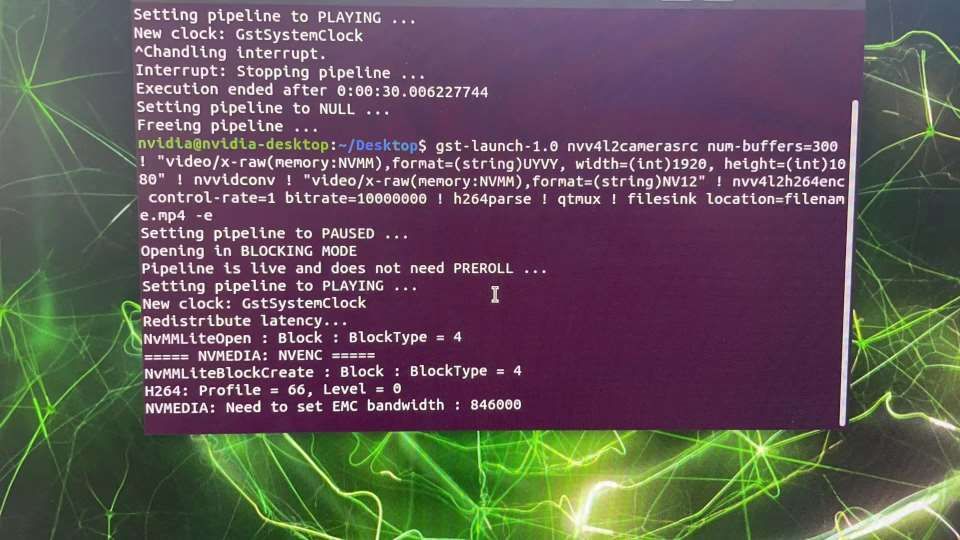
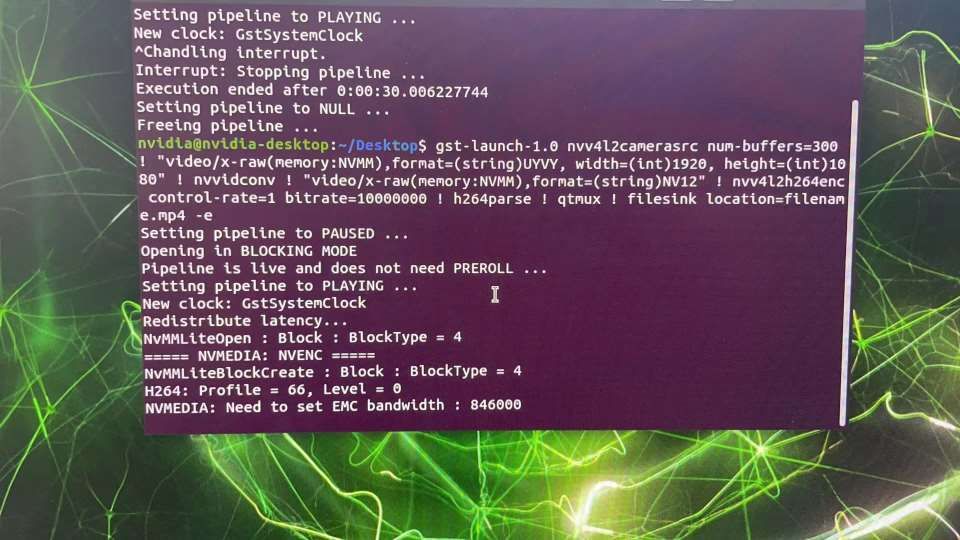
      imx462视频录制指令运行反馈_1.jpeg

      veye_xummV 1 Reply Last reply Reply Quote 0
      • veye_xummV Offline
        veye_xumm @国电富通
        last edited by

        @国电富通
        如图所示,这个命令在正确执行,完全没有任何问题。
        这个命令是录像300帧,所以会看起来卡顿大约10秒左右。完成后会生成filename.mp4文件。
        可以用wiki上的指令播放,或者你用其他播放器播放。

        Questions will be answered as soon as possible, please be patient.
        如果你使用中文,请直接用中文提问。
        May the force be with YOU. (This is the translation of the mysterious Chinese symbol above.)

        国 1 Reply Last reply Reply Quote 0
        • 国 Offline
          国电富通 @veye_xumm
          last edited by

          @veye_xumm 用vlc或video去打开生成的录像失败,麻烦看下是什么原因导致的录制视频打开失败_1.jpeg

          veye_xummV 1 Reply Last reply Reply Quote 0
          • veye_xummV Offline
            veye_xumm @国电富通
            last edited by

            @国电富通 http://wiki.veye.cc/index.php/VEYE_CS_Camera_for_Jetson_TX2/zh#Gstreamer_Usage
            有播放的指令

            Questions will be answered as soon as possible, please be patient.
            如果你使用中文,请直接用中文提问。
            May the force be with YOU. (This is the translation of the mysterious Chinese symbol above.)

            国 1 Reply Last reply Reply Quote 0
            • 国 Offline
              国电富通 @veye_xumm
              last edited by

              @veye_xumm 可以了,非常感谢!顺便问一下如果想长时间录制的话帧数最大可以调整到多少。

              veye_xummV 1 Reply Last reply Reply Quote 0
              • veye_xummV Offline
                veye_xumm @国电富通
                last edited by

                @国电富通 这些应用层的,你最好到英伟达的l4t文档里去学习一下。那是最专业的。https://docs.nvidia.com/jetson/archives/r35.3.1/DeveloperGuide/text/SD/Multimedia.html

                Questions will be answered as soon as possible, please be patient.
                如果你使用中文,请直接用中文提问。
                May the force be with YOU. (This is the translation of the mysterious Chinese symbol above.)

                国 1 Reply Last reply Reply Quote 0
                • 国 Offline
                  国电富通 @veye_xumm
                  last edited by

                  @veye_xumm 您好,我咨询一下,使用VEYE IMX462 录制的1080p视频,用gst-play-1.0 命令播放出现闪屏的问题请问该怎样解决?

                  veye_xummV 1 Reply Last reply Reply Quote 0
                  • veye_xummV Offline
                    veye_xumm @国电富通
                    last edited by

                    @国电富通 我们没有遇到过这个现象。是不是你录像太大时间太长,出现了录像文件本身的丢帧之类?

                    Questions will be answered as soon as possible, please be patient.
                    如果你使用中文,请直接用中文提问。
                    May the force be with YOU. (This is the translation of the mysterious Chinese symbol above.)

                    1 Reply Last reply Reply Quote 0
                    • 国 Offline
                      国电富通
                      last edited by

                      您好,我咨询一下,使用VEYE IMX462 打开的视频画面在灯光下有频闪现象,经查资料发现是没有设置PAL格式,也就是你们的1080p\25FPS支持这个格式,请问怎样把相机属性设置为1080p\25fps( 尝试通过python脚本来修改不行)。![0_1687171083838_PAL.jpg](正在上传 100%)

                      veye_xummV 1 Reply Last reply Reply Quote 0
                      • veye_xummV Offline
                        veye_xumm @国电富通
                        last edited by

                        @国电富通
                        使用
                        https://wiki.veye.cc/index.php/VEYE-MIPI-290/327_i2c/zh
                        part5.5配置即可。 注意你的bus number。 另外写完之后建议读出来确认是否成功。

                        Questions will be answered as soon as possible, please be patient.
                        如果你使用中文,请直接用中文提问。
                        May the force be with YOU. (This is the translation of the mysterious Chinese symbol above.)

                        1 Reply Last reply Reply Quote 0
                        • 国 Offline
                          国电富通
                          last edited by

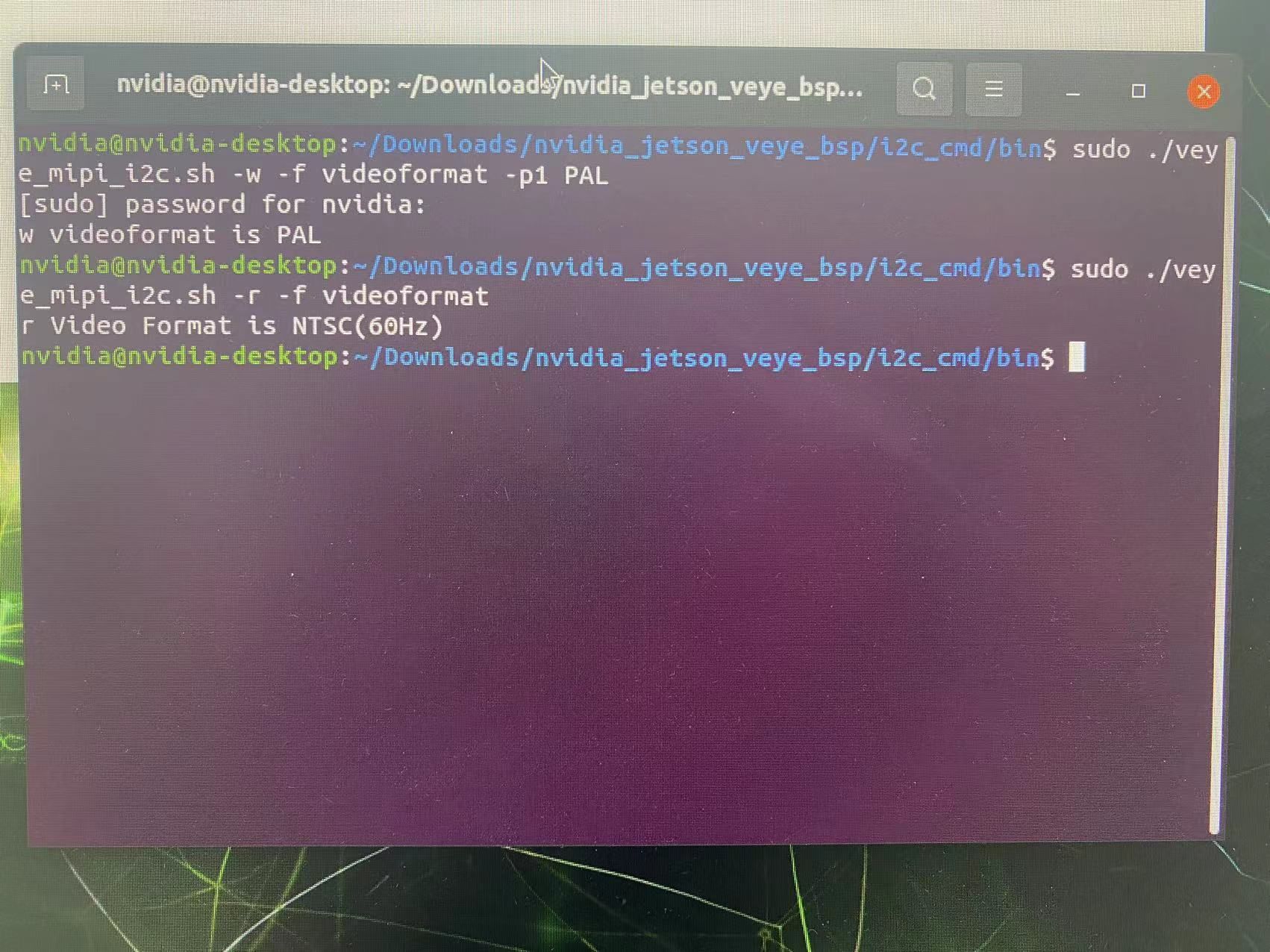
                          我按照您说的方法part5.5去做PAL(50Hz)的制式修改,但是修改完后读取失败,尝试过重新编译source仍不行。修改PAL制式读取失败的问题.jpg

                          veye_xummV 1 Reply Last reply Reply Quote 0
                          • veye_xummV Offline
                            veye_xumm @国电富通
                            last edited by

                            @国电富通 重新编译一下source试试。

                            Questions will be answered as soon as possible, please be patient.
                            如果你使用中文,请直接用中文提问。
                            May the force be with YOU. (This is the translation of the mysterious Chinese symbol above.)

                            veye_xummV 1 Reply Last reply Reply Quote 0
                            • veye_xummV Offline
                              veye_xumm @veye_xumm
                              last edited by

                              @veye_xumm 命令后面加上-b 9或者 -b 10试试

                              Questions will be answered as soon as possible, please be patient.
                              如果你使用中文,请直接用中文提问。
                              May the force be with YOU. (This is the translation of the mysterious Chinese symbol above.)

                              国 1 Reply Last reply Reply Quote 0
                              • 国 Offline
                                国电富通 @veye_xumm
                                last edited by

                                @veye_xumm 使用命令。./veye_mipi_i2c.sh -w -f videoformat -p1 PAL
                                -b 9 写进去以后,用命令./veye_mipi_i2c.sh -r -f videoformat查看显示的还是NTSC(60Hz)(source也重新编译了)

                                veye_xummV 1 Reply Last reply Reply Quote 0
                                • veye_xummV Offline
                                  veye_xumm @国电富通
                                  last edited by

                                  @国电富通 写入和读出都要加上 -b 9啊,这样才操作同一个camera。

                                  Questions will be answered as soon as possible, please be patient.
                                  如果你使用中文,请直接用中文提问。
                                  May the force be with YOU. (This is the translation of the mysterious Chinese symbol above.)

                                  国 1 Reply Last reply Reply Quote 0
                                  • 国 Offline
                                    国电富通 @veye_xumm
                                    last edited by

                                    @veye_xumm 好的,写入成功了。

                                    veye_xummV 1 Reply Last reply Reply Quote 0
                                    • veye_xummV Offline
                                      veye_xumm @国电富通
                                      last edited by

                                      @国电富通 OK

                                      Questions will be answered as soon as possible, please be patient.
                                      如果你使用中文,请直接用中文提问。
                                      May the force be with YOU. (This is the translation of the mysterious Chinese symbol above.)

                                      1 Reply Last reply Reply Quote 0

                                      Hello! It looks like you're interested in this conversation, but you don't have an account yet.

                                      Getting fed up of having to scroll through the same posts each visit? When you register for an account, you'll always come back to exactly where you were before, and choose to be notified of new replies (either via email, or push notification). You'll also be able to save bookmarks and upvote posts to show your appreciation to other community members.

                                      With your input, this post could be even better 💗

                                      Register Login
                                      • First post
                                        Last post