VEYE IMAGING Forum
    • Categories
    • Tags
    • Recent
    • Popular
    • Users
    • WIKI
    • veye.cc
    • Register
    • Login

    ESP32控制SC132相机硬件触发,通过树莓派保存图片到SD卡的一些问题
    Scheduled Pinned Locked Moved CS MIPI camera
    13 Posts 2 Posters 5.0k Views 2 Watching
    Loading More Posts
    • Oldest to Newest
    • Newest to Oldest
    • Most Votes
    Reply
    • Reply as topic
    Log in to reply
    This topic has been deleted. Only users with topic management privileges can see it.
    • M Offline
      MJYC @veye_xumm
      last edited by

      @veye_xumm
      您好,目前按照您所说的连续捕获的stream-count=-1的方式,没有办法捕获一次,保存一张不同名字的图片。
      我将我目前的情况详细的叙述一下:
      我将gpio-trigger.py 编写好,在Terimal中运行python nano gpio-trigger.py 能够正常的实现触发,存图
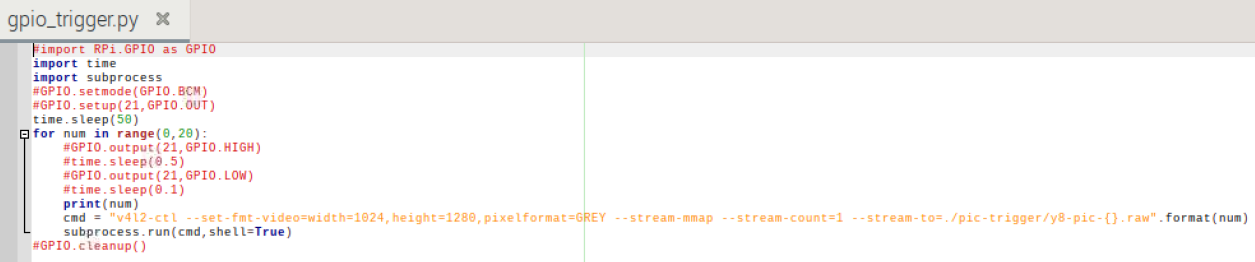
      0d72f9a2-0640-4f65-9f6d-cdd109c362be-屏幕截图 2023-11-17 164338.png
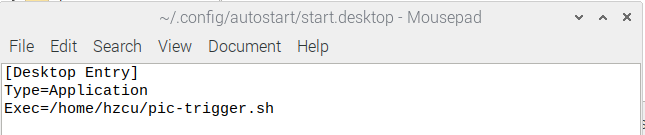
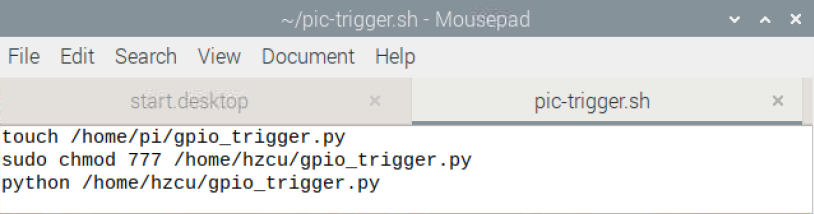
      于是,我将这个python文件作为开机启动程序
      d0d226fb-4253-4adc-b351-bd6829310b8b-屏幕截图 2023-11-17 164132.png
      3c2c2ad4-6b5e-4d5b-b131-3be6be43055b-屏幕截图 2023-11-17 164238.png

      但是每次重启后,都是没进行硬件触发,就在文件夹下产生了20张(指所有),且所有照片都是空的。于是我猜想是启动的太早了,于是我在gpio-trigger.py进入循环前,进行了60s的延迟。但是仍然没有解决,还是会出现延迟结束,没有硬件触发,直接生成20张空图片
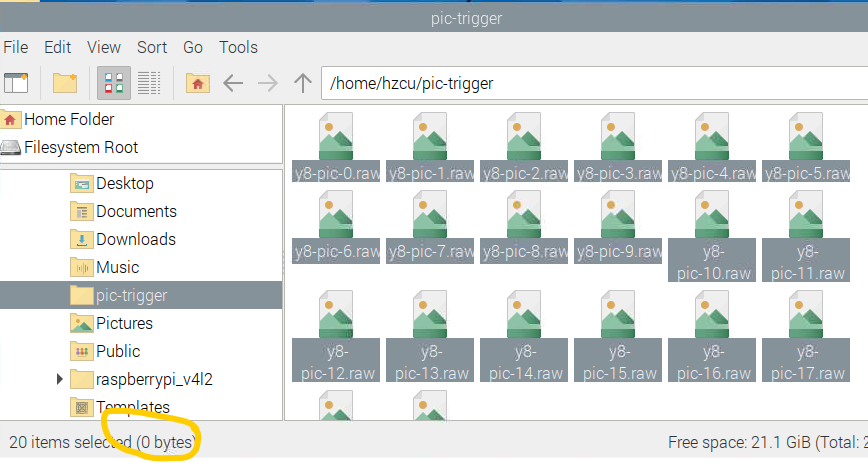
      屏幕截图 2023-11-17 165806.png

      veye_xummV 1 Reply Last reply Reply Quote 0
      • veye_xummV Offline
        veye_xumm @MJYC
        last edited by

        @mjyc 你现在摄像头的工作模式,是断电保存的,还是树莓派启动后配置的?

        Questions will be answered as soon as possible, please be patient.
        如果你使用中文,请直接用中文提问。
        May the force be with YOU. (This is the translation of the mysterious Chinese symbol above.)

        M 1 Reply Last reply Reply Quote 0
        • M Offline
          MJYC @veye_xumm
          last edited by

          @veye_xumm said in ESP32控制SC132相机硬件触发,通过树莓派保存图片到SD卡的一些问题:

          摄像头的工作模式

          摄像头的工作模式,是我paramsave保存的,每次上电v4l2-ctrl -L看到的都是一样的。

          veye_xummV 1 Reply Last reply Reply Quote 0
          • veye_xummV Offline
            veye_xumm @MJYC
            last edited by

            @mjyc 你试试别让他上电后自动执行,你手动执行你的这个python脚本?

            Questions will be answered as soon as possible, please be patient.
            如果你使用中文,请直接用中文提问。
            May the force be with YOU. (This is the translation of the mysterious Chinese symbol above.)

            M 4 Replies Last reply Reply Quote 0
            • M Offline
              MJYC @veye_xumm
              last edited by

              @veye_xumm said in ESP32控制SC132相机硬件触发,通过树莓派保存图片到SD卡的一些问题:

              手动执行你的这个python脚本

              手动执行这个python脚本,必须要拍满20张图片再次运行,才能继续拍摄。但是我如果用while(1):这种写法,运行一次,不ctrl c退出,也是不能继续拍摄的。
              报错为:VIDIOC_S_FMT:failed:Device or resource busy
              VIDIOC_REQBUFS returned -1(Device or resource busy)

              当然自启动问题更多,根本不会等待硬件触发,直接拍完20张。有一次,我试了一下while(1):这种写法,一直存零kb的空图。

              1 Reply Last reply Reply Quote 0
              • M Offline
                MJYC @veye_xumm
                last edited by

                @veye_xumm 可以可以提供一下解决方案,实现自启动,4个相机硬件触发同步拍摄。真的很急,我的微信号YMJXIAOBAI

                1 Reply Last reply Reply Quote 0
                • M Offline
                  MJYC @veye_xumm
                  last edited by

                  @veye_xumm
                  我下午有空的,可否帮忙解决一下这个困扰我两周的问题吗

                  veye_xummV 1 Reply Last reply Reply Quote 0
                  • M Offline
                    MJYC @veye_xumm
                    last edited by

                    @veye_xumm

                    我觉得如果代码中,最开始能清楚所有占用设备的进程,然后开始拍照,这样不管是断电还是提前结束,都不影响下次代码运行。(我运行代码的时候,发现没有结束进程(比如没拍够,或者断电了)下次再拍,会报failed:Device or resource busy。

                    1 Reply Last reply Reply Quote 0
                    • veye_xummV Offline
                      veye_xumm @MJYC
                      last edited by

                      @mjyc
                      我很理解你的心情。说实话我们对应用层开发的经验比较有限,所以只能提供给你一些建议。

                      如果是我们自己开发这个功能的话,倾向于:

                      1. 如果对C语言比较熟练,启动例程使用yavta的源码进行修改。
                      2. 如果对C不熟,用python,也会参考这个源码修改。

                      而不是在用一个简单的脚步去调用v4l2-ctl命令取图。这种子进程的方式会忽略掉大量的异常状态和错误状态,导致程序的失控。

                      Questions will be answered as soon as possible, please be patient.
                      如果你使用中文,请直接用中文提问。
                      May the force be with YOU. (This is the translation of the mysterious Chinese symbol above.)

                      M 1 Reply Last reply Reply Quote 0
                      • M Offline
                        MJYC @veye_xumm
                        last edited by

                        @veye_xumm
                        好的好的,感谢您的建议

                        1 Reply Last reply Reply Quote 0

                        Hello! It looks like you're interested in this conversation, but you don't have an account yet.

                        Getting fed up of having to scroll through the same posts each visit? When you register for an account, you'll always come back to exactly where you were before, and choose to be notified of new replies (either via email, or push notification). You'll also be able to save bookmarks and upvote posts to show your appreciation to other community members.

                        With your input, this post could be even better 💗

                        Register Login
                        • First post
                          Last post