VEYE IMAGING Forum
    • Categories
    • Tags
    • Recent
    • Popular
    • Users
    • WIKI
    • veye.cc
    • Register
    • Login

    IMX327S with reComputer Xavier/Nano

    Scheduled Pinned Locked Moved VEYE MIPI camera
    12 Posts 2 Posters 3.7k Views 1 Watching
    Loading More Posts
    • Oldest to Newest
    • Newest to Oldest
    • Most Votes
    Reply
    • Reply as topic
    Log in to reply
    This topic has been deleted. Only users with topic management privileges can see it.
    • N Offline
      newleaf
      last edited by

      Has anyone had any luck getting either the IMX327S (veye-mipi) or IMX307 (cs-mipi) working with the reComputer Jetson Xavier or Nano carrier boards?

      We built a custom kernel for the IMX327S per the VEYE instructions and flashed the Xavier, but are getting the dreaded "probe failed" for dmesg.

      I know this is a general post needing more detail (which I can provide). However, after seeing some issues on here re: Seeed compatibility, I was wondering if anyone had success with the reComputer. I also reached out to Seeed Studio.

      I will be continuing to try additional things, such as the prebuilt kernel and the IMX307 to see if it works with the Seeed board.

      Any tips appreciated.

      veye_xummV 1 Reply Last reply Reply Quote 0
      • veye_xummV Offline
        veye_xumm @newleaf
        last edited by

        @newleaf

        The "probe failed" error indicates that there might be an issue with the hardware connection. Please check the FPC cable orientation, ensuring it is correctly connected.

        We have customers who have been successfully using our camera+seed boards.

        Questions will be answered as soon as possible, please be patient.
        如果你使用中文,请直接用中文提问。
        May the force be with YOU. (This is the translation of the mysterious Chinese symbol above.)

        1 Reply Last reply Reply Quote 0
        • N Offline
          newleaf
          last edited by

          Thx for the help!

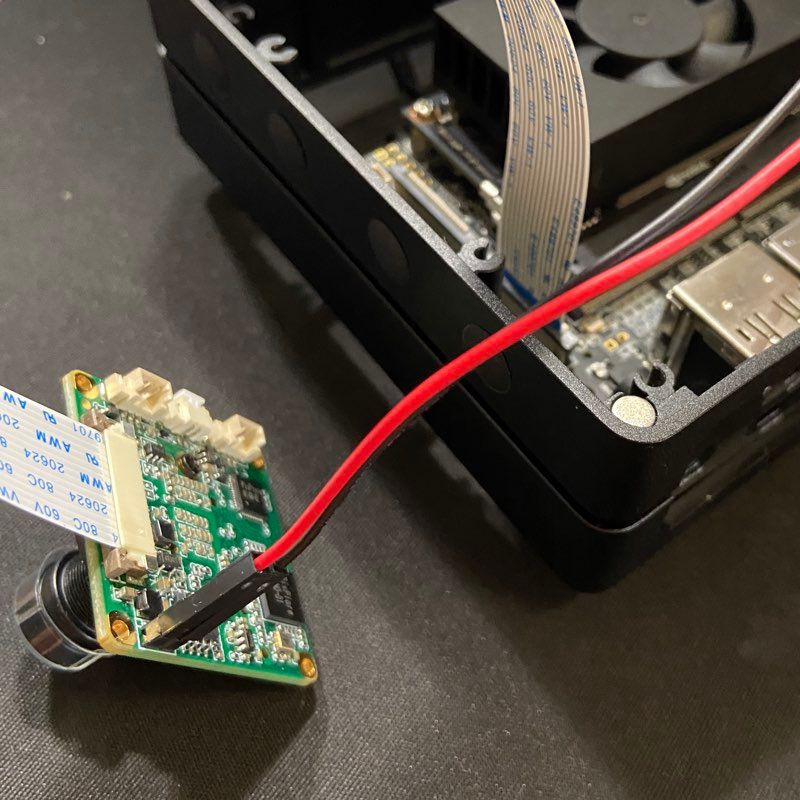
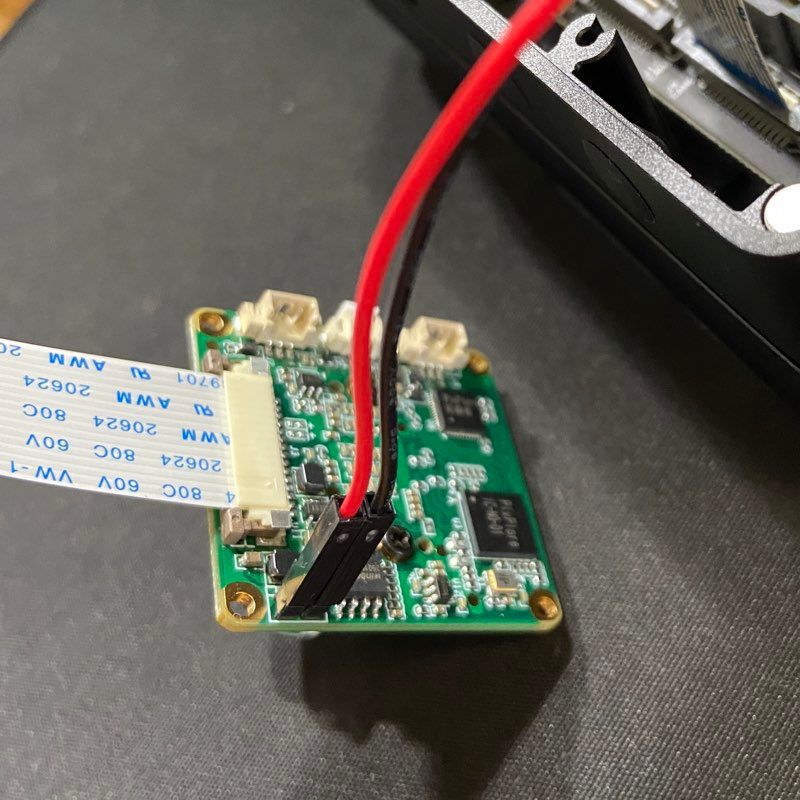
          Pics attached for verification.
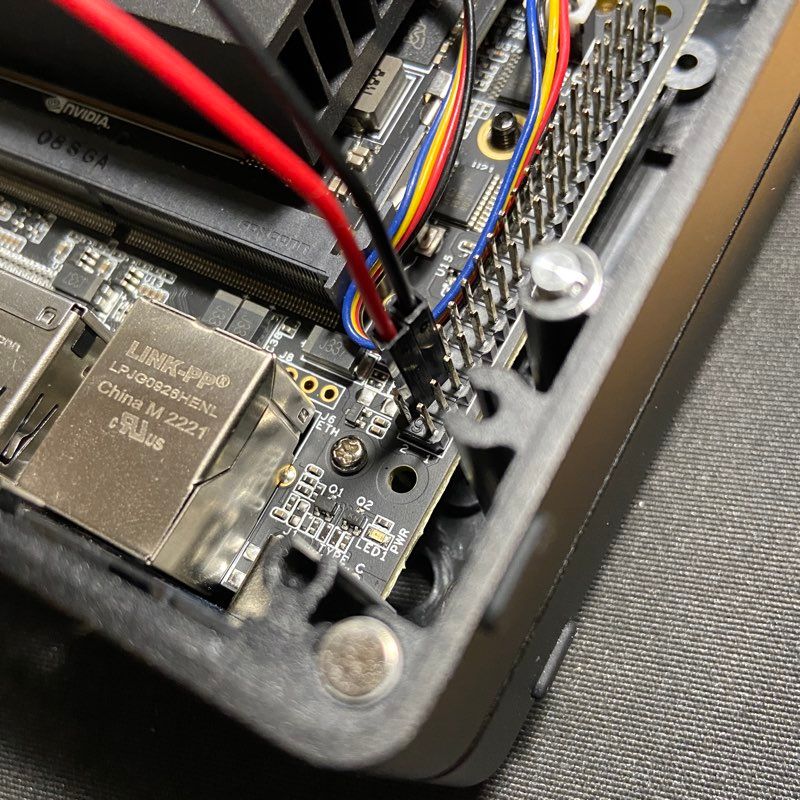
          IMG_2134_a.jpg IMG_2131_a.jpg IMG_2132_a.jpg

          veye_xummV 1 Reply Last reply Reply Quote 0
          • veye_xummV Offline
            veye_xumm @newleaf
            last edited by

            @newleaf
            I think the hardware connection is fine. Please execute the part3.7 and part4.1 command and send me the output to take a look.

            Questions will be answered as soon as possible, please be patient.
            如果你使用中文,请直接用中文提问。
            May the force be with YOU. (This is the translation of the mysterious Chinese symbol above.)

            N 2 Replies Last reply Reply Quote 0
            • N Offline
              newleaf @veye_xumm
              last edited by

              @veye_xumm Will do. Might be a bit later today or first thing morning (PST).

              I just got the module to work on a RasPi with gstreamer. So the module is good! Wanted to ensure that I didn't brick it.

              Once again, thank you.

              1 Reply Last reply Reply Quote 0
              • N Offline
                newleaf @veye_xumm
                last edited by

                @veye_xumm Below are the results with the camera connected as shown.

                ls /proc/device-tree/cam_i2cmux/i2c@*
                /proc/device-tree/cam_i2cmux/i2c@0:
                '#address-cells'   linux,phandle   name   phandle   rbpcv2_veyecam_a@3b   reg  '#size-cells'
                
                /proc/device-tree/cam_i2cmux/i2c@1:
                '#address-cells'   linux,phandle   name   phandle   rbpcv2_veyecam_c@3b   reg  '#size-cells'
                
                ls /sys/bus/i2c/drivers/
                 bq27xxx-battery   dummy     ina230x    lp855x     nct1008_nct72   pca954x                   rt5640   rtc-rx8025   stepper_pca   tegra_edid   tps65132   usb3503
                 cs53l30           ina219x   ina3221x   max77620   pca953x        'PEX9749 thermal sensor'   rt5659   sgtl5000     tas2552       tmpm32xi2c   ucsi_ccg   veyecam
                
                dmesg | grep veye
                [    6.214128] veyecam 9-003b: probing v4l2 sensor
                [    6.214385] veyecam 9-003b: tegracam sensor driver:veyecam_v2.0.6
                [   16.243950] veyecam 9-003b: probe failed
                [   16.244034] veyecam 9-003b: board setup failed
                [   16.244245] veyecam 10-003b: probing v4l2 sensor
                [   16.244499] veyecam 10-003b: tegracam sensor driver:veyecam_v2.0.6
                [   26.481745] veyecam 10-003b: probe failed
                [   26.481863] veyecam 10-003b: board setup failed
                

                Thank you!

                veye_xummV 1 Reply Last reply Reply Quote 0
                • veye_xummV Offline
                  veye_xumm @newleaf
                  last edited by

                  @newleaf
                  I think you did everything correctly. The software operations are all correct, but there is a failure in I2C communication.
                  I once encountered a similar issue on Seeed's J401-3 carrier board and worked with Seeed's engineers to resolve it.
                  The solution at that time was to upgrade the firmware (vl822-fw.tar.bz2)provided by Seeed.

                  I suggest you check with Seeed to confirm if it's the same issue. The I2C address for our camera is 0x3b.

                  Questions will be answered as soon as possible, please be patient.
                  如果你使用中文,请直接用中文提问。
                  May the force be with YOU. (This is the translation of the mysterious Chinese symbol above.)

                  N 1 Reply Last reply Reply Quote 0
                  • N Offline
                    newleaf @veye_xumm
                    last edited by

                    @veye_xumm This seems to align with what I saw on one of their forums. Thx for the firmware update filename, I can reference it in an email to them.

                    veye_xummV 2 Replies Last reply Reply Quote 0
                    • veye_xummV Offline
                      veye_xumm @newleaf
                      last edited by

                      @newleaf You are welcome.

                      Questions will be answered as soon as possible, please be patient.
                      如果你使用中文,请直接用中文提问。
                      May the force be with YOU. (This is the translation of the mysterious Chinese symbol above.)

                      1 Reply Last reply Reply Quote 0
                      • veye_xummV Offline
                        veye_xumm @newleaf
                        last edited by

                        @newleaf
                        vl822-fw.tar.bz2.a

                        Please change the file extension of the attachment to .tar.bz2.

                        **I found a previous document for your reference. **

                        The issue has been traced to a firmware problem with the USB hub chip.
                        Engineers at Seeed have provided a solution, which I have verified to be effective.

                        The specific steps are as follows:

                        STEP 1. Use SSH to remotely log in to your Orin Nano or Orin NX, as during the upgrade process, it is required that no external devices be connected to the USB interface.
                        STEP 2. Find a way to copy the compressed file in the attachment to the Jetson system. If using a USB drive to copy, remember to unplug the USB drive after the copy is complete.
                        STEP 3. Follow the instructions below to perform the upgrade.

                        $ tar -xjvf vl822-fw.tar.bz2
                        $ cd vl822-fw
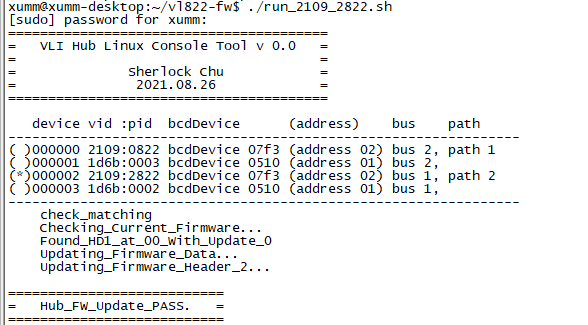
                        2c47d8e7-e912-42a3-89f5-72b1cb88ac82-image.png

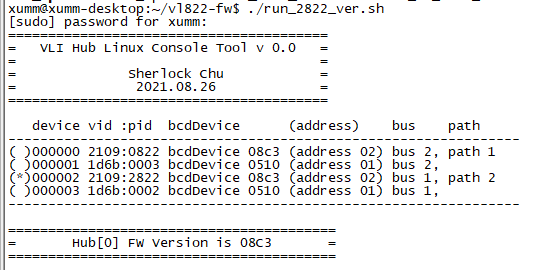
                        STEP 4. Power off and wait for 5 seconds before powering on again. Then, execute the command below to confirm the version of the USB hub firmware.
                        $ ./run_2822_ver.sh
                        1cba6d98-09b9-4bcb-8e12-a97809ab5752-image.png

                        STEP 5.
                        Congratulations, the upgrade has been successful. You should now be able to use i2cdetect to detect the VEYE camera at 0x3b.

                        Questions will be answered as soon as possible, please be patient.
                        如果你使用中文,请直接用中文提问。
                        May the force be with YOU. (This is the translation of the mysterious Chinese symbol above.)

                        1 Reply Last reply Reply Quote 0
                        • N Offline
                          newleaf
                          last edited by

                          Sorry for the late reply.

                          Applied the USB bus firmware update from Seeed and the camera WORKS!!!

                          Thank you for the help. The 327S module is very nice BTW. Also got it to work on the Pi.

                          veye_xummV 1 Reply Last reply Reply Quote 0
                          • veye_xummV Offline
                            veye_xumm @newleaf
                            last edited by

                            @newleaf You are welcome.

                            Questions will be answered as soon as possible, please be patient.
                            如果你使用中文,请直接用中文提问。
                            May the force be with YOU. (This is the translation of the mysterious Chinese symbol above.)

                            1 Reply Last reply Reply Quote 0

                            Hello! It looks like you're interested in this conversation, but you don't have an account yet.

                            Getting fed up of having to scroll through the same posts each visit? When you register for an account, you'll always come back to exactly where you were before, and choose to be notified of new replies (either via email, or push notification). You'll also be able to save bookmarks and upvote posts to show your appreciation to other community members.

                            With your input, this post could be even better 💗

                            Register Login
                            • First post
                              Last post