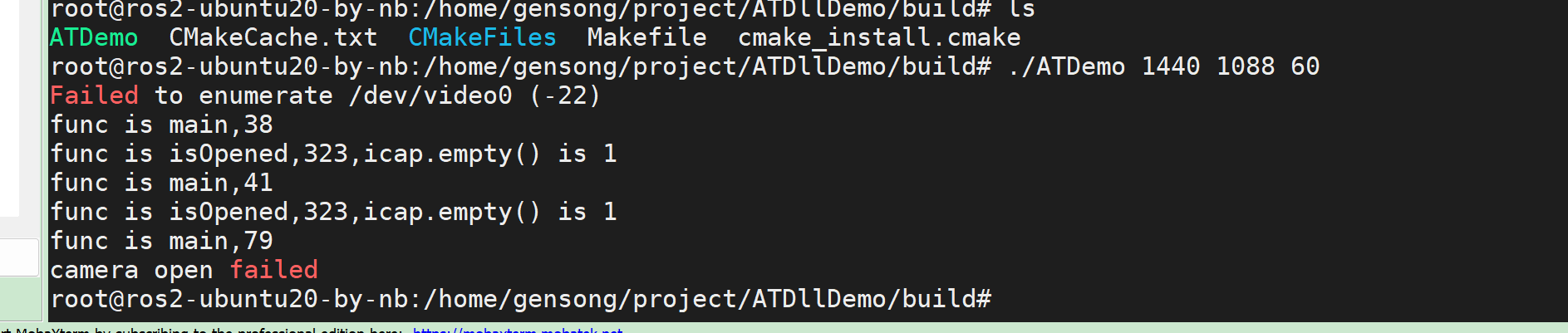
获取图像的测试代码,依赖opencv4.2的动态库,测试可以正常出图,用opencv4.6的库出现cap.isOpened()返回false
-
//#include <opencv2/opencv.hpp>
#include "AlgorithmAT.h"
#include "AlgorithmSLF.h"
#include <opencv.hpp>
#include <iostream>
#include <string>
//using namespace std;
int main(int argc, char* argv[])
{

	int width = 1080;
    int height = 1080;
    int fps = 30;

    if (argc > 1) {
        width = std::stoi(argv[1]);
    }
    if (argc > 2) {
        height = std::stoi(argv[2]);
    }
    if (argc > 3) {
        fps = std::stoi(argv[3]);
    }

	//创建客户端实例
	AlgorithmAT* at = new AlgorithmAT();

	std::string configPath = "/home/gensong/project/ATDllDemo/config/config.yaml";
	std::string algorithmConfigPath = "/home/gensong/project/ATDllDemo/config/algorithmConfig.yaml";
	at->Init(configPath,algorithmConfigPath);

	int launchMode = 0;
	//cv::Mat src_frame = cv::imread("/home/gensong/project/ATDllDemo/picture/1.jpg");
	//bool ret_val = cap.read(src_frame);

	std::string v4l2_cmd = "media-ctl -d /dev/video0 --set-v4l2 '\"m00_b_mvcam 7-003b\":0[fmt:Y8_1X8/" + std::to_string(width) + "x" + std::to_string(height) + "@1/" + std::to_string(fps) + " field:none]'";
    system(v4l2_cmd.c_str());
    printf("func is %s,%d\n",__func__,__LINE__);
    cv::VideoCapture cap("v4l2src io-mode=dmabuf device=/dev/video0 ! video/x-raw, format=(string)GRAY8, width=(int)" + std::to_string(width) + ", height=(int)" + std::to_string(height) + " ! appsink");

    printf("func is %s,%d\n",__func__,__LINE__);
    if (cap.isOpened()) {
        printf("func is %s,%d\n",__func__,__LINE__);
        while (true) {
			cv::Mat src_frame;
            printf("func is %s,%d\n",__func__,__LINE__);
            bool ret_val = cap.read(src_frame);
            printf("func is %s,%d,ret_val is %d\n",__func__,__LINE__,ret_val);
            if (ret_val) {
                cv::imshow("demo", src_frame);
                cv::waitKey(1);

				long long frameTime = 20240222153410123;
				std::vector<Algorithm_Pos_t> locRes;
				cv::Mat dst_frame;
   				cv::medianBlur(src_frame, dst_frame, 5); //
				bool retPos = at->GetPos(launchMode,dst_frame,frameTime,locRes);
				std::cout << "retPos:" << retPos << std::endl;

				vector<Algorithm_Pos_t>::iterator locItem;
				for(locItem = locRes.begin();locItem != locRes.end();locItem++)
				{
					std::cout << "id:" << (*locItem).id << std::endl;
					std::cout << "timeDelay:" << (*locItem).timeDelay << std::endl;
					std::cout << "x:" << (*locItem).x << std::endl;
					std::cout << "y:" << (*locItem).y << std::endl;
					std::cout << "z:" << (*locItem).z << std::endl;
					std::cout << "yaw:" << (*locItem).yaw << std::endl;
					std::cout << "pitch:" << (*locItem).pitch << std::endl;
					std::cout << "roll:" << (*locItem).roll << std::endl;
					std::cout << "id:" << (*locItem).id << std::endl;
				}
            } else {
                std::cout << "camera open failed" << std::endl;
                break;
            }
        }
    } else {
        printf("func is %s,%d\n",__func__,__LINE__);
        std::cout << "camera open failed" << std::endl;
    }

	cv::destroyAllWindows();

	//接收并打印数据
	// while(true)
	// {
	// 	//std::cout<< "getPose:"<<vision.aprilTag_t.id<<"-"<<vision.aprilTag_t.x<<"-"<<vision.aprilTag_t.y<<"-"<<vision.aprilTag_t.z<<std::endl;
	// 	usleep(30*1000);
	// }

	return 0;
}
-
#include <opencv.hpp>
#include <iostream>
#include <string>int main() {
cv::VideoCapture cap("/home/gensong/test.mp4"); // 打开本地视频文件
if (!cap.isOpened()) { // 检查文件是否成功打开
std::cout << "Failed to open video file!" << std::endl;
return -1;
}cv::Mat frame; while (cap.read(frame)) { // 读取每一帧画面 cv::imshow("Video", frame); // 显示视频 cv::waitKey(1); } cap.release(); // 释放资源 return 0;} 基于opencv4.6的库 用这个代码可以正常打开播放视频
-
麻烦问下 cv::VideoCapture cap("v4l2src io-mode=dmabuf device=/dev/video0 ! video/x-raw, format=(string)GRAY8, width=(int)" + std::to_string(width) + ", height=(int)" + std::to_string(height) + " ! appsink"); 和 cv::VideoCapture cap("/home/gensong/test.mp4"); 两者的区别是什么? 为什么 cv::VideoCapture cap("/home/gensong/test.mp4"); 就可以打开视频, 而 cv::VideoCapture cap("v4l2src io-mode=dmabuf device=/dev/video0 ! video/x-raw, format=(string)GRAY8, width=(int)" + std::to_string(width) + ", height=(int)" + std::to_string(height) + " ! appsink"); 就会提示 cap.isOpened()返回false
-
@nb said in 获取图像的测试代码,依赖opencv4.2的动态库,测试可以正常出图,用opencv4.6的库出现cap.isOpened()返回false:
麻烦问下 cv::VideoCapture cap("v4l2src io-mode=dmabuf device=/dev/video0 ! video/x-raw, format=(string)GRAY8, width=(int)" + std::to_string(width) + ", height=(int)" + std::to_string(height) + " ! appsink"); 和 cv::VideoCapture cap("/home/gensong/test.mp4"); 两者的区别是什么? 为什么 cv::VideoCapture cap("/home/gensong/test.mp4"); 就可以打开视频, 而 cv::VideoCapture cap("v4l2src io-mode=dmabuf device=/dev/video0 ! video/x-raw, format=(string)GRAY8, width=(int)" + std::to_string(width) + ", height=(int)" + std::to_string(height) + " ! appsink"); 就会提示 cap.isOpened()返回false
不好意思,回复的晚了。 我们对opencv的研究并不深入,只是给了一个简单的调试demo。 我想这个问题我现在无法给您准确的回复。
-
@veye_xumm said in 获取图像的测试代码,依赖opencv4.2的动态库,测试可以正常出图,用opencv4.6的库出现cap.isOpened()返回false:
好意思,回复的晚了。 我们对opencv的研究并不深入,只是给了一个简单的调试demo。 我想这个问题我现在无法给您准确的回复
好的 谢谢 这个问题 我已经自己解决了的
-
@nb 好的。真棒~
-
@nb 您好,我遇到了类似的问题,请问一下您的解决方案就是将4.6的opencv更换成4.2的opencv吗?

Hello! It looks like you're interested in this conversation, but you don't have an account yet.
Getting fed up of having to scroll through the same posts each visit? When you register for an account, you'll always come back to exactly where you were before, and choose to be notified of new replies (either via email, or push notification). You'll also be able to save bookmarks and upvote posts to show your appreciation to other community members.
With your input, this post could be even better 💗
Register Login