VEYE IMAGING Forum
    • Categories
    • Tags
    • Recent
    • Popular
    • Users
    • WIKI
    • veye.cc
    • Register
    • Login

    Problem with GXC-MIPI-IMX662

    Scheduled Pinned Locked Moved VEYE MIPI camera
    14 Posts 2 Posters 486 Views 1 Watching
    Loading More Posts
    • Oldest to Newest
    • Newest to Oldest
    • Most Votes
    Reply
    • Reply as topic
    Log in to reply
    This topic has been deleted. Only users with topic management privileges can see it.
    • veye_xummV Offline
      veye_xumm @alex_ai
      last edited by

      @alex_ai

      I believe the issue does not lie with the camera output, but rather with the compression process after you receive the data. Please verify this using the client software available at the link below. The veye_viewer client is designed to preview raw grey format data directly, without applying any compression.

      https://github.com/veyeimaging/veye_viewer

      Questions will be answered as soon as possible, please be patient.
      如果你使用中文,请直接用中文提问。
      May the force be with YOU. (This is the translation of the mysterious Chinese symbol above.)

      A 1 Reply Last reply Reply Quote 0
      • A Offline
        alex_ai @veye_xumm
        last edited by

        @veye_xumm said:

        veye_viewer

        Hi @veye_xumm, all videos captured from veye_viewer (you can see it on first video)

        veye_xummV 2 Replies Last reply Reply Quote 0
        • veye_xummV Offline
          veye_xumm @alex_ai
          last edited by

          @alex_ai Sorry, I misunderstood your setup. I've verified this on other boards, including Jetson, and it works fine. I now believe the issue is caused by image scaling in the veye_viewer client software on the latest Raspberry Pi OS. We'll fix this as soon as possible — please bear with us.

          Questions will be answered as soon as possible, please be patient.
          如果你使用中文,请直接用中文提问。
          May the force be with YOU. (This is the translation of the mysterious Chinese symbol above.)

          1 Reply Last reply Reply Quote 0
          • veye_xummV Offline
            veye_xumm @alex_ai
            last edited by veye_xumm

            @alex_ai
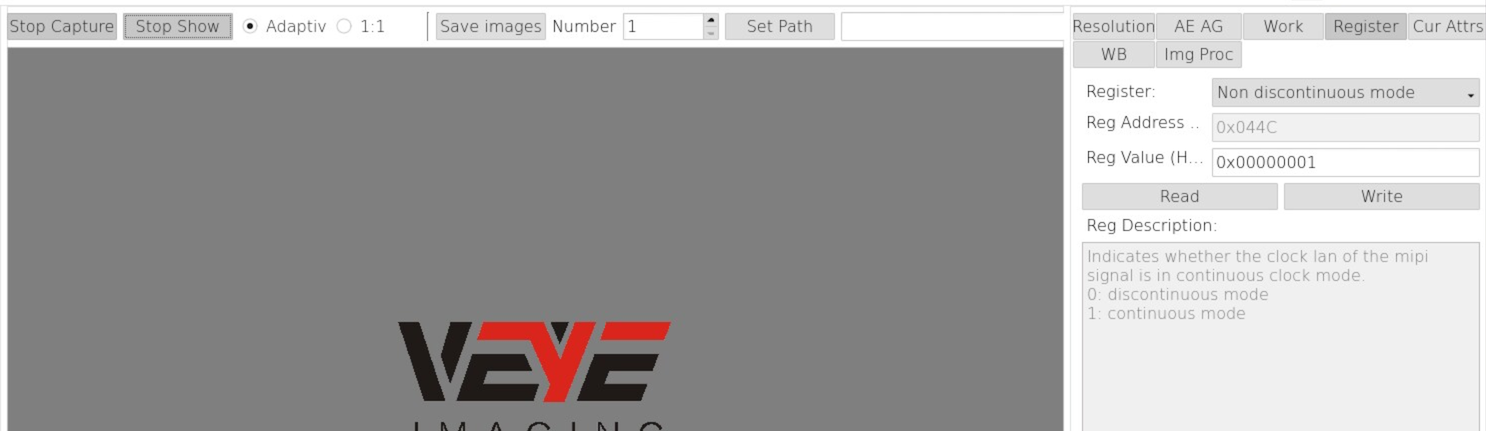
            Good news — I've found a solution to the issue. The camera's MIPI signal needs to be switched to continuous clock (non-discontinuous) mode. You can do this by running the following command: https://wiki.veye.cc/index.php/Gx_mipi_i2c.sh_user_guide#nondiscontinuousmode — or alternatively by setting register 0x44c in veye_viewer.
            After making the change, please use the paramsave command to save the settings to the camera.

            Questions will be answered as soon as possible, please be patient.
            如果你使用中文,请直接用中文提问。
            May the force be with YOU. (This is the translation of the mysterious Chinese symbol above.)

            A 1 Reply Last reply Reply Quote 0
            • A Offline
              alex_ai @veye_xumm
              last edited by

              Hi @veye_xumm
              I tried to set value to 1

              rms@raspberrypi10:~/source/raspberrypi_v4l2/gx_i2c_tools $ ./gx_mipi_i2c.sh -r nondiscontinuousmode -b 6
              Read Nondiscontinuous_mode is 1
              

              But when click "Start Show" - no video in veye_viewer (same as in python) just nothing happened (it works when back value to 0)

              Maybe need also change some another parameter?

              veye_xummV 2 Replies Last reply Reply Quote 0
              • veye_xummV Offline
                veye_xumm @alex_ai
                last edited by

                @alex_ai

                @alex_ai said:

                ./gx_mipi_i2c.sh -r nondiscontinuousmode -b 6

                use -w, not -r.
                -w means write.

                Questions will be answered as soon as possible, please be patient.
                如果你使用中文,请直接用中文提问。
                May the force be with YOU. (This is the translation of the mysterious Chinese symbol above.)

                A 1 Reply Last reply Reply Quote 0
                • veye_xummV Offline
                  veye_xumm @alex_ai
                  last edited by

                  @alex_ai
                  No need to set it up manually anymore! We've updated the driver, so just grab the latest code, compile it, and install it.
                  https://github.com/veyeimaging/raspberrypi_v4l2

                  Questions will be answered as soon as possible, please be patient.
                  如果你使用中文,请直接用中文提问。
                  May the force be with YOU. (This is the translation of the mysterious Chinese symbol above.)

                  1 Reply Last reply Reply Quote 0
                  • A Offline
                    alex_ai @veye_xumm
                    last edited by

                    @veye_xumm said:

                    use -w, not -r.

                    Yes, I know, I just wanted to confirm that nondiscontinuousmode is set to 1 :

                    Read Nondiscontinuous_mode is 1
                    

                    I installed new driver and no differences - no video for value 1

                    My PiOs : 6.18.39+rpt-rpi-2712
                    dmesg log:

                    [    2.624024] gxcam 10-003b: veye gx series camera driver version: 01.00.04
                    [    2.624247] gxcam 10-003b: no reset gpio provided
                    [    2.685103] gxcam 10-003b: camera is: GXC-MIPI-IMX662
                    [    2.688265] gxcam 10-003b: VideoModeCap: 0x2
                    [    2.706466] gxcam 10-003b: gxcam_enum_controls success
                    

                    example of veye_viewer and no video
                    veye_viewer1.png

                    veye_xummV 1 Reply Last reply Reply Quote 0
                    • veye_xummV Offline
                      veye_xumm @alex_ai
                      last edited by

                      @alex_ai
                      Register 0x44c should indeed be configured to 1.
                      This is quite strange, as the image preview works perfectly on our end with the exact same configuration.

                      1. Are you viewing the image via remote desktop?
                      2. Under the same conditions, does setting register 0x44c to 0 produce an image (with jitter), while setting it to 1 results in no image at all?

                      Questions will be answered as soon as possible, please be patient.
                      如果你使用中文,请直接用中文提问。
                      May the force be with YOU. (This is the translation of the mysterious Chinese symbol above.)

                      A 1 Reply Last reply Reply Quote 0
                      • A Offline
                        alex_ai @veye_xumm
                        last edited by

                        @veye_xumm said:

                        Are you viewing the image via remote desktop?

                        yes, also just tried with hdmi - same

                        @veye_xumm said:

                        Under the same conditions, does setting register 0x44c to 0 produce an image (with jitter), while setting it to 1 results in no image at all?

                        yes, it works if set 0 with jitter and no image with value 1, I recorded video to demo

                        test_3x264.mp4.txt

                        A 1 Reply Last reply Reply Quote 0
                        • A Offline
                          alex_ai @alex_ai
                          last edited by

                          Just tried to run it on Rpi4 (bookworm 6.12)
                          It is same: no image for setting 1 but for 0 - no jitter!

                          Probably this issue only for Rpi5 (trixie 6.18).

                          Not sure how it works for you with value 1, I tested on 2 devices and it same no image for value 1

                          1 Reply Last reply Reply Quote 0

                          Hello! It looks like you're interested in this conversation, but you don't have an account yet.

                          Getting fed up of having to scroll through the same posts each visit? When you register for an account, you'll always come back to exactly where you were before, and choose to be notified of new replies (either via email, or push notification). You'll also be able to save bookmarks and upvote posts to show your appreciation to other community members.

                          With your input, this post could be even better 💗

                          Register Login
                          • First post
                            Last post