VEYE IMAGING Forum
    • Categories
    • Tags
    • Recent
    • Popular
    • Users
    • WIKI
    • veye.cc
    • Register
    • Login

    Taking images with IMX462 in Python

    Scheduled Pinned Locked Moved VEYE MIPI camera
    10 Posts 2 Posters 2.1k Views 1 Watching
    Loading More Posts
    • Oldest to Newest
    • Newest to Oldest
    • Most Votes
    Reply
    • Reply as topic
    Log in to reply
    This topic has been deleted. Only users with topic management privileges can see it.
    • S Offline
      Seka
      last edited by

      Hi,

      can I use the same scripts for python with IMX462 camera as I use for IMX327?

      I somehow cannot initialize the camera:

      import D_mipicamera as Dcam
      
      
      camera = Dcam.mipi_camera()
      
      
      camera.init_camera()
      
      import os
      status = os.system('sh ./veye_mipi_i2c.sh -w -f cameramode -p1 0x0 -b 10')
      print status 
      
      status = os.system('sh ./veye_mipi_i2c.sh -w -f daynightmode -p1 0xFC -p1 0x00 -b 10')
      #print status 
      
      
      ##turn off automatic exposure
      status = os.system('sh ./veye_mipi_i2c.sh -w -f agc -p1 0 -b 10')
      print status 
      ##turn off white balance
      status = os.system('sh ./veye_mipi_i2c.sh -w -f wbmode -p1 0x1b -b 10')
      print status 


      status = os.system('sh ./veye_mipi_i2c.sh -w -f lowlight -p1 0x09  -b 10')
      print status 
      
      directory="/home/pi/testmipi/"
      
      date = datetime.datetime.now().strftime("%m_%d_%Y_%H_%M_%S")
      frame = camera.capture(encoding = 'jpeg')
      
      camera.release_buffer(frame)
      del frame
      time.sleep(1)
      
      frame = camera.capture(encoding = 'jpeg')
      frame.as_array.tofile((directory)+"nm590"+ date + ".jpg")
      camera.release_buffer(frame)
      del frame
      
      veye_xummV 1 Reply Last reply Reply Quote 0
      • veye_xummV Offline
        veye_xumm @Seka
        last edited by

        @seka
        Hi,
        I think you need to run

        ./rpi3-gpiovirtbuf s 133 1
        

        to power up VEYE-MIPI-IMX462 first. Because on imx462 module, the reset pin is effective.

        I will upgrade our python demo later.

        Questions will be answered as soon as possible, please be patient.
        如果你使用中文,请直接用中文提问。
        May the force be with YOU. (This is the translation of the mysterious Chinese symbol above.)

        1 Reply Last reply Reply Quote 0
        • S Offline
          Seka
          last edited by

          Thank you Xu,
          ok, I can now initiate the camera but get another pointer access error when running:

           frame = camera.capture(encoding = 'raw')
              frame.as_array.tofile((directory)+"nm280"+ date + ".raw")
              camera.release_buffer(frame)
          

          The error I get is:

          In [48]: frame.as_array.tofile((directory)+"nm280"+ date + ".raw")
          Traceback (most recent call last):
          
            File "<ipython-input-48-46dc4d541567>", line 1, in <module>
              frame.as_array.tofile((directory)+"nm280"+ date + ".raw")
          
            File "D_mipicamera.py", line 208, in as_array
              return np.ctypeslib.as_array(self.buffer_ptr[0].data, shape=(self.length,))
          
          ValueError: NULL pointer access


          Can you please send me a line of code with which I can create a raw image ?

          Many thanks

          veye_xummV 1 Reply Last reply Reply Quote 0
          • veye_xummV Offline
            veye_xumm @Seka
            last edited by

            @seka
            sorry for reply late.
            I think this camera do not support [raw format].
            Since it only support YUV422(UYVY/YUYV), the python demo only support capture file format :
            IMAGE_ENCODING_JPEG, IMAGE_ENCODING_I420,IMAGE_ENCODING_BMP,IMAGE_ENCODING_PNG

            Questions will be answered as soon as possible, please be patient.
            如果你使用中文,请直接用中文提问。
            May the force be with YOU. (This is the translation of the mysterious Chinese symbol above.)

            S 1 Reply Last reply Reply Quote 0
            • S Offline
              Seka @veye_xumm
              last edited by

              @veye_xumm so is here a way to create raw images at all? with bash script?

              Can you please write a line of code in python or bash with which I can capture images in raw format?

              Many thanks

              veye_xummV 1 Reply Last reply Reply Quote 0
              • veye_xummV Offline
                veye_xumm @Seka
                last edited by

                @seka
                hi,
                This camera module can not output raw data.
                It has an ISP module built-in, the output format is YUV.

                Questions will be answered as soon as possible, please be patient.
                如果你使用中文,请直接用中文提问。
                May the force be with YOU. (This is the translation of the mysterious Chinese symbol above.)

                S 2 Replies Last reply Reply Quote 0
                • S Offline
                  Seka @veye_xumm
                  last edited by

                  @veye_xumm Is there a way to capture with 10 or 12 bit depth as the sensor is capable of?

                  This is part of the manual that I received from you.

                  It seems like this is raw format, no?
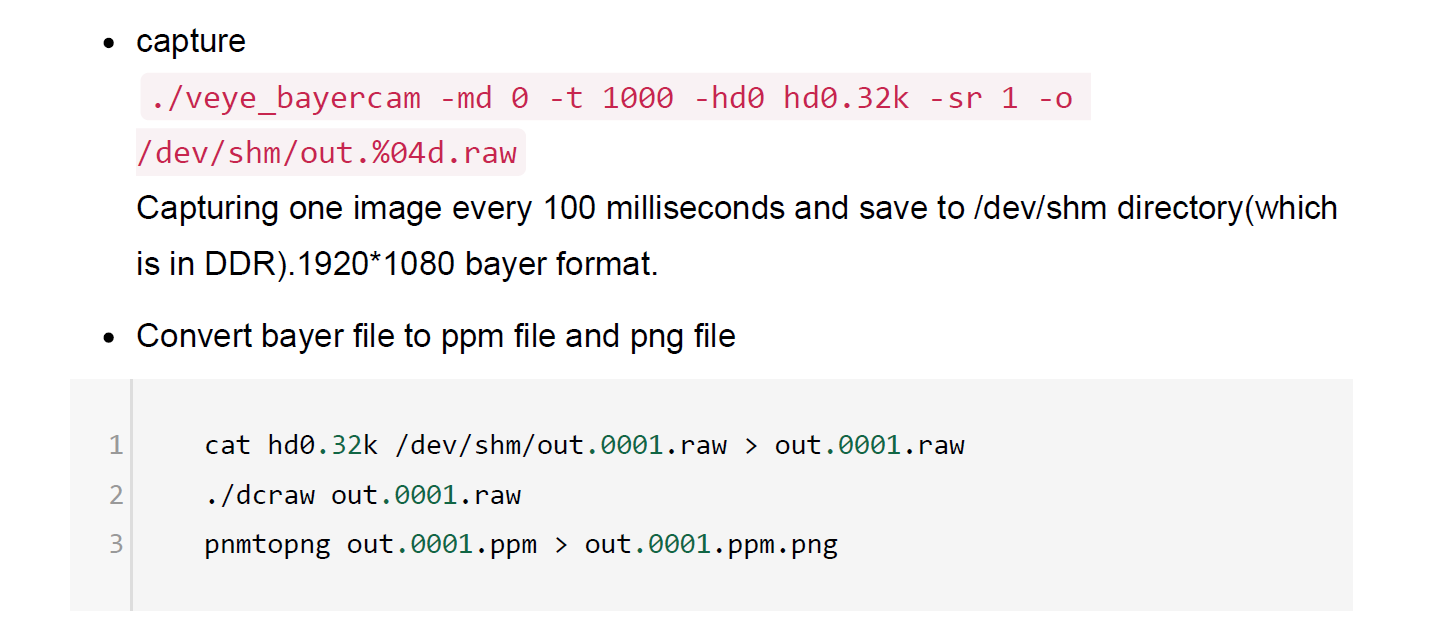
                  2a232b32-fa3f-4586-9ba4-19ce5535b17b-image.png

                  1 Reply Last reply Reply Quote 0
                  • S Offline
                    Seka @veye_xumm
                    last edited by

                    @veye_xumm but yuv is 10 or 12 bit?? that would be ok for me too...

                    Can you please adjust my code so that I capture in 10- or 12 bit YUV?

                    Thank you

                    S 1 Reply Last reply Reply Quote 0
                    • S Offline
                      Seka @Seka
                      last edited by

                      @seka ```

                      frame = camera.capture(encoding = 'i420')
                             frame.as_array.tofile("test.yuv")
                      

                      probably like this??

                      veye_xummV 1 Reply Last reply Reply Quote 0
                      • veye_xummV Offline
                        veye_xumm @Seka
                        last edited by

                        @seka
                        hi, VEYE-MIPI-IMX462 do not support YUV 10BIT/12BIT.

                        Questions will be answered as soon as possible, please be patient.
                        如果你使用中文,请直接用中文提问。
                        May the force be with YOU. (This is the translation of the mysterious Chinese symbol above.)

                        1 Reply Last reply Reply Quote 0

                        Hello! It looks like you're interested in this conversation, but you don't have an account yet.

                        Getting fed up of having to scroll through the same posts each visit? When you register for an account, you'll always come back to exactly where you were before, and choose to be notified of new replies (either via email, or push notification). You'll also be able to save bookmarks and upvote posts to show your appreciation to other community members.

                        With your input, this post could be even better 💗

                        Register Login
                        • First post
                          Last post