VEYE-MIPI-327S gstreamer issue
-
Hi,
I trying to get gstreamer working via UDP
RPI side
/home/pi/raspberrypi/veye_raspcam/bin/./veye_raspivid -b 4000000 -t 0 -o - | gst-launch-1.0 -v fdsrc ! h264parse ! rtph264pay config-interval=1 pt=96 ! gdppay ! udpsink host=192.168.0.208 port=7000 sync=falsePC side (192.168.0.208:7000)
gst-launch-1.0 -v udpsrc port=7000 ! gdpdepay ! rtph264depay ! avdec_h264 ! autovideosink sync=falseI get the following error
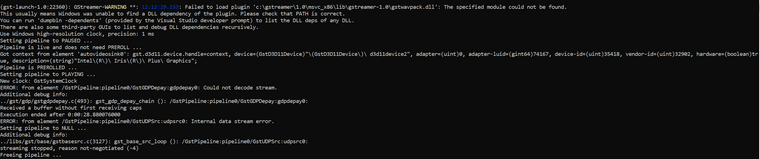
Any help is really appreciated!
-
@sebaszz I suggest you to use tcp, it is more stable.
-
I tried. Without succes. Any suggestions?
RPI side (192.168.0.163)
./veye_raspivid -b 4000000 -t 0 -o - | gst-launch-1.0 -v fdsrc ! h264parse ! rtph264pay config-interval=1 pt=96 ! gdppay ! tcpserversink host=192.168.0.208 port=7000PC side (192.168.0.208)
gst-launch-1.0 -v tcpclientsrc host=192.168.0.163 port=7000 ! gdpdepay ! rtph264depay ! avdec_h264 ! autovideosink sync=falseERROR GSTREAMER
(gst-launch-1.0:5064): GStreamer-WARNING **: 21:15:29.964: Failed to load plugin 'C:\gstreamer\1.0\msvc_x86\lib\gstreamer-1.0\gstwavpack.dll': The specified module could not be found.
This usually means Windows was unable to find a DLL dependency of the plugin. Please check that PATH is correct.
You can run 'dumpbin -dependents' (provided by the Visual Studio developer prompt) to list the DLL deps of any DLL.
There are also some third-party GUIs to list and debug DLL dependencies recursively.
Use Windows high-resolution clock, precision: 1 ms
Setting pipeline to PAUSED ...
ERROR: from element /GstPipeline:pipeline0/GstTCPClientSrc:tcpclientsrc0: Could not open resource for reading.
Additional debug info:
../gst/tcp/gsttcpclientsrc.c(493): gst_tcp_client_src_start (): /GstPipeline:pipeline0/GstTCPClientSrc:tcpclientsrc0:
Failed to connect to host '192.168.0.163:7000': No connection could be made because the target machine actively refused it.
ERROR: pipeline doesn't want to preroll.
ERROR: from element /GstPipeline:pipeline0/GstTCPClientSrc:tcpclientsrc0: GStreamer error: state change failed and some element failed to post a proper error message with the reason for the failure.
Additional debug info:
../libs/gst/base/gstbasesrc.c(3557): gst_base_src_start (): /GstPipeline:pipeline0/GstTCPClientSrc:tcpclientsrc0:
Failed to start
ERROR: pipeline doesn't want to preroll.
Failed to set pipeline to PAUSED.
Setting pipeline to NULL ...
Freeing pipeline ...
ERROR RPI
14/06/2022 20:15:22 Enabling custom mmal: Splitter has 4 output port,you could use num 2,3 for extend Setting pipeline to PAUSED ... mmal: Splitter has 4 output port,you could use num 2,3 for extend Pipeline is PREROLLING ... mmal: Splitter has 4 output port,you could use num 2,3 for extend Setting pipeline to NULL ... mmal: Splitter has 4 output port,you could use num 2,3 for extend Setting pipeline to NULL ... ERROR: from element /GstPipeline:pipeline0/GstTCPServerSink:tcpserversink0: Could not open resource for reading. Additional debug info: gsttcpserversink.c(403): gst_tcp_server_sink_init_send (): /GstPipeline:pipeline0/GstTCPServerSink:tcpserversink0: Failed to bind on host '192.168.0.208:7000': Error binding to address: Cannot assign requested address ERROR: pipeline doesn't want to preroll. Freeing pipeline ... ERROR: from element /GstPipeline:pipeline0/GstTCPServerSink:tcpserversink0: Could not open resource for reading. Additional debug info: gsttcpserversink.c(403): gst_tcp_server_sink_init_send (): /GstPipeline:pipeline0/GstTCPServerSink:tcpserversink0: Failed to bind on host '192.168.0.208:7000': Error binding to address: Cannot assign requested address ERROR: pipeline doesn't want to preroll. Freeing pipeline ... mmal: mmal_vc_port_enable: failed to enable port vc.ril.isp:in:0(UYVY): ENOMEM mmal: mmal_port_enable: failed to enable connected port (vc.ril.isp:in:0(UYVY))0x1bfef00 (ENOMEM) mmal: mmal_connection_enable: output port couldn't be enabled mmal: Failed to create rawcam->isp connection mmal: Out of memory mmal: Camera is not detected. Please check carefully the camera module is installed correctly -
I prefer to have a UDP working since it will be used after testing via 4G/LTE connection.
All these test are currently done via Wifi. Standard Pi camera is working fine.
-
@sebaszz said in VEYE-MIPI-327S gstreamer issue:
./veye_raspivid -b 4000000 -t 0 -o - | gst-launch-1.0 -v fdsrc ! h264parse ! rtph264pay
config-interval=1 pt=96 ! gdppay ! tcpserversink host=192.168.0.208 port=7000Please use rpi ip addr in this cmd too.
-
FIXED! thank you!

Hello! It looks like you're interested in this conversation, but you don't have an account yet.
Getting fed up of having to scroll through the same posts each visit? When you register for an account, you'll always come back to exactly where you were before, and choose to be notified of new replies (either via email, or push notification). You'll also be able to save bookmarks and upvote posts to show your appreciation to other community members.
With your input, this post could be even better 💗
Register Login