VEYE-MIPI-IMX385 with Raspberry 4 no pictures
-
Raspberry 4 2GB, 5.15.56-v71+
camera connected with type B cable and extra power,
enabled legacy mode, reboot
./enable_i2c_vc.sh, reboot
./camera_i2c_config
but I cant make pictures:
~/r/v/bin (master)> ./veye_raspistill -o test.jpg
Hardare version: b03115
before create camera com sensor mode 0
mmal: mmal_component_enable w 1920 h 1080 fps 30raspipreview_create com
mmal: Splitter has 4 output port,you could use num 2,3 for extend
HOW CAN I RESOLVE THIS? -
Same problem on a zero w and imx462.
SO is buster
The camera is connected with the cable inside the box and power cables connected.
Is possible to prepare a working image for the zero and the 462 to download for dummys? -
@stefanosmx @salva
Is there a preview image?
I want to run this command first to see if the i2c channel was successfully established.i2cdetect -y 10Normally, there should be 3b present.
-
@veye_xumm Thank you for the fast answer. Will take some time to connect to a monitor, will try it out.
Now the interesting thing: the sensorid was IMXffff. I investigated the thing with the protection devices, because maybe I made a wrong connection: I used an extension connector for the CSI cable. And how I understand it, when using two type B cables, what I did, then the order of the pins is reversed. With the AUX power this results in a short, if I am right. Now, after removing the protection devices the sensorid is IMX 385, after installing everything new. but the above problem with the error persists. -
@veye_xumm there is no preview image.
i2c:(master)> sudo i2cdetect -y 10
0 1 2 3 4 5 6 7 8 9 a b c d e f
00: -- -- -- -- -- -- -- --
10: -- -- -- -- -- -- -- -- -- -- UU -- -- -- -- --
20: -- -- -- -- -- -- -- -- -- -- -- -- -- -- -- --
30: -- -- -- -- -- -- -- -- -- -- -- 3b -- -- -- --
40: -- -- -- -- -- -- -- -- -- -- -- -- -- -- -- --
50: -- -- -- -- -- -- -- -- -- -- -- -- -- -- -- --
60: -- -- -- -- -- -- -- -- -- -- -- -- -- -- -- --
70: -- -- -- -- -- -- -- -- -
The camera makes excellent pictures now, everything OK. I installed the 4mm M16 lens in the metal full glass lenses variant, very nice.
2 errors were the cause:- two CSI type B cables in series, dangerous!
- in the boot/config.txt there was an artefact from the Inno-maker IMX327 module: dtoverlay=imx290,clock-frequency=74250000, after it was inactivated (#dtoverlay=imx290,clock-frequency=74250000) the veye raspicam commands function flawlessly.
My problem is solved, lets see what we can do for the other guy SALVA with his IMX462 module.
-
@stefanosmx Glad to know it.
-
When I test i2cdetect -y 10 get an empty result
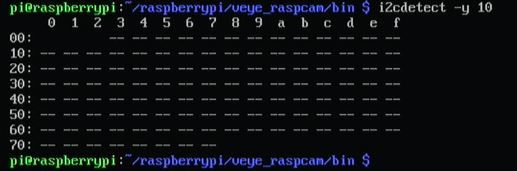
When I try to take a photo
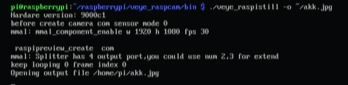
Then it hangs until I do control-c
-
Is working now!
I am sorry , I had connected the camera wire in the reverse way. Now is taking photos and video.
-
@salva OK

Hello! It looks like you're interested in this conversation, but you don't have an account yet.
Getting fed up of having to scroll through the same posts each visit? When you register for an account, you'll always come back to exactly where you were before, and choose to be notified of new replies (either via email, or push notification). You'll also be able to save bookmarks and upvote posts to show your appreciation to other community members.
With your input, this post could be even better 💗
Register Login