VEYE IMAGING Forum
    • Categories
    • Tags
    • Recent
    • Popular
    • Users
    • WIKI
    • veye.cc
    • Register
    • Login

    RAW-MIPI-SC132M驱动编译后无法正常播放


    Scheduled Pinned Locked Moved CS MIPI camera
    12 Posts 2 Posters 4.8k Views 1 Watching
    Loading More Posts
    • Oldest to Newest
    • Newest to Oldest
    • Most Votes
    Reply
    • Reply as topic
    Log in to reply
    This topic has been deleted. Only users with topic management privileges can see it.
    • A Offline
      ashengzi
      last edited by

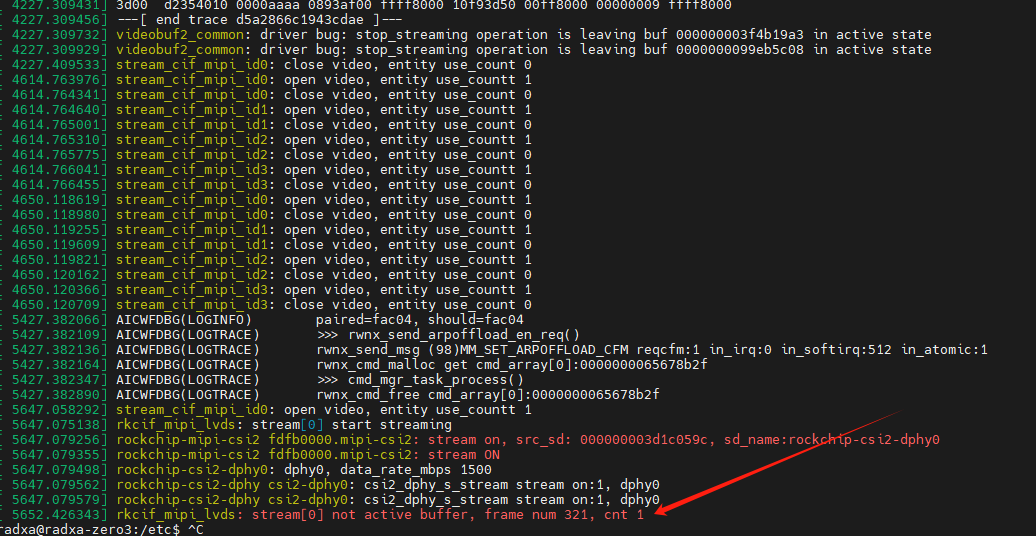
      8f9c1cbf-f04f-4ee2-b525-3c96ae3a0f83-image.png 报了这个错误

      veye_xummV 1 Reply Last reply Reply Quote 0
      • veye_xummV Offline
        veye_xumm @ashengzi
        last edited by

        @ashengzi
        你调用

        python3 ./v4l2dev_2_opencv_show_grey.py --width 1024--height 1280--fps 60 --i2c 2
        

        试一下

        Questions will be answered as soon as possible, please be patient.
        如果你使用中文,请直接用中文提问。
        May the force be with YOU. (This is the translation of the mysterious Chinese symbol above.)

        A 1 Reply Last reply Reply Quote 0
        • A Offline
          ashengzi
          last edited by

          This post is deleted!
          1 Reply Last reply Reply Quote 0
          • A Offline
            ashengzi @veye_xumm
            last edited by

            @veye_xumm said in RAW-MIPI-SC132M驱动编译后无法正常播放:

            @ashengzi
            你调用

            python3 ./v4l2dev_2_opencv_show_grey.py --width 1024--height 1280--fps 60 --i2c 2
            

            试一下
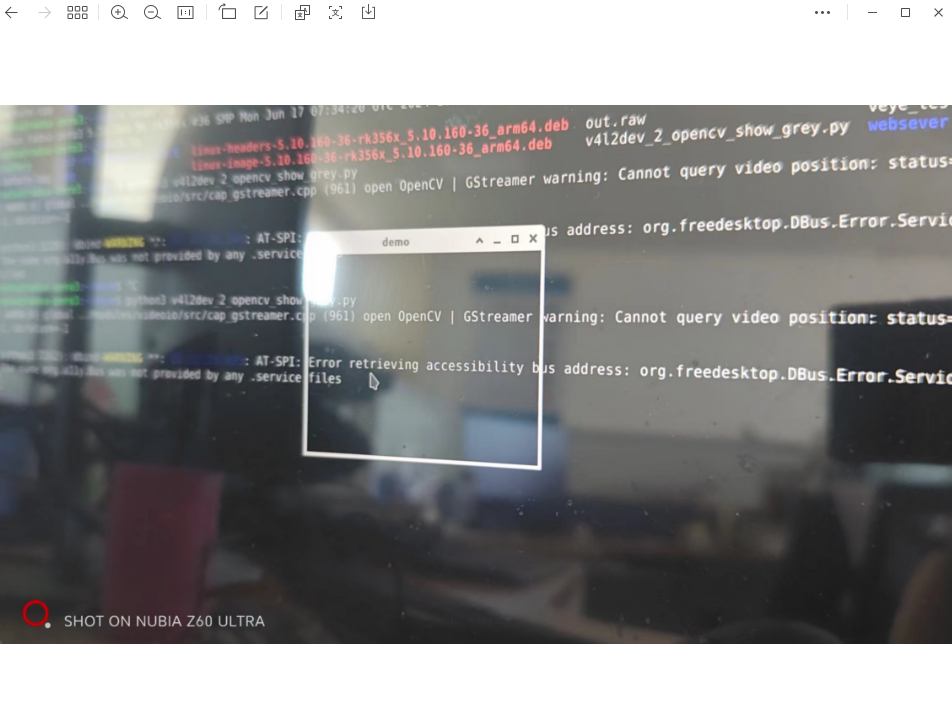
            试过了,也不行
            dfffcc0f-4336-40d3-97ca-ac5ee9eeadb5-image.png

            veye_xummV 1 Reply Last reply Reply Quote 0
            • veye_xummV Offline
              veye_xumm @ashengzi
              last edited by

              @ashengzi 比较奇怪,按理说v4l2-ctl取图成功,用python预览也就可以成功的。因为其底层都是v4l2驱动接口。

              Questions will be answered as soon as possible, please be patient.
              如果你使用中文,请直接用中文提问。
              May the force be with YOU. (This is the translation of the mysterious Chinese symbol above.)

              A 1 Reply Last reply Reply Quote 0
              • A Offline
                ashengzi @veye_xumm
                last edited by

                @veye_xumm said in RAW-MIPI-SC132M驱动编译后无法正常播放:

                @ashengzi 比较奇怪,按理说v4l2-ctl取图成功,用python预览也就可以成功的。因为其底层都是v4l2驱动接口。

                0b919c66-4b5a-4dcc-b00c-7500d7cdd436-image.png
                v4l2-ctl -D --verbose -d /dev/video0 --set-fmt-video=width=$WIDTH,height=$HEIGHT,pixelformat=GREY --stream-mmap --stream-count=1 --stream-to=y8-${WIDTH}x${HEIGHT}.raw
                VIDIOC_QUERYCAP: ok
                Driver Info:
                Driver name : rkcif
                Card type : rkcif
                Bus info : platform:rkcif_mipi_lvds
                Driver version : 5.10.160
                Capabilities : 0x84201000
                Video Capture Multiplanar
                Streaming
                Extended Pix Format
                Device Capabilities
                Device Caps : 0x04201000
                Video Capture Multiplanar
                Streaming
                Extended Pix Format
                Media Driver Info:
                Driver name : rkcif
                Model : rkcif_mipi_lvds
                Serial :
                Bus info :
                Media version : 5.10.160
                Hardware revision: 0x00000000 (0)
                Driver version : 5.10.160
                Interface Info:
                ID : 0x03000002
                Type : V4L Video
                Entity Info:
                ID : 0x00000001 (1)
                Name : stream_cif_mipi_id0
                Function : V4L2 I/O
                Pad 0x01000004 : 0: Sink
                Link 0x0200002f: from remote pad 0x1000022 of entity 'rockchip-mipi-csi2': Data, Enabled
                Link 0x0200003d: from remote pad 0x1000023 of entity 'rockchip-mipi-csi2': Data
                Link 0x0200004b: from remote pad 0x1000024 of entity 'rockchip-mipi-csi2': Data
                Link 0x02000059: from remote pad 0x1000025 of entity 'rockchip-mipi-csi2': Data
                VIDIOC_G_FMT: ok
                VIDIOC_S_FMT: ok
                Format Video Capture Multiplanar:
                Width/Height : 1024/1280
                Pixel Format : 'GREY' (8-bit Greyscale)
                Field : None
                Number of planes : 1
                Flags :
                Colorspace : Default
                Transfer Function : Default
                YCbCr/HSV Encoding: Default
                Quantization : Default
                Plane 0 :
                Bytes per Line : 1024
                Size Image : 1310720
                VIDIOC_REQBUFS returned 0 (Success)
                VIDIOC_QUERYBUF returned 0 (Success)
                VIDIOC_QUERYBUF returned 0 (Success)
                VIDIOC_QUERYBUF returned 0 (Success)
                VIDIOC_QUERYBUF returned 0 (Success)
                VIDIOC_QBUF returned 0 (Success)
                VIDIOC_QBUF returned 0 (Success)
                VIDIOC_QBUF returned 0 (Success)
                VIDIOC_QBUF returned 0 (Success)
                VIDIOC_STREAMON returned 0 (Success)
                cap dqbuf: 0 seq: 0 bytesused: 1310720 ts: 1211.810033 delta: 1211810.033 ms (ts-monotonic, ts-src-eof)
                gstreamer版本没有问题,单张抓图也没有问题,抓帧也没问题,搞不明白问题出在哪里了?

                A 1 Reply Last reply Reply Quote 0
                • A Offline
                  ashengzi @ashengzi
                  last edited by

                  @ashengzi said in RAW-MIPI-SC132M驱动编译后无法正常播放:

                  @veye_xumm said in RAW-MIPI-SC132M驱动编译后无法正常播放:

                  @ashengzi 比较奇怪,按理说v4l2-ctl取图成功,用python预览也就可以成功的。因为其底层都是v4l2驱动接口。

                  0b919c66-4b5a-4dcc-b00c-7500d7cdd436-image.png
                  v4l2-ctl -D --verbose -d /dev/video0 --set-fmt-video=width=$WIDTH,height=$HEIGHT,pixelformat=GREY --stream-mmap --stream-count=1 --stream-to=y8-${WIDTH}x${HEIGHT}.raw
                  VIDIOC_QUERYCAP: ok
                  Driver Info:
                  Driver name : rkcif
                  Card type : rkcif
                  Bus info : platform:rkcif_mipi_lvds
                  Driver version : 5.10.160
                  Capabilities : 0x84201000
                  Video Capture Multiplanar
                  Streaming
                  Extended Pix Format
                  Device Capabilities
                  Device Caps : 0x04201000
                  Video Capture Multiplanar
                  Streaming
                  Extended Pix Format
                  Media Driver Info:
                  Driver name : rkcif
                  Model : rkcif_mipi_lvds
                  Serial :
                  Bus info :
                  Media version : 5.10.160
                  Hardware revision: 0x00000000 (0)
                  Driver version : 5.10.160
                  Interface Info:
                  ID : 0x03000002
                  Type : V4L Video
                  Entity Info:
                  ID : 0x00000001 (1)
                  Name : stream_cif_mipi_id0
                  Function : V4L2 I/O
                  Pad 0x01000004 : 0: Sink
                  Link 0x0200002f: from remote pad 0x1000022 of entity 'rockchip-mipi-csi2': Data, Enabled
                  Link 0x0200003d: from remote pad 0x1000023 of entity 'rockchip-mipi-csi2': Data
                  Link 0x0200004b: from remote pad 0x1000024 of entity 'rockchip-mipi-csi2': Data
                  Link 0x02000059: from remote pad 0x1000025 of entity 'rockchip-mipi-csi2': Data
                  VIDIOC_G_FMT: ok
                  VIDIOC_S_FMT: ok
                  Format Video Capture Multiplanar:
                  Width/Height : 1024/1280
                  Pixel Format : 'GREY' (8-bit Greyscale)
                  Field : None
                  Number of planes : 1
                  Flags :
                  Colorspace : Default
                  Transfer Function : Default
                  YCbCr/HSV Encoding: Default
                  Quantization : Default
                  Plane 0 :
                  Bytes per Line : 1024
                  Size Image : 1310720
                  VIDIOC_REQBUFS returned 0 (Success)
                  VIDIOC_QUERYBUF returned 0 (Success)
                  VIDIOC_QUERYBUF returned 0 (Success)
                  VIDIOC_QUERYBUF returned 0 (Success)
                  VIDIOC_QUERYBUF returned 0 (Success)
                  VIDIOC_QBUF returned 0 (Success)
                  VIDIOC_QBUF returned 0 (Success)
                  VIDIOC_QBUF returned 0 (Success)
                  VIDIOC_QBUF returned 0 (Success)
                  VIDIOC_STREAMON returned 0 (Success)
                  cap dqbuf: 0 seq: 0 bytesused: 1310720 ts: 1211.810033 delta: 1211810.033 ms (ts-monotonic, ts-src-eof)
                  gstreamer版本没有问题,单张抓图也没有问题,抓帧也没问题,搞不明白问题出在哪里了?

                  1bc5c0a1-1bc8-4539-9451-8171b5a7a215-image.png
                  我这边发现我编译的radxa官方固件是5.10.160-1,而veye官网上用的是Linux radxa-zero3 5.10.160-26,这个有影响吗

                  veye_xummV 1 Reply Last reply Reply Quote 0
                  • veye_xummV Offline
                    veye_xumm @ashengzi
                    last edited by

                    @ashengzi said in RAW-MIPI-SC132M驱动编译后无法正常播放:

                    我这边发现我编译的radxa官方固件是5.10.160-1,而veye官网上用的是Linux radxa-zero3 5.10.160-26,这个有影响吗

                    这个没有关系。

                    我这边测试了一下没问题啊。
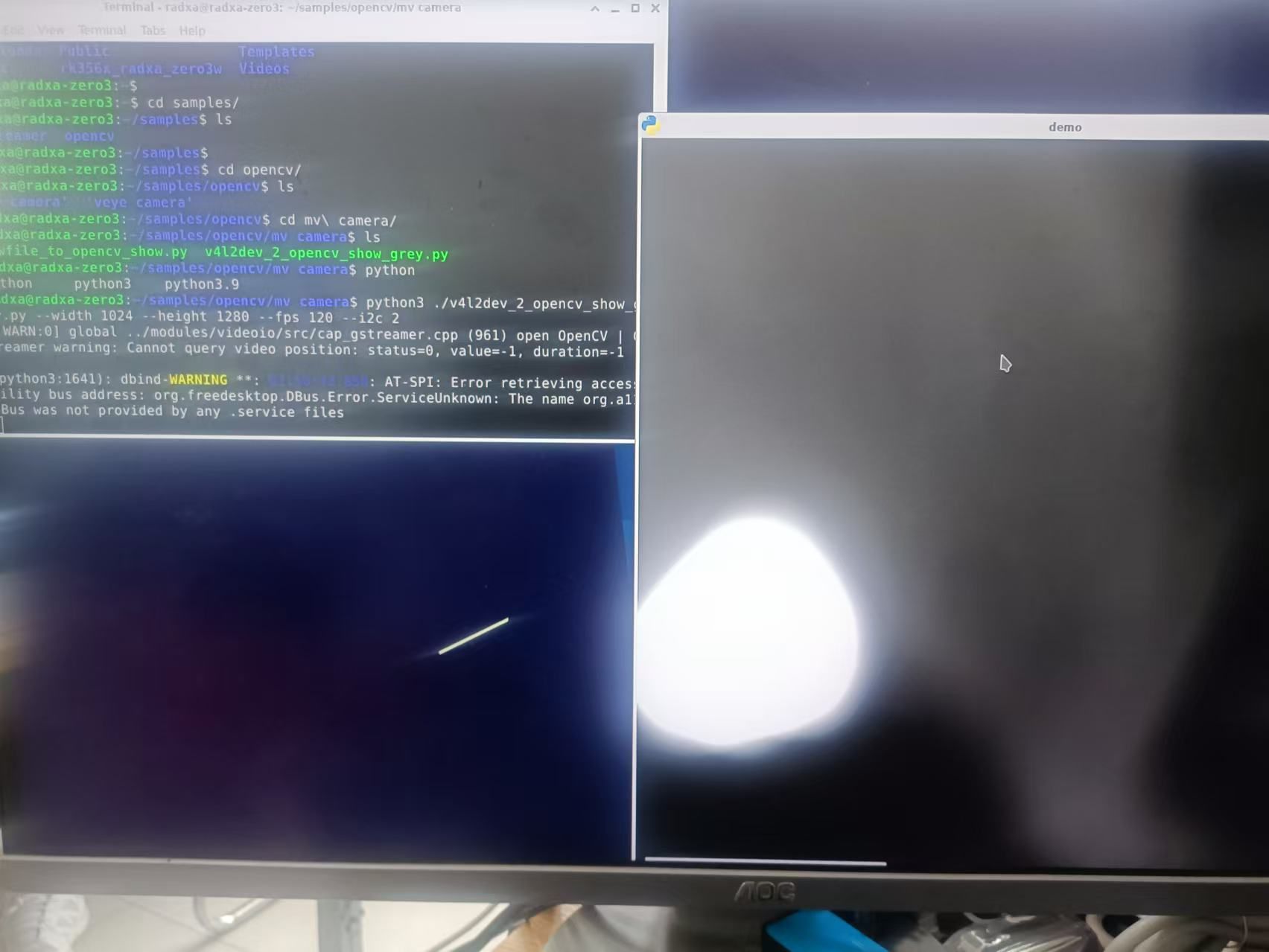
                    61ef29e4-85bf-4e4b-b83b-dd99735b2c2c-567b481a95a3fe4153d7f03b37fc8ac.jpg

                    另外提一下,我这边OS用的是radxa发布的debain系统,不是ubuntu系统。 不知你这用的什么系统?

                    Questions will be answered as soon as possible, please be patient.
                    如果你使用中文,请直接用中文提问。
                    May the force be with YOU. (This is the translation of the mysterious Chinese symbol above.)

                    A 2 Replies Last reply Reply Quote 0
                    • A Offline
                      ashengzi @veye_xumm
                      last edited by

                      @veye_xumm said in RAW-MIPI-SC132M驱动编译后无法正常播放:

                      @ashengzi said in RAW-MIPI-SC132M驱动编译后无法正常播放:

                      我这边发现我编译的radxa官方固件是5.10.160-1,而veye官网上用的是Linux radxa-zero3 5.10.160-26,这个有影响吗

                      这个没有关系。

                      我这边测试了一下没问题啊。
                      61ef29e4-85bf-4e4b-b83b-dd99735b2c2c-567b481a95a3fe4153d7f03b37fc8ac.jpg

                      另外提一下,我这边OS用的是radxa发布的debain系统,不是ubuntu系统。 不知你这用的什么系统?
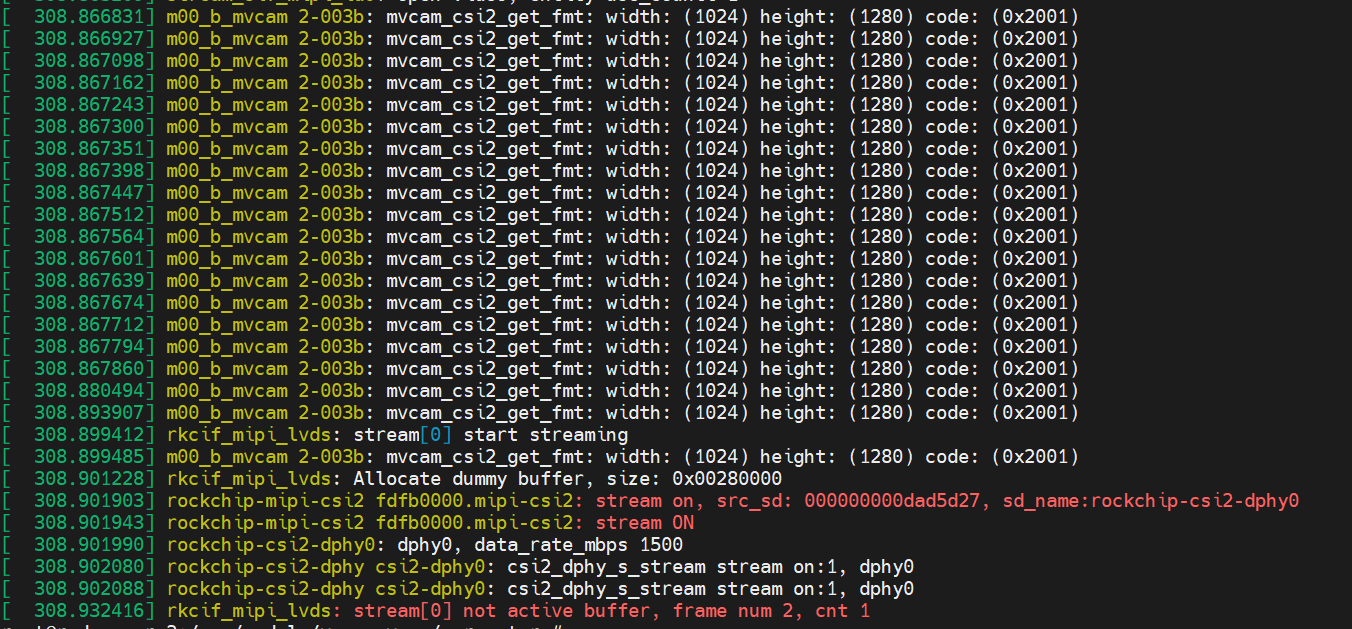
                      804b8cbd-60cb-466a-b3b9-1061d13a5dd2-image.png
                      3d8552a7-301d-4051-84b0-86076d65c310-image.png
                      我这个也是deban系统,驱动运行正应该是正常的,但就是无法正常播放,好像卡在哪个地方了

                      1 Reply Last reply Reply Quote 0
                      • A Offline
                        ashengzi @veye_xumm
                        last edited by

                        @veye_xumm
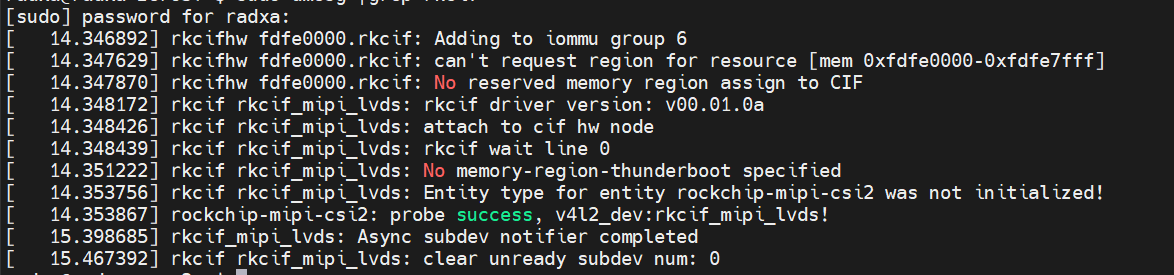
                        692724e7-2e5a-4ce8-ab0a-40fcaf83daa7-image.png
                        系统启动时好像有报错,不知道和这个是否有关?

                        veye_xummV 1 Reply Last reply Reply Quote 0
                        • veye_xummV Offline
                          veye_xumm @ashengzi
                          last edited by

                          客户已解决。是kernel配置中关于rkcif的配置原因。

                          Questions will be answered as soon as possible, please be patient.
                          如果你使用中文,请直接用中文提问。
                          May the force be with YOU. (This is the translation of the mysterious Chinese symbol above.)

                          1 Reply Last reply Reply Quote 0

                          Hello! It looks like you're interested in this conversation, but you don't have an account yet.

                          Getting fed up of having to scroll through the same posts each visit? When you register for an account, you'll always come back to exactly where you were before, and choose to be notified of new replies (either via email, or push notification). You'll also be able to save bookmarks and upvote posts to show your appreciation to other community members.

                          With your input, this post could be even better 💗

                          Register Login
                          • First post
                            Last post