VEYE IMAGING Forum
    • Categories
    • Tags
    • Recent
    • Popular
    • Users
    • WIKI
    • veye.cc
    • Register
    • Login

    RAW_MIPI_SC535M相机实时帧率获取问题(framecount报错)

    Scheduled Pinned Locked Moved VEYE MIPI camera
    12 Posts 2 Posters 4.1k Views 1 Watching
    Loading More Posts
    • Oldest to Newest
    • Newest to Oldest
    • Most Votes
    Reply
    • Reply as topic
    Log in to reply
    This topic has been deleted. Only users with topic management privileges can see it.
    • veye_xummV Offline
      veye_xumm @毛宪历
      last edited by

      @毛宪历 said in RAW_MIPI_SC535M相机实时帧率获取问题(framecount报错):

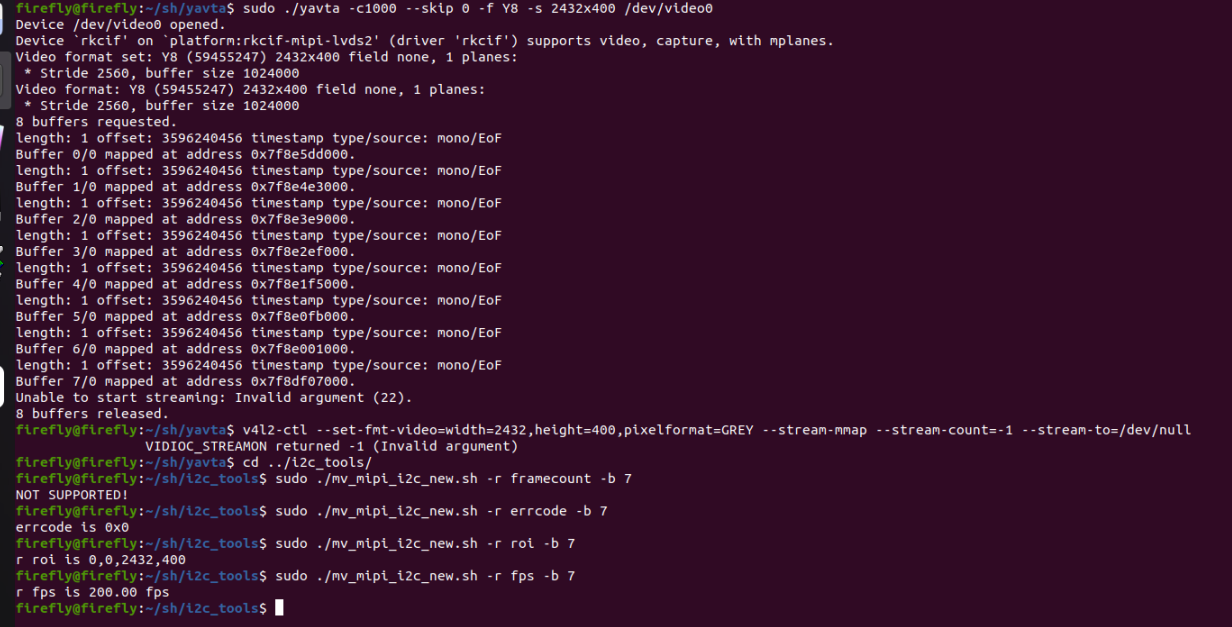
      ./mv_mipi_i2c.sh -r -f framecount-b your_i2c_bus_number指令获取当前采集的帧率时,指令返回NOT SUPPORTED!

      -b的前面应该加一个空格,这个是我们文档的问题,抱歉。

      @毛宪历 said in RAW_MIPI_SC535M相机实时帧率获取问题(framecount报错):

      我的疑问是控制台实时显示的相机帧率信息可以代表相机当前处于稳定采集的状态吗?控制台每一条更新的信息都可以代表相机当前采集了一帧图像吗?

      是的,用yavta或者v4l2-ctl取图,都可以显示帧率。

      Questions will be answered as soon as possible, please be patient.
      如果你使用中文,请直接用中文提问。
      May the force be with YOU. (This is the translation of the mysterious Chinese symbol above.)

      毛 1 Reply Last reply Reply Quote 0
      • 毛 Offline
        毛宪历 @veye_xumm
        last edited by

        @veye_xumm 关于./mv_mipi_i2c.sh -r -f framecount-b your_i2c_bus_number指令,增加了空格依旧是同样的现象。
        然后我通过c++v4l2操作相机时,某些情况下相机会无法触发流式采集,反馈无效的参数,同时使用./mv_mipi_i2c.sh也无法采集,然后获取errcode是0x0,相机断电后也无法恢复,只能恢复出厂设置才能解决这个问题。请问这是什么原因呀?

        veye_xummV 1 Reply Last reply Reply Quote 0
        • veye_xummV Offline
          veye_xumm @毛宪历
          last edited by

          @毛宪历

          @毛宪历 said in RAW_MIPI_SC535M相机实时帧率获取问题(framecount报错):

          关于./mv_mipi_i2c.sh -r -f framecount-b your_i2c_bus_number指令,增加了空格依旧是同样的现象。

          请从github update一下代码。
          https://github.com/veyeimaging/rk35xx_firefly/tree/main/mv_tools_rockchip/i2c_tools

          @毛宪历 said in RAW_MIPI_SC535M相机实时帧率获取问题(framecount报错):

          然后我通过c++v4l2操作相机时,某些情况下相机会无法触发流式采集,反馈无效的参数,同时使用./mv_mipi_i2c.sh也无法采集,然后获取errcode是0x0,相机断电后也无法恢复,只能恢复出厂设置才能解决这个问题。请问这是什么原因呀?

          这个你需要详细给我说明一下,怎样操作无法采集? ./mv_mipi_i2c.sh只是设置参数用的,本身没有采集图像的功能。
          你出现问题的时候,可以用我们sample上的v4l2-ctl采图,进行验证。

          Questions will be answered as soon as possible, please be patient.
          如果你使用中文,请直接用中文提问。
          May the force be with YOU. (This is the translation of the mysterious Chinese symbol above.)

          毛 1 Reply Last reply Reply Quote 0
          • 毛 Offline
            毛宪历 @veye_xumm
            last edited by 毛宪历

            @veye_xumm不好意思我描述的不太清晰,采集失败的具体内容如图a0b2c08b-31a7-44d3-8a3e-f299f813c715-image.png

            veye_xummV 1 Reply Last reply Reply Quote 0
            • veye_xummV Offline
              veye_xumm @毛宪历
              last edited by

              @毛宪历
              按照我们的wiki,

              配置完数据格式,分辨率,帧率之后,执行:
              
              ./yavta -c1 -Fy8-${WIDTH}x${HEIGHT}.raw --skip 0 -f Y8 -s ${WIDTH}x${HEIGHT} /dev/video0
              

              所以你得在运行yavta之前,参考part7.4.1 设置数据格式,分辨率,帧率,进行配置参数。

              Questions will be answered as soon as possible, please be patient.
              如果你使用中文,请直接用中文提问。
              May the force be with YOU. (This is the translation of the mysterious Chinese symbol above.)

              毛 1 Reply Last reply Reply Quote 0
              • 毛 Offline
                毛宪历 @veye_xumm
                last edited by

                @veye_xumm said in RAW_MIPI_SC535M相机实时帧率获取问题(framecount报错):

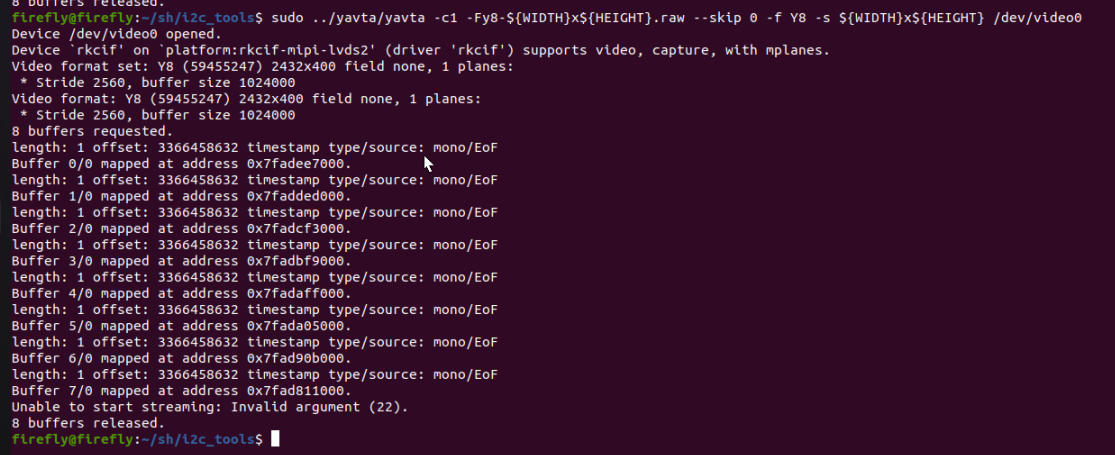
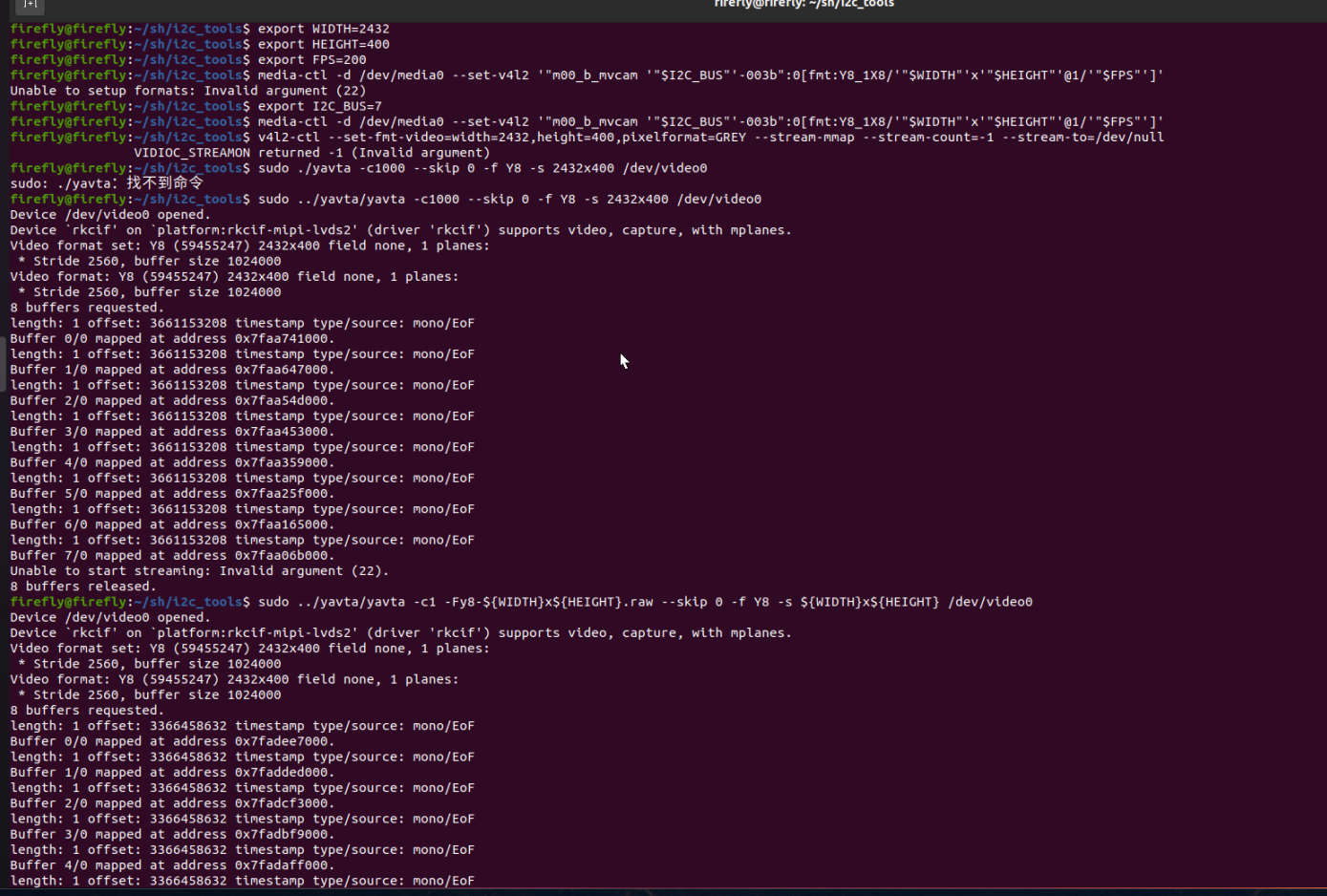
                yavta -c1 -Fy8-${WIDTH}x${HEIGHT}.raw --skip 0 -f Y8 -s ${WIDTH}x${HEIGHT} /dev/video0

                依旧是采集失败:
                a415e905-b7aa-4ace-b9a1-0d6ff2d3cb7a-image.png
                e20f9937-8122-4040-b7e3-f1b1c4a9dff1-image.png

                veye_xummV 1 Reply Last reply Reply Quote 0
                • veye_xummV Offline
                  veye_xumm @毛宪历
                  last edited by

                  @毛宪历 按照你之前的描述,恢复默认值,然后执行这一系列命令,就可以成功抓图是吗?

                  之后你做了哪些配置,然后无法抓图了呢?

                  Questions will be answered as soon as possible, please be patient.
                  如果你使用中文,请直接用中文提问。
                  May the force be with YOU. (This is the translation of the mysterious Chinese symbol above.)

                  毛 1 Reply Last reply Reply Quote 0
                  • 毛 Offline
                    毛宪历 @veye_xumm
                    last edited by

                    @veye_xumm
                    是的,恢复出厂设置后这些操作都可以成功执行。
                    我是用了v4l2对相机进行调试,但并不操作相机的任何参数。
                    流程是:
                    ->open相机
                    ->ioctl [VIDIOC_QUERYCAP]查询设备能力
                    ->ioctl [VIDIOC_S_FMT]设置图像格式为:V4L2_BUF_TYPE_VIDEO_CAPTURE_MPLANE,V4L2_PIX_FMT_GREY
                    ->请求和映射缓冲区并把缓冲区放入队列
                    ->ioctl [VIDIOC_STREAMON]开启流式传输V4L2_BUF_TYPE_VIDEO_CAPTURE_MPLANE
                    ->ioctl [VIDIOC_STREAMOFF] 停止流式传输V4L2_BUF_TYPE_VIDEO_CAPTURE_MPLANE
                    ->释放缓冲区
                    ->在开启流式传输后通过select查看缓冲区是否存在缓存数据,有则使用ioctl [VIDIOC_DQBUF] 提取图像。

                    调试过程中有可能出现缓冲区重复释放、设备未正常close的情况,但具体是什么操作导致了相机无法采集这个不好确认。所以我期望能从相机本身的参数上看到原因,比如获取errcode等方式,因为通过指令采集失败总要有失败反馈吧?

                    veye_xummV 1 Reply Last reply Reply Quote 0
                    • veye_xummV Offline
                      veye_xumm @毛宪历
                      last edited by

                      @毛宪历 你这种情况,相机不见得能记录errcode。
                      你现在的情况,用我们wiki的例程,能正常采集,不会有问题。用你的程序,可能会把相机干到一种不出图的状态,需要相机恢复默认值才能解决。
                      我有两个解决问题的思路推荐给你。

                      1. 对比你的程序和yavta的差异。
                      2. 使用我们的mv_mipi_i2c.sh脚本,将几个与图像相关的参数读出来。包括roi,fps,trgmode,

                      Questions will be answered as soon as possible, please be patient.
                      如果你使用中文,请直接用中文提问。
                      May the force be with YOU. (This is the translation of the mysterious Chinese symbol above.)

                      毛 1 Reply Last reply Reply Quote 0
                      • 毛 Offline
                        毛宪历 @veye_xumm
                        last edited by

                        @veye_xumm 你好,如果相机恢复出厂设置还是无法采集,有什么方案彻底重置相机吗?比如重装驱动?有操作说明吗?

                        veye_xummV 1 Reply Last reply Reply Quote 0
                        • veye_xummV Offline
                          veye_xumm @毛宪历
                          last edited by

                          线下沟通,已解决。
                          解决方案是,在取图之前,通过system函数直接调用如下脚本:

                          export I2C_BUS=7
                          export WIDTH=2432
                          export HEIGHT=500
                          export FPS=50
                          v4l2-ctl -d /dev/v4l-subdev2 --set-ctrl roi_x=0
                          v4l2-ctl -d /dev/v4l-subdev2 --set-ctrl roi_y=548
                          media-ctl -d /dev/media0 --set-v4l2 '"m00_b_mvcam '"$I2C_BUS"'-003b":0[fmt:Y8_1X8/'"$WIDTH"'x'"$HEIGHT"'@1/'"$FPS"']'
                          

                          然后再取图。
                          如果直接用mv_mipi_i2c,sh配置roi,那么相机内的参数直接被修改,这个数值无法实时反映到v4l2驱动层中。造成参数的错乱。

                          Questions will be answered as soon as possible, please be patient.
                          如果你使用中文,请直接用中文提问。
                          May the force be with YOU. (This is the translation of the mysterious Chinese symbol above.)

                          1 Reply Last reply Reply Quote 0

                          Hello! It looks like you're interested in this conversation, but you don't have an account yet.

                          Getting fed up of having to scroll through the same posts each visit? When you register for an account, you'll always come back to exactly where you were before, and choose to be notified of new replies (either via email, or push notification). You'll also be able to save bookmarks and upvote posts to show your appreciation to other community members.

                          With your input, this post could be even better 💗

                          Register Login
                          • First post
                            Last post