mv-mipi-imx264m 移植到3588出现错误ERROR: csi size err
-
大家好,我将mv-mipi-imx264m接到3588平台时候,v4l2存图会报错,错误如下:
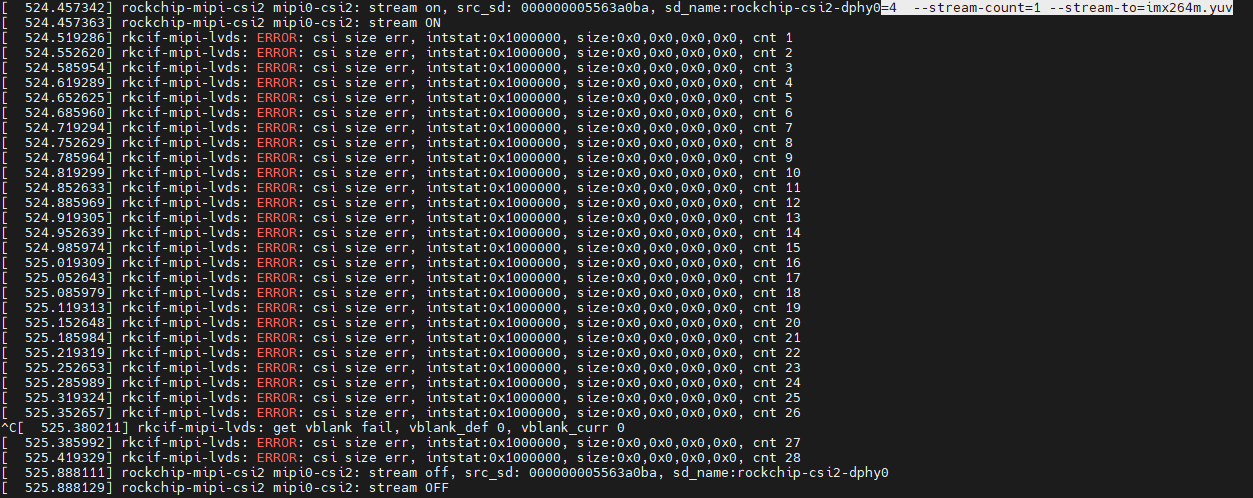 。具体情况如下:
1.硬件平台为自行设计,基于RK3588 Demo。操作系统移植topeet开发板,kernel版本5.10;
2.采购的mv-mipi-imx264m相机板,后面单独设计接口板。图中接插件J3的信号转接后与RK3588连接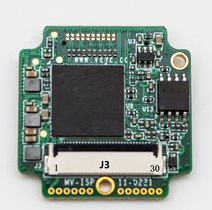 。连接以下信号:电源/MIPI 4lane/IIC/ENABLE/TriggerIN;
3.设备树。因为我是连接到RK3588的dcphy0,参考贵司firefly和orangepi的demo中做修改完成。
设备树中/iic/mvcam结点下面有时钟相关属性:clocks = <&ext_cam_clk>;
clock-names = "xvclk";但硬件上J3并没有时钟引脚,该属性忽略。
4.驱动直接复制rk35xx_veye_bsp-main\linux\drivers\kernel_v5.10下的veye_mvcam.c和veye_mvcam.h文件。相对应修改设备树中/iic/mvcam结点compatible = "veye,mvcam";
5.系统上电后可以通过dmesg|grep mvcam看到相机启动log。

6.使用v4l2-ctl相关指令可以修改相机参数,但是用v4l2采图就会报错:
[ 524.519286] rkcif-mipi-lvds: ERROR: csi size err, intstat:0x1000000, size:0x0,0x0,0x0,0x0, cnt 1
7.检索FAQ,有相关解决方案。https://wiki.veye.cc/index.php/FAQ_on_RK35xx_Platform/zh。
对照我使用的sdk中驱动部分,cif版本号*v0.2.0,和FAQ中下载的capture.c有很大区别,但MEDIA_BUS_FMT_Y8_1X8、MEDIA_BUS_FMT_Y10_1X10、MEDIA_BUS_FMT_Y12_1X12三种数据格式还是有定义的。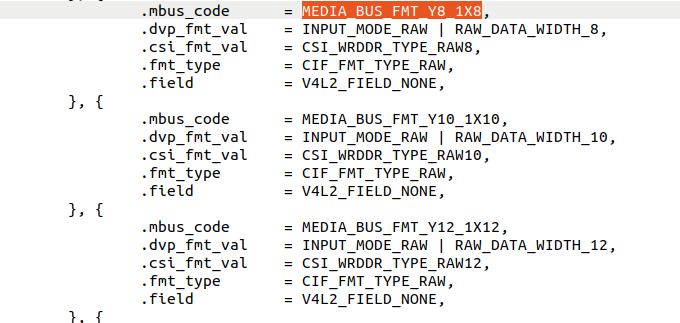 。
。
8.大致情况如上所述,帮忙看一下还有哪种可能性,非常感谢。
9.此外,请教一下驱动文件中几个时钟的计算: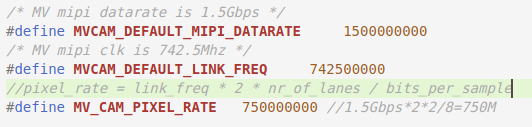 MVCAM_DEFAULT_LINK_FREQ和MV_CAM_PIXEL_RATE时钟的计算结果与注释中的公式并不一致,比较困惑。对了,看过mipi的波形,data0/1两组数据都看到的类似波形,时钟线看不到波形,考虑是时钟频率大大高于示波器带宽的缘故。
 -
@goooofy
你现在的驱动中i2c肯定是没问题的,时钟信号这些东西通常不会引起这种错误,也可以排除。
现在需要核实你的dts中mipi csi接口的定义是否与原理图一致。此外,rockchip平台取图的话,需要做一系列的配置工作。media-ctl之类的配置roi和分辨率。要注意一下这些配置是否正确。
最后,你可以尝试以下veye_viewer这个软件。
-
@veye_xumm 非常感谢!经过测试,进入系统后直接运行v4l2-ctl直接拿图或是原始视频都会报错,需要先运行配置指令media-ctl -d /dev/media0 --set-v4l2 '"m00_b_mvcam 3-003b":0[fmt:Y8_1X8/2432x2056@1/30 field:none]' 之后拿图正常。
-
@goooofy 好的。

Hello! It looks like you're interested in this conversation, but you don't have an account yet.
Getting fed up of having to scroll through the same posts each visit? When you register for an account, you'll always come back to exactly where you were before, and choose to be notified of new replies (either via email, or push notification). You'll also be able to save bookmarks and upvote posts to show your appreciation to other community members.
With your input, this post could be even better 💗
Register Login