VEYE IMAGING Forum
    • Categories
    • Tags
    • Recent
    • Popular
    • Users
    • WIKI
    • veye.cc
    • Register
    • Login

    OrangePi cm5-tablet RAW-MIPI-SC132M

    Scheduled Pinned Locked Moved Rockchip App camera
    35 Posts 3 Posters 9.3k Views 2 Watching
    Loading More Posts
    • Oldest to Newest
    • Newest to Oldest
    • Most Votes
    Reply
    • Reply as topic
    Log in to reply
    This topic has been deleted. Only users with topic management privileges can see it.
    • M Offline
      mparem @mparem
      last edited by

      update: I modified the device tree a few times, and reached a different error message:

      i2c-6: Failed to create I2C device for /i2c@fec80000/mvcam@3b

      How can I verify that the drivers were correctly installed?

      neither lsmod nor less /proc/modules show anything veye-related

      veye_xummV 1 Reply Last reply Reply Quote 0
      • veye_xummV Offline
        veye_xumm @mparem
        last edited by

        @mparem
        Because on the RK platform, the mvcam driver needs to be built into the kernel, it will not appear in the lsmod list.
        Please send me your current DTS and the related error so I can take a look.
        The cam2 interface on the tablet corresponds to dcphy0 and i2c6, which is correct.

        Questions will be answered as soon as possible, please be patient.
        如果你使用中文,请直接用中文提问。
        May the force be with YOU. (This is the translation of the mysterious Chinese symbol above.)

        1 Reply Last reply Reply Quote 0
        • M Offline
          mparem
          last edited by mparem

          tablet_3b2.dts.txt

          This is the decompiled dts, which I modified (set i2c address to 0x3b and changed compatibility to veye,mvcam), compiled, then moved back into /boot/dtb*/rockchip/rk3588s-orangepi-cm5-tablet.dtb (faster than recompiling with orangepi-build)

          sudo dmesg | grep ov5647
          [    6.594040] i2c i2c-6: of_i2c: modalias failure on /i2c@fec80000/ov5647-cam2@36
          [    6.594051] i2c i2c-6: Failed to create I2C device for /i2c@fec80000/ov5647-cam2@36
          [    6.594128] platform csi2-dcphy0: Fixed dependency cycle(s) with /i2c@fec80000/ov5647-cam2@3b
          [    6.607375] i2c i2c-7: of_i2c: modalias failure on /i2c@fec90000/ov5647-cam3@36
          [    6.607381] i2c i2c-7: Failed to create I2C device for /i2c@fec90000/ov5647-cam3@36
          [    6.607412] platform csi2-dcphy1: Fixed dependency cycle(s) with /i2c@fec90000/ov5647-cam3@3b
          
          sudo dmesg | grep csi2-dcphy0
          [    5.600344] platform csi2-dcphy0: Fixed dependency cycle(s) with /mipi0-csi2
          [    6.594128] platform csi2-dcphy0: Fixed dependency cycle(s) with /i2c@fec80000/ov5647-cam2@3b
          [    6.824192] rockchip-csi2-dphy csi2-dcphy0: csi2 dphy0 probe successfully!
          
          
          sudo dmesg | grep i2c
          [    5.612002] platform fed80000.phy: Fixed dependency cycle(s) with /i2c@fec80000/fusb302@22/connector
          [    6.408625] platform fc000000.usb: Fixed dependency cycle(s) with /i2c@fec80000/fusb302@22
          [    6.423672] i2c_dev: i2c /dev entries driver
          [    6.584542] platform csi2-dphy0: Fixed dependency cycle(s) with /i2c@fea90000/ov13850-1@10
          [    6.584625] i2c i2c-1: 1 i2c clients have been registered at 0x0c
          [    6.584679] platform csi2-dphy0: Fixed dependency cycle(s) with /i2c@fea90000/ov13855-1@36
          [    6.594013] i2c i2c-6: of_i2c: modalias failure on /i2c@fec80000/imx219-cam2@10
          [    6.594028] i2c i2c-6: Failed to create I2C device for /i2c@fec80000/imx219-cam2@10
          [    6.594040] i2c i2c-6: of_i2c: modalias failure on /i2c@fec80000/ov5647-cam2@36
          [    6.594051] i2c i2c-6: Failed to create I2C device for /i2c@fec80000/ov5647-cam2@36
          [    6.594128] platform csi2-dcphy0: Fixed dependency cycle(s) with /i2c@fec80000/ov5647-cam2@3b
          [    6.607375] i2c i2c-7: of_i2c: modalias failure on /i2c@fec90000/ov5647-cam3@36
          [    6.607381] i2c i2c-7: Failed to create I2C device for /i2c@fec90000/ov5647-cam3@36
          [    6.607412] platform csi2-dcphy1: Fixed dependency cycle(s) with /i2c@fec90000/ov5647-cam3@3b
          [    6.607497] platform csi2-dcphy1: Fixed dependency cycle(s) with /i2c@fec90000/imx219-cam3@10
          [    6.708500] [Awinic] [1-0059]aw87xxx_i2c_probe: succeed, dev_index=[0], g_aw87xxx_dev_cnt= [1]
          [    6.709515] [Awinic] [1-005a]aw87xxx_i2c_probe: succeed, dev_index=[1], g_aw87xxx_dev_cnt= [2]
          
          veye_xummV 2 Replies Last reply Reply Quote 0
          • veye_xummV Offline
            veye_xumm @mparem
            last edited by

            @mparem
            Please post dmesg | grep mvcam output here.

            Questions will be answered as soon as possible, please be patient.
            如果你使用中文,请直接用中文提问。
            May the force be with YOU. (This is the translation of the mysterious Chinese symbol above.)

            M 1 Reply Last reply Reply Quote 0
            • M Offline
              mparem @veye_xumm
              last edited by

              @veye_xumm

              sudo dmesg | grep mvcam
              [sudo] password for orangepi: 
              [    6.581083] platform csi2-dcphy0: Fixed dependency cycle(s) with /i2c@fec80000/mvcam2@3b
              
              
              sudo i2cdetect -y 6
                   0  1  2  3  4  5  6  7  8  9  a  b  c  d  e  f
              00:                         -- -- -- -- -- -- -- -- 
              10: -- -- -- -- -- -- -- -- -- -- -- -- -- -- -- -- 
              20: -- -- UU -- -- -- -- -- -- -- -- -- -- -- -- -- 
              30: -- -- -- -- -- -- -- -- -- -- -- -- -- -- -- -- 
              40: -- -- -- -- -- -- -- -- -- -- -- -- -- -- -- -- 
              50: -- -- -- -- -- -- -- -- -- -- -- -- -- -- -- -- 
              60: -- -- -- -- -- -- -- -- -- -- 6a -- -- -- -- -- 
              70: -- -- -- -- -- -- -- --   
              
              1 Reply Last reply Reply Quote 0
              • veye_xummV Offline
                veye_xumm @mparem
                last edited by

                @mparem said in OrangePi cm5-tablet RAW-MIPI-SC132M:

                his is the decompiled dts, which I modified (set i2c address to 0x3b and changed compatibility to veye,mvcam), compiled, then moved back into /boot/dtb*/rockchip/rk3588s-orangepi-cm5-tablet.dtb (faster than recompiling with orangepi-build)

                I haven't used this method before, and I didn't quite understand your source code.
                Now it seems the issue might still be with the DTS. I suggest you try editing the DTS source code using conventional methods.

                Questions will be answered as soon as possible, please be patient.
                如果你使用中文,请直接用中文提问。
                May the force be with YOU. (This is the translation of the mysterious Chinese symbol above.)

                1 Reply Last reply Reply Quote 0
                • M Offline
                  mparem
                  last edited by

                  @veye_xumm
                  rk3588s-orangepi-cm5-tablet.dts.txt

                  rk3588s-orangepi-cm5-tablet-camera2-veyemv.dtsi.txt

                  sudo dmesg | grep mvcam
                  [    6.458001] platform csi2-dcphy0: Fixed dependency cycle(s) with /i2c@fec80000/mvcam@3b
                  
                  
                  veye_xummV 1 Reply Last reply Reply Quote 0
                  • veye_xummV Offline
                    veye_xumm @mparem
                    last edited by

                    @mparem
                    Since I don't have the tablet board here, the following is just a suggested approach based on my guess. You can try commenting out the following two lines or modifying them as shown below:

                    clocks = <&ext_cam_ov5647_clk>;  
                    clock-names = "xvclk";  
                    

                    Questions will be answered as soon as possible, please be patient.
                    如果你使用中文,请直接用中文提问。
                    May the force be with YOU. (This is the translation of the mysterious Chinese symbol above.)

                    M 1 Reply Last reply Reply Quote 0
                    • M Offline
                      mparem @veye_xumm
                      last edited by

                      @veye_xumm
                      I received the cm5-base board today, attempted to connect the camera, but dmesg does not show any logs when grepping for mvcam

                      veye_xummV 2 Replies Last reply Reply Quote 0
                      • veye_xummV Offline
                        veye_xumm @mparem
                        last edited by

                        @mparem https://github.com/veyeimaging/rk35xx_orangepi/releases
                        please try the latest image or deb packages.

                        Questions will be answered as soon as possible, please be patient.
                        如果你使用中文,请直接用中文提问。
                        May the force be with YOU. (This is the translation of the mysterious Chinese symbol above.)

                        1 Reply Last reply Reply Quote 0
                        • veye_xummV Offline
                          veye_xumm @mparem
                          last edited by

                          @mparem
                          https://github.com/veyeimaging/rk35xx_orangepi/releases/tag/v1.2_mvcam_tablet_cm5
                          Please try this image file on cm5-tablet.

                          Questions will be answered as soon as possible, please be patient.
                          如果你使用中文,请直接用中文提问。
                          May the force be with YOU. (This is the translation of the mysterious Chinese symbol above.)

                          zoldatenZ 1 Reply Last reply Reply Quote 0
                          • zoldatenZ Offline
                            zoldaten @veye_xumm
                            last edited by

                            @veye_xumm
                            got it!
                            should i change in my case rk3588s-orangepi-cm5-tablet.dtb directly like:

                            dtc -I dtb -O dts rk3588s-orangepi-cm5-tablet.dtb -o test.dts
                            dtc -I dts -O dtb test.dts -o rk3588s-orangepi-cm5-tablet.dtb
                            

                            and put it back to PC ?
                            or should i work somehow with rk3588s-orangepi-cm5-tablet-camera2.dtsi as you change it ?

                            veye_xummV 1 Reply Last reply Reply Quote 0
                            • veye_xummV Offline
                              veye_xumm @zoldaten
                              last edited by

                              @zoldaten
                              My recommended approach is to set up the system compilation environment following the official OrangePi method, then place our provided dtsi files and drivers into it to compile a new deb package.
                              Your suggested method might work as well, but I haven't personally tried it.

                              Questions will be answered as soon as possible, please be patient.
                              如果你使用中文,请直接用中文提问。
                              May the force be with YOU. (This is the translation of the mysterious Chinese symbol above.)

                              zoldatenZ 3 Replies Last reply Reply Quote 0
                              • zoldatenZ Offline
                                zoldaten @veye_xumm
                                last edited by

                                @veye_xumm ok. i tried method you recommend but when i built new image step-by-step and burn it to sd nothing changed. no veye camera there and no drivers.

                                1 Reply Last reply Reply Quote 0
                                • zoldatenZ Offline
                                  zoldaten @veye_xumm
                                  last edited by

                                  @veye_xumm hi. i`ve built once again image folowing https://github.com/veyeimaging/rk35xx_orangepi/tree/main/linux
                                  and nothing works:
                                  no_veye.png

                                  no_veye2.png

                                  could you check again instructions you provided ?

                                  moreover, i took rk3588s-orangepi-cm5-tablet.dtb from image with drivers installed you provided above and rk3588s-orangepi-cm5-tablet.dts from original image to compare.

                                  i decompiled `em to .dts and looked for differences.
                                  as far as i see on your image you do not use overlays and put all changes to dts:
                                  2026-02-26_11h37_09.png
                                  i looks like you changes overlap original ov5647, ov138*, etc and they stop working.

                                  in addition, i see address drift in program list:
                                  2026-02-26_11h39_53.png

                                  could your explain a bit how to make mixed up cameras working as you changes broke dts ?

                                  1 Reply Last reply Reply Quote 0
                                  • zoldatenZ Offline
                                    zoldaten @veye_xumm
                                    last edited by zoldaten

                                    @veye_xumm and i do not see any overlays from here compiled on image
                                    2026-02-26_11h44_43.png :

                                    veye_xummV 1 Reply Last reply Reply Quote 0
                                    • veye_xummV Offline
                                      veye_xumm @zoldaten
                                      last edited by

                                      @zoldaten I noticed you placed the compiled image onto the SD card. This is likely incorrect. You should refer to the official Orange Pi documentation and flash the compiled image to the eMMC storage that comes with the Orange Pi CM5 core board.

                                      Additionally, you might wonder why we compile the camera's dtsi directly into the main dtb instead of building it separately as an overlay. This approach follows the practice recommended by the Orange Pi manufacturer.

                                      Questions will be answered as soon as possible, please be patient.
                                      如果你使用中文,请直接用中文提问。
                                      May the force be with YOU. (This is the translation of the mysterious Chinese symbol above.)

                                      zoldatenZ 1 Reply Last reply Reply Quote 0
                                      • zoldatenZ Offline
                                        zoldaten @veye_xumm
                                        last edited by

                                        @veye_xumm got it.
                                        but why do you recommend flash eMMC ?
                                        i burned SD with your image provided and there veye presented. what`s the difference ?

                                        veye_xummV 1 Reply Last reply Reply Quote 0
                                        • veye_xummV Offline
                                          veye_xumm @zoldaten
                                          last edited by

                                          @zoldaten

                                          @zoldaten said in OrangePi cm5-tablet RAW-MIPI-SC132M:

                                          i burned SD with your image provided and there veye presented. what`s the difference ?

                                          Sorry, I misunderstood you earlier. I thought you meant that following the steps to compile wasn't working at all. So, now that you've successfully compiled it, the veyecamera has appeared, correct?

                                          What you should do now is modify the source code of the DTS. For different MIPI interfaces, use different dtsi configurations to set it up for the specific camera or sensor model you want.

                                          Questions will be answered as soon as possible, please be patient.
                                          如果你使用中文,请直接用中文提问。
                                          May the force be with YOU. (This is the translation of the mysterious Chinese symbol above.)

                                          zoldatenZ 1 Reply Last reply Reply Quote 0
                                          • zoldatenZ Offline
                                            zoldaten @veye_xumm
                                            last edited by zoldaten

                                            @veye_xumm veye appears only on image you provided via download link.
                                            the image i built has no veye on board.

                                            should i change the main dts after decompilation ...tablet.dbt > ...tablet.dts?
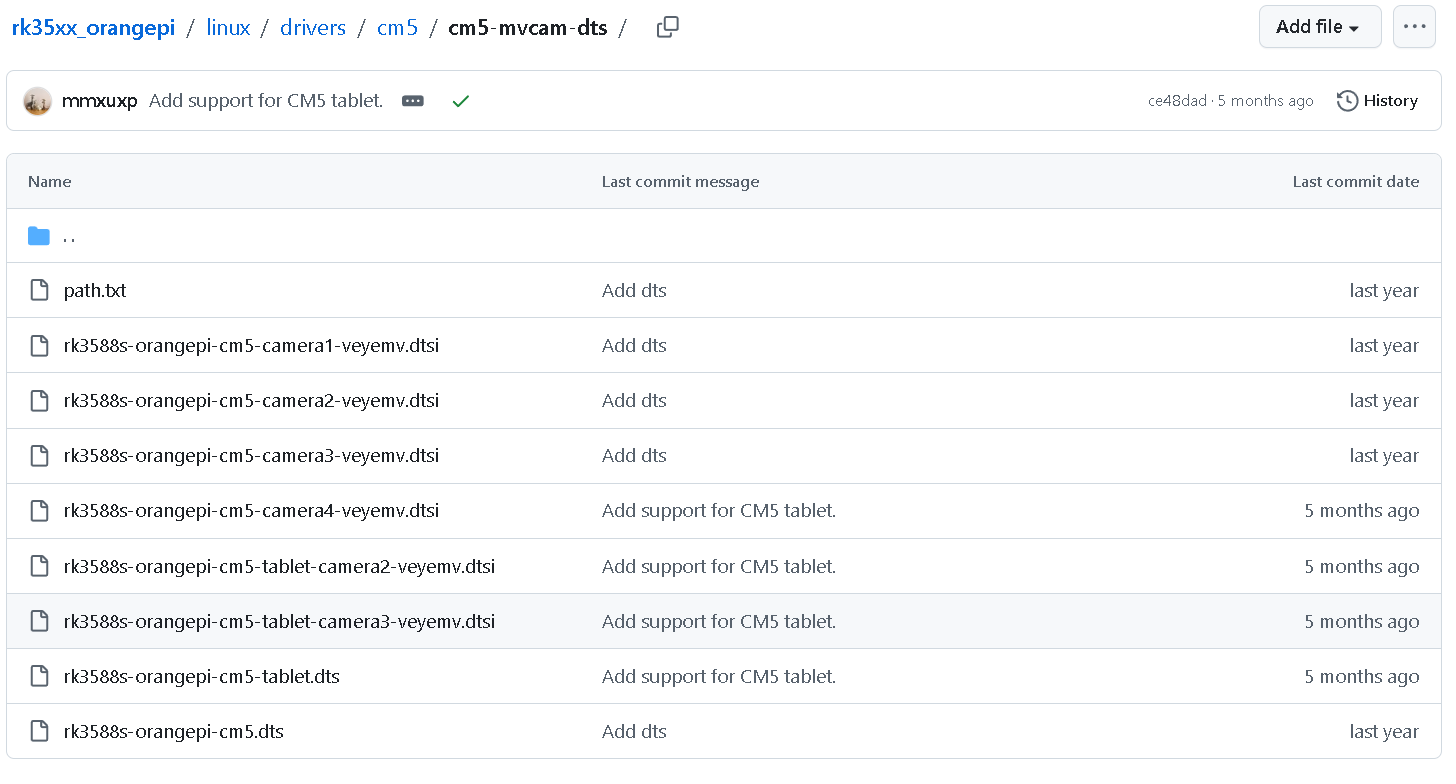
                                            or use somehow dtsi (https://github.com/veyeimaging/rk35xx_orangepi/tree/main/linux/drivers/cm5/cm5-mvcam-dts) to link with your ...tablet.dbt ?


                                            veye_xummV 1 Reply Last reply Reply Quote 0

                                            Hello! It looks like you're interested in this conversation, but you don't have an account yet.

                                            Getting fed up of having to scroll through the same posts each visit? When you register for an account, you'll always come back to exactly where you were before, and choose to be notified of new replies (either via email, or push notification). You'll also be able to save bookmarks and upvote posts to show your appreciation to other community members.

                                            With your input, this post could be even better 💗

                                            Register Login
                                            • First post
                                              Last post