SOLVED cssc132 (Raspberry pi 5). Not a video capture device. /dev/videoXX: No such device
-
@veye_xumm , Where can I get the driver I need?
-
-
@veye_xumm The video is not displayed in the program
sheko@raspberrypi:~/mv_tools_rpi $ ./mv_mipi_i2c_new.sh
Usage: ./mv_mipi_i2c_new.sh [-r/w] [function name] [param1] [param2 ] [param3] [param4] -b bus
options:
-r read
-w write
[function name] function name
[param1] param1 of each function
[param1] param2 of each function
[param3] param3 of each function
[param4] param4 of each function
-b [i2c bus num] i2c bus number
-d [i2c addr] i2c addr if not default 0x3b
Please open this srcipt and read the COMMENT on top for support functions and samples
sheko@raspberrypi:~/mv_tools_rpi $ ./mv_mipi_i2c_new.sh -r manufacturer -b 11
./mv_mipi_i2c_new.sh: line 453: Read i2c err -1
-36345312: syntax error in expression (error token is "i2c err -1
-36345312")sheko@raspberrypi:~/mv_tools_rpi $ ./mv_mipi_i2c_new.sh -r manufacturer -b 10
Manufacturer is VEYEsheko@raspberrypi:~/mv_tools_rpi $ ./mv_mipi_i2c_new.sh -r version -b 10
version is C 01.04 and L 00.00sheko@raspberrypi:~/mv_tools_rpi $ ./mv_mipi_i2c_new.sh -r errcode -b 10
errcode is 0x0sheko@raspberrypi:~/mv_tools_rpi $ ./mv_mipi_i2c_new.sh -r fmtcap -b 10
fmtcap is 0x3sheko@raspberrypi:~/mv_tools_rpi $ ./mv_mipi_i2c_new.sh -r readmodecap -b 10
r read mode capbility is 0x3sheko@raspberrypi:~/mv_tools_rpi $ ./mv_mipi_i2c_new.sh -r i2caddr -b 10
r i2c addr is 0x01sheko@raspberrypi:~/mv_tools_rpi $ ./mv_mipi_i2c_new.sh -r minwh -b 10
r ROI min width is -1 height is -1sheko@raspberrypi:~/mv_tools_rpi $ ./mv_mipi_i2c_new.sh -w imgacq [0/1] -b 10
./mv_mipi_i2c_new.sh: line 615: printf: [0/1]: invalid number
w image acq is 00sheko@raspberrypi:~/mv_tools_rpi $ ./mv_mipi_i2c_new.sh -w trgmode [0,2] -b 10
./mv_mipi_i2c_new.sh: line 815: printf: [0,2]: invalid number
w trigger mode is 0sheko@raspberrypi:~ $ dmesg | grep mvcam
[ 0.029049] /axi/pcie@1000120000/rp1/i2c@80000/veyemvcam@3b: Fixed dependency cycle(s) with /axi/pcie@1000120000/rp1/csi@128000
[ 0.029059] /axi/pcie@1000120000/rp1/i2c@88000/veyemvcam@3b: Fixed dependency cycle(s) with /axi/pcie@1000120000/rp1/csi@110000
[ 0.029082] /axi/pcie@1000120000/rp1/csi@110000: Fixed dependency cycle(s) with /axi/pcie@1000120000/rp1/i2c@88000/veyemvcam@3b
[ 0.029089] /axi/pcie@1000120000/rp1/csi@128000: Fixed dependency cycle(s) with /axi/pcie@1000120000/rp1/i2c@80000/veyemvcam@3b
[ 0.029211] /axi/pcie@1000120000/rp1/i2c@80000/veyemvcam@3b: Fixed dependency cycle(s) with /axi/pcie@1000120000/rp1/csi@128000
[ 0.029221] /axi/pcie@1000120000/rp1/i2c@88000/veyemvcam@3b: Fixed dependency cycle(s) with /axi/pcie@1000120000/rp1/csi@110000
[ 0.029246] /axi/pcie@1000120000/rp1/csi@110000: Fixed dependency cycle(s) with /axi/pcie@1000120000/rp1/i2c@88000/veyemvcam@3b
[ 0.029254] /axi/pcie@1000120000/rp1/csi@128000: Fixed dependency cycle(s) with /axi/pcie@1000120000/rp1/i2c@80000/veyemvcam@3b
[ 0.410283] /axi/pcie@1000120000/rp1/i2c@80000/veyemvcam@3b: Fixed dependency cycle(s) with /axi/pcie@1000120000/rp1/csi@128000
[ 0.410360] /axi/pcie@1000120000/rp1/i2c@88000/veyemvcam@3b: Fixed dependency cycle(s) with /axi/pcie@1000120000/rp1/csi@110000
[ 0.410672] /axi/pcie@1000120000/rp1/i2c@88000/veyemvcam@3b: Fixed dependency cycle(s) with /axi/pcie@1000120000/rp1/csi@110000
[ 0.410689] /axi/pcie@1000120000/rp1/csi@110000: Fixed dependency cycle(s) with /axi/pcie@1000120000/rp1/i2c@88000/veyemvcam@3b
[ 0.410753] /axi/pcie@1000120000/rp1/i2c@80000/veyemvcam@3b: Fixed dependency cycle(s) with /axi/pcie@1000120000/rp1/csi@128000
[ 0.410767] /axi/pcie@1000120000/rp1/csi@128000: Fixed dependency cycle(s) with /axi/pcie@1000120000/rp1/i2c@80000/veyemvcam@3b
[ 0.676352] /axi/pcie@1000120000/rp1/csi@128000: Fixed dependency cycle(s) with /axi/pcie@1000120000/rp1/i2c@80000/veyemvcam@3b
[ 0.676383] /axi/pcie@1000120000/rp1/i2c@80000/veyemvcam@3b: Fixed dependency cycle(s) with /axi/pcie@1000120000/rp1/csi@128000
[ 0.676753] /axi/pcie@1000120000/rp1/csi@110000: Fixed dependency cycle(s) with /axi/pcie@1000120000/rp1/i2c@88000/veyemvcam@3b
[ 0.676776] /axi/pcie@1000120000/rp1/i2c@88000/veyemvcam@3b: Fixed dependency cycle(s) with /axi/pcie@1000120000/rp1/csi@110000
[ 3.139990] rp1-cfe 1f00110000.csi: found subdevice /axi/pcie@1000120000/rp1/i2c@88000/veyemvcam@3b
[ 3.142880] rp1-cfe 1f00128000.csi: found subdevice /axi/pcie@1000120000/rp1/i2c@80000/veyemvcam@3b
[ 3.157307] veye_mvcam: loading out-of-tree module taints kernel.
[ 3.198535] mvcam 11-003b: veye mv series camera driver version: 01.01.08
[ 3.200894] mvcam 11-003b: Unable to load veye_vbyone driver,will go on
[ 3.703320] mvcam: mvcam_read: Reading register 0x04 failed
[ 3.703334] mvcam 11-003b: failed to read chip id
[ 3.704032] mvcam 10-003b: veye mv series camera driver version: 01.01.08
[ 3.709591] mvcam 10-003b: Unable to load veye_vbyone driver,will go on
[ 4.211903] mvcam 10-003b: camera is: RAW-MIPI-SC132M
[ 4.213695] mvcam 10-003b: firmware version: 0x1040000
[ 4.218412] mvcam 10-003b: Success to get mvcam endpoint data lanes, dts uses 2 lanes,will set to camera
[ 4.228280] mvcam 10-003b: mvcam_enum_controls success
[ 4.229657] rp1-cfe 1f00110000.csi: Using sensor mvcam 10-003b for capturesheko@raspberrypi:~ $ v4l2-ctl --list-devices
pispbe (platform:1000880000.pisp_be):
/dev/video20
/dev/video21
/dev/video22
/dev/video23
/dev/video24
/dev/video25
/dev/video26
/dev/video27
/dev/video28
/dev/video29
/dev/video30
/dev/video31
/dev/video32
/dev/video33
/dev/video34
/dev/video35
/dev/media0
/dev/media1rp1-cfe (platform:1f00110000.csi):
/dev/video0
/dev/video1
/dev/video2
/dev/video3
/dev/video4
/dev/video5
/dev/video6
/dev/video7
/dev/media2rp1-cfe (platform:1f00128000.csi):
/dev/media3rpi-hevc-dec (platform:rpi-hevc-dec):
/dev/video19
/dev/media4sheko@raspberrypi:~ $ v4l2-ctl --device=/dev/video0 --all
Driver Info:
Driver name : rp1-cfe
Card type : rp1-cfe
Bus info : platform:1f00110000.csi
Driver version : 6.12.47
Capabilities : 0xaca00001
Video Capture
Metadata Capture
Metadata Output
Streaming
Extended Pix Format
Device Capabilities
Device Caps : 0x24a00001
Video Capture
Metadata Capture
Streaming
Extended Pix Format
Media Driver Info:
Driver name : rp1-cfe
Model : rp1-cfe
Serial :
Bus info : platform:1f00110000.csi
Media version : 6.12.47
Hardware revision: 0x00114666 (1132134)
Driver version : 6.12.47
Interface Info:
ID : 0x03000014
Type : V4L Video
Entity Info:
ID : 0x00000012 (18)
Name : rp1-cfe-csi2_ch0
Function : V4L2 I/O
Pad 0x01000013 : 0: Sink, Must Connect
Link 0x02000034: from remote pad 0x1000006 of entity 'csi2' (Video Interface Bridge): Data
Priority: 2
Video input : 0 (rp1-cfe-csi2_ch0: ok)
Format Video Capture:
Width/Height : 1280/1080
Pixel Format : 'YUYV' (YUYV 4:2:2)
Field : None
Bytes per Line : 2560
Size Image : 2764800
Colorspace : Raw
Transfer Function : None
YCbCr/HSV Encoding: ITU-R 601
Quantization : Full Range
Flags :
Format Metadata Capture:
Sample Format : 'SENS' (Sensor Ancillary Metadata)
Buffer Size : 16384sheko@raspberrypi:~ $ ffplay /dev/video0
ffplay version 5.1.8-0+deb12u1+rpt1 Copyright (c) 2003-2025 the FFmpeg developers
built with gcc 12 (Debian 12.2.0-14+deb12u1)
configuration: --prefix=/usr --extra-version=0+deb12u1+rpt1 --toolchain=hardened --incdir=/usr/include/aarch64-linux-gnu --enable-gpl --disable-stripping --disable-mmal --enable-gnutls --enable-ladspa --enable-libaom --enable-libass --enable-libbluray --enable-libbs2b --enable-libcaca --enable-libcdio --enable-libcodec2 --enable-libdav1d --enable-libflite --enable-libfontconfig --enable-libfreetype --enable-libfribidi --enable-libglslang --enable-libgme --enable-libgsm --enable-libjack --enable-libmp3lame --enable-libmysofa --enable-libopenjpeg --enable-libopenmpt --enable-libopus --enable-libpulse --enable-librabbitmq --enable-librist --enable-librubberband --enable-libshine --enable-libsnappy --enable-libsoxr --enable-libspeex --enable-libsrt --enable-libssh --enable-libsvtav1 --enable-libtheora --enable-libtwolame --enable-libvidstab --enable-libvorbis --enable-libvpx --enable-libwebp --enable-libx265 --enable-libxml2 --enable-libxvid --enable-libzimg --enable-libzmq --enable-libzvbi --enable-lv2 --enable-omx --enable-openal --enable-opencl --enable-opengl --enable-sand --enable-sdl2 --disable-sndio --enable-libjxl --enable-neon --enable-v4l2-request --enable-libudev --enable-epoxy --libdir=/usr/lib/aarch64-linux-gnu --arch=arm64 --enable-pocketsphinx --enable-librsvg --enable-libdc1394 --enable-libdrm --enable-vout-drm --enable-libiec61883 --enable-chromaprint --enable-frei0r --enable-libx264 --enable-libplacebo --enable-librav1e --enable-shared
libavutil 57. 28.100 / 57. 28.100
libavcodec 59. 37.100 / 59. 37.100
libavformat 59. 27.100 / 59. 27.100
libavdevice 59. 7.100 / 59. 7.100
libavfilter 8. 44.100 / 8. 44.100
libswscale 6. 7.100 / 6. 7.100
libswresample 4. 7.100 / 4. 7.100
libpostproc 56. 6.100 / 56. 6.100
[video4linux2,v4l2 @ 0x7ffe94000c20 ioctl(VIDIOC_G_PARM): Inappropriate ioctl for device
[video4linux2,v4l2 @ 0x7ffe94000c20 Time per frame unknown
[video4linux2,v4l2 @ 0x7ffe94000c20] ioctl(VIDIOC_STREAMON): %(#ff0000)[Invalid argument
/dev/video0: Invalid argument]]]
nan : 0.000 fd= 0 aq= 0KB vq= 0KB sq= 0B f=0/0sheko@raspberrypi:~ $ vlc
VLC media player 3.0.21 Vetinari (revision 3.0.21-0-gdd8bfdbabe8)
[000055563a0e9560] main libvlc: Running vlc with the default interface. Use 'cvlc' to use vlc without interface.
[000055563a1898d0] main playlist: playlist is empty
libpng warning: iCCP: known incorrect sRGB profile
libpng warning: iCCP: known incorrect sRGB profile
libpng warning: iCCP: known incorrect sRGB profile
qt.qpa.wayland: Wayland does not support QWindow::requestActivate()
[00007fff8c007cd0] v4l2 demux error: cannot get streaming parameters: Inappropriate ioctl for device
libv4l2: error turning on stream: Invalid argument
[00007fff8c007cd0] v4l2 demux error: cannot start streaming: Invalid argument
[00007fff8c007cd0] v4l2 demux error: not a radio tuner device
[00007fff8c0078d0] v4l2 stream error: cannot get streaming parameters: Inappropriate ioctl for device
libv4l2: error turning on stream: Invalid argument
[00007fff8c0078d0 v4l2 stream error: cannot start streaming: Invalid argument
sheko@raspberrypi:~ $] -
You have successfully loaded the driver and detected the camera. Please refer to the instructions for the veye_viewer client software in the previous link to directly preview the images:
https://wiki.veye.cc/index.php/Mv_series_camera_appnotes_4_rpi#veye_viewer -
@veye_xumm './config/.sh': No such file or directory
what am I doing wrong?
sheko@raspberrypi:~ $ cd veye_viewer
chmod +x ./
chmod 755 ./config/.sh
./start_veye_viewer.sh
chmod: cannot access './config/.sh': No such file or directory
Platform detected: raspberrypi5
veye_viewer binary not found or not executable.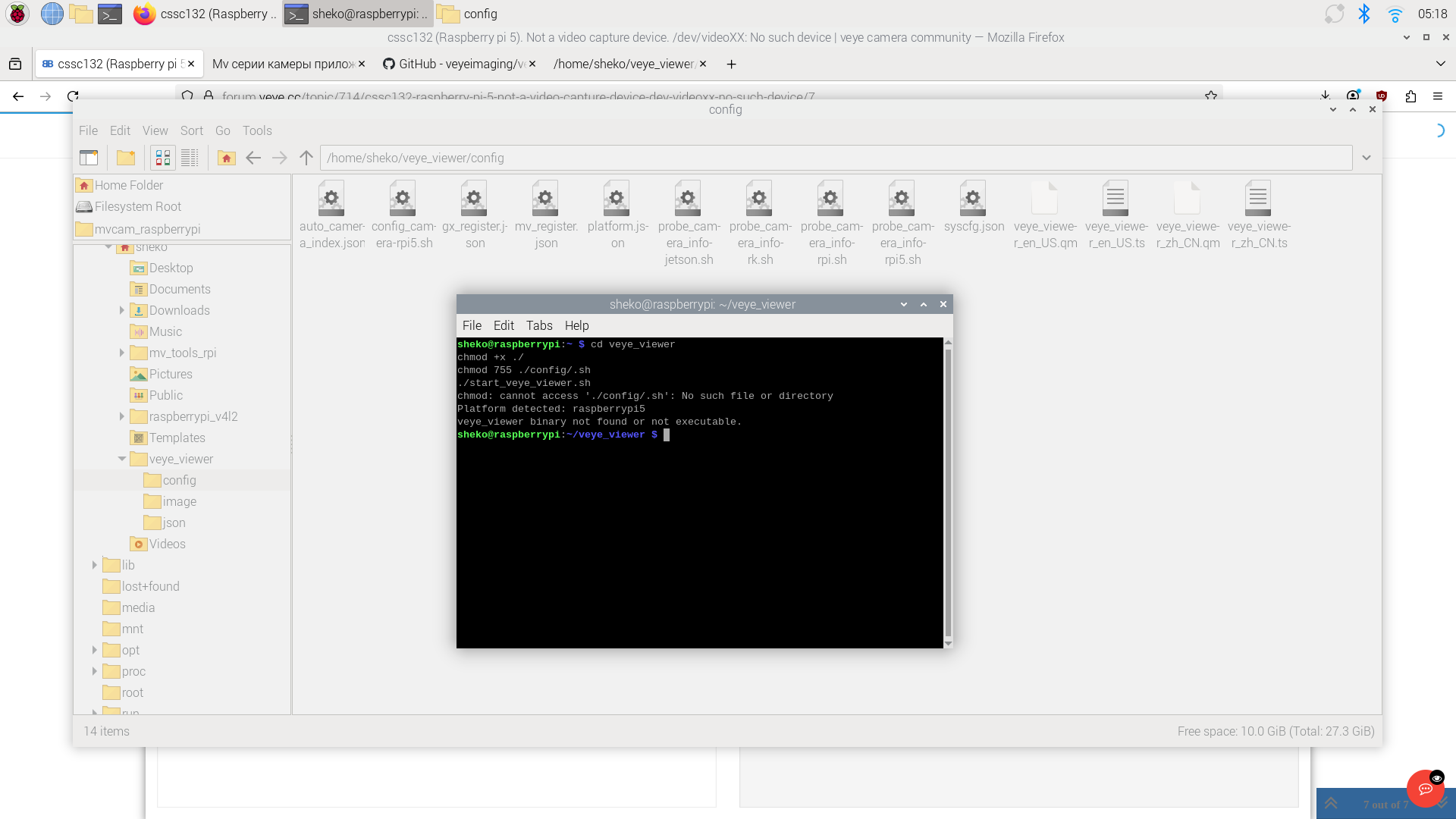
-
@sheko
Hi,
It looks like you downloaded the source code, but didn’t compile it. You can download the precompiled binary from the link below and run it directly.
https://github.com/veyeimaging/veye_viewer/releases/download/v1.1.4_rpi/veye_viewer_RaspberryPi_bin.zip -
Hi,
here is the result^heko@raspberrypi:~/veye_viewer_RaspberryPi_bin $ ./start_veye_viewer.sh
bash: ./start_veye_viewer.sh: Permission deniedsheko@raspberrypi:~/veye_viewer_RaspberryPi_bin $ chmod 755 ./config/.sh
./start_veye_viewer.sh
chmod: cannot access './config/.sh': No such file or directory
bash: ./start_veye_viewer.sh: Permission denied -
cd veye_viewer chmod +x ./* chmod 755 ./config/*.sh ./start_veye_viewer.sh -
the program started
white screen - no imagesheko@raspberrypi:~ $ cd veye_viewer
chmod +x ./*
chmod 755 ./config/*.sh
./start_veye_viewer.sh
Platform detected: raspberrypi5
Launching veye_viewer...
[2026-01-28 07:59:42.882][INFO ][Main.cpp:0029] Start cleaning expired logs. Keep days: 30 | Deadline date: 2025-12-29
[2026-01-28 07:59:42.886][INFO ][Main.cpp:0056] Log clean completed. Total deleted files: 0
Done --> /home/sheko/veye_viewer/config/auto_camera_index.json(veye_viewer:2119): GLib-GObject-CRITICAL **: 07:59:44.547: g_object_unref: assertion 'G_IS_OBJECT (object)' failed
Done --> /home/sheko/veye_viewer/config/auto_camera_index.json
Done --> /home/sheko/veye_viewer/config/auto_camera_index.json
[2026-01-28 08:00:53.233][WARN ][unknown_file:----] libpng warning: iCCP: known incorrect sRGB profile
[2026-01-28 08:00:53.234][WARN ][unknown_file:----] libpng warning: iCCP: known incorrect sRGB profile
[2026-01-28 08:00:53.235][WARN ][unknown_file:----] libpng warning: iCCP: known incorrect sRGB profile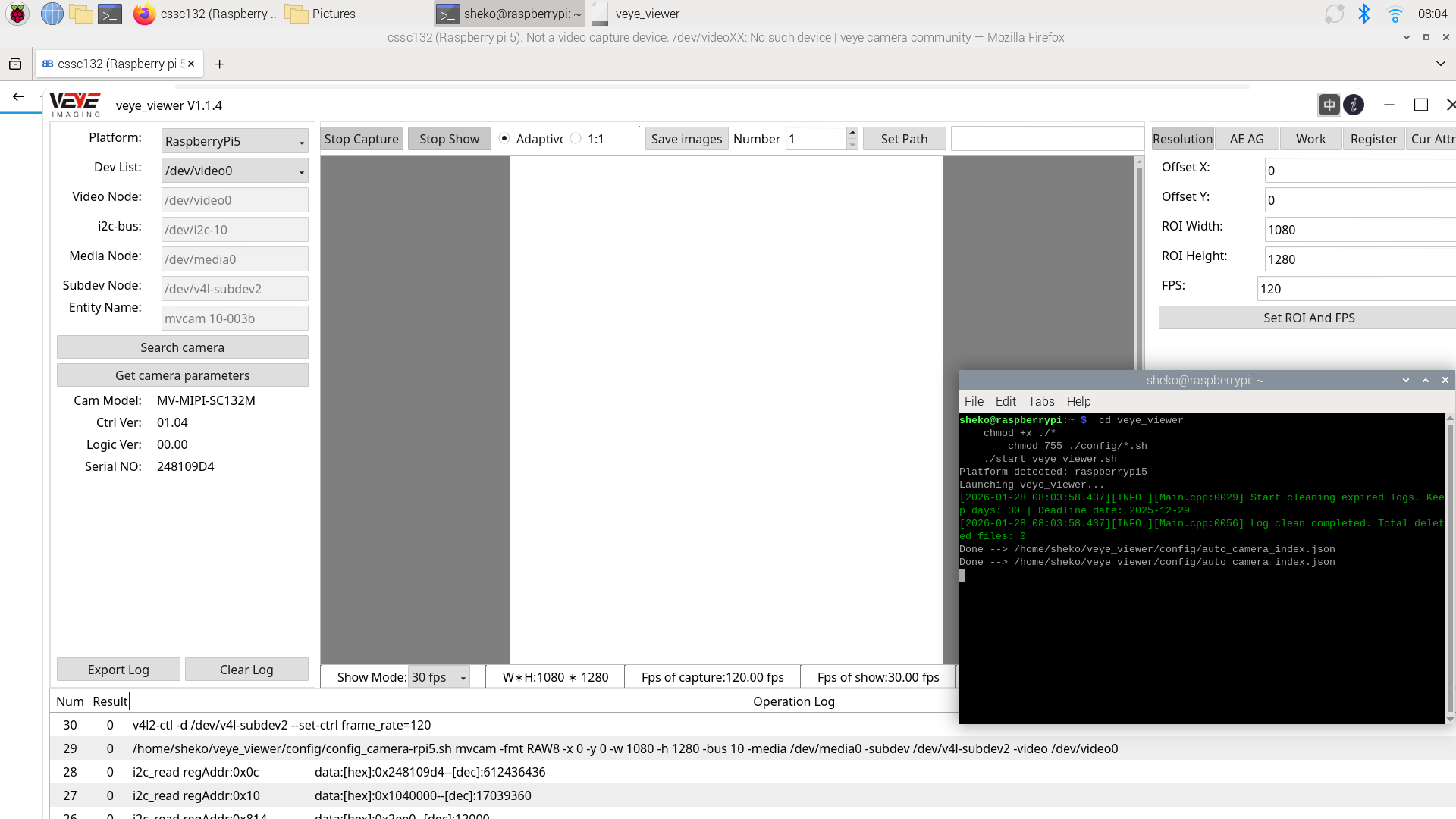
-
@sheko It looks like nothing is abnormal. You haven’t installed a lens, right?
-
That's right. It worked with the lens. Thank you very much for your technical support.