VEYE IMAGING Forum
    • Categories
    • Tags
    • Recent
    • Popular
    • Users
    • WIKI
    • veye.cc
    • Register
    • Login

    VEYE-MIPI-327E preview 速度調整?

    Scheduled Pinned Locked Moved VEYE MIPI camera
    21 Posts 2 Posters 6.9k Views 1 Watching
    Loading More Posts
    • Oldest to Newest
    • Newest to Oldest
    • Most Votes
    Reply
    • Reply as topic
    Log in to reply
    This topic has been deleted. Only users with topic management privileges can see it.
    • veye_xummV Offline
      veye_xumm @KUO
      last edited by

      @kuo 不行,不行。
      你用的什么主板?

      Questions will be answered as soon as possible, please be patient.
      如果你使用中文,请直接用中文提问。
      May the force be with YOU. (This is the translation of the mysterious Chinese symbol above.)

      K 1 Reply Last reply Reply Quote 0
      • K Offline
        KUO @veye_xumm
        last edited by

        @veye_xumm Raspberry pi 4B

        veye_xummV 1 Reply Last reply Reply Quote 0
        • veye_xummV Offline
          veye_xumm @KUO
          last edited by

          @kuo 建议您试试lagcy mode

          Questions will be answered as soon as possible, please be patient.
          如果你使用中文,请直接用中文提问。
          May the force be with YOU. (This is the translation of the mysterious Chinese symbol above.)

          K 1 Reply Last reply Reply Quote 0
          • K Offline
            KUO @veye_xumm
            last edited by

            @veye_xumm said in VEYE-MIPI-327E preview 速度調整?:

            lagcy mode

            請問這是甚麼?PIOS的版本嗎?

            veye_xummV 1 Reply Last reply Reply Quote 0
            • veye_xummV Offline
              veye_xumm @KUO
              last edited by

              @kuo http://wiki.veye.cc/index.php/Raspberry_Pi_Application_Note_Index/zh
              1.1.2

              Questions will be answered as soon as possible, please be patient.
              如果你使用中文,请直接用中文提问。
              May the force be with YOU. (This is the translation of the mysterious Chinese symbol above.)

              K 1 Reply Last reply Reply Quote 0
              • K Offline
                KUO @veye_xumm
                last edited by

                @veye_xumm
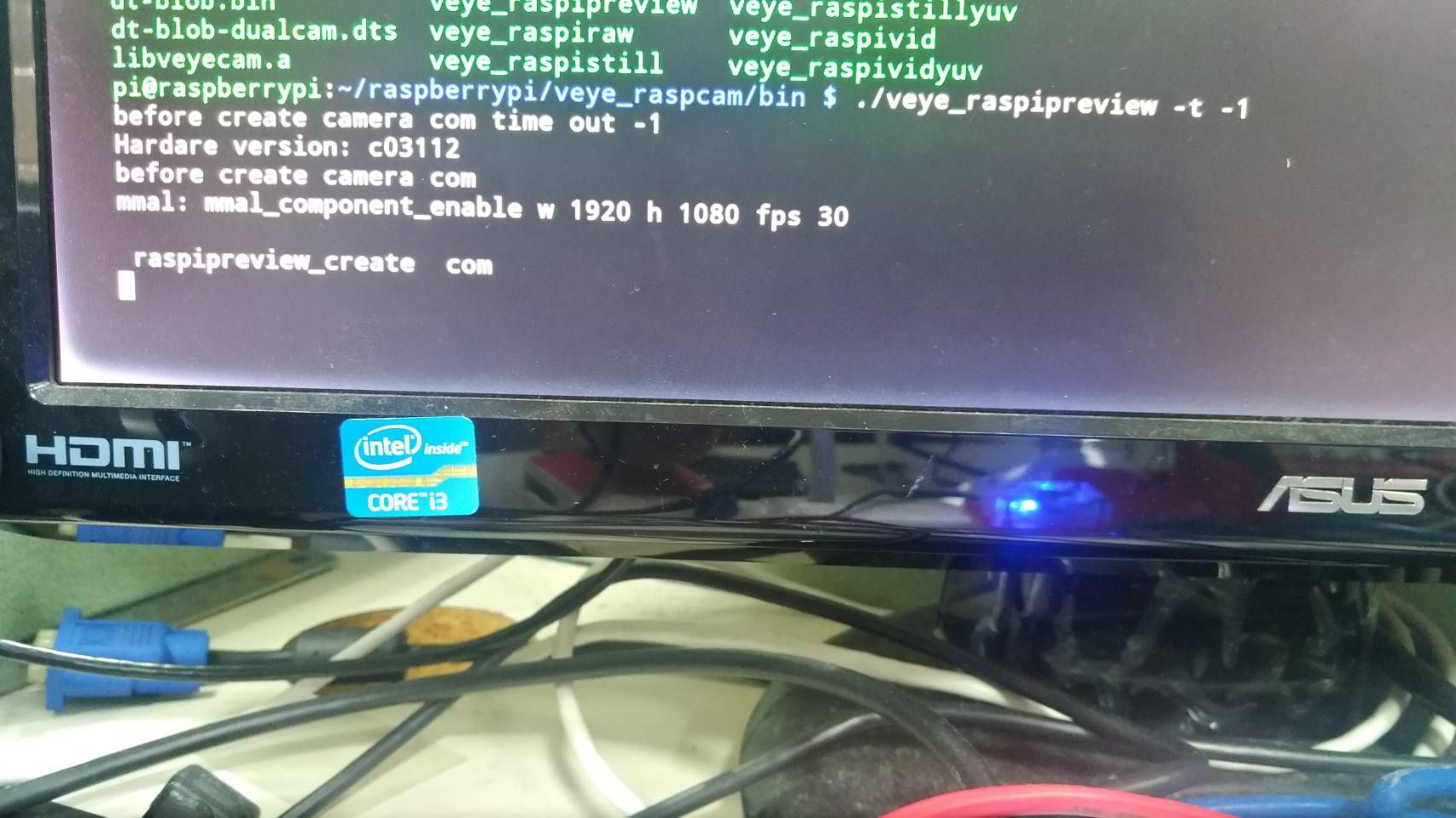
                (1)我試著使用 git clone https://github.com/veyeimaging/raspberrypi.git 提供的 ./veye_raspipreview -t -1 指令去preview
                不過沒有出現畫面,我裝的driver是veyecam2m,請問要做甚麼調整?
                9214.jpg
                (2)請問我能直接使用libcamera來preview嗎?
                (3)我用gstreamer和vlc來preview在30FPS的情況下畫面會卡頓是正常的嗎?您那邊畫面是順暢的嗎?

                veye_xummV 1 Reply Last reply Reply Quote 0
                • veye_xummV Offline
                  veye_xumm @KUO
                  last edited by

                  @kuo

                  (1)我試著使用 git clone https://github.com/veyeimaging/raspberrypi.git 提供的 ./veye_raspipreview -t -1 指令去preview

                  不過沒有出現畫面,我裝的driver是veyecam2m,請問要做甚麼調整?

                  这个是lagcy模式,需要uninstall驱动,打开lagcy camera支持才行。
                  http://wiki.veye.cc/index.php/VEYE_MIPI_290/327_for_Raspberry_Pi/zh#.E5.85.B3.E4.BA.8EpiOS.E7.89.88.E6.9C.AC---Bullseye
                  part2

                  (2)請問我能直接使用libcamera來preview嗎?

                  libcamera本质上是一个isp的框架,我们的相机本身带了isp功能。所以不需要,现在也不支持libcamera。

                  (3)我用gstreamer和vlc來preview在30FPS的情況下畫面會卡頓是正常的嗎?您那邊畫面是順暢的嗎?

                  这个主要原因是大量的使用cpu做软件的内存拷贝导致的。 还是建议你用lagcy mode。

                  Questions will be answered as soon as possible, please be patient.
                  如果你使用中文,请直接用中文提问。
                  May the force be with YOU. (This is the translation of the mysterious Chinese symbol above.)

                  K 2 Replies Last reply Reply Quote 0
                  • K Offline
                    KUO @veye_xumm
                    last edited by

                    This post is deleted!
                    1 Reply Last reply Reply Quote 0
                    • K Offline
                      KUO @veye_xumm
                      last edited by

                      @veye_xumm 感謝您 我試成功了
                      不過有一個疑問 沒有裝driver 他是怎麼辨識設備的?

                      veye_xummV 1 Reply Last reply Reply Quote 0
                      • veye_xummV Offline
                        veye_xumm @KUO
                        last edited by

                        @kuo 这个是树莓派的一种机制。其实并没有识别,cpu端通过mmal库,访问到gpu端,gpu端访问的camera。所以整体都是在应用层。

                        Questions will be answered as soon as possible, please be patient.
                        如果你使用中文,请直接用中文提问。
                        May the force be with YOU. (This is the translation of the mysterious Chinese symbol above.)

                        K 1 Reply Last reply Reply Quote 0
                        • K Offline
                          KUO @veye_xumm
                          last edited by

                          @veye_xumm 請問i2c裡面是否可以調整AF值 我想製作相機自動對焦的功能

                          veye_xummV 1 Reply Last reply Reply Quote 0
                          • veye_xummV Offline
                            veye_xumm @KUO
                            last edited by

                            @kuo 不好意思,现在相机没有这个功能。

                            Questions will be answered as soon as possible, please be patient.
                            如果你使用中文,请直接用中文提问。
                            May the force be with YOU. (This is the translation of the mysterious Chinese symbol above.)

                            K 1 Reply Last reply Reply Quote 0
                            • K Offline
                              KUO @veye_xumm
                              last edited by KUO

                              @veye_xumm 那如果如無法取得AF值 請問如何做對焦? 只能調整鏡頭嗎?

                              veye_xummV 1 Reply Last reply Reply Quote 0
                              • veye_xummV Offline
                                veye_xumm @KUO
                                last edited by

                                @kuo 两种方法,一种是你的后端程序去统计AF统计信息。 另一种就是直接用手动聚焦镜头,不用AF功能。

                                Questions will be answered as soon as possible, please be patient.
                                如果你使用中文,请直接用中文提问。
                                May the force be with YOU. (This is the translation of the mysterious Chinese symbol above.)

                                K 1 Reply Last reply Reply Quote 0
                                • K Offline
                                  KUO @veye_xumm
                                  last edited by KUO

                                  @veye_xumm AF统计信息該如何取得? 我想取得AF edge 值看他何時是清新何時是模糊

                                  veye_xummV 1 Reply Last reply Reply Quote 0
                                  • veye_xummV Offline
                                    veye_xumm @KUO
                                    last edited by

                                    @kuo 之前说过了,摄像机没有统计这个参数的功能。

                                    Questions will be answered as soon as possible, please be patient.
                                    如果你使用中文,请直接用中文提问。
                                    May the force be with YOU. (This is the translation of the mysterious Chinese symbol above.)

                                    K 1 Reply Last reply Reply Quote 0
                                    • K Offline
                                      KUO @veye_xumm
                                      last edited by

                                      @veye_xumm 好的謝謝您

                                      1 Reply Last reply Reply Quote 0

                                      Hello! It looks like you're interested in this conversation, but you don't have an account yet.

                                      Getting fed up of having to scroll through the same posts each visit? When you register for an account, you'll always come back to exactly where you were before, and choose to be notified of new replies (either via email, or push notification). You'll also be able to save bookmarks and upvote posts to show your appreciation to other community members.

                                      With your input, this post could be even better 💗

                                      Register Login
                                      • First post
                                        Last post
