VEYE IMAGING Forum
    • Categories
    • Tags
    • Recent
    • Popular
    • Users
    • WIKI
    • veye.cc
    • Register
    • Login

    树莓派4b 5.15.92,vm_mipi_imx296安装v4l2驱动,无法采集图像

    Scheduled Pinned Locked Moved Raspberry Pi App Software
    16 Posts 2 Posters 4.8k Views 1 Watching
    Loading More Posts
    • Oldest to Newest
    • Newest to Oldest
    • Most Votes
    Reply
    • Reply as topic
    Log in to reply
    This topic has been deleted. Only users with topic management privileges can see it.
    • H Offline
      hujun
      last edited by

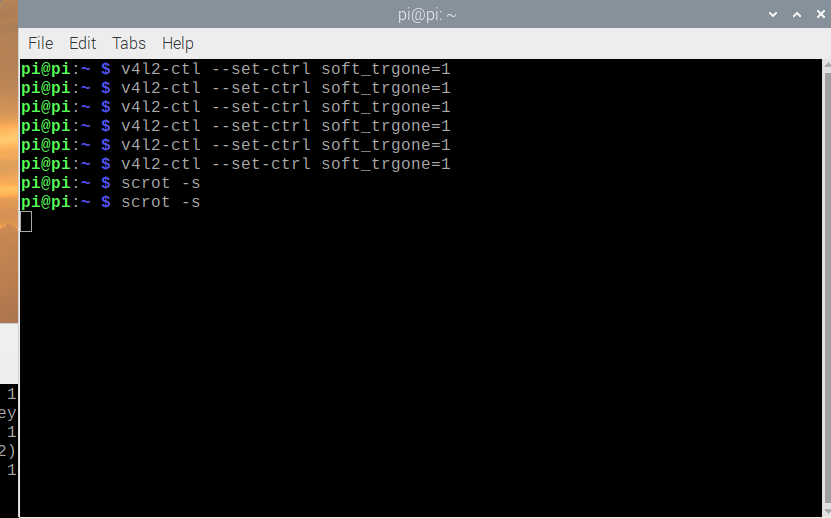
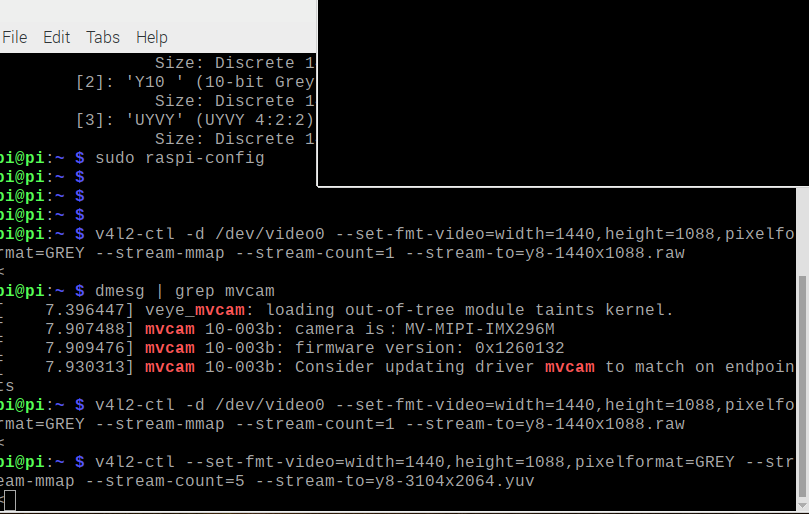
      如下图,显示需要升级驱动,而驱动,是我从GitHub下载源码编译,在安装的。请问怎么解决此问题,实现软触发采集图片。2023-02-20-102125_831x518_scrot.png 2023-02-20-102059_809x514_scrot.png

      veye_xummV 1 Reply Last reply Reply Quote 0
      • veye_xummV Offline
        veye_xumm @hujun
        last edited by

        @hujun 驱动的这个warning不用管它,不影响使用。
        建议参考这个链接的6.7.1,6.7.2部分,完整执行一下。
        http://wiki.veye.cc/index.php/Mv_series_camera_appnotes_4_rpi/zh#.E8.A7.A6.E5.8F.91.E6.A8.A1.E5.BC.8F

        Questions will be answered as soon as possible, please be patient.
        如果你使用中文,请直接用中文提问。
        May the force be with YOU. (This is the translation of the mysterious Chinese symbol above.)

        H 1 Reply Last reply Reply Quote 0
        • H Offline
          hujun @veye_xumm
          last edited by

          @veye_xumm 已经反复执行过几遍,显示器上已经没有图片显示,并且也使用过保存图片的命令,生成了图片,却在yuv player中无法播放。

          veye_xummV 1 Reply Last reply Reply Quote 0
          • veye_xummV Offline
            veye_xumm @hujun
            last edited by

            @hujun

            @hujun said in 树莓派4b 5.15.92,vm_mipi_imx296安装v4l2驱动,无法采集图像:

            显示器上已经没有图片显示

            操作系统吧hdmi输出休眠了吧? 加上个鼠标动一下就可以了。

            @hujun said in 树莓派4b 5.15.92,vm_mipi_imx296安装v4l2驱动,无法采集图像:

            生成了图片,却在yuv player中无法播放。

            看一下part8.

            @hujun said in 树莓派4b 5.15.92,vm_mipi_imx296安装v4l2驱动,无法采集图像:

            反复执行过几遍

            严格按照步骤走,肯定没问题。你可以把你的执行步骤先后顺序描述一下,我看一下。

            Questions will be answered as soon as possible, please be patient.
            如果你使用中文,请直接用中文提问。
            May the force be with YOU. (This is the translation of the mysterious Chinese symbol above.)

            H 1 Reply Last reply Reply Quote 0
            • H Offline
              hujun @veye_xumm
              last edited by

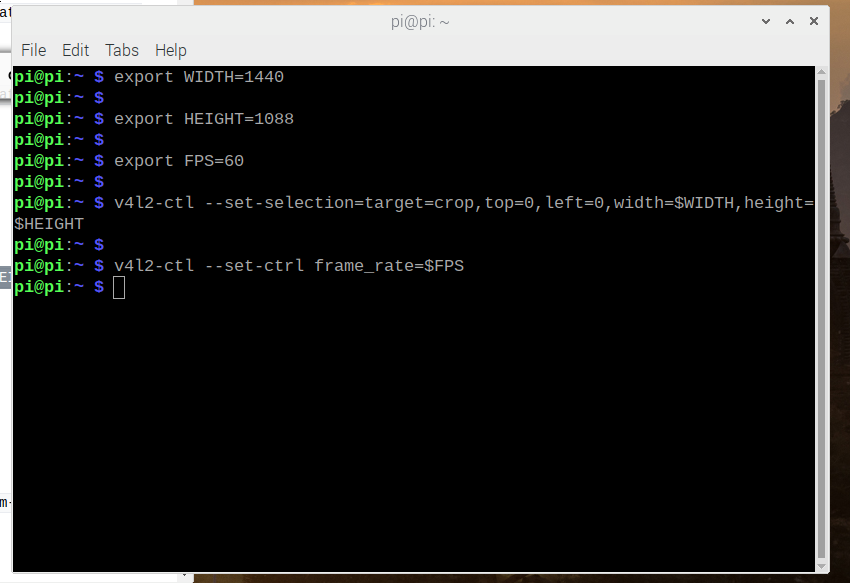
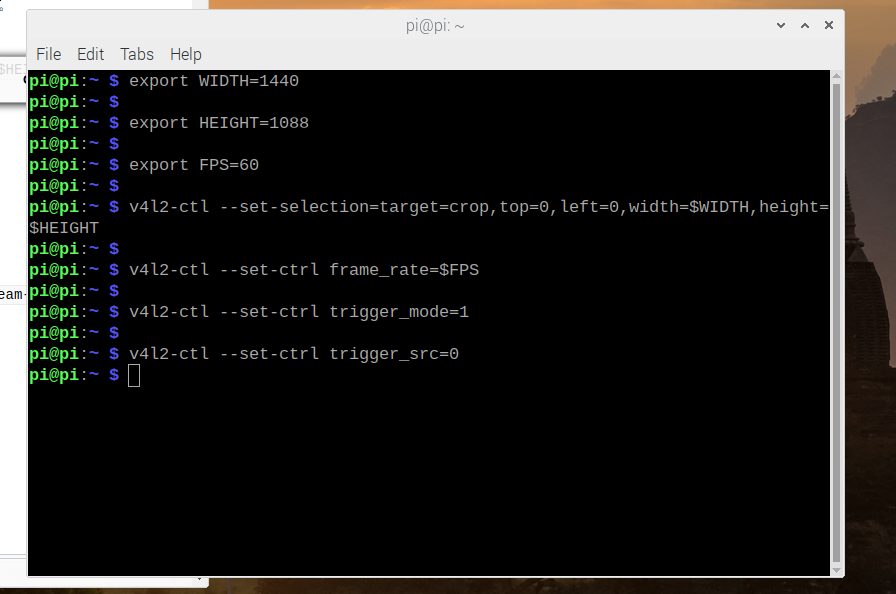
              @veye_xumm [0_1676863581519_fz3-16768635810120](正在上传 0%) 2023-02-20-112546_889x596_scrot.png 2023-02-20-112740_850x583_scrot.png 2023-02-20-112853_896x594_scrot.png 2023-02-20-113024_874x598_scrot.png 2023-02-20-113146_1671x638_scrot.png
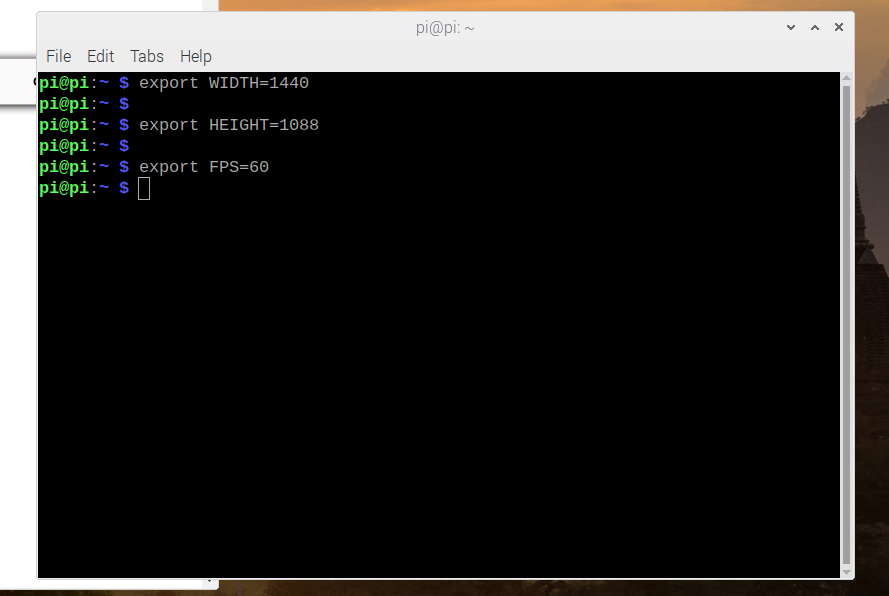
              步骤如上所示,也用鼠标拖到了,结果还是没有。

              veye_xummV 1 Reply Last reply Reply Quote 0
              • veye_xummV Offline
                veye_xumm @hujun
                last edited by

                @hujun
                c614c674-1f8b-46d2-89c3-fc7541ef5973-image.png
                看你截图的这个小于号,应该是已经接收到一张了。
                只是你的命令要接收5张,所以还在等待继续触发。

                Questions will be answered as soon as possible, please be patient.
                如果你使用中文,请直接用中文提问。
                May the force be with YOU. (This is the translation of the mysterious Chinese symbol above.)

                H 1 Reply Last reply Reply Quote 0
                • H Offline
                  hujun @veye_xumm
                  last edited by

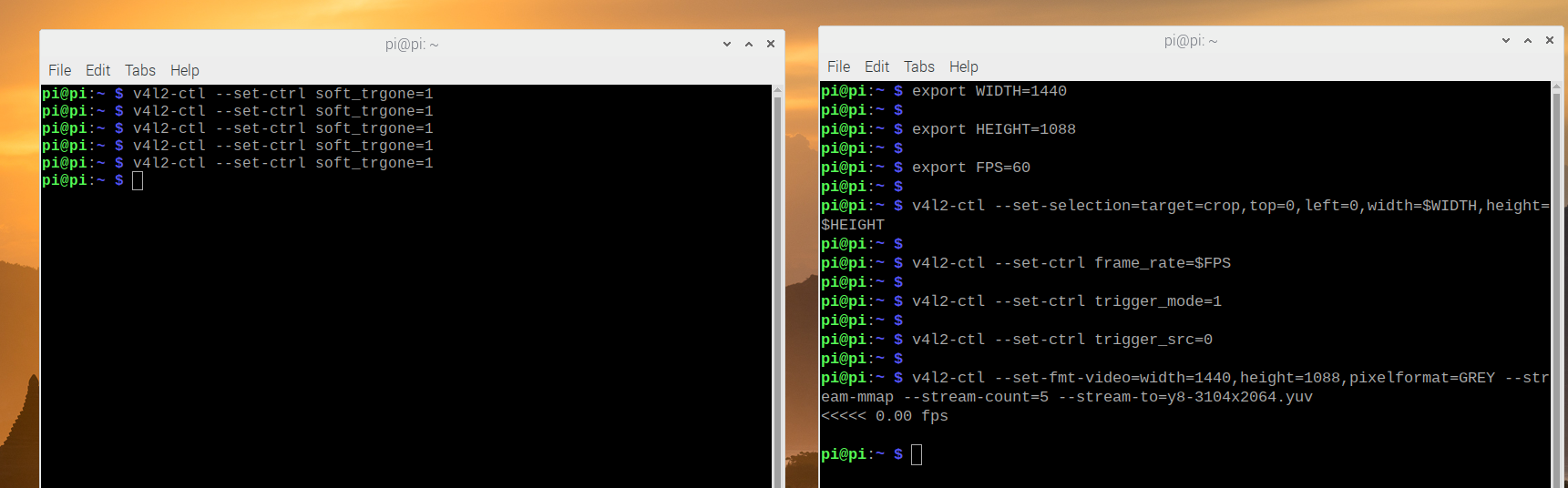
                  @veye_xumm 2023-02-20-114803_1721x536_scrot.png
                  现在执行了5次,显示如上,但屏幕还是没有显示图片

                  veye_xummV 1 Reply Last reply Reply Quote 0
                  • veye_xummV Offline
                    veye_xumm @hujun
                    last edited by

                    @hujun

                    @hujun said in 树莓派4b 5.15.92,vm_mipi_imx296安装v4l2驱动,无法采集图像:

                    显示如上,但屏幕还是没有显示图片

                    你理解错了,这个命令是抓取图片保存到文件中,不是显示到屏幕上的。

                    Questions will be answered as soon as possible, please be patient.
                    如果你使用中文,请直接用中文提问。
                    May the force be with YOU. (This is the translation of the mysterious Chinese symbol above.)

                    H 1 Reply Last reply Reply Quote 0
                    • H Offline
                      hujun @veye_xumm
                      last edited by

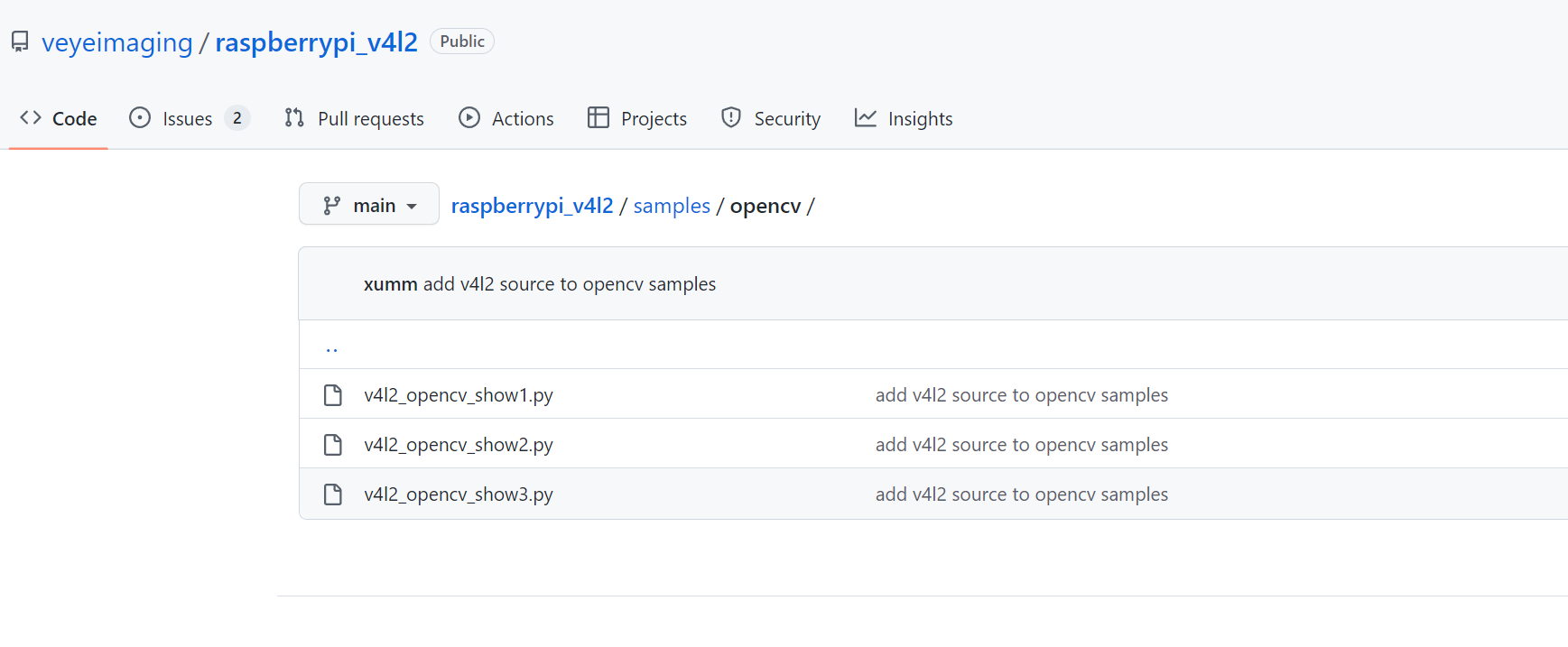
                      @veye_xumm 好的,非常感谢您的帮助。QQ截图20230220173440.png
                      另外我想询问,mv系列的相机,可否使用GitHub中上面这个v4l2文件夹中Python的demo,我在其它贴子上说,不支持。如果可以,有相关手册吗?

                      veye_xummV 1 Reply Last reply Reply Quote 0
                      • veye_xummV Offline
                        veye_xumm @hujun
                        last edited by

                        @hujun MV系列的不行。因为MV系列输出的是raw数据,不能直接显示到屏幕上去。
                        不过MV系列支持一种纯粹为了调试用的格式,就是UYVY数据格式。
                        你可以参考一下我们在jetson平台写的gstreamer命令行试试:
                        http://wiki.veye.cc/index.php/Mv_series_camera_appnotes_4_jetson/zh#.E5.AE.9E.E6.97.B6.E9.A2.84.E8.A7.88
                        但是话还得说回来,mv系列的东西做实时预览,并没有实际用途吧?

                        Questions will be answered as soon as possible, please be patient.
                        如果你使用中文,请直接用中文提问。
                        May the force be with YOU. (This is the translation of the mysterious Chinese symbol above.)

                        H 1 Reply Last reply Reply Quote 0
                        • H Offline
                          hujun @veye_xumm
                          last edited by

                          @veye_xumm 是的,我们并不是想实现实时预览。我们想通过qt控制MV相机,实现采集图片。最后由qt实现一系列的图像处理,点云生成的操作。目前问题是,无法在qt中调用,因为所用的都是命令行。

                          veye_xummV 1 Reply Last reply Reply Quote 0
                          • veye_xummV Offline
                            veye_xumm @hujun
                            last edited by

                            @hujun qt直接参考我们c语言的demo,打开/dev/video0获取数据即可。

                            Questions will be answered as soon as possible, please be patient.
                            如果你使用中文,请直接用中文提问。
                            May the force be with YOU. (This is the translation of the mysterious Chinese symbol above.)

                            H 1 Reply Last reply Reply Quote 0
                            • H Offline
                              hujun @veye_xumm
                              last edited by

                              @veye_xumm 请问在链接能提供一下吗?

                              veye_xummV 1 Reply Last reply Reply Quote 0
                              • veye_xummV Offline
                                veye_xumm @hujun
                                last edited by

                                @hujun http://wiki.veye.cc/index.php/Mv_series_camera_appnotes_4_rpi/zh
                                part6.5.2

                                Questions will be answered as soon as possible, please be patient.
                                如果你使用中文,请直接用中文提问。
                                May the force be with YOU. (This is the translation of the mysterious Chinese symbol above.)

                                H 1 Reply Last reply Reply Quote 0
                                • H Offline
                                  hujun @veye_xumm
                                  last edited by

                                  @veye_xumm 这篇文档我看了很久,您指的c语音demo是yavta文件夹中的c程序吗?

                                  veye_xummV 1 Reply Last reply Reply Quote 0
                                  • veye_xummV Offline
                                    veye_xumm @hujun
                                    last edited by

                                    @hujun 是的

                                    Questions will be answered as soon as possible, please be patient.
                                    如果你使用中文,请直接用中文提问。
                                    May the force be with YOU. (This is the translation of the mysterious Chinese symbol above.)

                                    1 Reply Last reply Reply Quote 0

                                    Hello! It looks like you're interested in this conversation, but you don't have an account yet.

                                    Getting fed up of having to scroll through the same posts each visit? When you register for an account, you'll always come back to exactly where you were before, and choose to be notified of new replies (either via email, or push notification). You'll also be able to save bookmarks and upvote posts to show your appreciation to other community members.

                                    With your input, this post could be even better 💗

                                    Register Login
                                    • First post
                                      Last post