VEYE IMAGING Forum
    • Categories
    • Tags
    • Recent
    • Popular
    • Users
    • WIKI
    • veye.cc
    • Register
    • Login

    RAW-MIPI-AR0234M配置为4lane模式

    Scheduled Pinned Locked Moved Machine Vision camera
    55 Posts 2 Posters 32.5k Views 1 Watching
    Loading More Posts
    • Oldest to Newest
    • Newest to Oldest
    • Most Votes
    Reply
    • Reply as topic
    Log in to reply
    This topic has been deleted. Only users with topic management privileges can see it.
    • veye_xummV Offline
      veye_xumm @lizi
      last edited by

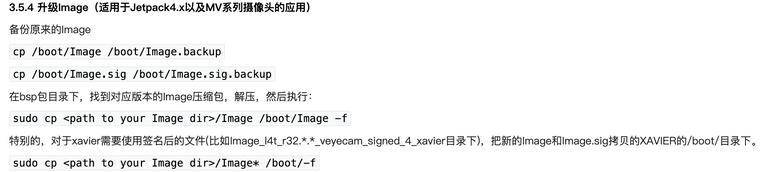
      @lizi 我们发布的压缩包里面,应该是同时有Image和Image.sig的。
      你注意一下版本,千万别搞错了。

      Questions will be answered as soon as possible, please be patient.
      如果你使用中文,请直接用中文提问。
      May the force be with YOU. (This is the translation of the mysterious Chinese symbol above.)

      L 1 Reply Last reply Reply Quote 0
      • L Offline
        lizi @veye_xumm
        last edited by

        @veye_xumm 压缩包里是有的,但是boot下没有Image.sig文件。这里也是只用cp一个Image吧?我的板子是orin-nano。是xavier才要复制Image.sig。没理解错吧截屏2024-01-24 11.30.38.png

        veye_xummV 1 Reply Last reply Reply Quote 0
        • veye_xummV Offline
          veye_xumm @lizi
          last edited by

          @lizi orin跟xavier一致,都拷过去

          Questions will be answered as soon as possible, please be patient.
          如果你使用中文,请直接用中文提问。
          May the force be with YOU. (This is the translation of the mysterious Chinese symbol above.)

          L 1 Reply Last reply Reply Quote 0
          • L Offline
            lizi @veye_xumm
            last edited by

            @veye_xumm 还是不行 截屏2024-01-24 11.51.18.png

            veye_xummV 1 Reply Last reply Reply Quote 0
            • veye_xummV Offline
              veye_xumm @lizi
              last edited by

              @lizi 如上图显示,你在i2c-9上接了一个摄像头。而且一切正常。

              Questions will be answered as soon as possible, please be patient.
              如果你使用中文,请直接用中文提问。
              May the force be with YOU. (This is the translation of the mysterious Chinese symbol above.)

              L 1 Reply Last reply Reply Quote 0
              • L Offline
                lizi @veye_xumm
                last edited by lizi

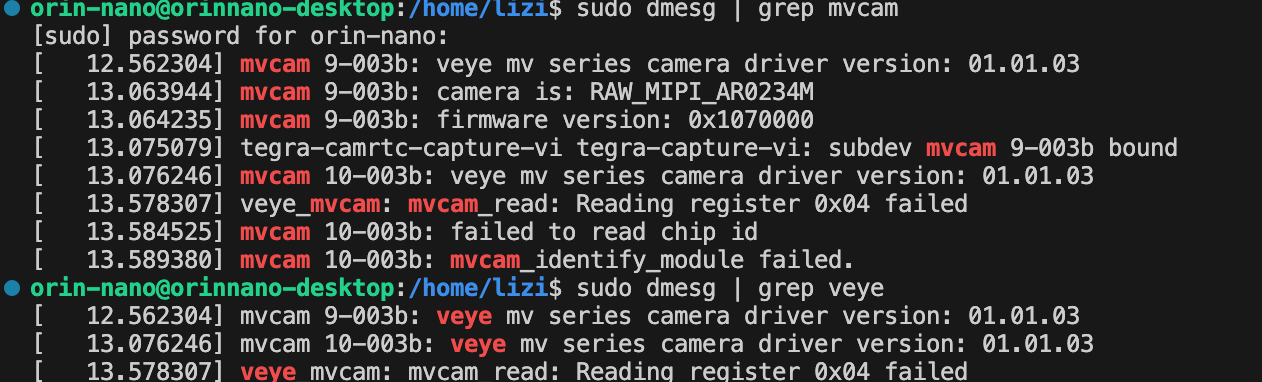
                @veye_xumm ok了可以读到摄像头。但是在跑i2c.sh的时候又出现了问题。上面的dmesg | grep mvcam 就有显示veye_mvcam: mvcam_read: Reading register 0x04 failed 寄存器读不到

                截屏2024-01-24 12.15.28.png

                veye_xummV 1 Reply Last reply Reply Quote 0
                • veye_xummV Offline
                  veye_xumm @lizi
                  last edited by

                  @lizi 执行一下这个链接的part3

                  Questions will be answered as soon as possible, please be patient.
                  如果你使用中文,请直接用中文提问。
                  May the force be with YOU. (This is the translation of the mysterious Chinese symbol above.)

                  L 1 Reply Last reply Reply Quote 0
                  • L Offline
                    lizi @veye_xumm
                    last edited by

                    @veye_xumm 还是同样的错误

                    veye_xummV 1 Reply Last reply Reply Quote 0
                    • veye_xummV Offline
                      veye_xumm @lizi
                      last edited by

                      @lizi 看一下part5. 你这个应该加上-b 9 参数

                      Questions will be answered as soon as possible, please be patient.
                      如果你使用中文,请直接用中文提问。
                      May the force be with YOU. (This is the translation of the mysterious Chinese symbol above.)

                      L 1 Reply Last reply Reply Quote 0
                      • L Offline
                        lizi @veye_xumm
                        last edited by

                        @veye_xumm 太感谢了,ok了。所以如果要配置另一个摄像头就是b -10是吗?

                        veye_xummV 1 Reply Last reply Reply Quote 0
                        • veye_xummV Offline
                          veye_xumm @lizi
                          last edited by

                          @lizi 是的,不客气。

                          Questions will be answered as soon as possible, please be patient.
                          如果你使用中文,请直接用中文提问。
                          May the force be with YOU. (This is the translation of the mysterious Chinese symbol above.)

                          L 1 Reply Last reply Reply Quote 0
                          • L Offline
                            lizi @veye_xumm
                            last edited by

                            @veye_xumm 您好,还有一个问题我想问一下就是有没有办法获取到捕获的视频帧现实世界的时间戳?

                            veye_xummV 1 Reply Last reply Reply Quote 0
                            • veye_xummV Offline
                              veye_xumm @lizi
                              last edited by

                              @lizi 摄像头支持的v4l2驱动框架,这个驱动框架提供的v4l2 buffer中就有timestamp。
                              这个时间戳,是jetson的硬件接收到一帧数据的时候打上去的,非常准确。

                              Questions will be answered as soon as possible, please be patient.
                              如果你使用中文,请直接用中文提问。
                              May the force be with YOU. (This is the translation of the mysterious Chinese symbol above.)

                              L 1 Reply Last reply Reply Quote 0
                              • L Offline
                                lizi @veye_xumm
                                last edited by

                                @veye_xumm 好的,感谢

                                1 Reply Last reply Reply Quote 0

                                Hello! It looks like you're interested in this conversation, but you don't have an account yet.

                                Getting fed up of having to scroll through the same posts each visit? When you register for an account, you'll always come back to exactly where you were before, and choose to be notified of new replies (either via email, or push notification). You'll also be able to save bookmarks and upvote posts to show your appreciation to other community members.

                                With your input, this post could be even better 💗

                                Register Login
                                • First post
                                  Last post