Taking images with IMX462 in Python
-
Hi,
can I use the same scripts for python with IMX462 camera as I use for IMX327?
I somehow cannot initialize the camera:
import D_mipicamera as Dcam camera = Dcam.mipi_camera() camera.init_camera() import os status = os.system('sh ./veye_mipi_i2c.sh -w -f cameramode -p1 0x0 -b 10') print status status = os.system('sh ./veye_mipi_i2c.sh -w -f daynightmode -p1 0xFC -p1 0x00 -b 10') #print status ##turn off automatic exposure status = os.system('sh ./veye_mipi_i2c.sh -w -f agc -p1 0 -b 10') print status ##turn off white balance status = os.system('sh ./veye_mipi_i2c.sh -w -f wbmode -p1 0x1b -b 10') print status status = os.system('sh ./veye_mipi_i2c.sh -w -f lowlight -p1 0x09 -b 10') print status directory="/home/pi/testmipi/" date = datetime.datetime.now().strftime("%m_%d_%Y_%H_%M_%S") frame = camera.capture(encoding = 'jpeg') camera.release_buffer(frame) del frame time.sleep(1) frame = camera.capture(encoding = 'jpeg') frame.as_array.tofile((directory)+"nm590"+ date + ".jpg") camera.release_buffer(frame) del frame -
@seka
Hi,
I think you need to run./rpi3-gpiovirtbuf s 133 1to power up VEYE-MIPI-IMX462 first. Because on imx462 module, the reset pin is effective.
I will upgrade our python demo later.
-
Thank you Xu,
ok, I can now initiate the camera but get another pointer access error when running:frame = camera.capture(encoding = 'raw') frame.as_array.tofile((directory)+"nm280"+ date + ".raw") camera.release_buffer(frame)The error I get is:
In [48]: frame.as_array.tofile((directory)+"nm280"+ date + ".raw")
Traceback (most recent call last):

  File "<ipython-input-48-46dc4d541567>", line 1, in <module>
    frame.as_array.tofile((directory)+"nm280"+ date + ".raw")

  File "D_mipicamera.py", line 208, in as_array
    return np.ctypeslib.as_array(self.buffer_ptr[0].data, shape=(self.length,))

ValueError: NULL pointer access
Can you please send me a line of code with which I can create a raw image ?
Many thanks
-
@seka
sorry for reply late.
I think this camera do not support [raw format].
Since it only support YUV422(UYVY/YUYV), the python demo only support capture file format :
IMAGE_ENCODING_JPEG, IMAGE_ENCODING_I420,IMAGE_ENCODING_BMP,IMAGE_ENCODING_PNG -
@veye_xumm so is here a way to create raw images at all? with bash script?
Can you please write a line of code in python or bash with which I can capture images in raw format?
Many thanks
-
@seka
hi,
This camera module can not output raw data.
It has an ISP module built-in, the output format is YUV. -
@veye_xumm Is there a way to capture with 10 or 12 bit depth as the sensor is capable of?
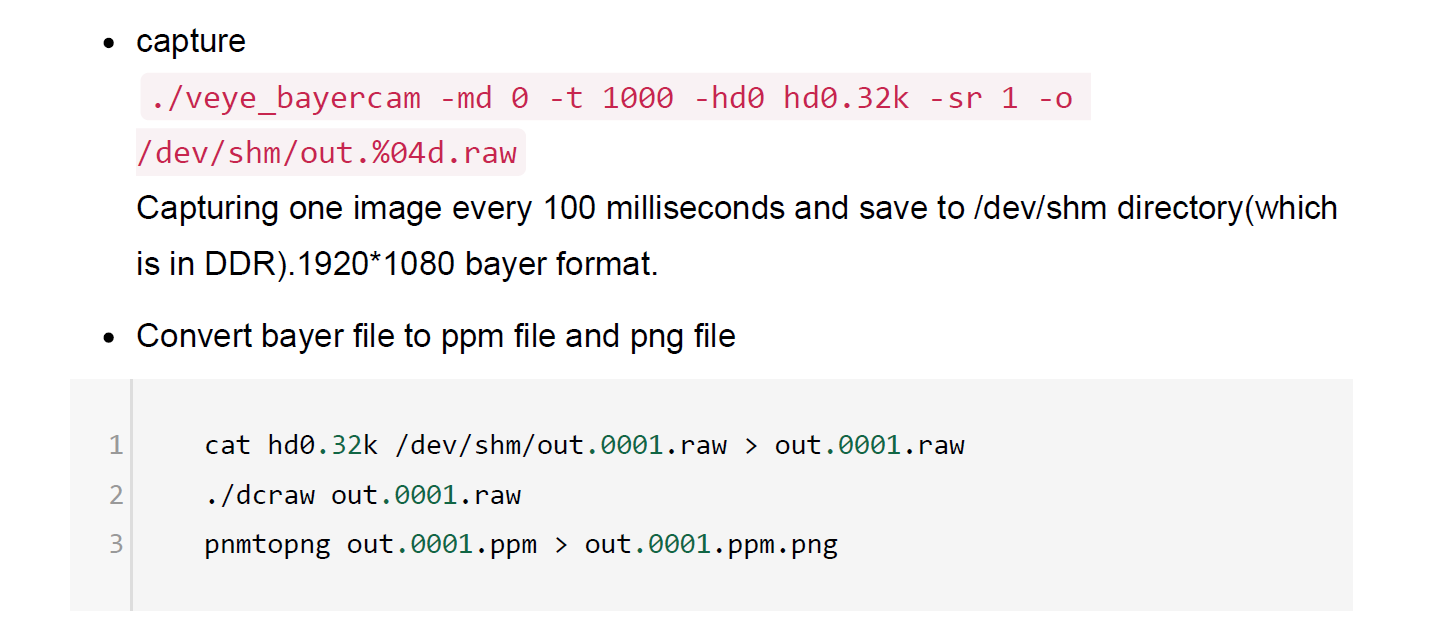
This is part of the manual that I received from you.
It seems like this is raw format, no?
-
@veye_xumm but yuv is 10 or 12 bit?? that would be ok for me too...
Can you please adjust my code so that I capture in 10- or 12 bit YUV?
Thank you
-
@seka ```
frame = camera.capture(encoding = 'i420')
       frame.as_array.tofile("test.yuv")
probably like this??
-
@seka
hi, VEYE-MIPI-IMX462 do not support YUV 10BIT/12BIT.

Hello! It looks like you're interested in this conversation, but you don't have an account yet.
Getting fed up of having to scroll through the same posts each visit? When you register for an account, you'll always come back to exactly where you were before, and choose to be notified of new replies (either via email, or push notification). You'll also be able to save bookmarks and upvote posts to show your appreciation to other community members.
With your input, this post could be even better 💗
Register Login