CS-USB-IMX307 OpenCV 連續採集影像造成 USB disconnct
-
@veye_xumm
色度是指這個嗎?我可以試看看
hue 0x00980903 (int) : min=0 max=100 step=1 default=50 value=50
我用 v4l2-ctl 下
v4l2-ctl -d /dev/video0 --set-ctrl=hue=0
可是它還是顯示 value=50 -
@coolmitch 我用另一個別的廠牌的 uvc camera 可以這樣設定。
v4l2-ctl -d /dev/video1 --all
Driver Info (not using libv4l2):
Driver name : uvcvideo
Card type : USB Camera
Bus info : usb-70090000.xusb-2.1
Driver version: 4.9.201
Capabilities : 0x84200001
Video Capture
Streaming
Extended Pix Format
Device Capabilities
Device Caps : 0x04200001
Video Capture
Streaming
Extended Pix Format
Priority: 2
Video input : 0 (Camera 1: ok)
Format Video Capture:
Width/Height : 1280/720
Pixel Format : 'MJPG'
Field : None
Bytes per Line : 0
Size Image : 1843200
Colorspace : sRGB
Transfer Function : Default (maps to sRGB)
YCbCr/HSV Encoding: Default (maps to ITU-R 601)
Quantization : Default (maps to Full Range)
Flags :
Crop Capability Video Capture:
Bounds : Left 0, Top 0, Width 1280, Height 720
Default : Left 0, Top 0, Width 1280, Height 720
Pixel Aspect: 1/1
Selection: crop_default, Left 0, Top 0, Width 1280, Height 720
Selection: crop_bounds, Left 0, Top 0, Width 1280, Height 720
Streaming Parameters Video Capture:
Capabilities : timeperframe
Frames per second: 30.000 (30/1)
Read buffers : 0
brightness 0x00980900 (int) : min=-64 max=64 step=1 default=0 value=0
contrast 0x00980901 (int) : min=0 max=100 step=1 default=38 value=38
saturation 0x00980902 (int) : min=0 max=100 step=1 default=60 value=60
hue 0x00980903 (int) : min=-180 max=180 step=1 default=0 value=%(#ff0000)[50]
white_balance_temperature_auto 0x0098090c (bool) : default=1 value=1
gamma 0x00980910 (int) : min=100 max=500 step=1 default=440 value=440
gain 0x00980913 (int) : min=0 max=128 step=1 default=40 value=40
power_line_frequency 0x00980918 (menu) : min=0 max=2 default=1 value=2
white_balance_temperature 0x0098091a (int) : min=2800 max=6500 step=10 default=4600 value=4600 flags=inactive
sharpness 0x0098091b (int) : min=0 max=100 step=1 default=80 value=80
backlight_compensation 0x0098091c (int) : min=0 max=2 step=1 default=0 value=1
exposure_auto 0x009a0901 (menu) : min=0 max=3 default=3 value=3
exposure_absolute 0x009a0902 (int) : min=50 max=10000 step=1 default=166 value=50 flags=inactive
exposure_auto_priority 0x009a0903 (bool) : default=0 value=1
focus_absolute 0x009a090a (int) : min=0 max=1023 step=1 default=68 value=68 flags=inactive
focus_auto 0x009a090c (bool) : default=1 value=1
aaeon@aaeon2-desktop:/var/log$ v4l2-ctl -d /dev/video1 --set-ctrl=hue=0
aaeon@aaeon2-desktop:/var/log$ v4l2-ctl -d /dev/video1 --all
Driver Info (not using libv4l2):
Driver name : uvcvideo
Card type : USB Camera
Bus info : usb-70090000.xusb-2.1
Driver version: 4.9.201
Capabilities : 0x84200001
Video Capture
Streaming
Extended Pix Format
Device Capabilities
Device Caps : 0x04200001
Video Capture
Streaming
Extended Pix Format
Priority: 2
Video input : 0 (Camera 1: ok)
Format Video Capture:
Width/Height : 1280/720
Pixel Format : 'MJPG'
Field : None
Bytes per Line : 0
Size Image : 1843200
Colorspace : sRGB
Transfer Function : Default (maps to sRGB)
YCbCr/HSV Encoding: Default (maps to ITU-R 601)
Quantization : Default (maps to Full Range)
Flags :
Crop Capability Video Capture:
Bounds : Left 0, Top 0, Width 1280, Height 720
Default : Left 0, Top 0, Width 1280, Height 720
Pixel Aspect: 1/1
Selection: crop_default, Left 0, Top 0, Width 1280, Height 720
Selection: crop_bounds, Left 0, Top 0, Width 1280, Height 720
Streaming Parameters Video Capture:
Capabilities : timeperframe
Frames per second: 30.000 (30/1)
Read buffers : 0
brightness 0x00980900 (int) : min=-64 max=64 step=1 default=0 value=0
contrast 0x00980901 (int) : min=0 max=100 step=1 default=38 value=38
saturation 0x00980902 (int) : min=0 max=100 step=1 default=60 value=60
hue 0x00980903 (int) : min=-180 max=180 step=1 default=0 %(#ff0000)[value=0]
white_balance_temperature_auto 0x0098090c (bool) : default=1 value=1
gamma 0x00980910 (int) : min=100 max=500 step=1 default=440 value=440
gain 0x00980913 (int) : min=0 max=128 step=1 default=40 value=40
power_line_frequency 0x00980918 (menu) : min=0 max=2 default=1 value=2
white_balance_temperature 0x0098091a (int) : min=2800 max=6500 step=10 default=4600 value=4600 flags=inactive
sharpness 0x0098091b (int) : min=0 max=100 step=1 default=80 value=80
backlight_compensation 0x0098091c (int) : min=0 max=2 step=1 default=0 value=1
exposure_auto 0x009a0901 (menu) : min=0 max=3 default=3 value=3
exposure_absolute 0x009a0902 (int) : min=50 max=10000 step=1 default=166 value=50 flags=inactive
exposure_auto_priority 0x009a0903 (bool) : default=0 value=1
focus_absolute 0x009a090a (int) : min=0 max=1023 step=1 default=68 value=68 flags=inactive
focus_auto 0x009a090c (bool) : default=1 value=1 -
@coolmitch
我的意思是,冒用这个协议。 这个需要单独给你做一个版本的固件升级包,现在的版本当然是不支持了。 -
@veye_xumm 我的意思是,就目前的版本,我也無法去設定他的值(但在其他的攝像頭可以設定)。所以是否改的冒用的版本也不能用?
-
@coolmitch
当然,会可以。 -
@veye_xumm 那是否也能把 power_line_frequency 也放進去支援 60hz ? 或是如果是特製版,那能直接把預設做成 60hz 嗎?
-
@veye_xumm 另一個想法,如果仿照這作法,camera 收到 USB 0x5514 做 reset (reboot) 可行嗎?
-
@coolmitch
可以默认支持60hz。回头我们做个定制版本你试试。 -
@veye_xumm 好地,感謝。
-
@coolmitch 现在默认值就是60hz.
-
-
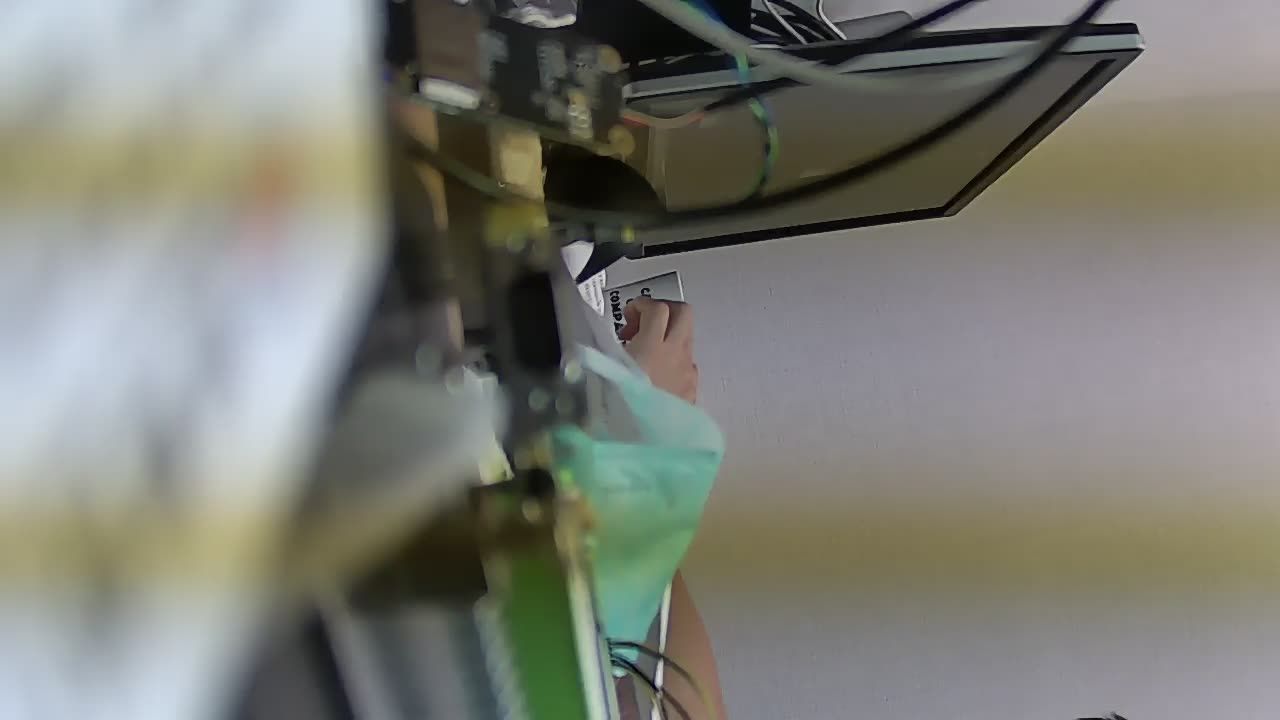
@veye_xumm 可以重啟。但我在日光燈下還是有條紋。
-
@coolmitch
这个条纹是稳定不动的吧? 那么就是跟你的60Hz匹配的。
这个问题我找了一个资料给你看一下。
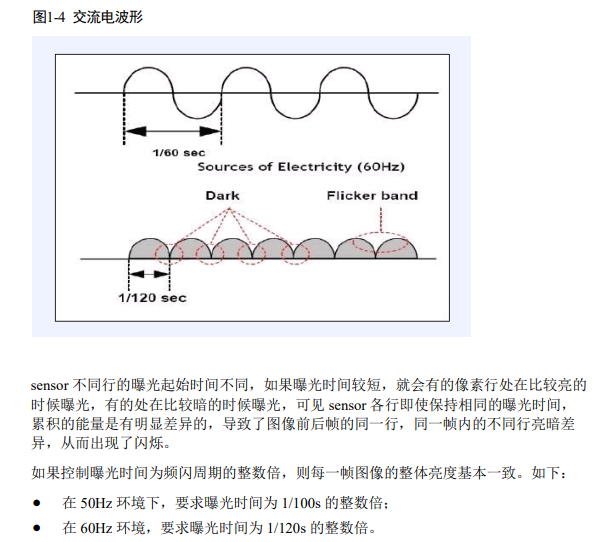
现在的问题是,你的灯光强度不仅随交流电变化,而且本身的强度又比较强。
这种情况下,如果还是维持曝光时间大于1/120s,那么就可能产生过曝的问题。所以这种现象一定环境下属于没办法解决的正常现象。 你可以换更小的光圈的镜头来解决。
-
@veye_xumm 好的,我再觀察比較ㄧ下不同環境跟不同攝像頭看看。

Hello! It looks like you're interested in this conversation, but you don't have an account yet.
Getting fed up of having to scroll through the same posts each visit? When you register for an account, you'll always come back to exactly where you were before, and choose to be notified of new replies (either via email, or push notification). You'll also be able to save bookmarks and upvote posts to show your appreciation to other community members.
With your input, this post could be even better 💗
Register Login