VEYE IMAGING Forum
    • Categories
    • Tags
    • Recent
    • Popular
    • Users
    • WIKI
    • veye.cc
    • Register
    • Login

    关于RAW-MIPI-SC132相机相关问题

    Scheduled Pinned Locked Moved VEYE MIPI camera
    16 Posts 2 Posters 4.0k Views 1 Watching
    Loading More Posts
    • Oldest to Newest
    • Newest to Oldest
    • Most Votes
    Reply
    • Reply as topic
    Log in to reply
    This topic has been deleted. Only users with topic management privileges can see it.
    • L Offline
      lb @veye_xumm
      last edited by

      @veye_xumm感谢解惑!

      1 Reply Last reply Reply Quote 0
      • L Offline
        lb
        last edited by

        你好,我现在想尝试编译贵司的设备树文件,相机是raw-mipi-sc132,用的dts源文件是这个目录~\nvidia_jetson_veye_bsp-master\dtbs\Xavier-NX\JetPack_5.0.2_Linux_JETSON_XAVIER_NX_TARGETS\dts dtb\MV-MIPI-CAM,请问使用的对嘛?
        有详细在内核源码添加设备树源文件并编译的文档吗?方便提供下吗。

        veye_xummV 1 Reply Last reply Reply Quote 0
        • veye_xummV Offline
          veye_xumm @lb
          last edited by

          @lb 对的。
          详细步骤参考:https://wiki.veye.cc/index.php/VEYE_CS_Camera_source_for_Jetson/zh

          Questions will be answered as soon as possible, please be patient.
          如果你使用中文,请直接用中文提问。
          May the force be with YOU. (This is the translation of the mysterious Chinese symbol above.)

          L 1 Reply Last reply Reply Quote 0
          • L Offline
            lb @veye_xumm
            last edited by lb

            @veye_xumm 有个问题咨询一下,2lane的mipi传输速率最大是1.5Gbps吗?我现在输出8位的10801280raw,每幅图数据10801280=1382400字节,如果是最大帧率120,这个传输能否支撑得了?

            veye_xummV 1 Reply Last reply Reply Quote 0
            • veye_xummV Offline
              veye_xumm @lb
              last edited by

              @lb 当然没问题,根本用不了那么大的带宽。
              你试试应该继续算下去,10801280120*8bit.
              现在sensor的模式配置的是1.188Gbps/lan。

              Questions will be answered as soon as possible, please be patient.
              如果你使用中文,请直接用中文提问。
              May the force be with YOU. (This is the translation of the mysterious Chinese symbol above.)

              L 1 Reply Last reply Reply Quote 0
              • L Offline
                lb @veye_xumm
                last edited by

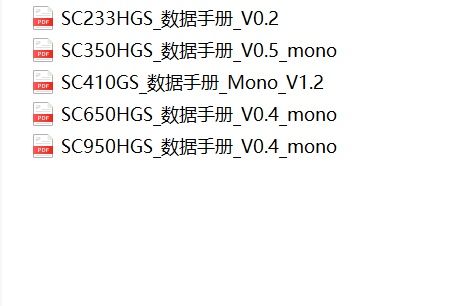
                @veye_xumm请问贵司有这几款传感器对应的相机吗?思特威的
                9F28F8EB-4C36-4CAF-BBE3-4D19BEED0BAE_picture.jpeg

                veye_xummV 1 Reply Last reply Reply Quote 0
                • L Offline
                  lb @veye_xumm
                  last edited by

                  @veye_xumm 还是关于mcu的,SDA模式下,我猜想两种可能:一是数据先到mcu,mcu再给sensor,mcu只是做了透传。二是mcu和sensor作为i2c从设备直接挂到nx i2c总线上。请问是其中的某个情况吗?还是别的一个大致的概述呢?

                  1 Reply Last reply Reply Quote 0
                  • veye_xummV Offline
                    veye_xumm @lb
                    last edited by

                    @lb said in 关于RAW-MIPI-SC132相机相关问题:

                    @veye_xumm请问贵司有这几款传感器对应的相机吗?思特威的
                    9F28F8EB-4C36-4CAF-BBE3-4D19BEED0BAE_picture.jpeg

                    这几款暂时还没有产品。

                    @lb said in 关于RAW-MIPI-SC132相机相关问题:

                    @veye_xumm 还是关于mcu的,SDA模式下,我猜想两种可能:一是数据先到mcu,mcu再给sensor,mcu只是做了透传。二是mcu和sensor作为i2c从设备直接挂到nx i2c总线上。请问是其中的某个情况吗?还是别的一个大致的概述呢?

                    后者。

                    Questions will be answered as soon as possible, please be patient.
                    如果你使用中文,请直接用中文提问。
                    May the force be with YOU. (This is the translation of the mysterious Chinese symbol above.)

                    1 Reply Last reply Reply Quote 0
                    • L Offline
                      lb
                      last edited by

                      @veye_xumm 关于编译设备树的,按照https://wiki.veye.cc/index.php/VEYE_CS_Camera_source_for_Jetson/zh
                      做了。以下是我的操作:
                      export LOCALVERSION=-tegra
                      export ARCH=arm64
                      export TEGRA_KERNEL_OUT=/home/lanbao/nvidia/nx_kernel/ok
                      export KERNEL_PATH=/home/lanbao/nvidia/nx_kernel/ok
                      export XAVIER_DTS_PATH=/home/lanbao/nvidia/nx_kernel/hardware/nvidia/platform/t19x
                      export CROSS_COMPILE_AARCH64_PATH=/usr/local/arm
                      export CROSS_COMPILE_AARCH64=/usr/local/arm/bin/aarch64-buildroot-linux-gnu-
                      export CROSS_COMPILE=$CROSS_COMPILE_AARCH64
                      export COMMON_DTS_PATH=$TEGRA_KERNEL_OUT/arch/arm64/boot/dts/nvidia

                      sudo sudo apt install git
                      git clone https://github.com/veyeimaging/nvidia_jetson_veye_bsp.git

                      export RELEASE_PACK_DIR=/home/lanbao/nvidia/nx_kernel/nvidia_jetson_veye_bsp
                      patch -p1 < /home/lanbao/nvidia/nx_kernel/nvidia_jetson_veye_bsp/kernel_patch_4_mv/l4t-r35.1/veye_mv_l4t_35.1.patch
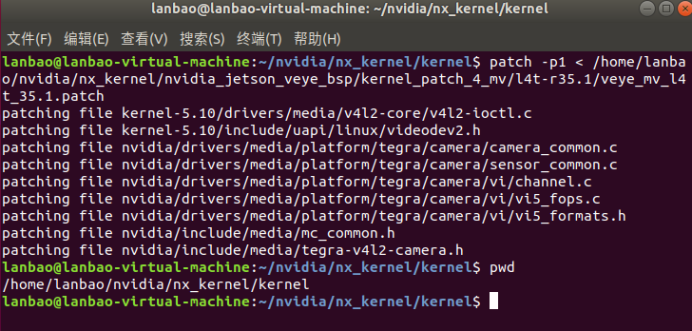
                      366307f8-1ece-4aa0-988c-4ecadfe49636-image.png
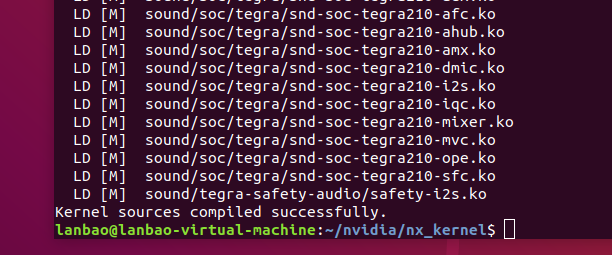
                      ./nvbuild.sh -o $TEGRA_KERNEL_OUT
                      087b58b4-4164-42ab-b3bd-c1cea5917035-image.png
                      编译树:
                      cp /home/lanbao/nvidia/nx_kernel/nvidia_jetson_veye_bsp/dtbs/Xavier-NX/JetPack_5.0.2_Linux_JETSON_XAVIER_NX_TARGETS/dts\ dtb/common/t19x/* -r $XAVIER_DTS_PATH/

                      cp /home/lanbao/nvidia/nx_kernel/nvidia_jetson_veye_bsp/dtbs/Xavier-NX/JetPack_5.0.2_Linux_JETSON_XAVIER_NX_TARGETS/dts\ dtb/MV-MIPI-CAM/tegra194-p3509-0000-a00.dtsi $XAVIER_DTS_PATH/jakku/kernel-dts/common/

                      export COMMON_DTS_PATH=$TEGRA_KERNEL_OUT/arch/arm64/boot/dts/nvidia

                      make ARCH=arm64 O=$TEGRA_KERNEL_OUT dtbs
                      得到设备树
                      $COMMON_DTS_PATH/tegra194-p3668-all-p3509-0000.dtb

                      然后将编译的树(只替换树),移植到NX路径/boot/lb,修改extlinux.conf 增加FDT新设备树路径。

                      问题:tegra194-p3668-all-p3509-0000.dtb此设备树无法启动jetson Linux。内核源码是自己对应jetpack版本下载的,都是OK的。能否给出一些指导意见。

                      veye_xummV 1 Reply Last reply Reply Quote 0
                      • veye_xummV Offline
                        veye_xumm @lb
                        last edited by

                        @lb 如果你使用的Xavier nx是nVidia官方的,建议你直接使用我们提供的编译好的版本。
                        如果你确实需要重新编译,建议你替换dtb的时候,同时安装ko。然后引出启动串口的打印信息找一下原因。

                        Questions will be answered as soon as possible, please be patient.
                        如果你使用中文,请直接用中文提问。
                        May the force be with YOU. (This is the translation of the mysterious Chinese symbol above.)

                        1 Reply Last reply Reply Quote 0

                        Hello! It looks like you're interested in this conversation, but you don't have an account yet.

                        Getting fed up of having to scroll through the same posts each visit? When you register for an account, you'll always come back to exactly where you were before, and choose to be notified of new replies (either via email, or push notification). You'll also be able to save bookmarks and upvote posts to show your appreciation to other community members.

                        With your input, this post could be even better 💗

                        Register Login
                        • First post
                          Last post