关于IMX385抓图问题
-
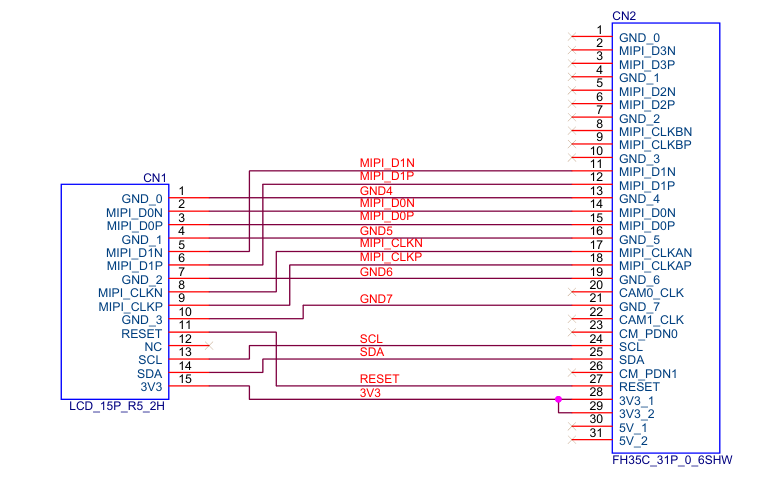
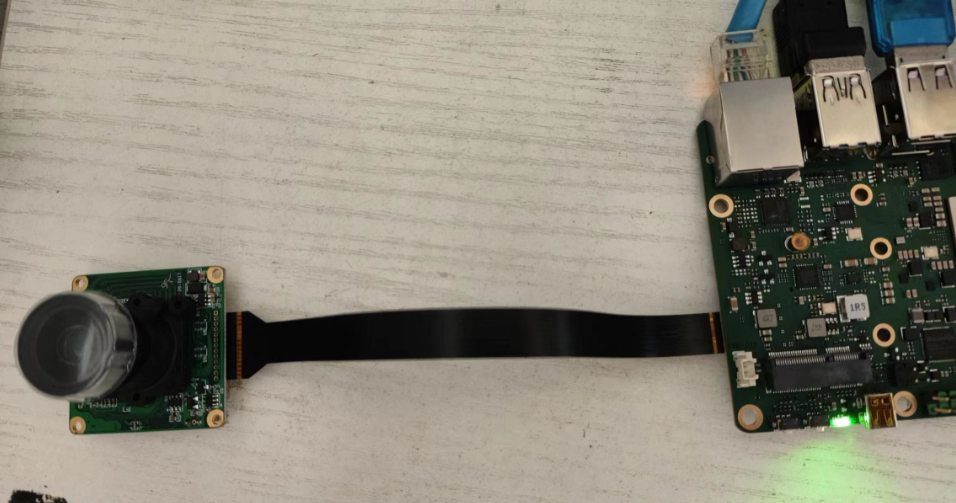
你好,我尝试制作FPC排线让 rock5b开发板能支持 IMX385, 设备树如下
/dts-v1/;
/plugin/;

#include <dt-bindings/clock/rk3588-cru.h>
#include <dt-bindings/power/rk3588-power.h>
#include <dt-bindings/gpio/gpio.h>
#include <dt-bindings/pinctrl/rockchip.h>

/ {
	metadata {
		title ="Enable VEYE CSI-2 Camera Modules";
		compatible = "radxa,rock-5b";
		category = "camera";
		exclusive = "csi2_dphy0";
		description = "Enable VEYE CSI-2 Camera Modules.";
	};

	fragment@0 {
		target = <&i2c3>;

		__overlay__ {
			status = "okay";
			#address-cells = <1>;
			#size-cells = <0>;

			veyecam2m: veyecam2m@3b{
				status = "okay";
				compatible = "veye,veyecam2m";
				reg = <0x3b>;
				clocks = <&cru CLK_MIPI_CAMARAOUT_M3>;
				clock-names = "xvclk";
				pinctrl-names = "default";
				pinctrl-0 = <&mipim0_camera3_clk>;
				power-domains = <&power RK3588_PD_VI>;
				pwdn-gpios = <&gpio1 RK_PB0 GPIO_ACTIVE_HIGH>;
				reset-gpios = <&gpio4 RK_PA0 GPIO_ACTIVE_HIGH>;
				rockchip,camera-module-index = <0>;
				rockchip,camera-module-facing = "back";
				rockchip,camera-module-name = "NC";
				rockchip,camera-module-lens-name = "NC";
				port {
					veyecam2m_out0: endpoint {
						remote-endpoint = <&mipidphy0_in_ucam0>;
						data-lanes = <1 2>;
					};
				};
			};
		};
	};

	fragment@1 {
		target = <&csi2_dphy0_hw>;

		__overlay__ {
			status = "okay";
		};
	};

	fragment@2 {
		target = <&csi2_dphy0>;

		__overlay__ {
			status = "okay";

			ports {
				#address-cells = <1>;
				#size-cells = <0>;

				port@0 {
					reg = <0>;
					#address-cells = <1>;
					#size-cells = <0>;

					mipidphy0_in_ucam0: endpoint@1 {
						reg = <1>;
						remote-endpoint = <&veyecam2m_out0>;
						data-lanes = <1 2>;
					};
				};

				port@1 {
					reg = <1>;
					#address-cells = <1>;
					#size-cells = <0>;

					csidphy0_out: endpoint@0 {
						reg = <0>;
						remote-endpoint = <&mipi2_csi2_input>;
					};
				};
			};
		};
	};

	fragment@3 {
		target = <&mipi2_csi2>;

		__overlay__ {
			status = "okay";

			ports {
				#address-cells = <1>;
				#size-cells = <0>;

				port@0 {
					reg = <0>;
					#address-cells = <1>;
					#size-cells = <0>;

					mipi2_csi2_input: endpoint@1 {
						reg = <1>;
						remote-endpoint = <&csidphy0_out>;
					};
				};

				port@1 {
					reg = <1>;
					#address-cells = <1>;
					#size-cells = <0>;

					mipi2_csi2_output: endpoint@0 {
						reg = <0>;
						remote-endpoint = <&cif_mipi2_in0>;
					};
				};
			};
		};
	};

	fragment@4 {
		target = <&rkcif>;

		__overlay__ {
			status = "okay";
		};
	};

	fragment@5 {
		target = <&rkcif_mipi_lvds2>;

		__overlay__ {
			status = "okay";
			firefly,yuv_camera;

			port {
				cif_mipi2_in0: endpoint {
					remote-endpoint = <&mipi2_csi2_output>;
				};
			};
		};
	};

	fragment@6 {
		target = <&rkcif_mipi_lvds2_sditf>;

		__overlay__ {
			status = "disabled";

			port {
				mipi_lvds2_sditf: endpoint {
					remote-endpoint = <&isp0_vir0>;
				};
			};
		};
	};

	fragment@7 {
		target = <&rkcif_mmu>;

		__overlay__ {
			status = "okay";
		};
	};

	fragment@8 {
		target = <&isp0_mmu>;

		__overlay__ {
			status = "disabled";
		};
	};

	fragment@9 {
		target = <&rkisp0>;

		__overlay__ {
			status = "disabled";
		};
	};

	fragment@10 {
		target = <&rkisp0_vir0>;

		__overlay__ {
			status = "disabled";

			port {
				#address-cells = <1>;
				#size-cells = <0>;

				isp0_vir0: endpoint@0 {
					reg = <0>;
					remote-endpoint = <&mipi_lvds2_sditf>;
				};
			};
		};
	};
};
开发板能够正确识别相机
[    6.032099] veyecam2m 3-003b: veye camera driver version: 00.01.01
[    6.032129] veyecam2m 3-003b: Failed to get power-gpios, maybe no use
[    6.032183] veyecam2m 3-003b: Looking up avdd-supply from device tree
[    6.032195] veyecam2m 3-003b: Looking up avdd-supply property in node /i2c@feab0000/veyecam2m@3b failed
[    6.032227] veyecam2m 3-003b: supply avdd not found, using dummy regulator
[    6.032336] veyecam2m 3-003b: Looking up dovdd-supply from device tree
[    6.032348] veyecam2m 3-003b: Looking up dovdd-supply property in node /i2c@feab0000/veyecam2m@3b failed
[    6.032364] veyecam2m 3-003b: supply dovdd not found, using dummy regulator
[    6.032398] veyecam2m 3-003b: Looking up dvdd-supply from device tree
[    6.032409] veyecam2m 3-003b: Looking up dvdd-supply property in node /i2c@feab0000/veyecam2m@3b failed
[    6.032424] veyecam2m 3-003b: supply dvdd not found, using dummy regulator
[    6.032457] veyecam2m 3-003b: could not get default pinstate
[    6.032574] veyecam2m 3-003b: could not get sleep pinstate
[    6.032676] veyecam2m 3-003b: Success to get veyecam2m endpoint data lanes, dts uses 2 lanes
[    6.155079] veyecam2m 3-003b:  camera id is veyecam2m
[    6.158461] veyecam2m 3-003b: sensor is IMX385
[    6.158547] veyecam2m 3-003b: board type is ONE board
[    6.160004] rockchip-csi2-dphy csi2-dphy0: dphy0 matches m00_b_veyecam2m 3-003b:bus type 5
当我使用以下命令抓图的时候
v4l2-ctl --set-fmt-video=width=1920,height=1080,pixelformat='NV12' --stream-mmap --stream-count=100 --stream-to=nv12-1920x1080.yuv会报错
[  162.928606] rockchip-mipi-csi2 fdd30000.mipi2-csi2: stream on, src_sd: 00000000e7b2a9e6, sd_name:rockchip-csi2-dphy0
[  162.928674] rockchip-mipi-csi2 fdd30000.mipi2-csi2: stream ON
[  164.876990] mipi2-csi2 ERR1:0x1000010 (fs/fe mis,vc: 0) (crc,vc: 0)
[  164.877110] rkcif-mipi-lvds2: ERROR: csi size err, intstat:0x1000002, lastline:29!!
[  166.528086] mipi2-csi2 ERR1:0x10 (fs/fe mis,vc: 0)
[  168.179137] mipi2-csi2 ERR1:0x1000000 (crc,vc: 0)
[  169.830230] rkcif-mipi-lvds2: ERROR: csi size err, intstat:0x1000002, lastline:63!!
[  169.830333] mipi2-csi2 ERR1:0x10 (fs/fe mis,vc: 0)
请教一下问题出在哪里,我应该如何进行排查。
-
@teo-chan 看起来i2c现在没问题,mipi数据接收有问题。
建议你查一下rock5b有没有官方已经支持的camera? dts跟官方支持的camera做一下对比看看。 -
@veye_xumm 有的,radxa官方有支持一款 IMX415的camera,这是他们官方的设备树
/dts-v1/;
/plugin/;

#include <dt-bindings/clock/rk3588-cru.h>
#include <dt-bindings/power/rk3588-power.h>
#include <dt-bindings/gpio/gpio.h>
#include <dt-bindings/pinctrl/rockchip.h>

/ {
	metadata {
		title ="Enable Radxa Camera 4K";
		compatible = "radxa,rock-5b";
		category = "camera";
		exclusive = "csi2_dphy0";
		description = "Enable Radxa Camera 4K.";
	};

	fragment@0 {
		target = <&i2c3>;

		__overlay__ {
			status = "okay";
			#address-cells = <1>;
			#size-cells = <0>;

			imx415: imx415@1a {
				status = "okay";
				compatible = "sony,imx415";
				reg = <0x1a>;
				clocks = <&cru CLK_MIPI_CAMARAOUT_M3>;
				clock-names = "xvclk";
				pinctrl-names = "default";
				pinctrl-0 = <&mipim0_camera3_clk>;
				power-domains = <&power RK3588_PD_VI>;
				pwdn-gpios = <&gpio1 RK_PB0 GPIO_ACTIVE_HIGH>;
				reset-gpios = <&gpio4 RK_PA0 GPIO_ACTIVE_LOW>;
				rockchip,camera-module-index = <0>;
				rockchip,camera-module-facing = "back";
				rockchip,camera-module-name = "RADXA-CAMERA-4K";
				rockchip,camera-module-lens-name = "DEFAULT";
				port {
					imx415_out0: endpoint {
						remote-endpoint = <&mipidphy0_in_ucam0>;
						data-lanes = <1 2 3 4>;
					};
				};
			};
		};
	};

	fragment@1 {
		target = <&csi2_dphy0_hw>;

		__overlay__ {
			status = "okay";
		};
	};

	fragment@2 {
		target = <&csi2_dphy0>;

		__overlay__ {
			status = "okay";

			ports {
				#address-cells = <1>;
				#size-cells = <0>;

				port@0 {
					reg = <0>;
					#address-cells = <1>;
					#size-cells = <0>;

					mipidphy0_in_ucam0: endpoint@1 {
						reg = <1>;
						remote-endpoint = <&imx415_out0>;
						data-lanes = <1 2 3 4>;
					};
				};

				port@1 {
					reg = <1>;
					#address-cells = <1>;
					#size-cells = <0>;

					csidphy0_out: endpoint@0 {
						reg = <0>;
						remote-endpoint = <&mipi2_csi2_input>;
					};
				};
			};
		};
	};

	fragment@3 {
		target = <&mipi2_csi2>;

		__overlay__ {
			status = "okay";

			ports {
				#address-cells = <1>;
				#size-cells = <0>;

				port@0 {
					reg = <0>;
					#address-cells = <1>;
					#size-cells = <0>;

					mipi2_csi2_input: endpoint@1 {
						reg = <1>;
						remote-endpoint = <&csidphy0_out>;
					};
				};

				port@1 {
					reg = <1>;
					#address-cells = <1>;
					#size-cells = <0>;

					mipi2_csi2_output: endpoint@0 {
						reg = <0>;
						remote-endpoint = <&cif_mipi2_in0>;
					};
				};
			};
		};
	};

	fragment@4 {
		target = <&rkcif>;

		__overlay__ {
			status = "okay";
		};
	};

	fragment@5 {
		target = <&rkcif_mipi_lvds2>;

		__overlay__ {
			status = "okay";

			port {
				cif_mipi2_in0: endpoint {
					remote-endpoint = <&mipi2_csi2_output>;
				};
			};
		};
	};

	fragment@6 {
		target = <&rkcif_mipi_lvds2_sditf>;

		__overlay__ {
			status = "okay";

			port {
				mipi_lvds2_sditf: endpoint {
					remote-endpoint = <&isp0_vir0>;
				};
			};
		};
	};

	fragment@7 {
		target = <&rkcif_mmu>;

		__overlay__ {
			status = "okay";
		};
	};

	fragment@8 {
		target = <&isp0_mmu>;

		__overlay__ {
			status = "okay";
		};
	};

	fragment@9 {
		target = <&rkisp0>;

		__overlay__ {
			status = "okay";
		};
	};

	fragment@10 {
		target = <&rkisp0_vir0>;

		__overlay__ {
			status = "okay";

			port {
				#address-cells = <1>;
				#size-cells = <0>;

				isp0_vir0: endpoint@0 {
					reg = <0>;
					remote-endpoint = <&mipi_lvds2_sditf>;
				};
			};
		};
	};
};
我对比了一下 rkips 为disabled,其他的基本一致。
&rkcif_mipi_lvds2_sditf { status = "disabled"; }; &rkisp0 { status = "disabled"; }; &isp0_mmu { status = "disabled"; }; &rkisp0_vir0 { status = "disabled"; }; -
@teo-chan 从代码上看不出啥问题。
需要检查一下你的转接板,data lane的信号连接有没有问题? -
-
@teo-chan 你量一下现在3.3V供电在camera端排线上实际电压是多少?
-
@veye_xumm 刚才量了一下,排线输出的是3.3V,到camera端拉低了一点变成3.0V了。
-
-
@veye_xumm 单独给摄像头供5V没问题了,谢谢。
-
@teo-chan 不客气。

Hello! It looks like you're interested in this conversation, but you don't have an account yet.
Getting fed up of having to scroll through the same posts each visit? When you register for an account, you'll always come back to exactly where you were before, and choose to be notified of new replies (either via email, or push notification). You'll also be able to save bookmarks and upvote posts to show your appreciation to other community members.
With your input, this post could be even better 💗
Register Login