VEYE IMAGING Forum
    • Categories
    • Tags
    • Recent
    • Popular
    • Users
    • WIKI
    • veye.cc
    • Register
    • Login

    硬触发设置Trigger Delay 没有起作用

    Scheduled Pinned Locked Moved Machine Vision camera
    10 Posts 2 Posters 4.5k Views 1 Watching
    Loading More Posts
    • Oldest to Newest
    • Newest to Oldest
    • Most Votes
    Reply
    • Reply as topic
    Log in to reply
    This topic has been deleted. Only users with topic management privileges can see it.
    • N Offline
      nb
      last edited by nb

      ./mv_mipi_i2c.sh -w -f outio1_mode -p1 0 -b 7
      sleep 1
      ./mv_mipi_i2c.sh -w -f trgmode -p1 1 -b 7
      sleep 1
      ./mv_mipi_i2c.sh -w -f trgsrc -p1 1 -b 7
      sleep 1
      ./mv_mipi_i2c.sh -w -f trgdelay -p1 10000 -b 7
      sleep 1
      ./set.sh 1 //设置控制TriggerN_I0 的引脚为高电平输出。

      我们按照上述设置硬触发,每次拉高一次硬件触发的IO, 闪光灯会闪一次,但是并没有拍到有效的RAW图像,raw图像的数据大小是0, 麻烦帮我们看下

      veye_xummV 1 Reply Last reply Reply Quote 0
      • veye_xummV Offline
        veye_xumm @nb
        last edited by

        @nb 请问你用的相机型号,主板类型是什么?trgnum设置的多少?除了闪光灯之外,有没有触发出多张图片? 怎么进行触发操作的?

        Questions will be answered as soon as possible, please be patient.
        如果你使用中文,请直接用中文提问。
        May the force be with YOU. (This is the translation of the mysterious Chinese symbol above.)

        N 3 Replies Last reply Reply Quote 0
        • N Offline
          nb @veye_xumm
          last edited by

          @veye_xumm 相机: imx296 主控rk35888
          trgnum没有设置, 设置这个trgnum的作用是啥?
          每次拉高一次硬件触发的IO, 闪光灯会闪一次,

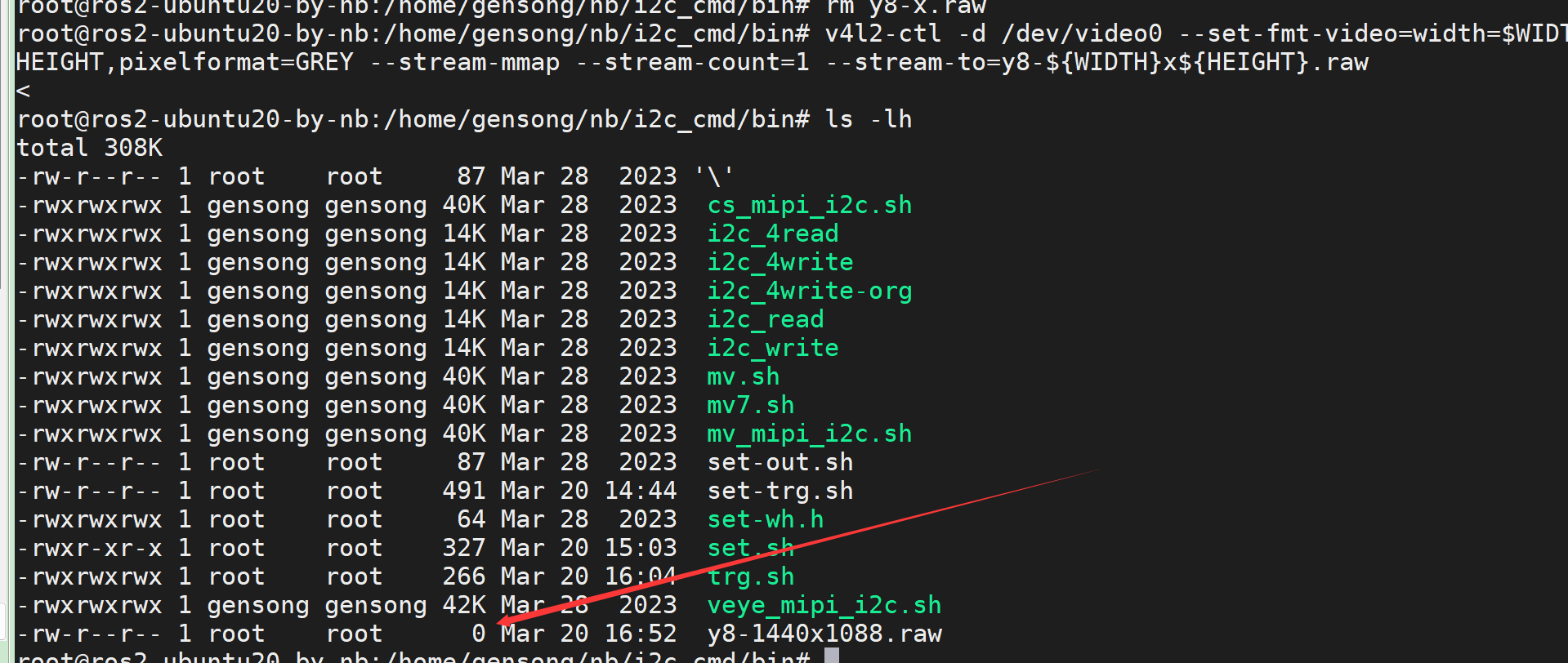
          但是 这个命令并没有抓到图像 v4l2-ctl -d /dev/video0 --set-fmt-video=width=$WIDTH,height=$HEIGHT,pixelformat=GREY --stream-mmap --stream-count=20 --stream-to=y8-${WIDTH}x${HEIGHT}.raw

          1 Reply Last reply Reply Quote 0
          • N Offline
            nb @veye_xumm
            last edited by

            @veye_xumm trgnum 设置成1 了, 但是获取的raw图像数据字节数是0
            c42c6ab3-8bbf-4220-86ec-fe097bc48581-image.png b6ea98ba-791e-41a5-b052-a8f3a8c58f9f-image.png

            1 Reply Last reply Reply Quote 0
            • N Offline
              nb @veye_xumm
              last edited by

              @veye_xumm ./yavta -c1 -Fy8-${WIDTH}x${HEIGHT}.raw --skip 0 -f Y8 -s ${WIDTH}x${HEIGHT} /dev/video0 用这个命令 就可以,每次拉高一次硬件触发的IO, 闪光灯会闪一次,并且可以拍到图像, 为什么v4l2-ctl -d /dev/video0 --set-fmt-video=width=$WIDTH,height=$HEIGHT,pixelformat=GREY --stream-mmap --stream-count=20 --stream-to=y8-${WIDTH}x${HEIGHT}.raw这个命令不行呢?

              veye_xummV 1 Reply Last reply Reply Quote 0
              • veye_xummV Offline
                veye_xumm @nb
                last edited by

                @nb

                设置这个trgnum的作用是啥?
                trgnum的意思是,希望一个触发信号可以触发多张图片,默认就是1的。

                ./yavta -c1 -Fy8-${WIDTH}x${HEIGHT}.raw --skip 0 -f Y8 -s ${WIDTH}x${HEIGHT} /dev/video0 用这个命令 就可以,每次拉高一次硬件触发的IO, 闪光灯会闪一次,并且可以拍到图像, 为什么v4l2-ctl -d /dev/video0 --set-fmt-video=width=$WIDTH,height=$HEIGHT,pixelformat=GREY --stream-mmap --stream-count=20 --stream-to=y8-${WIDTH}x${HEIGHT}.raw这个命令不行呢?

                这个问题我遇到过,在飞凌的RK3588平台,的确有这个问题,原因我们没有多做追究。Firefly平台没有问题。
                建议你先用yavta命令进行抓拍。

                Questions will be answered as soon as possible, please be patient.
                如果你使用中文,请直接用中文提问。
                May the force be with YOU. (This is the translation of the mysterious Chinese symbol above.)

                N 1 Reply Last reply Reply Quote 0
                • N Offline
                  nb @veye_xumm
                  last edited by

                  @veye_xumm 好的,感谢,

                  顺便再麻烦问下, 现在用这个 yavta ,每次要先开启yavta 再拉高硬触发IO, 然后抓拍一张,就结束了, 如果我想要设置固定的比如1s连续触发30次, 就是连续抓拍30张照片,应该怎么实现这个逻辑呢?

                  veye_xummV 1 Reply Last reply Reply Quote 0
                  • veye_xummV Offline
                    veye_xumm @nb
                    last edited by

                    @nb

                    yavta 是开源的,其-c参数指明需要抓取多少张。

                    如果我想要设置固定的比如1s连续触发30次, 就是连续抓拍30张照片,应该怎么实现这个逻辑呢?

                    你可以用软触发,或者硬触发做触发源。你可以自己去控制触发源,每次触发一张。 也可以将配置相机的触发间隔和trgnum,实现一次触发,输出多张。

                    Questions will be answered as soon as possible, please be patient.
                    如果你使用中文,请直接用中文提问。
                    May the force be with YOU. (This is the translation of the mysterious Chinese symbol above.)

                    N 1 Reply Last reply Reply Quote 0
                    • N Offline
                      nb @veye_xumm
                      last edited by

                      @veye_xumm said in 硬触发设置Trigger Delay 没有起作用:

                      你可以用软触发,或者硬触发做触发源。你可以自己去控制触发源,
                      目前的状态是 拉高一次IO,一次触发就结束了,不能接着触发。
                      下次再想触发的话,要再执行./yavta -c1 -Fy8-${WIDTH}x${HEIGHT}.raw --skip 0 -f Y8 -s ${WIDTH}x${HEIGHT} /dev/video0这个命令等待采集图像,然后再去拉高硬触发IO

                      怎么设置多次硬触发,然后根据多次的硬触发 ,输出对应硬触发次数的图像呢,不需要说 还要再手动再去执行 ./yavta -c1 -Fy8-${WIDTH}x${HEIGHT}.raw --skip 0 -f Y8 -s ${WIDTH}x${HEIGHT} /dev/video0等待采集,然后等待再次拉高IO

                      veye_xummV 1 Reply Last reply Reply Quote 0
                      • veye_xummV Offline
                        veye_xumm @nb
                        last edited by

                        @nb
                        https://wiki.veye.cc/index.php/Mv_mipi_camera_manual/zh#Sony.27s_Global_shutter.EF.BC.88.E5.85.A8.E5.B1.80.E6.9B.9D.E5.85.89.EF.BC.89
                        2.4.3

                        Questions will be answered as soon as possible, please be patient.
                        如果你使用中文,请直接用中文提问。
                        May the force be with YOU. (This is the translation of the mysterious Chinese symbol above.)

                        1 Reply Last reply Reply Quote 0

                        Hello! It looks like you're interested in this conversation, but you don't have an account yet.

                        Getting fed up of having to scroll through the same posts each visit? When you register for an account, you'll always come back to exactly where you were before, and choose to be notified of new replies (either via email, or push notification). You'll also be able to save bookmarks and upvote posts to show your appreciation to other community members.

                        With your input, this post could be even better 💗

                        Register Login
                        • First post
                          Last post

