VEYE IMAGING Forum
    • Categories
    • Tags
    • Recent
    • Popular
    • Users
    • WIKI
    • veye.cc
    • Register
    • Login

    IMX327在樹梅派Zero W上驅動問題

    Scheduled Pinned Locked Moved VEYE MIPI camera
    7 Posts 2 Posters 1.6k Views 1 Watching
    Loading More Posts
    • Oldest to Newest
    • Newest to Oldest
    • Most Votes
    Reply
    • Reply as topic
    Log in to reply
    This topic has been deleted. Only users with topic management privileges can see it.
    • L Offline
      leo12757
      last edited by leo12757

      你好,在樹梅派 Zero W上使用IMX327,

      依照:https://wiki.veye.cc/index.php/V4L2_mode_for_Raspberry_Pi)步驟安裝驅動,顯示下面錯誤:
      Installing the veyecam2m.ko driver

      install: cannot stat './driver_bin/6.6.20+rpt-rpi-v6/veyecam2m.ko': No such file or directory
      install: cannot stat './driver_bin/6.6.20+rpt-rpi-v6/veyecam2m.dtbo': No such file or directory

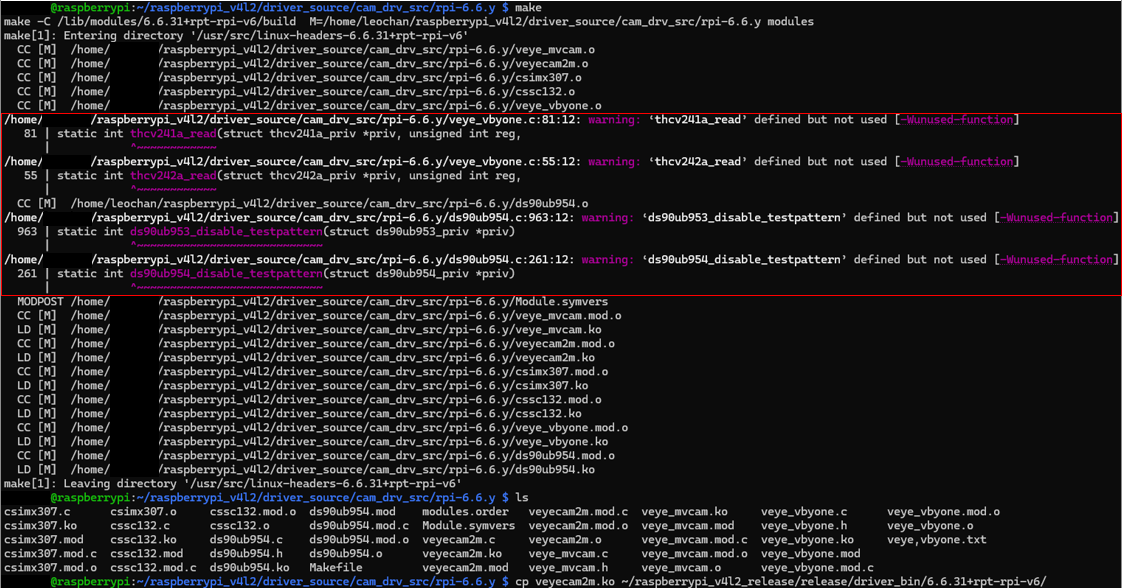
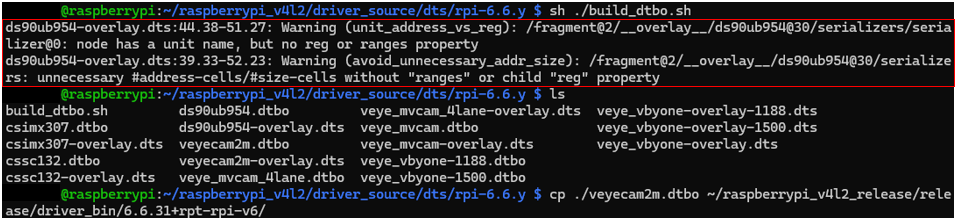
      依照:https://wiki.veye.cc/index.php/Build_drivers_from_source_for_rpi/zh
      自行編譯驅動,出現以下警告

      ced55c71-9df2-42cd-a009-8bb21fb03b4f-image.png

      737b16f5-4703-406c-b5ff-b99f0cc40be1-image.png

      0096b590-d91e-45ab-ab4f-e1376403547a-image.png

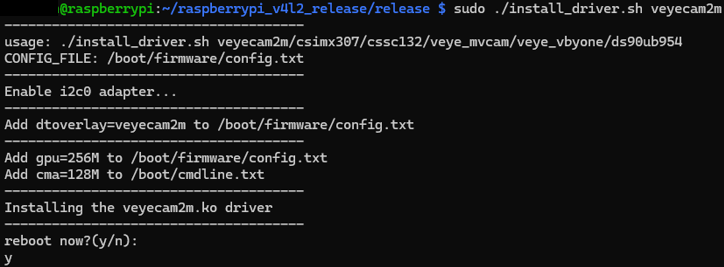
      可以安裝驅動:
      d55f0a8e-edec-4481-b5cb-96a786baedcb-image.png

      2ee3d434-fce5-4c77-a698-7181b3948ab0-image.png

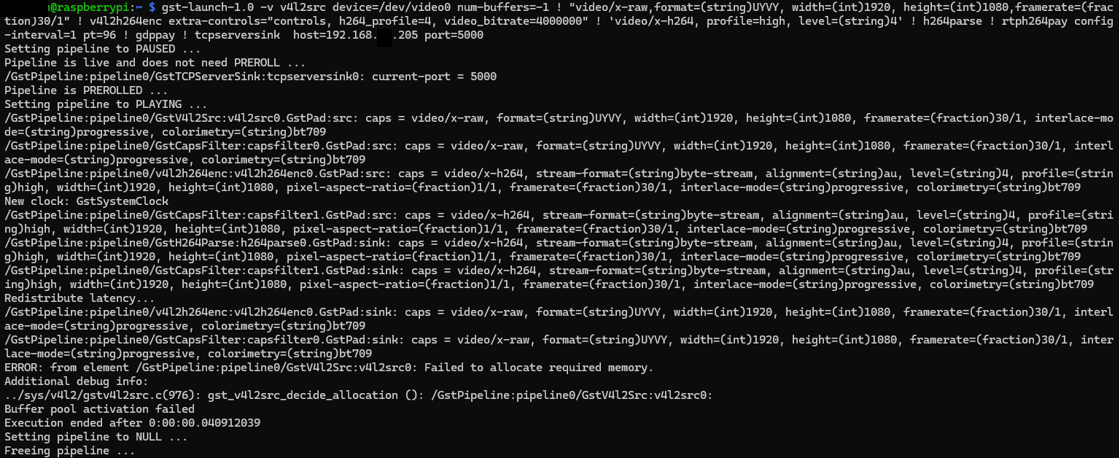
      不過使用:https://wiki.veye.cc/index.php/V4L2_mode_for_Raspberry_Pi 的Gstreamer 範例,會出現錯誤:
      63b8c84c-9a62-45d6-a597-15c0ee3ad289-image.png

      請問如何解決這個問題?謝謝。

      veye_xummV 1 Reply Last reply Reply Quote 0
      • veye_xummV Offline
        veye_xumm @leo12757
        last edited by

        @leo12757
        驱动编译中的warning不用理会。
        你可以先试试简单预览是否成功,比如用qv4l2,然后试试gstreamer预览。

        Questions will be answered as soon as possible, please be patient.
        如果你使用中文,请直接用中文提问。
        May the force be with YOU. (This is the translation of the mysterious Chinese symbol above.)

        L 2 Replies Last reply Reply Quote 0
        • L Offline
          leo12757 @veye_xumm
          last edited by leo12757

          @veye_xumm
          因為我安裝的是Lite版本PiOS,因此沒有VLC可以撥放...但我會試試看

          使用:https://wiki.veye.cc/index.php/V4L2_mode_for_Raspberry_Pi 的Gstreamer測試指令,Gstreamer看起來是正常的(?)。

          2550c331-b9bc-494d-9d81-663154712ec9-image.png

          另外,依照:https://wiki.veye.cc/index.php/V4L2_mode_for_Raspberry_Pi 的拍照和存成mp4檔的範例,也都會失敗:

          拍照:

          5375ebff-b83c-4017-b7c4-6c2fa558ec48-image.png

          mp4:
          d3bd9fdd-aff1-4903-a7e7-d939a67597ae-image.png

          麻煩了,謝謝。

          veye_xummV 1 Reply Last reply Reply Quote 0
          • veye_xummV Offline
            veye_xumm @leo12757
            last edited by

            @leo12757 麻烦你先直接用如下命令取一下图看看

            v4l2-ctl --set-fmt-video=width=1920,height=1080,pixelformat=UYVY --stream-mmap --stream-count=10 --stream-to=uyvy-1920x1080_stream.yuv
            

            Questions will be answered as soon as possible, please be patient.
            如果你使用中文,请直接用中文提问。
            May the force be with YOU. (This is the translation of the mysterious Chinese symbol above.)

            L 1 Reply Last reply Reply Quote 0
            • L Offline
              leo12757 @veye_xumm
              last edited by leo12757

              @veye_xumm

              顯示錯誤
              437a3f1e-c74e-4c24-8c4b-38d58fab9485-image.png

              1 Reply Last reply Reply Quote 0
              • L Offline
                leo12757 @veye_xumm
                last edited by

                @veye_xumm
                安裝全新PiOS,更新系統至最新,重新開機有畫面(系統)
                安裝IMX327驅動後沒有畫面顯示,但SSH仍可以登入,
                所以無法測試qv4l2、VLC。

                開機顯示該錯誤
                15dd9f7d-626c-4d98-aace-56c260e822f9-image.png
                [ 0.000000] 0F: reserved men: failed to allocate menory for node 'linux, cma': size 256 MiB
                [ 15.5268043] [drm:uc4_bo_create [vc4]] *ERROR» Failed to allocate fron GEM DMA helper:

                veye_xummV 1 Reply Last reply Reply Quote 0
                • veye_xummV Offline
                  veye_xumm @leo12757
                  last edited by

                  @leo12757
                  你好,抱歉这两天比较忙,我给一个大体的思路您可以试一下。
                  install_driver.sh在安装驱动的时候,做了如下两处更改,您可以手动去掉,然后重启系统后再测试一下。

                  1. Add gpu=256M to ${CONFIG_FILE},CONFIG_FILE="/boot/firmware/config.txt" or CONFIG_FILE="/boot/config.txt"

                  2. echo "Add cma=128M to /boot/cmdline.txt "

                  Questions will be answered as soon as possible, please be patient.
                  如果你使用中文,请直接用中文提问。
                  May the force be with YOU. (This is the translation of the mysterious Chinese symbol above.)

                  1 Reply Last reply Reply Quote 0

                  Hello! It looks like you're interested in this conversation, but you don't have an account yet.

                  Getting fed up of having to scroll through the same posts each visit? When you register for an account, you'll always come back to exactly where you were before, and choose to be notified of new replies (either via email, or push notification). You'll also be able to save bookmarks and upvote posts to show your appreciation to other community members.

                  With your input, this post could be even better 💗

                  Register Login
                  • First post
                    Last post