VEYE IMAGING Forum
    • Categories
    • Tags
    • Recent
    • Popular
    • Users
    • WIKI
    • veye.cc
    • Register
    • Login

    移植MV-IMX265驱动程序到迅为RK3568抓图卡死

    Scheduled Pinned Locked Moved VEYE MIPI camera
    39 Posts 2 Posters 18.2k Views 1 Watching
    Loading More Posts
    • Oldest to Newest
    • Newest to Oldest
    • Most Votes
    Reply
    • Reply as topic
    Log in to reply
    This topic has been deleted. Only users with topic management privileges can see it.
    • W Offline
      w88121446
      last edited by w88121446

      1.我的内核是4.19版本的,移植的是《rk35xx_firefly-main》里面4.19的《rk3566-firefly-roc-pc-cam-veyemvcam.dtsi》和《veye_mvcam.c》。目前已经可以正确发现设备,I2C没问题了,capture.c里面我也加上了Y8 Y10 Y12的支持。

      fae3074b-6d87-4e2b-bbe3-d27a7470acac-image.png
      2.使用·《v4l2-ctl -d /dev/video0 --set-fmt-video=width=2048,height=1544,pixelformat=Y12 --stream-mmap --stream-count=1 --stream-to=/home/topeet/桌面/y12.raw》命令抓图后会出现一个大小位0Byte的.raw文件,这个文件用vooya打开也是会报错,估计文件大小确实是0Byted67416d5-cbc6-4389-9bd2-7f85ec48cced-image.png

      然后就卡在上图这个界面,ctrl+c也不行。
      3.额外有一个疑问,在《rk35xx_firefly-main》里面的4.19和5.10的设备树区别很大,我用的4.19的设备树,里面使用了ISP,但是MV系列的产片我记得是不用ISP的,还请解答一下我这个疑问。

      veye_xummV 1 Reply Last reply Reply Quote 0
      • veye_xummV Offline
        veye_xumm @w88121446
        last edited by

        @w88121446
        第一个问题,请参考下面这个链接的问题2:
        https://wiki.veye.cc/index.php/FAQ_on_RK35xx_Platform/zh

        第二个问题,确实是不用ISP的。这个地方输入输出配置的格式一样,其实不起作用。

        Questions will be answered as soon as possible, please be patient.
        如果你使用中文,请直接用中文提问。
        May the force be with YOU. (This is the translation of the mysterious Chinese symbol above.)

        W 2 Replies Last reply Reply Quote 0
        • W Offline
          w88121446 @veye_xumm
          last edited by

          @veye_xumm 感谢您的及时回复。
          我下载了yavta,使用这个命令命令《./yavta -c1 -Fy8-2048x1544.raw --skip 0 -f Y8 -s 2048x1544 /dev/video0》然后有错误提示:显示不支持GREY,但是我再capture.c里面加入了MEDIA_BUS_FMT_Y8_1X8 MEDIA_BUS_FMT_Y10_1X10
          MEDIA_BUS_FMT_Y12_1X12
          哪里还可能有不对的地方

          504582d4-27e4-4ee3-9a41-265322687b75-image.png

          1 Reply Last reply Reply Quote 0
          • W Offline
            w88121446 @veye_xumm
            last edited by w88121446

            @veye_xumm 上面不支持GREY的问题我解决了,因为我用的4.19内核,是用不到/cif/capture.c的,而是需要在/isp/capture.c和/isp1/capture.c中增加对Y8 Y10 Y12的支持。
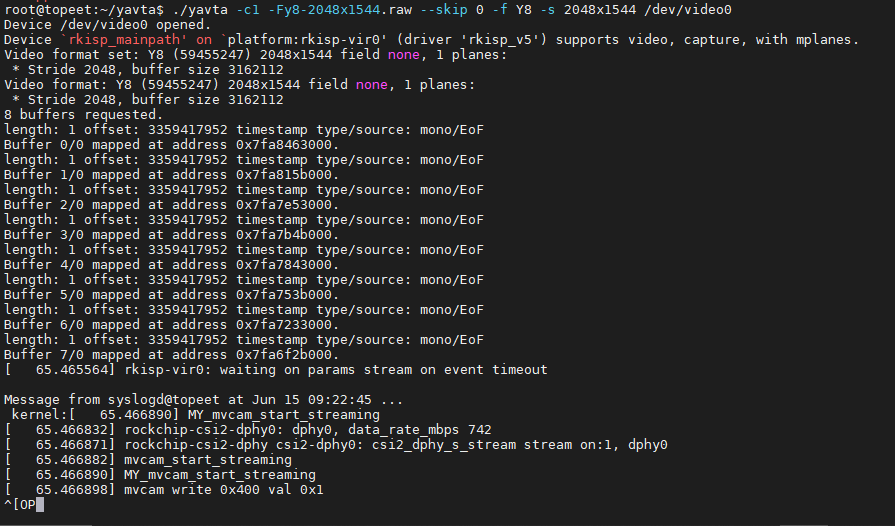
            接下来我发送命令《v4l2-ctl --set-fmt-video=width=2048,height=1544,pixelformat=GREY》配置尺寸和色彩格式,然后发送《./yavta -c1 -Fy8-2048x1544.raw --skip 0 -f Y8 -s 2048x1544 /dev/video0》。
            接下来如下图,想显示一些内存相关信息,然后会卡死在这里,ctrl+c也不管用。
            c5489a4d-96a8-4c1f-beeb-5fa88171c134-image.png
            重启后我是用命令《find / -name "y8-2048x1544.raw" 2>/dev/null》搜索.raw文件搜不到,表明没有成功抓图。
            希望大神帮忙解决一下。

            veye_xummV 1 Reply Last reply Reply Quote 0
            • veye_xummV Offline
              veye_xumm @w88121446
              last edited by

              @w88121446 此时,看一下dmesg看看有没有报错啊? 我们没有在讯为的板子上调过,你需要确认一下你移植驱动的正确性,比如硬件的mipi总线需要确认跟dts的配置保持一致。

              Questions will be answered as soon as possible, please be patient.
              如果你使用中文,请直接用中文提问。
              May the force be with YOU. (This is the translation of the mysterious Chinese symbol above.)

              W 3 Replies Last reply Reply Quote 0
              • W Offline
                w88121446 @veye_xumm
                last edited by

                @veye_xumm 卡死在这里了,输入命令不管用,dmesg也不行,看不了。

                veye_xummV 1 Reply Last reply Reply Quote 0
                • W Offline
                  w88121446 @veye_xumm
                  last edited by w88121446

                  设备数按照这个写的

                  &csi2_dphy0 {
                  	status = "okay";
                  
                  	ports {
                  		#address-cells = <1>;
                  		#size-cells = <0>;
                  		port@0 {
                  			reg = <0>;
                  			#address-cells = <1>;
                  			#size-cells = <0>;
                  
                  			mipi_in_ucam3: endpoint@4 {
                  				reg = <4>;
                  				remote-endpoint = <&mvcam_out>;
                  				data-lanes = <1 2>;
                  			};
                  		};
                  		port@1 {
                  			reg = <1>;
                  			#address-cells = <1>;
                  			#size-cells = <0>;
                  
                  			csidphy_out: endpoint@0 {
                  				reg = <0>;
                  				remote-endpoint = <&isp0_in>;
                  			};
                  		};
                  	};
                  };
                  
                  &csi2_dphy1 {
                  	status = "disabled";
                  };
                  
                  &csi2_dphy2 {
                  	status = "disabled";
                  };
                  
                  &rkisp_vir0 {
                  	status = "okay";
                  
                  	port {
                  		#address-cells = <1>;
                  		#size-cells = <0>;
                  
                  		isp0_in: endpoint@0 {
                  			reg = <0>;
                  			remote-endpoint = <&csidphy_out>;
                  		};
                  	};
                  };
                  
                  &rkisp_vir1 {
                  	status = "disabled";
                  };
                  
                  &i2c4 {
                  	status = "okay";
                  	clock-frequency = <400000>;
                  
                  	mvcam: mvcam@3b{
                          status = "okay";
                          compatible = "veye,mvcam";
                          reg = <0x3b>;
                          clocks = <&cru CLK_CIF_OUT>;
                          clock-names = "xvclk";
                          //avdd-supply = <&vcc_mipi>;
                          power-domains = <&power RK3568_PD_VI>;
                          pinctrl-names = "default";
                          pinctrl-0 = <&cif_clk>;
                  
                          //power-gpios = <&pca9555 PCA_IO0_4 GPIO_ACTIVE_HIGH>;
                          reset-gpios = <&gpio4 RK_PB0 GPIO_ACTIVE_HIGH>;
                          pwdn-gpios = <&gpio4 RK_PB7 GPIO_ACTIVE_HIGH>;
                  
                          firefly,clkout-enabled-index = <0>;
                          rockchip,camera-module-index = <0>;
                          rockchip,camera-module-facing = "back";
                          rockchip,camera-module-name = "NC";
                          rockchip,camera-module-lens-name = "NC";
                          port {
                  			mvcam_out: endpoint {
                  				remote-endpoint = <&mipi_in_ucam3>;
                                  data-lanes = <1 2>;
                              };
                          };
                      };
                  };
                  
                  
                  1 Reply Last reply Reply Quote 0
                  • W Offline
                    w88121446 @veye_xumm
                    last edited by

                    @veye_xumm 硬件原理图检查出过了,可以对的上。用示波器也可以看到MIPI信号。

                    1 Reply Last reply Reply Quote 0
                    • veye_xummV Offline
                      veye_xumm @w88121446
                      last edited by

                      @w88121446 said in 移植MV-IMX265驱动程序到迅为RK3568抓图卡死:

                      卡死在这里了,输入命令不管用,dmesg也不行,看不了。

                      卡死在这里——指的是运行取图指令卡死,还是上电就直接卡死?
                      在所有rk板子上,取图会导致报错的我遇到过,没有遇到过卡死的。建议你排查一下卡死的时候,相机的供电电压是否在正常范围,你的板子的电压是否还在正常范围。

                      Questions will be answered as soon as possible, please be patient.
                      如果你使用中文,请直接用中文提问。
                      May the force be with YOU. (This is the translation of the mysterious Chinese symbol above.)

                      W 1 Reply Last reply Reply Quote 0
                      • W Offline
                        w88121446 @veye_xumm
                        last edited by w88121446

                        @veye_xumm
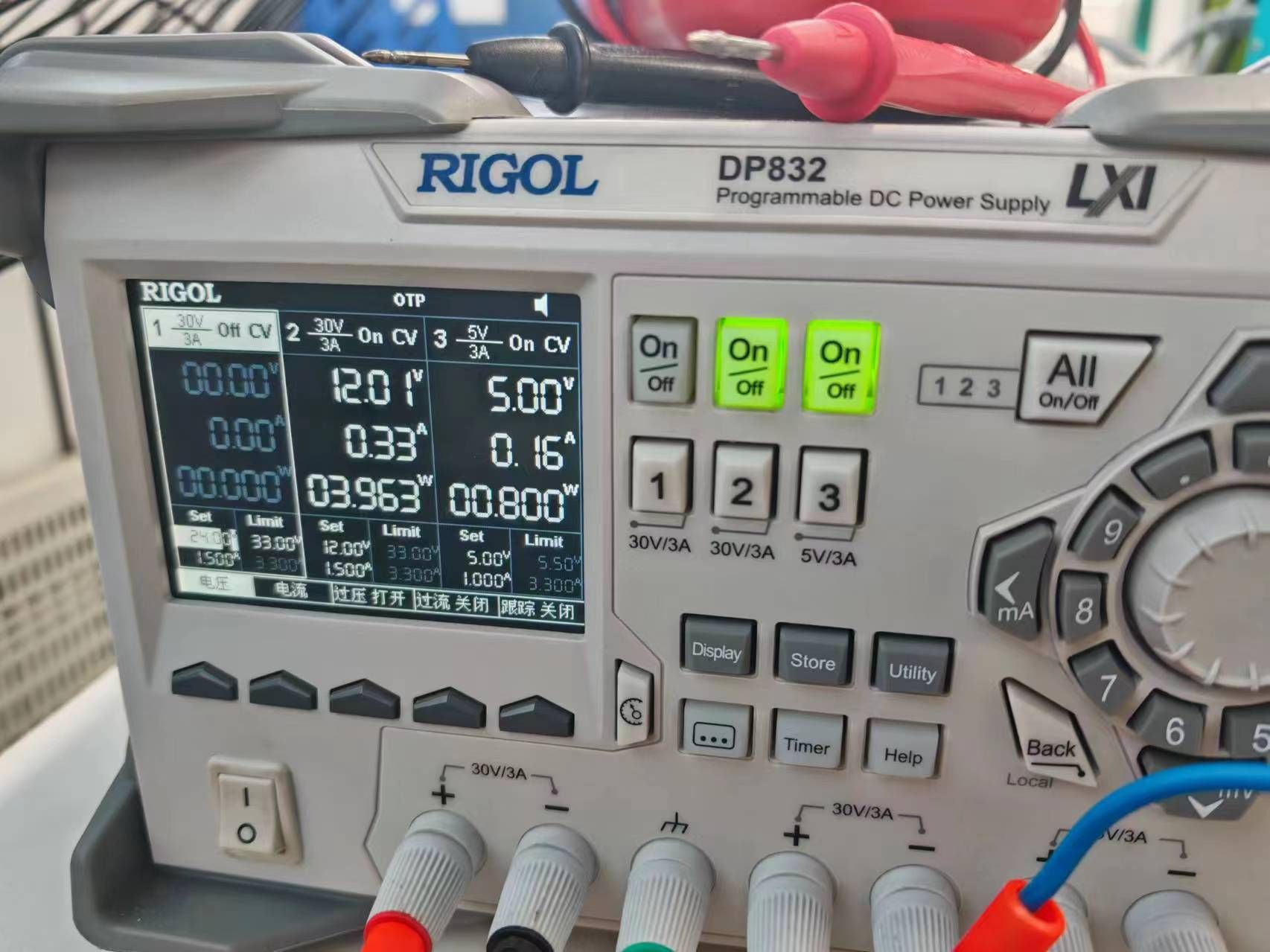
                        运行取图指令卡死,串口不能和RK3568通讯了。但是屏幕那边是正常的,可以正常触屏以及打开文件等操作,证明3568没有死机。
                        供电方面,3568的12V和265的5V我用线性电源供电的,电压显示正常。
                        抓图命令后,MIPI有信号了,5V那边电流会变成0.21A左右。
                        目前来看,只要MIPI有信号,串口那边就会卡住,就不能和3568通讯了。
                        344fdc810ed8685d093a41d5defe041.jpg

                        veye_xummV 1 Reply Last reply Reply Quote 0
                        • veye_xummV Offline
                          veye_xumm @w88121446
                          last edited by

                          @w88121446 调试串口卡住的话,你有没有其他手段,能进入操作系统的终端,执行一下dmesg,看看有什么报错?

                          Questions will be answered as soon as possible, please be patient.
                          如果你使用中文,请直接用中文提问。
                          May the force be with YOU. (This is the translation of the mysterious Chinese symbol above.)

                          W 1 Reply Last reply Reply Quote 0
                          • W Offline
                            w88121446 @veye_xumm
                            last edited by w88121446

                            @veye_xumm
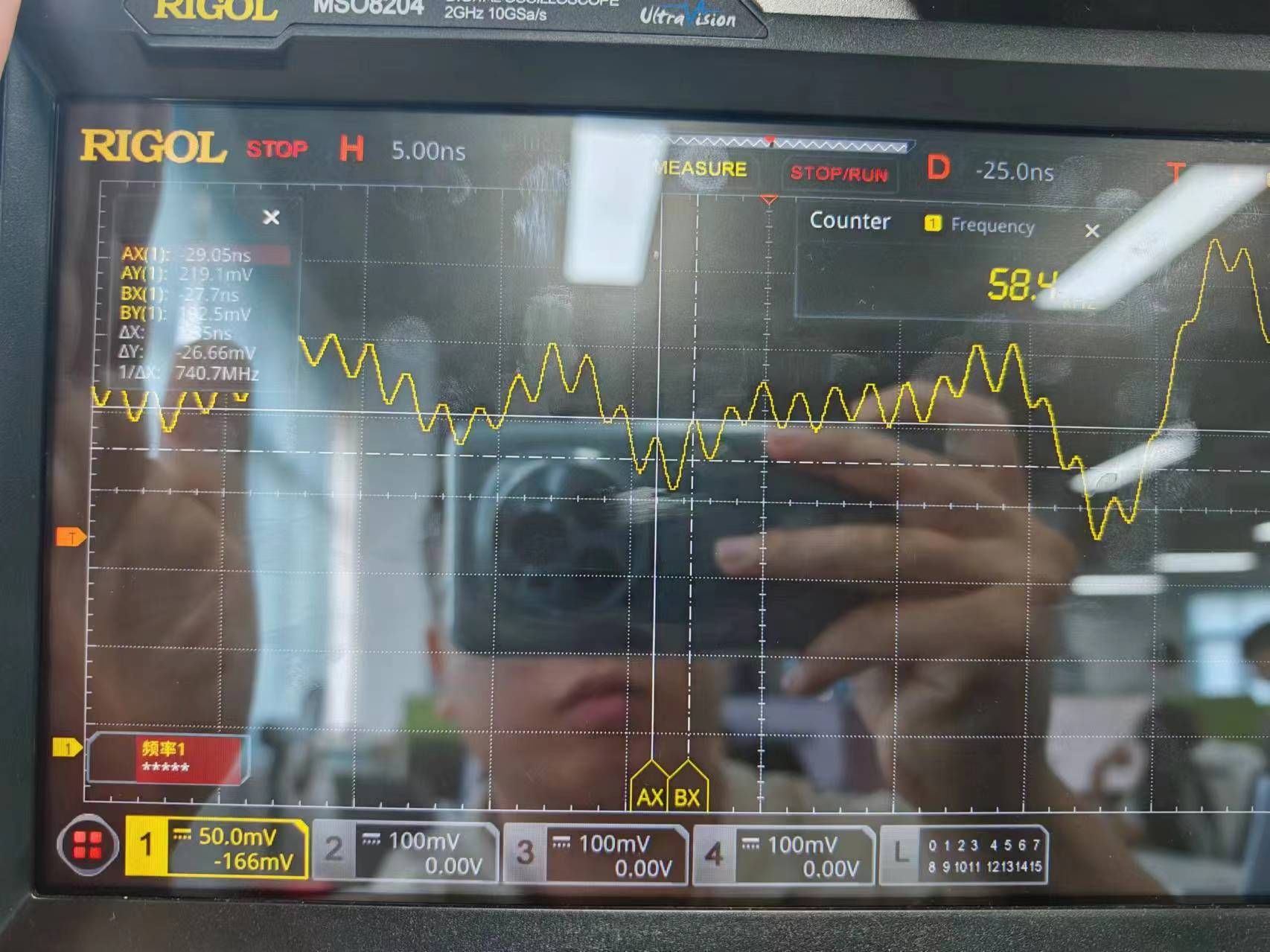
                            1.我给3568接了鼠标和键盘,调用操作系统的终端dmesg,未发现报错,打印信息和串口卡住之前的一样。
                            我看了一下mipi_clk信号,频率是740MHZ,峰峰值只有26mv左右。这个会不会有问题,我的OV5695的mipi_clk峰峰值大概有46mv。

                            2.关于link_freq和pixel_freq我有一个疑问
                            我的0v2710:OV2710_PIXEL_RATE=80 M
                            OV2710_LINK_FREQ=400M
                            我的ov5695:OV5695_PIXEL_RATE=180M
                            OV5695_LINK_FREQ=420M
                            这俩都满足这个公式
                            pixel_rate = link_freq * 2 * lanes / bits_per_pixel

                            mv-imx265的驱动中:MV_CAM_PIXEL_RATE=750M
                            MVCAM_DEFAULT_LINK_FREQ =742.5M
                            明显是不满足公式
                            pixel_rate=link_freq * 2 * lanes / bits_per_pixel

                            在这里有没有可能有问题?

                            afdb161a38c4eefe53b98b25c288c6f.jpg=

                            veye_xummV 1 Reply Last reply Reply Quote 0
                            • veye_xummV Offline
                              veye_xumm @w88121446
                              last edited by

                              @w88121446 said in 移植MV-IMX265驱动程序到迅为RK3568抓图卡死:

                              我看了一下mipi_clk信号,频率是740MHZ,峰峰值只有26mv左右。这个会不会有问题,我的OV5695的mipi_clk峰峰值大概有46mv。
                              2.关于link_freq和pixel_freq我有一个疑问
                              我的0v2710:OV2710_PIXEL_RATE=80 M
                              OV2710_LINK_FREQ=400M
                              我的ov5695:OV5695_PIXEL_RATE=180M
                              OV5695_LINK_FREQ=420M
                              这俩都满足这个公式
                              pixel_rate = link_freq * 2 * lanes / bits_per_pixel
                              mv-imx265的驱动中:MV_CAM_PIXEL_RATE=750M
                              MVCAM_DEFAULT_LINK_FREQ =742.5M
                              明显是不满足公式
                              pixel_rate=link_freq * 2 * lanes / bits_per_pixel
                              在这里有没有可能有问题?

                              这些都是没问题的。现在我们全系列的MV系列相机和RAW系列都已经接如果firefly、radxa的rk3568板子。
                              不过,我们在这两个板子上都是用的kernel5.10的。
                              我仔细回忆了一下,当初我们最早曾尝试在firefly板子上做过基于4.19的版本的取图,现象跟你现在的现象一样,不出图也不报错。后来firefly发布了5.10版本的bsp,我们就转到5.10版本了。

                              Questions will be answered as soon as possible, please be patient.
                              如果你使用中文,请直接用中文提问。
                              May the force be with YOU. (This is the translation of the mysterious Chinese symbol above.)

                              W 1 Reply Last reply Reply Quote 0
                              • W Offline
                                w88121446 @veye_xumm
                                last edited by

                                @veye_xumm 我先弄个5.10试试,不过对我这边很麻烦,还关系到其他同事。4.19还有抢救的希望吗?

                                veye_xummV 1 Reply Last reply Reply Quote 0
                                • veye_xummV Offline
                                  veye_xumm @w88121446
                                  last edited by

                                  @w88121446 这个我这边不清楚,没法给你有效的参考信息。

                                  Questions will be answered as soon as possible, please be patient.
                                  如果你使用中文,请直接用中文提问。
                                  May the force be with YOU. (This is the translation of the mysterious Chinese symbol above.)

                                  W 1 Reply Last reply Reply Quote 0
                                  • W Offline
                                    w88121446 @veye_xumm
                                    last edited by w88121446

                                    @veye_xumm 您好,我现在在5.10的内核中可以正确发现MV-IMX265了。目前遇到两个问题
                                    1.是发送《v4l2-ctl -L》
                                    回复如下图,不回复FPS等信息了

                                    4c3f0dd1-de83-4ec7-a8f0-68d28ca64862-image.png

                                    2.是发送《v4l2-ctl --set-ctrl frame_rate=10》设置帧率是会报错

                                    30822052-67c6-4d50-abce-11a30a1029ae-image.png

                                    请您指点一下

                                    veye_xummV 1 Reply Last reply Reply Quote 0
                                    • veye_xummV Offline
                                      veye_xumm @w88121446
                                      last edited by

                                      @w88121446
                                      配参数应该配置到/dev/v4l-subdev2 吧?
                                      你可以参考参考part7.2

                                      Questions will be answered as soon as possible, please be patient.
                                      如果你使用中文,请直接用中文提问。
                                      May the force be with YOU. (This is the translation of the mysterious Chinese symbol above.)

                                      W 1 Reply Last reply Reply Quote 0
                                      • W Offline
                                        w88121446 @veye_xumm
                                        last edited by

                                        @veye_xumm 图像可以采集出来了,想实时预览的话有什么办法吗?

                                        veye_xummV 2 Replies Last reply Reply Quote 0
                                        • veye_xummV Offline
                                          veye_xumm @w88121446
                                          last edited by

                                          @w88121446 said in 移植MV-IMX265驱动程序到迅为RK3568抓图卡死:

                                          @veye_xumm 图像可以采集出来了,想实时预览的话有什么办法吗?

                                          我们wiki上面提到一个python脚本,可以做预览,你可以参考一下。

                                          Questions will be answered as soon as possible, please be patient.
                                          如果你使用中文,请直接用中文提问。
                                          May the force be with YOU. (This is the translation of the mysterious Chinese symbol above.)

                                          W 1 Reply Last reply Reply Quote 0
                                          • W Offline
                                            w88121446 @veye_xumm
                                            last edited by

                                            @veye_xumm 暂时没有python环境,我尝试使用gstreamer里的脚本预览
                                            设置成这样:media-ctl -d /dev/media0 --set-v4l2 '"m00_b_mvcam 2-003b":0[fmt:Y8_1X8/2048x1544@1/30]'
                                            然后再预览:gst-launch-1.0 v4l2src device=/dev/video1 io-mode=4 ! queue ! video/x-raw,format=NV12,width=2048,height=1544,framerate=30/1 ! glimagesink
                                            出来的图颜色不对,有时绿有时粉,方向也不时我想要的,该如何旋转。

                                            如果设置成这样:media-ctl -d /dev/media0 --set-v4l2 '"m00_b_mvcam 2-003b":0[fmt:UYVY8_2X8/2048x1544@1/30]'
                                            然后再预览:gst-launch-1.0 v4l2src device=/dev/video1 io-mode=4 ! queue ! video/x-raw,format=NV12,width=2048,height=1544,framerate=30/1 ! glimagesink
                                            不出图。

                                            麻烦您指导一下,我的模块是MV-IMX265

                                            veye_xummV 1 Reply Last reply Reply Quote 0

                                            Hello! It looks like you're interested in this conversation, but you don't have an account yet.

                                            Getting fed up of having to scroll through the same posts each visit? When you register for an account, you'll always come back to exactly where you were before, and choose to be notified of new replies (either via email, or push notification). You'll also be able to save bookmarks and upvote posts to show your appreciation to other community members.

                                            With your input, this post could be even better 💗

                                            Register Login
                                            • First post
                                              Last post