VEYE imx385 驱动问题+
-
VEYE MIPI在 roc3588s-pc的板子,直接刷了 您提供的最新的
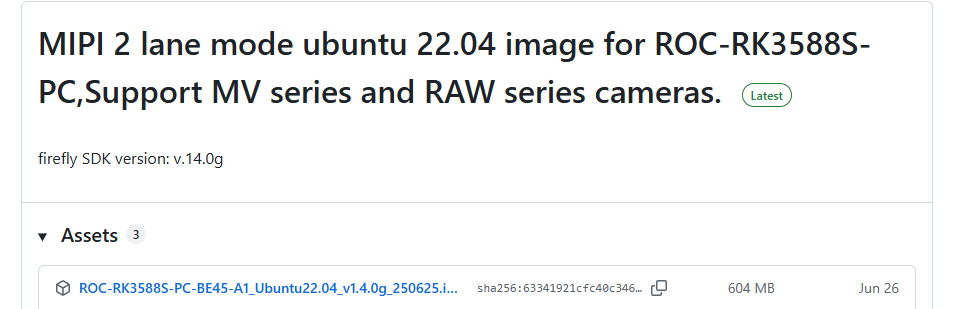 好像不太对,我DMESG是 这样,是不是需要我在firefly 重新编译到最新的linux系统里面,这个版本 已经不支持VEYE系列了
parsed
[ 6.876879] veye_vbyone 7-0065: thcv242a_init_pre: begin
[ 6.877028] veye_vbyone 7-0065: Cannot write register 0x50 (-6)!
[ 6.877170] veye_vbyone 7-0065: Cannot write register 0x04 (-6)!
[ 6.877313] veye_vbyone 7-0065: Cannot write register 0x10 (-6)!
[ 6.877455] veye_vbyone 7-0065: Cannot write register 0x1704 (-6)!
[ 6.877597] veye_vbyone 7-0065: Cannot write register 0x102 (-6)!
[ 6.877739] veye_vbyone 7-0065: Cannot write register 0x103 (-6)!
[ 6.877881] veye_vbyone 7-0065: Cannot write register 0x104 (-6)!
[ 6.878023] veye_vbyone 7-0065: Cannot write register 0x105 (-6)!
[ 6.878165] veye_vbyone 7-0065: Cannot write register 0x100 (-6)!
[ 6.878307] veye_vbyone 7-0065: Cannot write register 0x10f (-6)!
[ 6.878453] veye_vbyone 7-0065: Cannot write register 0x10a (-6)!
[ 6.878598] veye_vbyone 7-0065: Cannot write register 0x31 (-6)!
[ 6.878602] veye_vbyone 7-0065: thcv242a_init_pre: successfully
[ 6.878605] veye_vbyone 7-0065: thcv242a_probe: error initializing thcv242a pre
[ 7.040169] mvcam 7-003b: veye mv series camera driver version: 01.01.08 -
@flaty
您这个截图的镜像是MV和RAW系列的。
请参考这个链接中的镜像。
https://github.com/veyeimaging/rk35xx_firefly/releases/tag/v1.7 -
@veye_xumm 我也得觉得不对,IMX385 veye系列的最新的驱动是哪个,是1.7下的吗
-
@flaty 驱动源码你直接用github最新的就行。
-
@veye_xumm 编译错误 我把信息发给您看一下,是驱动里面的结构体
CC drivers/media/i2c/veyecam2m.o
drivers/media/i2c/veyecam2m.c: In function 'veyecam2m_g_mbus_config':
drivers/media/i2c/veyecam2m.c:419:24: error: 'V4L2_MBUS_CSI2' undeclared (first use in this function); did you mean 'V4L2_MBUS_CSI1'?
419 | config->type = V4L2_MBUS_CSI2;
| ^~~~~~~~~~~~~~
| V4L2_MBUS_CSI1
drivers/media/i2c/veyecam2m.c:419:24: note: each undeclared identifier is reported only once for each function it appears in
drivers/media/i2c/veyecam2m.c: At top level:
drivers/media/i2c/veyecam2m.c:898:3: error: 'const struct v4l2_subdev_video_ops' has no member named 'g_mbus_config'
898 | .g_mbus_config = veyecam2m_g_mbus_config,
| ^~~~~~~~~~~~~
drivers/media/i2c/veyecam2m.c:898:19: error: initialization of 'int (*)(struct v4l2_subdev *, struct v4l2_subdev_frame_interval )' from incompatible pointer type 'int ()(struct v4l2_subdev *, struct v4l2_mbus_config *)' [-Werror=incompatible-pointer-types]
898 | .g_mbus_config = veyecam2m_g_mbus_config,
| ^~~~~~~~~~~~~~~~~~~~~~~
drivers/media/i2c/veyecam2m.c:898:19: note: (near initialization for 'veyecam2m_video_ops.s_frame_interval')
cc1: all warnings being treated as errors
make[4]: *** [scripts/Makefile.build:273:drivers/media/i2c/veyecam2m.o] 错误 1一下是内核配置
============Start building kernel============
TARGET_ARCH =arm64
TARGET_KERNEL_CONFIG =rockchip_linux_defconfig
TARGET_KERNEL_DTS =roc-rk3588s-pc-mipi101-BSD1218-A101KL68
TARGET_KERNEL_CONFIG_FRAGMENT =rk3588_linux.config firefly-linux.config -
[0_1756784079945_log.zip](正在上传 100%) 这个是完整的编译log,您看一下,我使用firefly最新的SDK 进行的编译,采用5.10的内核
-
@flaty
参见代码的注释,你的内核缺少这个接口,需要注掉这个函数。

-
@veye_xumm 您这边 适配过 SDK1.4.0G 这个版本吗 firefly
-
@flaty 可以的。
-
-
@flaty 就是这个。
-
@veye_xumm zhge dsi的头您看 有问题吗 检测不到相机,
#include "roc-rk3588s-pc.dtsi"//#include "rk3588-roc-pc-cam-8ms1m.dtsi"
//open this line to enable fpdlink-III link
//#include "rk3588-roc-pc-fpdlink-90ub954.dtsi"//open this line to enable v-by-one hs link
#include "rk3588-roc-pc-vbyone-overlay.dtsi"#include "rk3588-roc-pc-cam-veyecam2m.dtsi"
#include "rk3588-roc-pc-cam-veyemvcam.dtsi"#include "roc-rk3588s-pc-v10-diff.dtsi"
#define WHICHDSI 0 /* dsi0 = 0,dsi1 = 1*/ -
-
@veye_xumm 我再试一下吧,不知道咋回事,,,编译什么都没问题
-
@veye_xumm
[ 7.047946] veyecam2m 7-003b: veye camera driver version: 00.01.01
[ 7.047980] veyecam2m 7-003b: Failed to get power-gpios, maybe no use
[ 7.048101] veyecam2m 7-003b: supply avdd not found, using dummy regulator
[ 7.048213] veyecam2m 7-003b: supply dovdd not found, using dummy regulator
[ 7.048278] veyecam2m 7-003b: supply dvdd not found, using dummy regulator
[ 7.048303] veyecam2m 7-003b: could not get default pinstate
[ 7.048309] veyecam2m 7-003b: could not get sleep pinstate
[ 7.048320] veyecam2m 7-003b: Success to get veyecam2m endpoint data lanes, dts uses 2 lanes
[ 7.170539] veyecam2m 7-003b: camera id is veyecam2m
[ 7.173503] veyecam2m 7-003b: sensor is IMX385
[ 7.173564] veyecam2m 7-003b: board type is ONE board
[ 7.219705] rockchip-csi2-dphy csi2-dphy0: dphy0 matches m00_b_veyecam2m 7-003b:bus type 5
以上电源的错误,但是ls /dev/video0 可以看到设备了 -
@flaty 这些报错都不用管。 我们的模组不需要这些供电。
-
@veye_xumm 测试 出图像了,搞定了 ,谢谢
-
@flaty 不客气。
-
@veye_xumm 现在遇到个新的问题,我不知道是板子硬件支持,我是用DMABUF 作为V4L2的qbuf, 但是返回错误 Failed to queue buffer: Invalid argument,您看一下我这部分代码,是不是该驱动支持,
//将缓冲区注册到摄像头
struct v4l2_buffer buf={0};
struct v4l2_plane planes[1]={0};
buf.index =0;
buf.type = V4L2_BUF_TYPE_VIDEO_CAPTURE_MPLANE;
buf.memory = V4L2_MEMORY_DMABUF;
buf.length = 1;
buf.m.planes = planes;
planes[0].m.fd = frame_buffers[i].dmabuf_fd;
planes[0].length =buffer_size;if (ioctl(cam_fd, VIDIOC_QBUF, &buf) < 0) { perror("Failed to queue buffer"); return -1; } -
@flaty 建议您参考一下yavta的源码。git clone https://github.com/veyeimaging/yavta.git

Hello! It looks like you're interested in this conversation, but you don't have an account yet.
Getting fed up of having to scroll through the same posts each visit? When you register for an account, you'll always come back to exactly where you were before, and choose to be notified of new replies (either via email, or push notification). You'll also be able to save bookmarks and upvote posts to show your appreciation to other community members.
With your input, this post could be even better 💗
Register Login