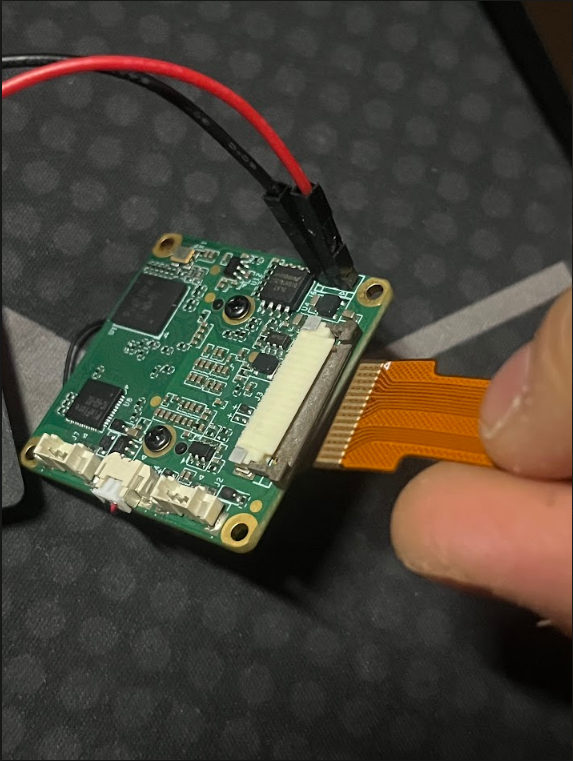
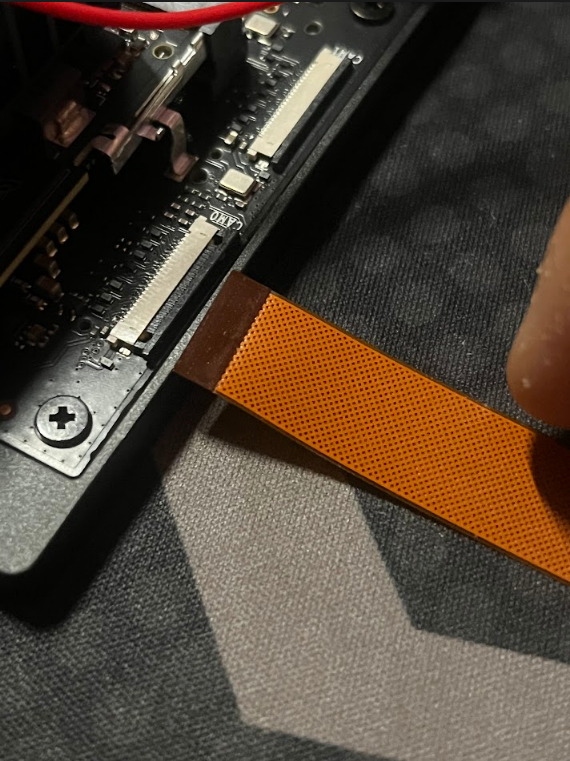
I decided to return the camera sensor and look for a better alternative despite my best efforts
D
Offline
Latest posts made by D_101
-
RE: Jetson Nano Orin IMX462
-
RE: Jetson Nano Orin IMX462
@veye_xumm So I've taken the following steps
- Re-flashed my Orin with the NVIDIA SDK manager
- Changed the CSI cable with the second cable that was provided by you guys. I also ensured the black tab on the Jetson Orin was facing 'up' while the pins on the wider end of the CSI cable that went to the IMX462 was facing 'towards' the tab (Please see pictures below for reference)
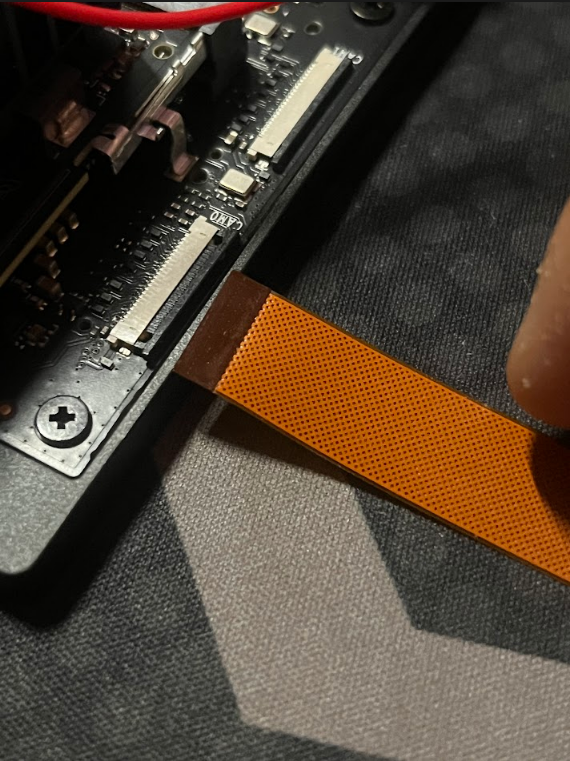
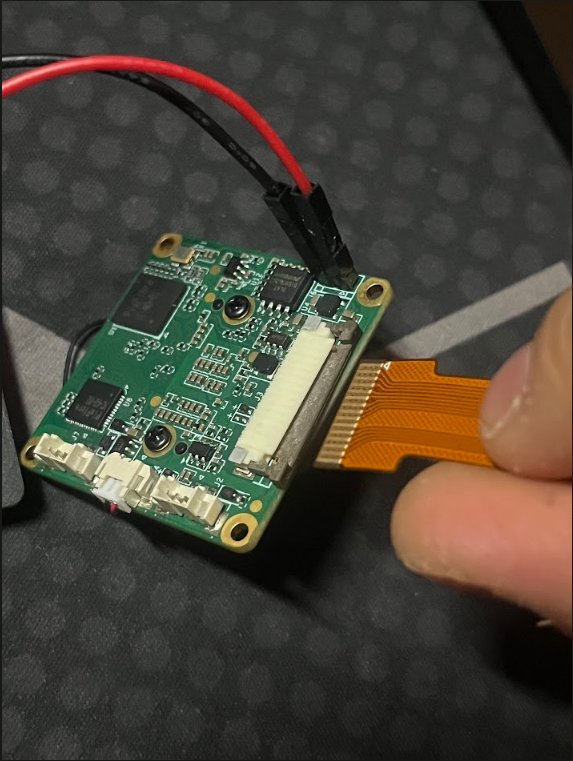
- And below are the steps that I took that eventually lead to the same
probing errorthat was mentioned earlier
wget https://github.com/veyeimaging/nvidia_jetson_veye_bsp/releases/latest/download/nvidia_jetson_veye_bsp.tar.gz

tar -xzvf nvidia_jetson_veye_bsp.tar.gz

sudo cp -r nvidia_jetson_veye_bsp/ko/$(uname -r)/* /lib/modules/$(uname -r)/kernel/drivers/media/i2c/ -f

sudo depmod


sudo cp -r nvidia_jetson_veye_bsp/ko/5.15.148-tegra-l4t36.4.4/downstream/i2c/* /lib/modules/$(uname -r)/updates/drivers/media/i2c/ -f

sudo cp -r nvidia_jetson_veye_bsp/ko/5.15.148-tegra-l4t36.4.4/downstream/terga-camera/tegra-camera.ko /lib/modules/$(uname -r)/updates/drivers/media/platform/tegra/camera -f

sudo cp nvidia_jetson_veye_bsp/ko/5.15.148-tegra-l4t36.4.4/upstream/*.ko /lib/modules/$(uname -r)/kernel/drivers/media/v4l2-core/ -f

sudo depmod

ls /boot/dtb
# Output : kernel_tegra234-p3768-0000+p3767-0005-nv-super.dtb

# Create veyecam directory
sudo mkdir -p /boot/veyecam

# Copy the IMX462 overlay from JetPack 6.2.1 directory
sudo cp nvidia_jetson_veye_bsp/dtbs/Orin/JetPack_6.2.1_Linux_JETSON_ORIN_TARGETS/orin_nx_nano/tegra234-p3767-camera-p3768-veyecam2m-dual.dtbo /boot/veyecam/

sudo nano /boot/extlinux/extlinux.conf

################## Output from extlinux.conf file ##################

TIMEOUT 30
DEFAULT primary

MENU TITLE L4T boot options

LABEL primary
      MENU LABEL primary kernel
      LINUX /boot/Image
      # FDT line added 1/6/25
      INITRD /boot/initrd
      FDT /boot/dtb/kernel_tegra234-p3768-0000+p3767-0005-nv-super.dtb
      APPEND ${cbootargs} root=PARTUUID=4467ef34-b907-4537-8470-c873fa849134 rw rootwait rootfstype=ext4 mminit_loglevel=4 console=ttyTCU0,115200 firmware_class.path=/etc/firmware fbcon=map:0 video=efifb:off console=tty0 nv-auto-config
      # IMX462
      OVERLAYS /boot/veyecam/tegra234-p3767-camera-p3768-veyecam2m-dual.dtbo
# When testing a custom kernel, it is recommended that you create a backup of
# the original kernel and add a new entry to this file so that the device can
# fallback to the original kernel. To do this:
#
# 1, Make a backup of the original kernel
#      sudo cp /boot/Image /boot/Image.backup
#
# 2, Copy your custom kernel into /boot/Image
#
# 3, Uncomment below menu setting lines for the original kernel
#
# 4, Reboot

# LABEL backup
#    MENU LABEL backup kernel
#    LINUX /boot/Image.backup
#    INITRD /boot/initrd
#    APPEND ${cbootargs}

LABEL primary-backup
      MENU LABEL primary kernel backup
      LINUX /boot/Image
      FDT /boot/dtb/kernel_tegra234-p3768-0000+p3767-0005-nv-super.dtb
      INITRD /boot/initrd
      APPEND ${cbootargs} root=PARTUUID=4467ef34-b907-4537-8470-c873fa849134 rw rootwait rootfstype=ext4 mminit_loglevel=4 console=ttyTCU0,115200 firmware_class.path=/etc/firmware fbcon=map:0 video=efifb:off console=tty0 nv-auto-config
      OVERLAYS /boot/veyecam/tegra234-p3767-camera-p3768-veyecam2m-dual.dtbo

#######################################################################
sudo apt-mark hold nvidia-l4t-kernel nvidia-l4t-kernel-dtbs

sudo reboot
After restarting the Orin, I got the following
dmesgoutputsudo dmesg | grep veyecam [ 11.201520] veyecam 9-003b: probing v4l2 sensor [ 11.201648] veyecam 9-003b: tegracam sensor driver:veyecam_v2.0.6 [ 11.211991] veyecam 9-003b: probe failed [ 11.212000] veyecam 9-003b: board setup failed [ 11.212329] veyecam 10-003b: probing v4l2 sensor [ 11.212455] veyecam 10-003b: tegracam sensor driver:veyecam_v2.0.6 [ 11.227303] veyecam 10-003b: probe failed [ 11.227310] veyecam 10-003b: board setup failedI did my best to be as thorough as possible, but at this point I'm not sure what else I could be missing
-
RE: Jetson Nano Orin IMX462
@veye_xumm said in Jetson Nano Orin IMX462:
-
I think your hardware connections are correct. Also, the Dupont wires are generally not required.
-
I believe there are some issues with your operations on the
.koand.dtbfiles. Let me explain in detail below:
Your camera model is VEYE-MIPI-IMX462, which is a color camera. You should only use theveyecam2m-labeled DTBO andveyecam.ko. There is no need to update the.kofiles in the downstream and upstream directories. -
However, judging from the
dmesgoutput, it seems that you have also performed some correct steps, because the commanddmesg | grep veyeshows that the driver has been loaded correctly and has attempted to probe the camera.
Overall, I think there are some minor issues in your operations, but the general approach seems to be correct. Based on the following information:
# Checking dmesg
[   10.758731] veyecam 9-003b: probing v4l2 sensor
[   10.758853] veyecam 9-003b: tegracam sensor driver: veyecam_v2.0.6
[   10.771484] veyecam 9-003b: probe failed
[   10.771489] veyecam 9-003b: board setup failed
[   10.776701] veyecam 10-003b: probing v4l2 sensor
[   10.776828] veyecam 10-003b: tegracam sensor driver: veyecam_v2.0.6
[   10.787671] veyecam 10-003b: probe failed
[   10.787678] veyecam 10-003b: board setup failed
I can only suspect a hardware issue. Please remove the Dupont wires, or try using a different MIPI port.
Responding to " You should only use the
veyecam2m-labeled DTBO" I see the following in thedtbsdirectorybash ct@ct-orin:~/nvidia_jetson_veye_bsp/dtbs/Orin/JetPack_6.2.1_Linux_JETSON_ORIN_TARGETS/orin_nx_nano$ ls Makefile-JP6.1 Makefile-JP6.2 README tegra234-camera-rbpcv3-csimx307.dtsi tegra234-camera-rbpcv3-cssc132.dtsi tegra234-camera-rbpcv3-veyecam2m-0x22.dtsi tegra234-camera-rbpcv3-veyecam2m.dtsi tegra234-camera-rbpcv3-veyecam2m_mvcam.dtsi tegra234-camera-rbpcv3-veye_gxcam.dtsi tegra234-camera-rbpcv3-veyeimx335.dtsi tegra234-camera-rbpcv3-veye_mvcam-4lane-cam0.dtsi tegra234-camera-rbpcv3-veye_mvcam-4lane-cam1-0.dtsi tegra234-camera-rbpcv3-veye_mvcam-4lane-cam1.dtsi tegra234-camera-rbpcv3-veye_mvcam.dtsi tegra234-fpdlink-dual-90ub954.dtsi tegra234-p3767-camera-p3768-csimx307-dual.dtbo tegra234-p3767-camera-p3768-csimx307-dual.dts tegra234-p3767-camera-p3768-cssc132-dual.dtbo tegra234-p3767-camera-p3768-cssc132-dual.dts tegra234-p3767-camera-p3768-raw_ar0234m-dual-4lane-cam1.dtbo tegra234-p3767-camera-p3768-raw_ar0234m-dual-4lane-cam1.dts tegra234-p3767-camera-p3768-raw_ar0234m-dual.dtbo tegra234-p3767-camera-p3768-raw_ar0234m-dual.dts tegra234-p3767-camera-p3768-raw_imx462m-dual.dtbo tegra234-p3767-camera-p3768-raw_imx462m-dual.dts tegra234-p3767-camera-p3768-veyecam2m-dual-0x22.dts tegra234-p3767-camera-p3768-veyecam2m-dual.dtbo tegra234-p3767-camera-p3768-veyecam2m-dual.dts tegra234-p3767-camera-p3768-veyecam2m-fpdlink-dual.dtbo tegra234-p3767-camera-p3768-veyecam2m-fpdlink-dual.dts tegra234-p3767-camera-p3768-veyecam2m-raw_ar0234m.dts tegra234-p3767-camera-p3768-veye_gxcam-dual.dtbo tegra234-p3767-camera-p3768-veye_gxcam-dual.dts tegra234-p3767-camera-p3768-veyeimx335-dual.dtbo tegra234-p3767-camera-p3768-veyeimx335-dual.dts tegra234-p3767-camera-p3768-veye_mvcam-dual-4lane-cam1.dtbo tegra234-p3767-camera-p3768-veye_mvcam-dual-4lane-cam1.dts tegra234-p3767-camera-p3768-veye_mvcam-dual.dtbo tegra234-p3767-camera-p3768-veye_mvcam-dual.dtsMy question is
- The only
.dtbofile that looks right is the/tegra234-p3767-camera-p3768-veyecam2m-dual.dtbowhich I did add to myextlinux.conffile as stated below
TIMEOUT 30
DEFAULT primary

MENU TITLE L4T boot options

LABEL primary
      MENU LABEL primary kernel
      LINUX /boot/Image
      # FDT line added 1/6/25
      FDT /boot/dtb/kernel_tegra234-p3768-0000+p3767-0005-nv-super.dtb
      INITRD /boot/initrd
      APPEND ${cbootargs} root=PARTUUID=4467ef34-b907-4537-8470-c873fa849134 rw rootwait rootfstype=ext4 mminit_loglevel=4 console=ttyTCU0,115200 firmware_class.path=/etc/firmware fbcon=map:0 video=efifb:off console=tty0 nv-auto-config
      # IMX462
      OVERLAYS /boot/veyecam/tegra234-p3767-camera-p3768-veyecam2m-dual.dtbo

# When testing a custom kernel, it is recommended that you create a backup of
# the original kernel and add a new entry to this file so that the device can
# fallback to the original kernel. To do this:
#
# 1, Make a backup of the original kernel
#      sudo cp /boot/Image /boot/Image.backup
#
# 2, Copy your custom kernel into /boot/Image
#
# 3, Uncomment below menu setting lines for the original kernel
#
# 4, Reboot

# LABEL backup
#    MENU LABEL backup kernel
#    LINUX /boot/Image.backup
#    INITRD /boot/initrd
#    APPEND ${cbootargs}

LABEL primary-backup
      MENU LABEL primary kernel backup
      LINUX /boot/Image
      FDT /boot/dtb/kernel_tegra234-p3768-0000+p3767-0005-nv-super.dtb
      INITRD /boot/initrd
      APPEND ${cbootargs} root=PARTUUID=4467ef34-b907-4537-8470-c873fa849134 rw rootwait rootfstype=ext4 mminit_loglevel=4 console=ttyTCU0,115200 firmware_class.path=/etc/firmware fbcon=map:0 video=efifb:off console=tty0 nv-auto-config
      OVERLAYS /boot/veyecam/tegra234-p3767-camera-p3768-veyecam2m-dual.dtbo
My question here is
- Last listed in the directory above I only see
tegra234-p3767-camera-p3768-veyecam2m-dual.dtboandtegra234-camera-rbpcv3-veyecam2m.dtsithat come close to what you instructed earlier regarding me using theveyecam2mthat was labeled withDTBO - Since I only have
oneIMX462 and you instructed me to
The onlyveyecam2m-labeled DTBOfile that I assumed I need to usetegra234-p3767-camera-p3768-veyecam2m-dual.dtbo
Is that correct?
Also, responding to the comment you made earlier regarding updating the
.kofiles up/downstreamThere is no need to update the `.ko` files in the **downstream** and **upstream** directories.It is stated in the wiki page to do just that
Therefore, for Jetpack 6.2.1, the following commands should be modified as:

sudo cp nvidia_jetson_veye_bsp/ko/5.15.148-tegra-l4t36.4.4/downstream/i2c/* /lib/modules/$(uname -r)/updates/drivers/media/i2c/ -f

sudo cp nvidia_jetson_veye_bsp/ko/5.15.148-tegra-l4t36.4.4/downstream/terga-camera/tegra-camera.ko /lib/modules/$(uname -r)/updates/drivers/media/platform/tegra/camera -f

sudo cp nvidia_jetson_veye_bsp/ko/5.15.148-tegra-l4t36.4.4/upstream/*.ko /lib/modules/$(uname -r)/kernel/drivers/media/v4l2-core/ -f
If those steps aren't necessary for someone who's running
Jetpack 6.2.1I feel like it should beremoved to lessen the confusionsince the wiki page instructions aren't the easiest to follow in my opinion. -
-
Jetson Nano Orin IMX462
In short, I have a Jetson Orin Nano and a IMX462, despite the way I orientate the camera cable, my Orin Nano can not detect the IMX462 despite having the drivers properly installed
Below are the specifications of my Orin Nano
cat /etc/nv_tegra_release
uname -r
ls /boot/dtb
# R36 (release), REVISION: 4.7, GCID: 42132812, BOARD: generic, EABI: aarch64, DATE: Thu Sep 18 22:54:44 UTC 2025
# KERNEL_VARIANT: oot
TARGET_USERSPACE_LIB_DIR=nvidia
TARGET_USERSPACE_LIB_DIR_PATH=usr/lib/aarch64-linux-gnu/nvidia
5.15.148-tegra
kernel_tegra234-p3768-0000+p3767-0005-nv-super.dtb
The following are the steps I've taken to install the IMX462 driver
wget https://github.com/veyeimaging/nvidia_jetson_veye_bsp/releases/latest/download/nvidia_jetson_veye_bsp.tar.gz
tar -xzvf nvidia_jetson_veye_bsp.tar.gz
sudo cp -r nvidia_jetson_veye_bsp/ko/$(uname -r)/* /lib/modules/$(uname -r)/kernel/drivers/media/i2c/ -f
sudo depmod


sudo cp -r nvidia_jetson_veye_bsp/ko/5.15.148-tegra-l4t36.4.4/downstream/i2c/* /lib/modules/$(uname -r)/updates/drivers/media/i2c/ -f

sudo cp -r nvidia_jetson_veye_bsp/ko/5.15.148-tegra-l4t36.4.4/downstream/terga-camera/tegra-camera.ko /lib/modules/$(uname -r)/updates/drivers/media/platform/tegra/camera -f

sudo cp nvidia_jetson_veye_bsp/ko/5.15.148-tegra-l4t36.4.4/upstream/*.ko /lib/modules/$(uname -r)/kernel/drivers/media/v4l2-core/ -f

sudo depmod

ls /boot/dtb
# Output : kernel_tegra234-p3768-0000+p3767-0005-nv-super.dtb

# Create veyecam directory
sudo mkdir -p /boot/veyecam

# Copy the IMX462 overlay from JetPack 6.2.1 directory
sudo cp nvidia_jetson_veye_bsp/dtbs/Orin/JetPack_6.2.1_Linux_JETSON_ORIN_TARGETS/orin_nx_nano/tegra234-p3767-camera-p3768-raw_imx462m-dual.dtbo /boot/veyecam/

sudo nano /boot/extlinux/extlinux.conf

# Edit extlinux.conf file
#TIMEOUT 30
#DEFAULT primary

#MENU TITLE L4T boot options

#LABEL primary
#      MENU LABEL primary kernel
#     LINUX /boot/Image
#      INITRD /boot/initrd
 #     APPEND ${cbootargs} root=PARTUUID=<your-uuid> rw rootwait rootfstype=ext4 mminit_loglevel=4 console=ttyTCU0,115200 firmware_class.path=/etc/firmware fbcon=map:0 video=efifb:off console=tty0 nv-auto-config
#      FDT /boot/dtb/kernel_tegra234-p3768-0000+p3767-0005-nv-super.dtb
 #     OVERLAYS /boot/veyecam/tegra234-p3767-camera-p3768-veyecam2m-dual.dtbo

sudo apt-mark hold nvidia-l4t-kernel nvidia-l4t-kernel-dtbs

sudo reboot
The following command was used to determine if the IMX462 was being detected
# Check correct module is loaded

lsmod | grep veyecam

# Check dmesg for camera detection
sudo dmesg | grep -i veyecam

# Check I2C - camera should appear at 0x3b
sudo i2cdetect -y -r 9

# Check for video devices
ls -l /dev/video*

# Checking correct module
veyecam                16384  0
tegra_camera          253952  4 nvhost_isp5,nvhost_nvcsi_t194,veyecam,nvhost_vi5

# Checking dmesg
[   10.758731] veyecam 9-003b: probing v4l2 sensor
[   10.758853] veyecam 9-003b: tegracam sensor driver:veyecam_v2.0.6
[   10.771484] veyecam 9-003b: probe failed
[   10.771489] veyecam 9-003b: board setup failed
[   10.776701] veyecam 10-003b: probing v4l2 sensor
[   10.776828] veyecam 10-003b: tegracam sensor driver:veyecam_v2.0.6
[   10.787671] veyecam 10-003b: probe failed
[   10.787678] veyecam 10-003b: board setup failed

# Probing I2C bus
  0  1  2  3  4  5  6  7  8  9  a  b  c  d  e  f
00: -- -- -- -- -- -- -- -- -- -- -- -- -- -- -- --
10: -- -- -- -- -- -- -- -- -- -- -- -- -- -- -- --
20: -- -- -- -- -- -- -- -- -- -- -- -- -- -- -- --
30: -- -- -- -- -- -- -- -- -- -- -- -- -- -- -- --
40: -- -- -- -- -- -- -- -- -- -- -- -- -- -- -- --
50: -- -- -- -- -- -- -- -- -- -- -- -- -- -- -- --
60: -- -- -- -- -- -- -- -- -- -- -- -- -- -- -- --
70: -- -- -- -- -- -- -- -- -- -- -- -- -- -- -- --

# Checking video device
ls: cannot access '/dev/video*': No such file or directory
As a sanity check, I've double/triple checked the orientation of the camera cables to my Jetson, the camera pins to the board are facing DOWN, while to the IMX462 the pins are facing UP