CSI132相机nvidia nx平台上无法更新硬件
-
@veye_xumm said in CSI132相机nvidia nx平台上无法更新硬件:
我现在按照 这个链接里面的教程 https://blog.csdn.net/zbb297918657/article/details/106390209
把镜像烧写到那个tf卡里,然后系统装上去以后,按照http://wiki.veye.cc/index.php/VEYE_CS_Camera_for_Jetson_TX2/zh里的步骤执行到3.6,然后ls /sys/bus/i2c/drivers/ 是能看到 cssc132的目录,但是ls /proc/device-tree/cam_i2cmux/i2c@* 就没有看到对应的相机的型号,请问这个是什么原因,是我没有执行3.9吗? -
@zjutony said in CSI132相机nvidia nx平台上无法更新硬件:
ls /proc/device-tree/cam_i2cmux/i2c@* 就没有看到对应的相机的型号,
这个是dtb更新对了才有的。你看一下3.6.4步骤是否正确执行了?
-
@veye_xumm
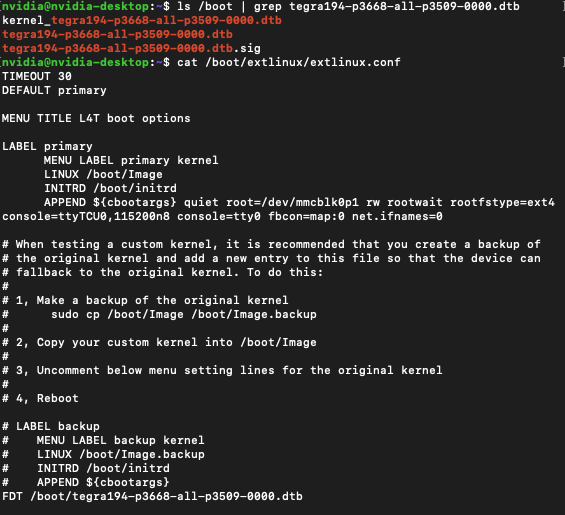
我们是nx的板子,您看看这样子是不是操作正确的 -
@zjutony
这个配置文件没错,dtb文件你用对应摄像头模组型号的。别弄错了就行了。 -
@veye_xumm 这个我看教程上这个dtb文件只有对应计算单元的,没有看到和相机型号对应的关系,这个是在哪里看
-
@zjutony
举个例子,如果你使用132,jetpack4.6 jetson nx,就需要下面这个路径下的dtb。
https://github.com/veyeimaging/nvidia_jetson_veye_bsp/tree/master/Xavier-NX/JetPack_4.6_Linux_JETSON_XAVIER_NX_TARGETS/dts dtb/CS-MIPI-SC132 -
@veye_xumm said in CSI132相机nvidia nx平台上无法更新硬件:
https://github.com/veyeimaging/nvidia_jetson_veye_bsp/tree/master/Xavier-NX/JetPack_4.6_Linux_JETSON_XAVIER_NX_TARGETS/dts dtb/CS-MIPI-SC132
这个文件夹下两个文件都要考到boot下吗,还是说就考呗那个dtb就行
-
@zjutony
dtb就可以 -
This post is deleted! -
@veye_xumm 重新下载了下dtb文件,现在可以了,多谢
-
@zjutony 不客气

Hello! It looks like you're interested in this conversation, but you don't have an account yet.
Getting fed up of having to scroll through the same posts each visit? When you register for an account, you'll always come back to exactly where you were before, and choose to be notified of new replies (either via email, or push notification). You'll also be able to save bookmarks and upvote posts to show your appreciation to other community members.
With your input, this post could be even better 💗
Register Login