VEYE IMAGING Forum
    • Categories
    • Tags
    • Recent
    • Popular
    • Users
    • WIKI
    • veye.cc
    • Register
    • Login

    CSI132相机nvidia nx平台上无法更新硬件

    Scheduled Pinned Locked Moved CS MIPI camera
    28 Posts 2 Posters 8.6k Views 1 Watching
    Loading More Posts
    • Oldest to Newest
    • Newest to Oldest
    • Most Votes
    Reply
    • Reply as topic
    Log in to reply
    This topic has been deleted. Only users with topic management privileges can see it.
    • Z Offline
      zjutony @veye_xumm
      last edited by

      @veye_xumm 更新的时候需要插着相机嘛,我更新的时候没有插相机

      veye_xummV 3 Replies Last reply Reply Quote 0
      • veye_xummV Offline
        veye_xumm @zjutony
        last edited by

        @zjutony
        更新的时候不需要。

        Questions will be answered as soon as possible, please be patient.
        如果你使用中文,请直接用中文提问。
        May the force be with YOU. (This is the translation of the mysterious Chinese symbol above.)

        1 Reply Last reply Reply Quote 0
        • veye_xummV Offline
          veye_xumm @zjutony
          last edited by

          @zjutony 最近有两个人都跟我反馈此问题了。请问你的原生系统,是通过nvidia提供的镜像烧写的,还是通过sdkmanager烧进去的?

          Questions will be answered as soon as possible, please be patient.
          如果你使用中文,请直接用中文提问。
          May the force be with YOU. (This is the translation of the mysterious Chinese symbol above.)

          1 Reply Last reply Reply Quote 0
          • veye_xummV Offline
            veye_xumm @zjutony
            last edited by

            @zjutony 可否把你的

            dmesg
            

            提示信息保存到一个txt,作为附件,发上来我看看?

            Questions will be answered as soon as possible, please be patient.
            如果你使用中文,请直接用中文提问。
            May the force be with YOU. (This is the translation of the mysterious Chinese symbol above.)

            Z 1 Reply Last reply Reply Quote 0
            • Z Offline
              zjutony @veye_xumm
              last edited by

              @veye_xumm dmesg.txt

              veye_xummV 1 Reply Last reply Reply Quote 0
              • veye_xummV Offline
                veye_xumm @zjutony
                last edited by

                @zjutony 我们的kernel并未生效。
                请上传一下/boot/extlinux/extlinux.conf

                Questions will be answered as soon as possible, please be patient.
                如果你使用中文,请直接用中文提问。
                May the force be with YOU. (This is the translation of the mysterious Chinese symbol above.)

                Z 1 Reply Last reply Reply Quote 0
                • Z Offline
                  zjutony @veye_xumm
                  last edited by

                  @veye_xumm extlinux.txt

                  veye_xummV 1 Reply Last reply Reply Quote 0
                  • veye_xummV Offline
                    veye_xumm @zjutony
                    last edited by

                    @zjutony
                    你好,我这边测试了一遍,没有问题。
                    跟你核对一下md5

                    ~$ md5sum /boot/Image
                    c52160b4a7a73dd171651d0df165f013  /boot/Image
                    xumm@xumm-desktop:~$ md5sum /boot/Image.sig 
                    9478788d08d86fcb31db8c2281820c93  /boot/Image.sig
                    xumm@xumm-desktop:~$ md5sum /boot/tegra194-p3668-all-p3509-0000.dtb
                    9ef615754c5b0bbb7778d8d18dc1f609  /boot/tegra194-p3668-all-p3509-0000.dtb
                    

                    Questions will be answered as soon as possible, please be patient.
                    如果你使用中文,请直接用中文提问。
                    May the force be with YOU. (This is the translation of the mysterious Chinese symbol above.)

                    Z 1 Reply Last reply Reply Quote 0
                    • Z Offline
                      zjutony @veye_xumm
                      last edited by

                      @veye_xumm b9915c21-af1f-4a22-bae9-173eee52cdc1-image.png
                      我对了下似乎这个也没有问题,是不是这个可以通过host pc直接烧写镜像的方法将其烧写进镜像文件中,可否将你们烧写好的这个镜像文件发我,我直接用这个镜像文件进行测试看

                      veye_xummV 1 Reply Last reply Reply Quote 0
                      • veye_xummV Offline
                        veye_xumm @zjutony
                        last edited by

                        @zjutony
                        我刚才尝试了一下,用
                        https://developer.nvidia.com/zh-cn/embedded/jetpack
                        下载的镜像直接烧写,然后按照我们的步骤操作了一下,没有问题。
                        你也可以这样尝试一下。

                        你这个问题也有其他人跟我反馈过,现在还没有确切的结论。不知道跟jetpack4.6增加的rootfs备份分区有没有关系。

                        如果要深究原因,你可以把你的系统的串口打印信息保存起来,发给我看看。 关键点在boot怎样引导的Image,引导的哪个Image。

                        Questions will be answered as soon as possible, please be patient.
                        如果你使用中文,请直接用中文提问。
                        May the force be with YOU. (This is the translation of the mysterious Chinese symbol above.)

                        Z 3 Replies Last reply Reply Quote 0
                        • Z Offline
                          zjutony @veye_xumm
                          last edited by

                          @veye_xumm said in CSI132相机nvidia nx平台上无法更新硬件:

                          https://developer.nvidia.com/zh-cn/embedded/jetpack

                          这个直接烧写是说的不用sdkmanager吗?

                          veye_xummV 1 Reply Last reply Reply Quote 0
                          • Z Offline
                            zjutony @veye_xumm
                            last edited by

                            @veye_xumm 那如果我把系统降低点是否会没有这个问题呢,就4.6之前的版本是不是都还是比较稳定的

                            veye_xummV 1 Reply Last reply Reply Quote 0
                            • veye_xummV Offline
                              veye_xumm @zjutony
                              last edited by

                              @zjutony 用sdkmanager也是可以的。

                              Questions will be answered as soon as possible, please be patient.
                              如果你使用中文,请直接用中文提问。
                              May the force be with YOU. (This is the translation of the mysterious Chinese symbol above.)

                              1 Reply Last reply Reply Quote 0
                              • veye_xummV Offline
                                veye_xumm @zjutony
                                last edited by

                                @zjutony 老版本我们也支持的。 这个不是稳定性的问题,就是不知为何没有生效。 但是我这总是复现不出,所以没有找到根本原因。你可以再试试我说的方法。

                                Questions will be answered as soon as possible, please be patient.
                                如果你使用中文,请直接用中文提问。
                                May the force be with YOU. (This is the translation of the mysterious Chinese symbol above.)

                                1 Reply Last reply Reply Quote 0
                                • Z Offline
                                  zjutony @veye_xumm
                                  last edited by

                                  @veye_xumm said in CSI132相机nvidia nx平台上无法更新硬件:

                                  https://developer.nvidia.com/zh-cn/embedded/jetpack

                                  我现在按照 这个链接里面的教程 https://blog.csdn.net/zbb297918657/article/details/106390209
                                  把镜像烧写到那个tf卡里,然后系统装上去以后,按照http://wiki.veye.cc/index.php/VEYE_CS_Camera_for_Jetson_TX2/zh里的步骤执行到3.6,然后ls /sys/bus/i2c/drivers/ 是能看到 cssc132的目录,但是ls /proc/device-tree/cam_i2cmux/i2c@* 就没有看到对应的相机的型号,请问这个是什么原因,是我没有执行3.9吗?

                                  veye_xummV 1 Reply Last reply Reply Quote 0
                                  • veye_xummV Offline
                                    veye_xumm @zjutony
                                    last edited by

                                    @zjutony

                                    @zjutony said in CSI132相机nvidia nx平台上无法更新硬件:

                                    ls /proc/device-tree/cam_i2cmux/i2c@* 就没有看到对应的相机的型号,

                                    这个是dtb更新对了才有的。你看一下3.6.4步骤是否正确执行了?

                                    Questions will be answered as soon as possible, please be patient.
                                    如果你使用中文,请直接用中文提问。
                                    May the force be with YOU. (This is the translation of the mysterious Chinese symbol above.)

                                    Z 1 Reply Last reply Reply Quote 0
                                    • Z Offline
                                      zjutony @veye_xumm
                                      last edited by

                                      @veye_xumm
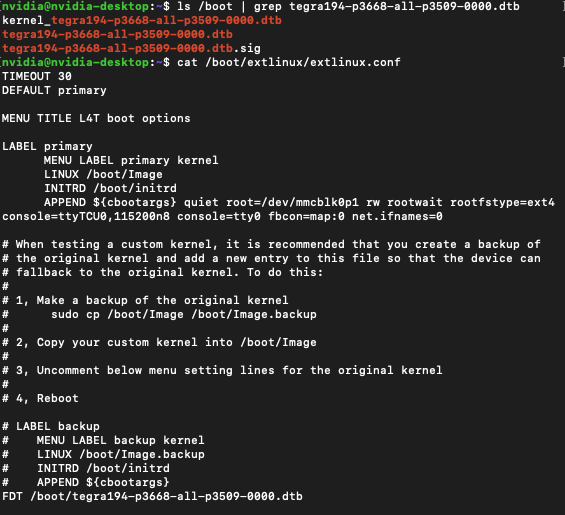
                                      de673cb3-9dc6-47d3-8ea0-9b580a3e05bd-image.png
                                      我们是nx的板子,您看看这样子是不是操作正确的

                                      veye_xummV 1 Reply Last reply Reply Quote 0
                                      • veye_xummV Offline
                                        veye_xumm @zjutony
                                        last edited by

                                        @zjutony
                                        这个配置文件没错,dtb文件你用对应摄像头模组型号的。别弄错了就行了。

                                        Questions will be answered as soon as possible, please be patient.
                                        如果你使用中文,请直接用中文提问。
                                        May the force be with YOU. (This is the translation of the mysterious Chinese symbol above.)

                                        Z 1 Reply Last reply Reply Quote 0
                                        • Z Offline
                                          zjutony @veye_xumm
                                          last edited by

                                          @veye_xumm 这个我看教程上这个dtb文件只有对应计算单元的,没有看到和相机型号对应的关系,这个是在哪里看

                                          veye_xummV 1 Reply Last reply Reply Quote 0
                                          • veye_xummV Offline
                                            veye_xumm @zjutony
                                            last edited by

                                            @zjutony
                                            举个例子,如果你使用132,jetpack4.6 jetson nx,就需要下面这个路径下的dtb。
                                            https://github.com/veyeimaging/nvidia_jetson_veye_bsp/tree/master/Xavier-NX/JetPack_4.6_Linux_JETSON_XAVIER_NX_TARGETS/dts dtb/CS-MIPI-SC132

                                            Questions will be answered as soon as possible, please be patient.
                                            如果你使用中文,请直接用中文提问。
                                            May the force be with YOU. (This is the translation of the mysterious Chinese symbol above.)

                                            Z 1 Reply Last reply Reply Quote 0

                                            Hello! It looks like you're interested in this conversation, but you don't have an account yet.

                                            Getting fed up of having to scroll through the same posts each visit? When you register for an account, you'll always come back to exactly where you were before, and choose to be notified of new replies (either via email, or push notification). You'll also be able to save bookmarks and upvote posts to show your appreciation to other community members.

                                            With your input, this post could be even better 💗

                                            Register Login
                                            • First post
                                              Last post