VEYE IMAGING Forum
    • Categories
    • Tags
    • Recent
    • Popular
    • Users
    • WIKI
    • veye.cc
    • Register
    • Login

    树莓派上输入抓拍命令,导致卡住(IMX307)

    Scheduled Pinned Locked Moved VEYE MIPI camera
    25 Posts 2 Posters 7.9k Views 1 Watching
    Loading More Posts
    • Oldest to Newest
    • Newest to Oldest
    • Most Votes
    Reply
    • Reply as topic
    Log in to reply
    This topic has been deleted. Only users with topic management privileges can see it.
    • 年 Offline
      年华灬 @veye_xumm
      last edited by 年华灬

      @veye_xumm 连续抓拍是有问题的,现在我用的命令不是连续抓拍命令,就是拍照命令,只是加 -e bmp 输出的字节也是0字节,也是有问题,望给出解决办法,或者有别的办法吗? 我要输出文件格式是 标准的 BMP文件格式,有什么命令可以实现。

      veye_xummV 1 Reply Last reply Reply Quote 0
      • veye_xummV Offline
        veye_xumm @年华灬
        last edited by

        @年华灬
        因为bmp拍照是取得第一张,所以是0字节。
        临时得一个方法是你连续拍两张取第二张。
        我们会尽快解决此bug。

        Questions will be answered as soon as possible, please be patient.
        如果你使用中文,请直接用中文提问。
        May the force be with YOU. (This is the translation of the mysterious Chinese symbol above.)

        年 2 Replies Last reply Reply Quote 0
        • 年 Offline
          年华灬 @veye_xumm
          last edited by

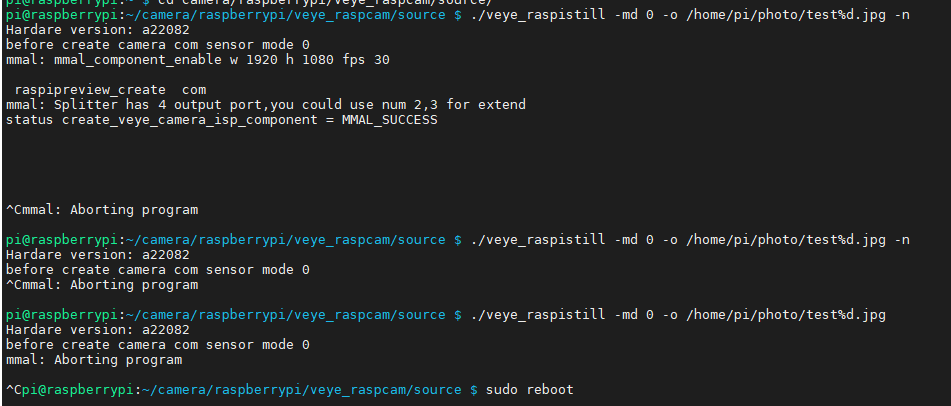
          @veye_xumm 好的,谢谢回复 ,另外,在推流的过程中再发送拍照命令就会导致 IMX307卡住,您那边测试一下,出现该问题后,在拍照啥的都不行了。

          测试流程:
          1 发送推流命令 ./veye_raspivid -b 4000000 -t 0 -o - | nc -l -p 5000
          2 开启另一个终端发送拍照命令 ./veye_raspistill -md 0 -o /home/pi/photo/test%d.jpg
          此时无法拍照,会卡住,无法命令
          3 杀死所有 veye 进程,再次发送拍照命令
          4 此时 BUG出现,只能重启树莓派,希望给出解决办法

          开启推流
          789938b7-51b5-4c03-a368-07064acea561-1642410087(1).png

          发送拍照命令
          f06642b9-b1fb-4440-b6c5-0f9b18ba826b-image.png

          veye_xummV 2 Replies Last reply Reply Quote 0
          • veye_xummV Offline
            veye_xumm @年华灬
            last edited by

            @年华灬
            肯定会这样。
            硬件只有一个摄像头,只有一个数据通道,两个进程不能同时去占据同一个资源。

            Questions will be answered as soon as possible, please be patient.
            如果你使用中文,请直接用中文提问。
            May the force be with YOU. (This is the translation of the mysterious Chinese symbol above.)

            1 Reply Last reply Reply Quote 0
            • veye_xummV Offline
              veye_xumm @年华灬
              last edited by

              @年华灬
              解决的方案:
              读一下两个程序的代码,建议参考veye_raspivid的,它有一个spiltter,现在有没有用到的。
              这个spiltter相当于是一个数据的分发器,用其空闲的port,去做拍照功能。

              Questions will be answered as soon as possible, please be patient.
              如果你使用中文,请直接用中文提问。
              May the force be with YOU. (This is the translation of the mysterious Chinese symbol above.)

              1 Reply Last reply Reply Quote 0
              • 年 Offline
                年华灬 @veye_xumm
                last edited by 年华灬

                @veye_xumm said in 树莓派上输入抓拍命令,导致卡住(IMX307):

                @年华灬
                因为bmp拍照是取得第一张,所以是0字节。
                临时得一个方法是你连续拍两张取第二张。
                我们会尽快解决此bug。

                另外,使用连续拍两张照片的方式,是有正确的BMP图片,但是文件名无法正确命名
                注:两次命令一致,输出不一致

                09e203ad-1d67-4936-9a35-aa06699e8c04-1642410514(1).png

                1 Reply Last reply Reply Quote 0
                • 年 Offline
                  年华灬 @veye_xumm
                  last edited by 年华灬

                  @veye_xumm said in 树莓派上输入抓拍命令,导致卡住(IMX307):

                  @年华灬
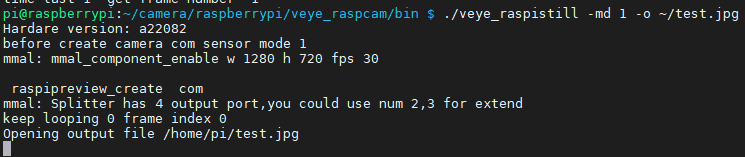
                  你之前帖子拍照都是 -md 1的,也就是说是720p的。
                  这个与现在read出来的不符。
                  如果实际mipi数据格式与抓拍程序以为的格式不同,会出现问题。

                  如果你不想在拍照的时候同同时预览,可以加-n选项。
                  比如这样:

                  ./veye_raspistill -md 0 -o ~/test.jpg -n
                  

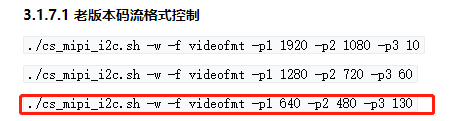
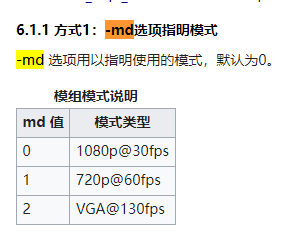
                  如果我想拍摄 640*360像素的图片,-md 几啊,或者是不是可以不加-md ,另外,我是不是先更改设置 ./cs_mipi_i2c.sh -w -f videofmt -p1 640 -p2 360 -p3 30 码流配置才行,说明中只有 ./cs_mipi_i2c.sh -w -f videofmt -p1 640 -p2 480 -p3 130 这种码流配置
                  bb338f52-ef86-4c11-bd3c-cff7fe307115-1642478018(1).png

                  veye_xummV 1 Reply Last reply Reply Quote 0
                  • veye_xummV Offline
                    veye_xumm @年华灬
                    last edited by

                    @年华灬
                    CS-MIPI-IMX307并不是任意尺寸可设的,它只提供了三种分辨率模式。
                    http://wiki.veye.cc/index.php/CS-MIPI-IMX307_STARVIS_Module/zh

                    Questions will be answered as soon as possible, please be patient.
                    如果你使用中文,请直接用中文提问。
                    May the force be with YOU. (This is the translation of the mysterious Chinese symbol above.)

                    年 1 Reply Last reply Reply Quote 0
                    • 年 Offline
                      年华灬 @veye_xumm
                      last edited by

                      @veye_xumm
                      现在 这里出错了。这样怎么解决,前提是我设置了 640*360分辨率,未保存参数, 导致出错了应该,但是 重启树莓派也不好使。

                      0ebaeabb-b309-4453-817b-7f6b44324670-1642486376(1).png

                      veye_xummV 1 Reply Last reply Reply Quote 0
                      • veye_xummV Offline
                        veye_xumm @年华灬
                        last edited by

                        @年华灬 恢复一下默认值吧 sysreset

                        Questions will be answered as soon as possible, please be patient.
                        如果你使用中文,请直接用中文提问。
                        May the force be with YOU. (This is the translation of the mysterious Chinese symbol above.)

                        年 1 Reply Last reply Reply Quote 0
                        • 年 Offline
                          年华灬 @veye_xumm
                          last edited by

                          @veye_xumm 重新初始化参数了,按照说明上设置的命令,依然无法设置成功,读出来还是错误的,刚才 用 1920*1080命令设置了一次,是成功的

                          6bf2c5bd-9a14-4dae-88db-e67b8c325201-1642487357(1).png

                          1a9efc56-fcdf-4fd5-a569-56b181af1a72-1642487336(1).png

                          veye_xummV 1 Reply Last reply Reply Quote 0
                          • veye_xummV Offline
                            veye_xumm @年华灬
                            last edited by

                            @年华灬
                            你的意思是,可以配置为1080p模式,无法配置为640*480是吗?
                            请读一下你的模组版本号我看看

                            Questions will be answered as soon as possible, please be patient.
                            如果你使用中文,请直接用中文提问。
                            May the force be with YOU. (This is the translation of the mysterious Chinese symbol above.)

                            年 2 Replies Last reply Reply Quote 0
                            • 年 Offline
                              年华灬 @veye_xumm
                              last edited by

                              @veye_xumm said in 树莓派上输入抓拍命令,导致卡住(IMX307):

                              @年华灬
                              你的意思是,可以配置为1080p模式,无法配置为640*480是吗?
                              请读一下你的模组版本号我看看

                              b83a94a0-2c01-4849-beee-550d98e0fa9e-1642489173(1).png

                              1 Reply Last reply Reply Quote 0
                              • 年 Offline
                                年华灬 @veye_xumm
                                last edited by 年华灬

                                @veye_xumm said in 树莓派上输入抓拍命令,导致卡住(IMX307):

                                @年华灬
                                你的意思是,可以配置为1080p模式,无法配置为640*480是吗?
                                请读一下你的模组版本号我看看

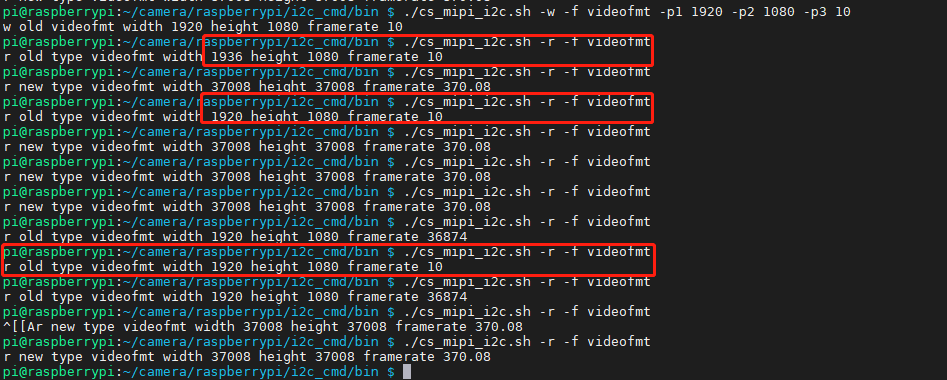
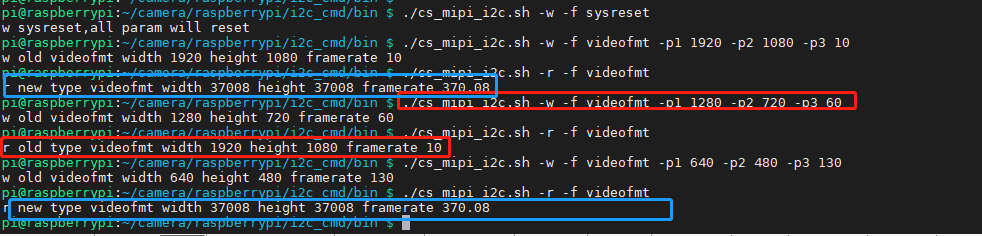
                                说实话,我现在也没弄懂现在是什么情况,刚才重新初始化参数后,不管设置什么1080P还是720P都不好使了,现在懵逼中

                                蓝色框体读取错误,红色框体内 读出来与设置不符合啊。所以现在不知道啥情况了
                                c506b274-90f3-4c70-a103-4510ff4d1eb6-1642489570(1).png

                                一直读取后有两次正确的,其他都是错误的

                                b0c36365-e382-4aad-9ce3-7cd9a2b2a344-1642490499(1).png

                                veye_xummV 1 Reply Last reply Reply Quote 0
                                • veye_xummV Offline
                                  veye_xumm @年华灬
                                  last edited by

                                  @年华灬
                                  这个模组启动比较慢,大约7-8秒,你进行sysreset之后需要等会儿才能正确读到。
                                  会不会是i2c通信有问题,你检查检查排线插接情况,是否有接触不良?
                                  可以循环使用
                                  i2cdetect -y 10
                                  查看是否有0x3b,有的话,说明摄像头的i2c还活着,在响应。

                                  如果detect一会儿有,一会儿没有,一种可能,摄像头在不停重启。
                                  可以尝试在detect到的时候发送sysreset

                                  Questions will be answered as soon as possible, please be patient.
                                  如果你使用中文,请直接用中文提问。
                                  May the force be with YOU. (This is the translation of the mysterious Chinese symbol above.)

                                  年 1 Reply Last reply Reply Quote 0
                                  • 年 Offline
                                    年华灬 @veye_xumm
                                    last edited by

                                    This post is deleted!
                                    1 Reply Last reply Reply Quote 0

                                    Hello! It looks like you're interested in this conversation, but you don't have an account yet.

                                    Getting fed up of having to scroll through the same posts each visit? When you register for an account, you'll always come back to exactly where you were before, and choose to be notified of new replies (either via email, or push notification). You'll also be able to save bookmarks and upvote posts to show your appreciation to other community members.

                                    With your input, this post could be even better 💗

                                    Register Login
                                    • First post
                                      Last post