VEYE IMAGING Forum
    • Categories
    • Tags
    • Recent
    • Popular
    • Users
    • WIKI
    • veye.cc
    • Register
    • Login

    New Raspberry pi 5 support

    Scheduled Pinned Locked Moved VEYE MIPI camera
    25 Posts 4 Posters 12.0k Views 1 Watching
    Loading More Posts
    • Oldest to Newest
    • Newest to Oldest
    • Most Votes
    Reply
    • Reply as topic
    Log in to reply
    This topic has been deleted. Only users with topic management privileges can see it.
    • V Offline
      Vaa @veye_xumm
      last edited by

      @veye_xumm Thank you for your support!
      I have successfully installed RPI5 driver veyecam2m.
      I somehow managed to get uyuv frame from veye imx462 camera
      using v4l2-ctl utility. (VLC is not working as mentioned).
      But in my c++ project I use Linux v4l2 recommended procedure for capturing frames, and it doesn't work (It worked normally for RPI4).
      VIDIOC_DQBUF fail, VIDIOC_STREAMON fail.
      What is your recommendation for frame capturing algorythm?

      veye_xummV 1 Reply Last reply Reply Quote 0
      • veye_xummV Offline
        veye_xumm @Vaa
        last edited by

        @vaa Before running your program, have you executed the ./media_setting_rpi5.sh veyecam2m script?

        Questions will be answered as soon as possible, please be patient.
        如果你使用中文,请直接用中文提问。
        May the force be with YOU. (This is the translation of the mysterious Chinese symbol above.)

        V 1 Reply Last reply Reply Quote 0
        • V Offline
          Vaa @veye_xumm
          last edited by

          @veye_xumm Yes, I have. I did everything recommended.
          Btw, I found VLC can preview ONLY if UYVY colorspace is set. It preview with wrong green-violet picture, but at least it does.

          veye_xummV 1 Reply Last reply Reply Quote 0
          • veye_xummV Offline
            veye_xumm @Vaa
            last edited by

            @vaa Yes, indeed. That's what confuse me.

            Questions will be answered as soon as possible, please be patient.
            如果你使用中文,请直接用中文提问。
            May the force be with YOU. (This is the translation of the mysterious Chinese symbol above.)

            V A 2 Replies Last reply Reply Quote 0
            • V Offline
              Vaa @veye_xumm
              last edited by

              @veye_xumm Are you going to improve your driver's compatibility?

              veye_xummV 1 Reply Last reply Reply Quote 0
              • A Offline
                alex_ai @veye_xumm
                last edited by

                @veye_xumm Hi, Also trying to use IMX462 on RPi5 and after installing drivers it was detected correctly by rpi5 scripts but can't play it by VLC or my program which use setting on RPi4 like this:

                device: v4l2src device=/dev/video0
                

                Could you please advise what I'm doing wrong?

                A 1 Reply Last reply Reply Quote 0
                • A Offline
                  alex_ai @alex_ai
                  last edited by

                  @alex_ai said in New Raspberry pi 5 support:

                  @veye_xumm Hi, Also trying to use IMX462 on RPi5 and after installing drivers it was detected correctly by rpi5 scripts but can't play it by VLC or my program which use setting on RPi4 like this:

                  device: v4l2src device=/dev/video0
                  

                  Could you please advise what I'm doing wrong?

                  I managed open stream via gst-launch-1.0 v4l2src ... but my application uses OpenCV it could not open device, @veye_xumm did you try it on RPi5 with python samples?

                  A 1 Reply Last reply Reply Quote 0
                  • A Offline
                    alex_ai @alex_ai
                    last edited by

                    @alex_ai said in New Raspberry pi 5 support:

                    I managed open stream via gst-launch-1.0 v4l2src ... but my application uses OpenCV it could not open device, @veye_xumm did you try it on RPi5 with python samples?

                    In my case OpenCv was without Gstreamer plugin and I had to build it from source code with parameter : -D WITH_GSTREAMER=ON and now issue resolved.
                    Also after every RPi restart have to run script: ./media_setting_rpi5.sh veyecam2m

                    @veye_xumm any chances use configuration script ./veye_mipi_i2c.sh on RPi5?

                    veye_xummV 1 Reply Last reply Reply Quote 0
                    • veye_xummV Offline
                      veye_xumm @Vaa
                      last edited by

                      @vaa

                      @vaa said in New Raspberry pi 5 support:

                      Are you going to improve your driver's compatibility?

                      I don't think it's a driver compatibility issue as both qv4l2 and gstreamer work fine.

                      Questions will be answered as soon as possible, please be patient.
                      如果你使用中文,请直接用中文提问。
                      May the force be with YOU. (This is the translation of the mysterious Chinese symbol above.)

                      1 Reply Last reply Reply Quote 0
                      • veye_xummV Offline
                        veye_xumm @alex_ai
                        last edited by

                        @alex_ai

                        @alex_ai said in New Raspberry pi 5 support:

                        any chances use configuration script ./veye_mipi_i2c.sh on RPi5?

                        No. Just pay attention to i2c bus number.

                        Questions will be answered as soon as possible, please be patient.
                        如果你使用中文,请直接用中文提问。
                        May the force be with YOU. (This is the translation of the mysterious Chinese symbol above.)

                        V A 2 Replies Last reply Reply Quote 0
                        • V Offline
                          Vaa @veye_xumm
                          last edited by

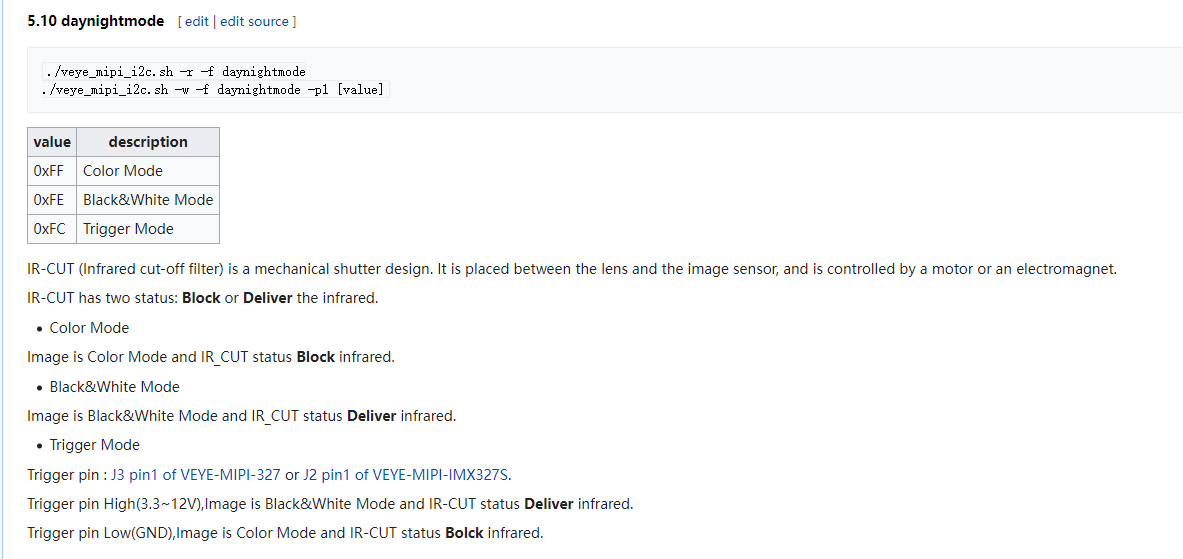
                          @veye_xumm This is not clear to me. For example, how can I switch Infrared filter on/off then? It seems to me the veye_mipi_i2c.sh script is not working at all.

                          veye_xummV 1 Reply Last reply Reply Quote 0
                          • veye_xummV Offline
                            veye_xumm @Vaa
                            last edited by

                            @vaa
                            27403117-be21-4c55-b465-1031c0940faf-image.png
                            In addition to this, the -b parameter needs to be added:
                            -b [i2c bus num] i2c bus number
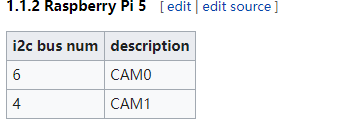
                            bac83919-ad7e-4211-ad97-cd47574b7d86-image.png

                            Questions will be answered as soon as possible, please be patient.
                            如果你使用中文,请直接用中文提问。
                            May the force be with YOU. (This is the translation of the mysterious Chinese symbol above.)

                            V 1 Reply Last reply Reply Quote 0
                            • V Offline
                              Vaa @veye_xumm
                              last edited by Vaa

                              @veye_xumm Thank you for your support!
                              I got my application working good.
                              Here is a receipt how can I achived this:

                              1. ./media_setting_rpi5.sh veyecam2m

                              2. ./veye_mipi_i2c.sh -b 6 -w -f yuvseq -p1 YUYV

                              3. ./veye_mipi_i2c.sh -b 6 -w -f videoformat -p1 PAL

                              4. In my app open device /dev/video0 with following parameters:
                                width 1920;
                                height 1080;
                                pixel_format V4L2_PIX_FMT_UYVY (only this is working!!!)
                                field_format V4L2_FIELD_NONE

                              In case I try to set pixel_format to any other value is cause VIDIOC_STREAMON fail. I suppose this is a bug in the driver.
                              Some other applications like gstreamer only set pixel_format if you directly point to do this, this is why it works, but many others (e.g. trying to set default pixel_format) are not.

                              V 1 Reply Last reply Reply Quote 1
                              • A Offline
                                alex_ai @veye_xumm
                                last edited by

                                @veye_xumm said in New Raspberry pi 5 support:

                                @alex_ai

                                @alex_ai said in New Raspberry pi 5 support:

                                any chances use configuration script ./veye_mipi_i2c.sh on RPi5?

                                No. Just pay attention to i2c bus number.

                                I think answer was "yes" but with parameter -b. I could not execute from bin dir because it compiled to another OS, so compile i2c_read, i2c_write from source code fixed my issue.
                                @veye_xumm thank you for help and support!

                                veye_xummV 1 Reply Last reply Reply Quote 0
                                • veye_xummV Offline
                                  veye_xumm @alex_ai
                                  last edited by

                                  @alex_ai You are welcome.

                                  Questions will be answered as soon as possible, please be patient.
                                  如果你使用中文,请直接用中文提问。
                                  May the force be with YOU. (This is the translation of the mysterious Chinese symbol above.)

                                  1 Reply Last reply Reply Quote 0
                                  • V Offline
                                    Vaa @Vaa
                                    last edited by

                                    @vaa said in New Raspberry pi 5 support:

                                    @veye_xumm
                                    In case I try to set pixel_format to any other value is cause VIDIOC_STREAMON fail. I suppose this is a bug in the driver.
                                    Some other applications like gstreamer only set pixel_format if you directly point to do this, this is why it works, but many others (e.g. trying to set default pixel_format) are not.

                                    Will you going to fix the issue?

                                    1 Reply Last reply Reply Quote 0

                                    Hello! It looks like you're interested in this conversation, but you don't have an account yet.

                                    Getting fed up of having to scroll through the same posts each visit? When you register for an account, you'll always come back to exactly where you were before, and choose to be notified of new replies (either via email, or push notification). You'll also be able to save bookmarks and upvote posts to show your appreciation to other community members.

                                    With your input, this post could be even better 💗

                                    Register Login
                                    • First post
                                      Last post