MV-MIPI-IMX264在迅为RK3568上成像内容不正确
-
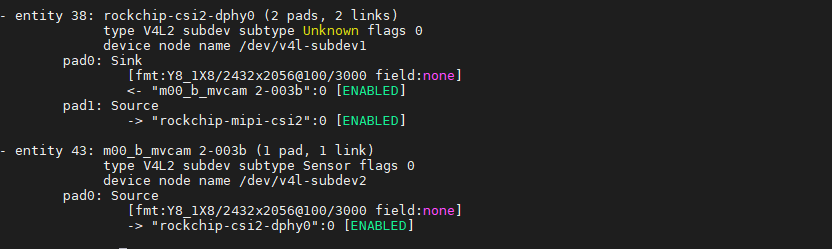
在迅为的RK3568上使用MV-MIPI-IMX264M黑白版本相机,使用v4l2-ctl -d /dev/video0 --set-fmt-video=width=2560,height=2056,pixelformat=GREY --stream-mmap --stream-count=1 --stream-to=/mnt/y8-imx264-2-2464x2056.raw命令抓拍后得到了raw文件,将raw文件直接放到PS上打开,成像内容不对,这是我的设备树设备树.txt ,驱动文件是你们提供的https://github.com/veyeimaging/rk35xx_veye_bsp里面的veye_mvcam.c文件,硬件连接和拍照都没问题,请问这是哪里出了问题?



-
-
@veye_xumm
我拍了两张照片,都是用25602056分辨率进行采集的,也是使用25602056分辨率进行打开的,可以看到两张图片的内容是不同的,但是都很模糊,模糊的原因是什么呢?,我应该调节哪些参数呢?


-
@阿坎德 模糊的原因是镜头聚焦不清晰,应该拧动镜头进行聚焦。
软件方面已经正常了。 -
@veye_xumm
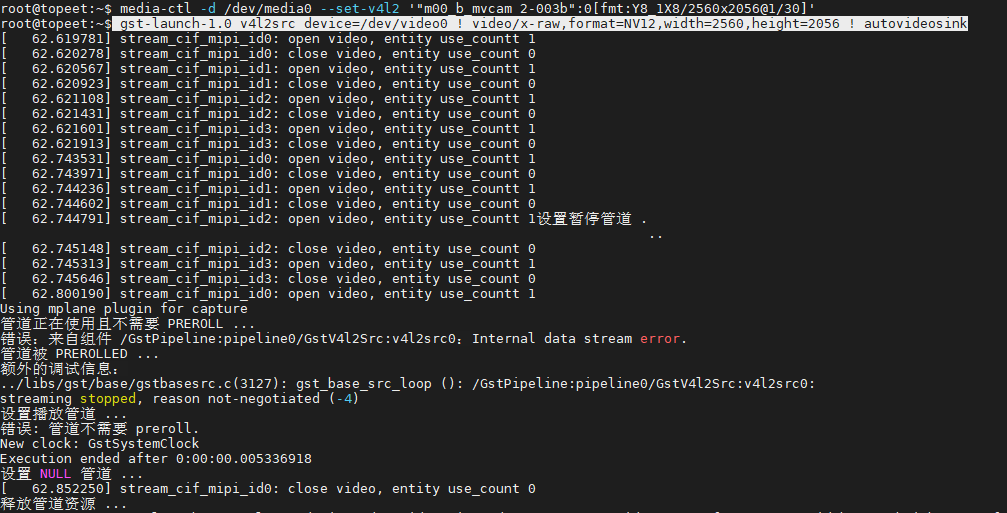
在进行镜头聚焦时,我需要用到预览功能,但是我输入 gst-launch-1.0 v4l2src device=/dev/video0 ! video/x-raw,format=NV12,width=2560,height=2056 ! autovideosink这个命令后,显示管道正在使用,出现这个问题的原因是什么?
-
@阿坎德
预览的话,我们验证过的是这个脚本:
https://github.com/veyeimaging/rk35xx_veye_bsp/tree/main/samples/opencv/mv camera
v4l2dev_2_opencv_show_grey.py -
@veye_xumm
当我使用opencv进行预览时,出现了这个错误,请问这个问题的原因是什么?

-
@阿坎德 相机本身支持最大的分辨率是2464(H)× 2056(V),所以你需要修改一下你命令行中width这个参数为2464.
-
@阿坎德 你好,有进一步的结果吗?

Hello! It looks like you're interested in this conversation, but you don't have an account yet.
Getting fed up of having to scroll through the same posts each visit? When you register for an account, you'll always come back to exactly where you were before, and choose to be notified of new replies (either via email, or push notification). You'll also be able to save bookmarks and upvote posts to show your appreciation to other community members.
With your input, this post could be even better 💗
Register Login