VEYE IMAGING Forum
    • Categories
    • Tags
    • Recent
    • Popular
    • Users
    • WIKI
    • veye.cc
    • Register
    • Login

    树莓派CM4安装双目驱动问题

    Scheduled Pinned Locked Moved VEYE MIPI camera
    30 Posts 2 Posters 16.5k Views 1 Watching
    Loading More Posts
    • Oldest to Newest
    • Newest to Oldest
    • Most Votes
    Reply
    • Reply as topic
    Log in to reply
    This topic has been deleted. Only users with topic management privileges can see it.
    • veye_xummV Offline
      veye_xumm @ff1211
      last edited by veye_xumm

      @ff1211 不好意思,版本的问题我搞错了,需要rpi-5.15.y目录下,模仿现在307的那个做法做一个mv的。
      第二个问题,
      http://wiki.veye.cc/index.php/I2c_bus_number_and_video_node
      建议你装到camera1接口上去,这个对应的i2c-10的。

      Questions will be answered as soon as possible, please be patient.
      如果你使用中文,请直接用中文提问。
      May the force be with YOU. (This is the translation of the mysterious Chinese symbol above.)

      F 1 Reply Last reply Reply Quote 0
      • F Offline
        ff1211 @veye_xumm
        last edited by

        @veye_xumm 我不知道怎么做这个mv的,所以我才问您怎么换系统。或者如果可以的话,麻烦您上传一个吧。

        veye_xummV 1 Reply Last reply Reply Quote 0
        • veye_xummV Offline
          veye_xumm @ff1211
          last edited by

          @ff1211 好的,我安排一下,尽快做一个版本给您。一两天之内。

          Questions will be answered as soon as possible, please be patient.
          如果你使用中文,请直接用中文提问。
          May the force be with YOU. (This is the translation of the mysterious Chinese symbol above.)

          F 1 Reply Last reply Reply Quote 0
          • F Offline
            ff1211 @veye_xumm
            last edited by

            @veye_xumm 辛苦了,如果可以告诉我一声哈。

            veye_xummV 1 Reply Last reply Reply Quote 0
            • veye_xummV Offline
              veye_xumm @ff1211
              last edited by

              @ff1211 研发进度略有推迟,晚一两天。

              Questions will be answered as soon as possible, please be patient.
              如果你使用中文,请直接用中文提问。
              May the force be with YOU. (This is the translation of the mysterious Chinese symbol above.)

              F 1 Reply Last reply Reply Quote 0
              • F Offline
                ff1211 @veye_xumm
                last edited by

                @veye_xumm 好的

                veye_xummV 1 Reply Last reply Reply Quote 0
                • veye_xummV Offline
                  veye_xumm @ff1211
                  last edited by

                  @ff1211
                  你好驱动已经完成。请参考:
                  https://github.com/veyeimaging/raspberrypi_v4l2/releases/tag/v1.09
                  http://wiki.veye.cc/index.php/Mv_series_camera_appnotes_4_rpi/zh#CM4.E7.9A.84.E8.A1.A5.E5.85.85.E8.AF.B4.E6.98.8E

                  Questions will be answered as soon as possible, please be patient.
                  如果你使用中文,请直接用中文提问。
                  May the force be with YOU. (This is the translation of the mysterious Chinese symbol above.)

                  F 1 Reply Last reply Reply Quote 0
                  • F Offline
                    ff1211 @veye_xumm
                    last edited by

                    @veye_xumm 您好,我按照您新发的驱动安装了,但是只能探测到一个摄像头。

                    f884f252-3734-49ce-88fb-c0b2e5012892-image.png

                    veye_xummV 2 Replies Last reply Reply Quote 0
                    • veye_xummV Offline
                      veye_xumm @ff1211
                      last edited by

                      @ff1211
                      http://wiki.veye.cc/index.php/Mv_series_camera_appnotes_4_rpi/zh
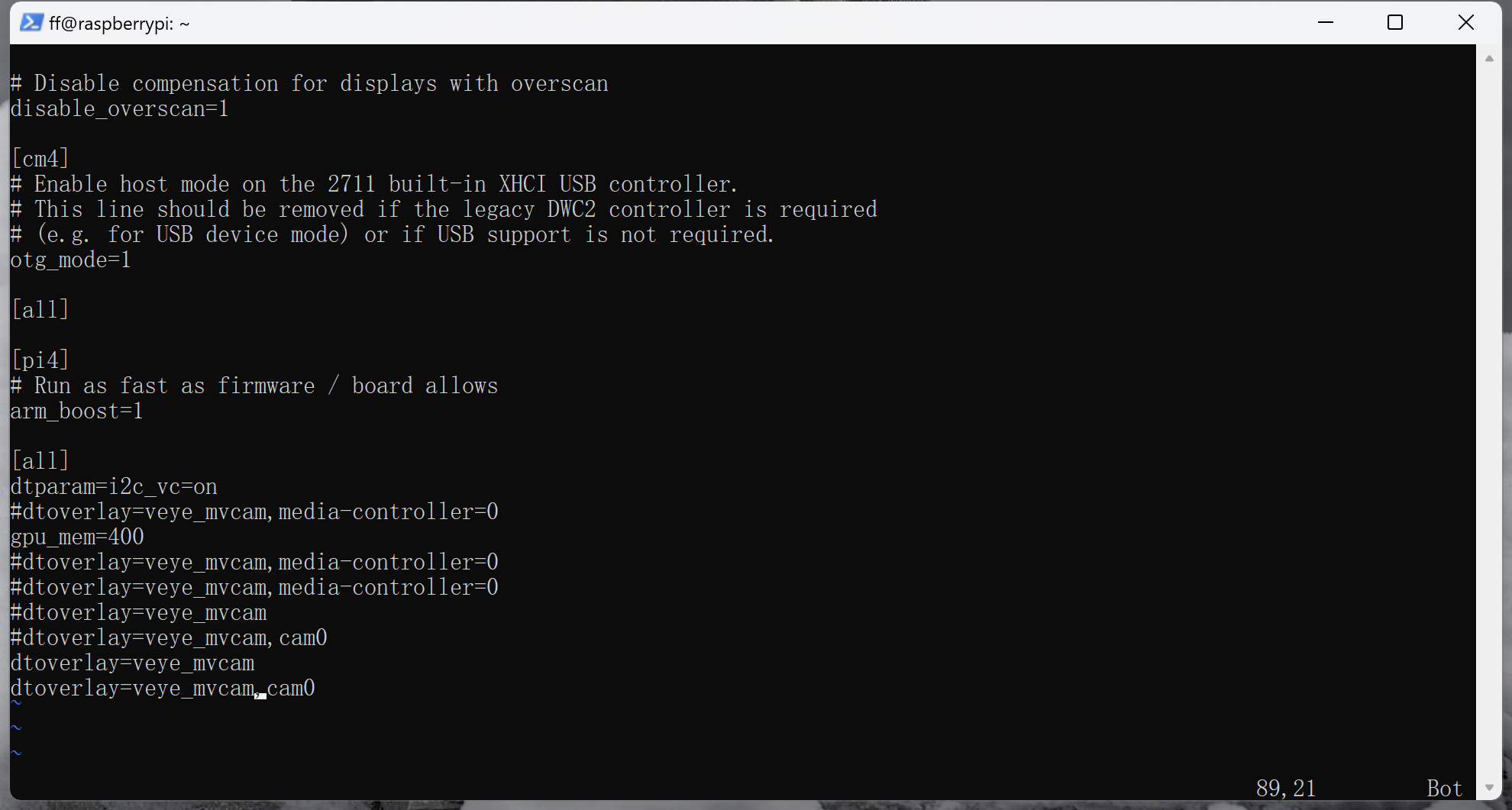
                      这个链接的6.8.3做了吗? 截个图我看看。

                      Questions will be answered as soon as possible, please be patient.
                      如果你使用中文,请直接用中文提问。
                      May the force be with YOU. (This is the translation of the mysterious Chinese symbol above.)

                      F 1 Reply Last reply Reply Quote 0
                      • F Offline
                        ff1211 @veye_xumm
                        last edited by

                        @veye_xumm b2e71afc-ee70-4e38-85c5-b177efa12cc0-image.png
                        上面那些带注释的是昨天尝试的,今天重新编译安装了下驱动后就被自动注释掉了。下面这个最后一行是我刚加的,加完重启之后还是这个问题。

                        veye_xummV 1 Reply Last reply Reply Quote 0
                        • veye_xummV Offline
                          veye_xumm @ff1211
                          last edited by

                          @ff1211 6.8.1章节的执行了吗? 有没有/dev/i2c-0设备文件?

                          Questions will be answered as soon as possible, please be patient.
                          如果你使用中文,请直接用中文提问。
                          May the force be with YOU. (This is the translation of the mysterious Chinese symbol above.)

                          F 3 Replies Last reply Reply Quote 0
                          • F Offline
                            ff1211 @veye_xumm
                            last edited by

                            @veye_xumm said in 树莓派CM4安装双目驱动问题:

                            /dev/i2c-0
                            做了的。
                            这是iic
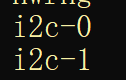
                            9ba71066-d59c-4443-8c3d-447a1e777e7b-image.png
                            这是video
                            d6260737-26ad-4124-b971-08f87a5a19aa-image.png

                            1 Reply Last reply Reply Quote 0
                            • F Offline
                              ff1211 @veye_xumm
                              last edited by

                              @veye_xumm
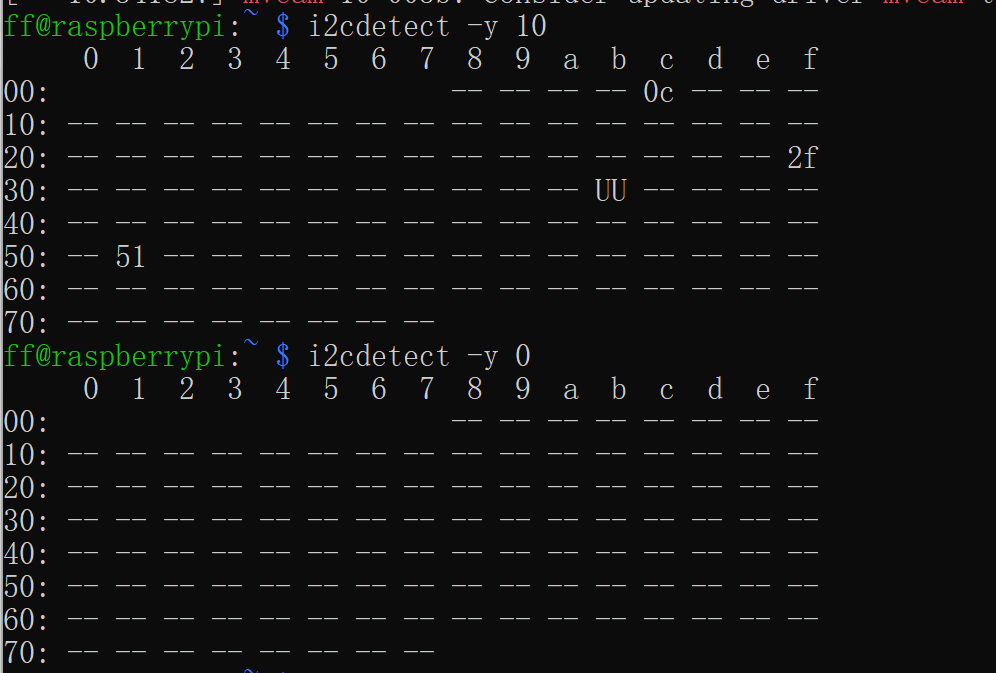
                              我看到了这步,如果写-y 10的话确实0x3b那里有个“UU”,但是改成-y 0的话就什么都没有输出。
                              95317efd-0356-4e43-9437-7a8191b871b6-image.png

                              d58cc3a4-d661-400b-a04f-8697e55df908-image.png

                              会不会是这个问题。

                              1 Reply Last reply Reply Quote 0
                              • F Offline
                                ff1211 @veye_xumm
                                last edited by

                                @veye_xumm 我检查了下供电和连线,都正常的,我认为应该可以排除硬件问题。

                                veye_xummV 1 Reply Last reply Reply Quote 0
                                • veye_xummV Offline
                                  veye_xumm @ff1211
                                  last edited by

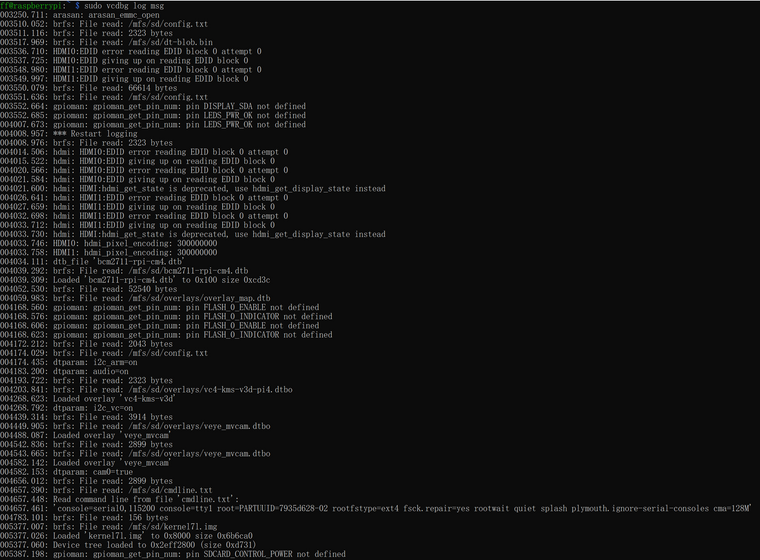
                                  @ff1211 执行一下这个命令,我看看

                                  sudo vcdbg log msg
                                  

                                  Questions will be answered as soon as possible, please be patient.
                                  如果你使用中文,请直接用中文提问。
                                  May the force be with YOU. (This is the translation of the mysterious Chinese symbol above.)

                                  F 1 Reply Last reply Reply Quote 0
                                  • F Offline
                                    ff1211 @veye_xumm
                                    last edited by

                                    @veye_xumm said in 树莓派CM4安装双目驱动问题:

                                    sudo vcdbg log msg

                                    02256627-cda7-499a-9d8d-e8360fe20a7d-image.png

                                    1 Reply Last reply Reply Quote 0
                                    • veye_xummV Offline
                                      veye_xumm @ff1211
                                      last edited by

                                      @ff1211 said in 树莓派CM4安装双目驱动问题:

                                      @veye_xumm 您好,我按照您新发的驱动安装了,但是只能探测到一个摄像头。
                                      f884f252-3734-49ce-88fb-c0b2e5012892-image.png

                                      这个地方dmesg | grep mvcam的东西,是不是没有截全啊?

                                      Questions will be answered as soon as possible, please be patient.
                                      如果你使用中文,请直接用中文提问。
                                      May the force be with YOU. (This is the translation of the mysterious Chinese symbol above.)

                                      F 1 Reply Last reply Reply Quote 0
                                      • F Offline
                                        ff1211 @veye_xumm
                                        last edited by

                                        @veye_xumm fe0d768f-6941-49c9-91b4-c5acc3f7b7b5-image.png
                                        抱歉,差了一行

                                        veye_xummV 1 Reply Last reply Reply Quote 0
                                        • veye_xummV Offline
                                          veye_xumm @ff1211
                                          last edited by

                                          @ff1211 e3ac5025-87ca-408a-8816-d20d777d7ed4-image.png

                                          Questions will be answered as soon as possible, please be patient.
                                          如果你使用中文,请直接用中文提问。
                                          May the force be with YOU. (This is the translation of the mysterious Chinese symbol above.)

                                          F 1 Reply Last reply Reply Quote 0
                                          • F Offline
                                            ff1211 @veye_xumm
                                            last edited by

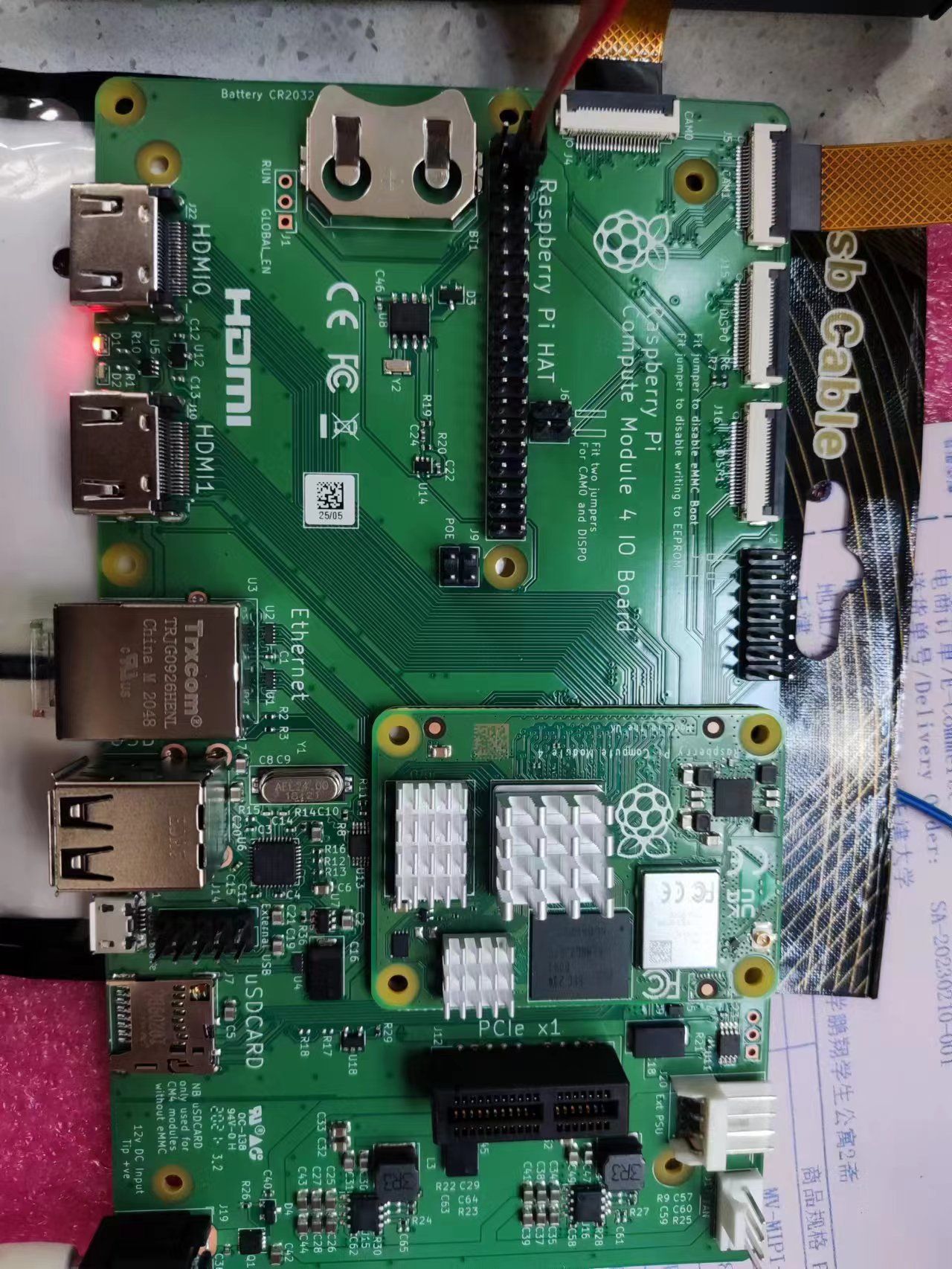
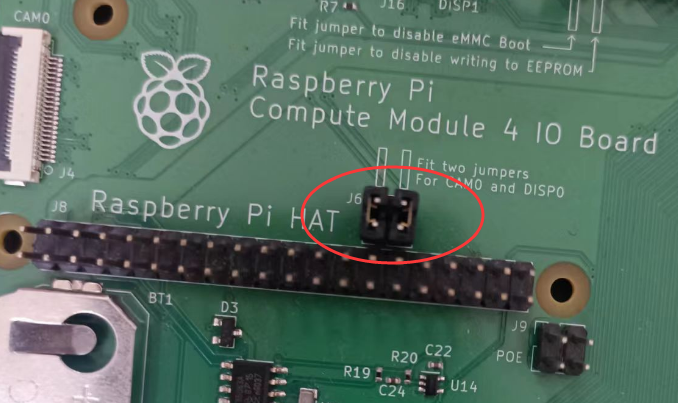
                                            @veye_xumm 21b1a08a-6de7-43fb-af76-8d97a4b21bd8-0ae45807320f539aa783991dbb5e268.jpg
                                            我都没插,是这个问题嘛?

                                            veye_xummV 1 Reply Last reply Reply Quote 0

                                            Hello! It looks like you're interested in this conversation, but you don't have an account yet.

                                            Getting fed up of having to scroll through the same posts each visit? When you register for an account, you'll always come back to exactly where you were before, and choose to be notified of new replies (either via email, or push notification). You'll also be able to save bookmarks and upvote posts to show your appreciation to other community members.

                                            With your input, this post could be even better 💗

                                            Register Login
                                            • First post
                                              Last post