VEYE IMAGING Forum
    • Categories
    • Tags
    • Recent
    • Popular
    • Users
    • WIKI
    • veye.cc
    • Register
    • Login

    NVidia Jetson Jetpack 6 support?

    Scheduled Pinned Locked Moved VEYE MIPI camera
    55 Posts 3 Posters 33.6k Views 2 Watching
    Loading More Posts
    • Oldest to Newest
    • Newest to Oldest
    • Most Votes
    Reply
    • Reply as topic
    Log in to reply
    This topic has been deleted. Only users with topic management privileges can see it.
    • veye_xummV Offline
      veye_xumm @Otca
      last edited by

      @otca
      b834dbf9-ee47-482a-b293-dac734e1f365-image.png
      Have you ever disassembled the camera module?Is the direction of the internal FFC flex cable correct?

      Questions will be answered as soon as possible, please be patient.
      如果你使用中文,请直接用中文提问。
      May the force be with YOU. (This is the translation of the mysterious Chinese symbol above.)

      O 1 Reply Last reply Reply Quote 0
      • O Offline
        Otca @veye_xumm
        last edited by

        @veye_xumm said in NVidia Jetson Jetpack 6 support?:

        Have you ever disassembled the camera module?Is the direction of the internal FFC flex cable correct?

        I have not disassembled camera but if you think i should disassemble and check connections, I'll give it a try.
        if its possible please give me reference needed for this part.
        and for the other question, I did check the power supply and it was 5.14 V.

        O 1 Reply Last reply Reply Quote 0
        • O Offline
          Otca @Otca
          last edited by

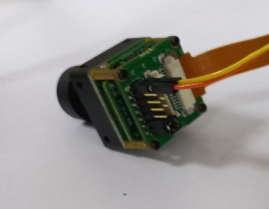
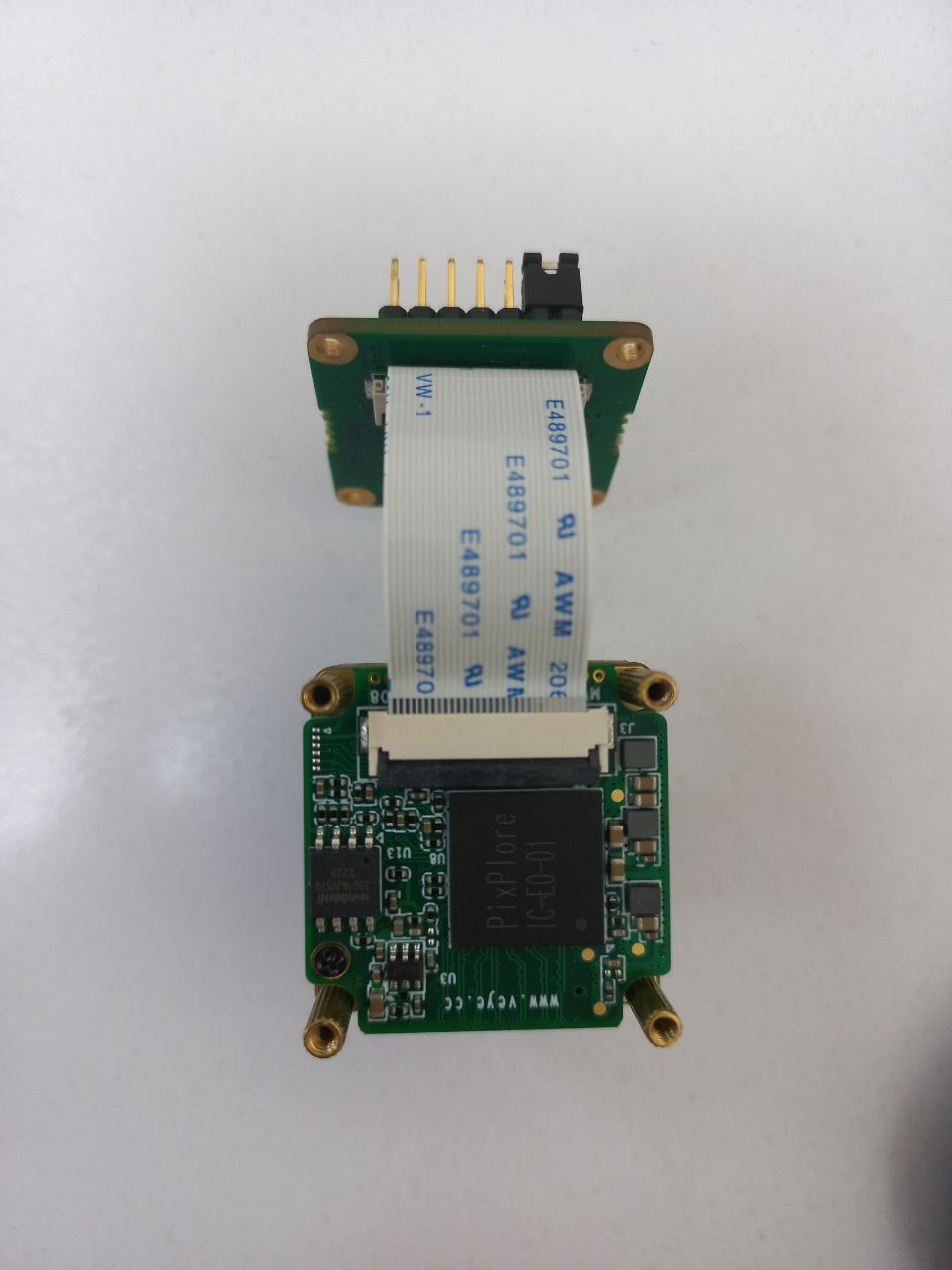
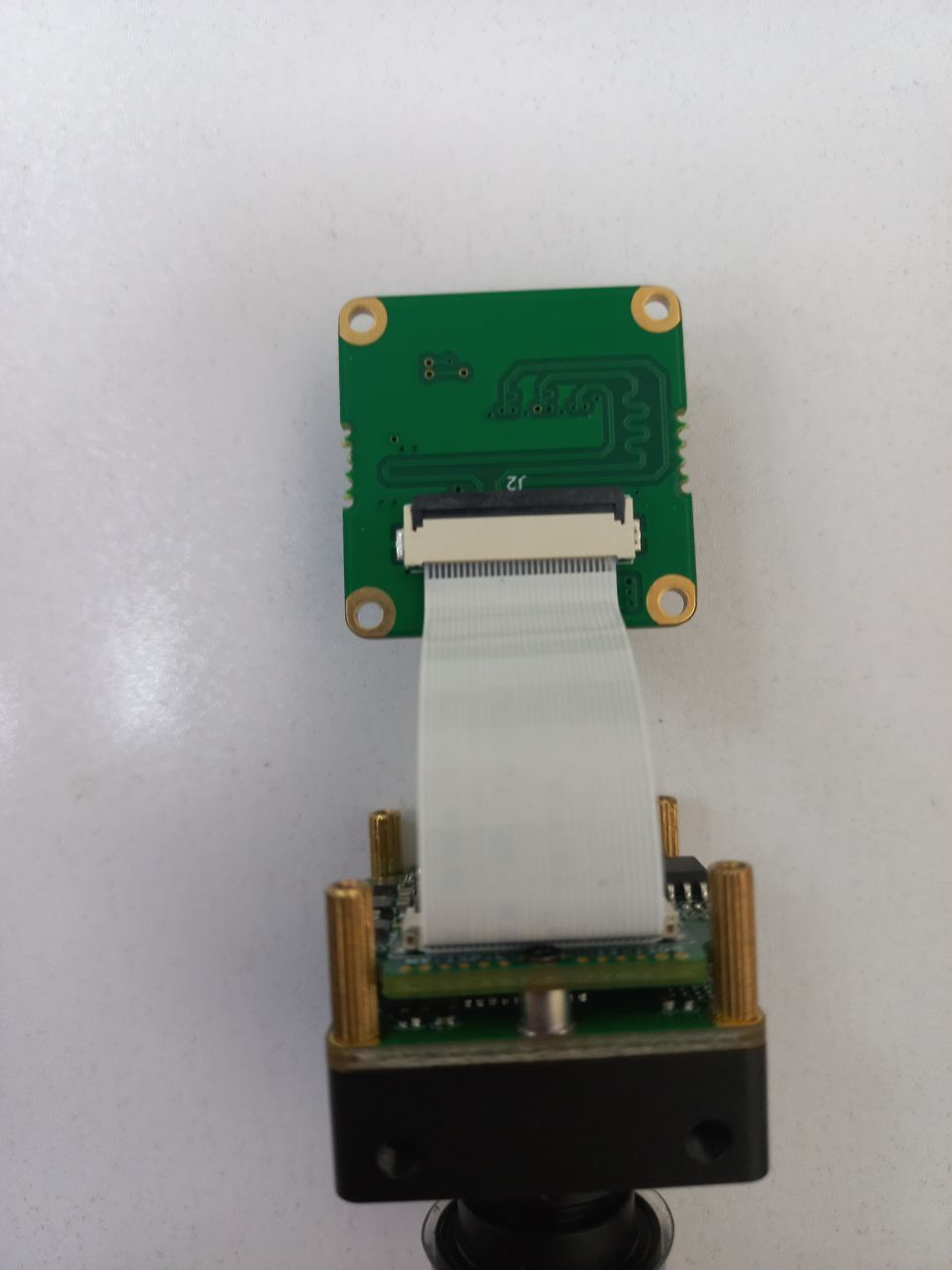
          IMG_20240819_125026_560.jpg IMG_20240819_125022_288.jpg

          veye_xummV 1 Reply Last reply Reply Quote 0
          • veye_xummV Offline
            veye_xumm @Otca
            last edited by

            @otca
            There's nothing wrong with that in my opinion. You have 4 cameras, have you tried any others?
            Or try plugging the camera into another mipi port ?

            Questions will be answered as soon as possible, please be patient.
            如果你使用中文,请直接用中文提问。
            May the force be with YOU. (This is the translation of the mysterious Chinese symbol above.)

            O 1 Reply Last reply Reply Quote 0
            • O Offline
              Otca @veye_xumm
              last edited by

              @veye_xumm i did try the other cameras and i got the same results

              veye_xummV 1 Reply Last reply Reply Quote 0
              • veye_xummV Offline
                veye_xumm @Otca
                last edited by

                @otca

                Based on the current situation, it seems unlikely that the camera module is damaged because the probability of both cameras failing at the same time is very low. Do you have any other Jetson boards, or even a Raspberry Pi? If you do, you could try connecting the camera to them to determine if the camera is functioning properly.

                In addition, could you measure the voltage level of the following pin?
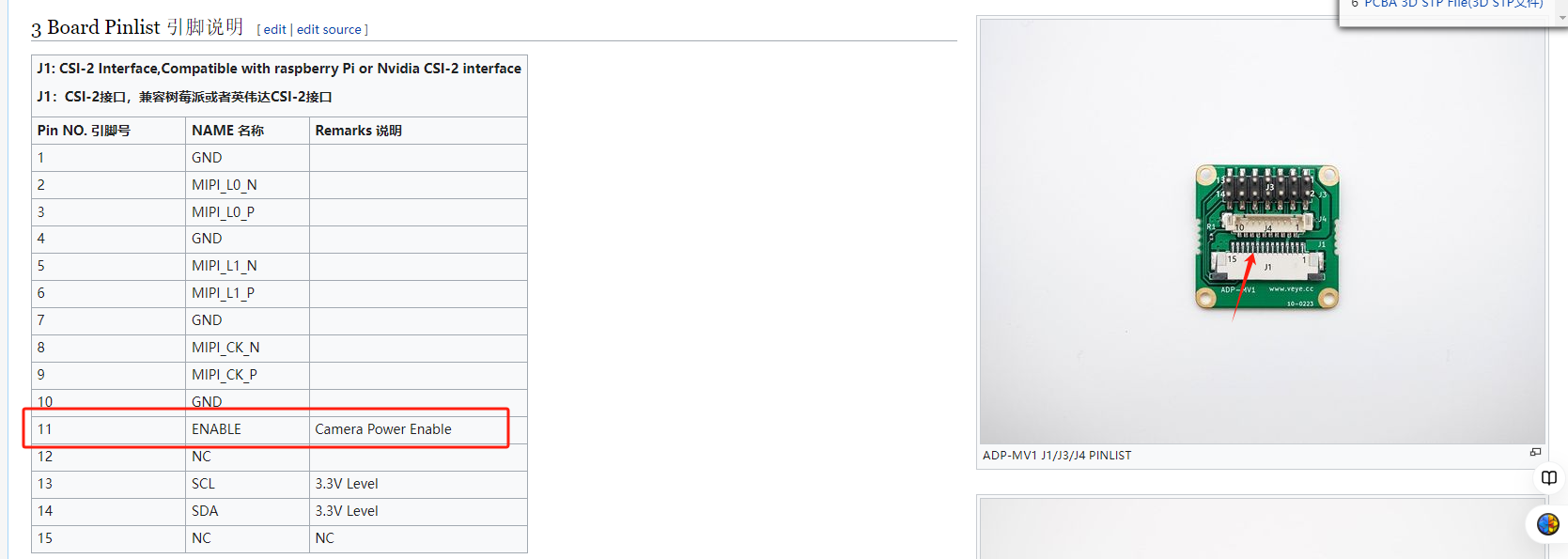
                13d59ab2-315d-4813-aebf-9eec8d6dd61c-image.png

                Questions will be answered as soon as possible, please be patient.
                如果你使用中文,请直接用中文提问。
                May the force be with YOU. (This is the translation of the mysterious Chinese symbol above.)

                O 1 Reply Last reply Reply Quote 0
                • O Offline
                  Otca @veye_xumm
                  last edited by

                  @veye_xumm said in NVidia Jetson Jetpack 6 support?:

                  Based on the current situation, it seems unlikely that the camera module is damaged because the probability of both cameras failing at the same time is very low. Do you have any other Jetson boards, or even a Raspberry Pi? If you do, you could try connecting the camera to them to determine if the camera is functioning properly.

                  Thanks for the suggestion! I do have other Jetson and Raspberry Pi boards available, so I’ll try connecting the camera to one of those to see if it’s working properly. By the way, I checked the J1-Pin11 voltage, and it reads 3.33V. If there are any other measurements or tests you think I should run, just let me know.

                  O 1 Reply Last reply Reply Quote 0
                  • O Offline
                    Otca @Otca
                    last edited by

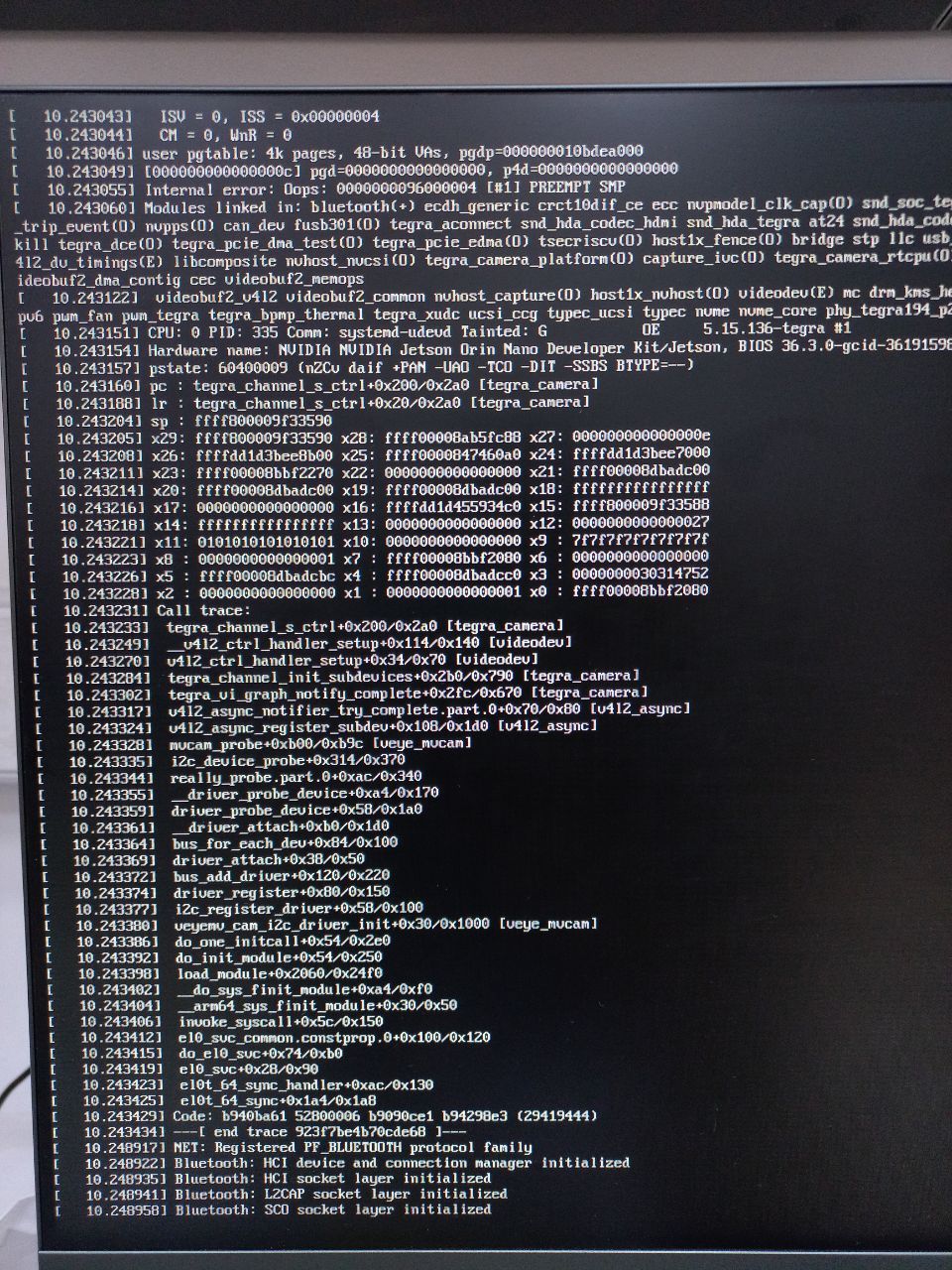
                    Do u know this issue?
                    IMG_20240902_162519_398.jpg

                    O 1 Reply Last reply Reply Quote 0
                    • O Offline
                      Otca @Otca
                      last edited by

                      Idk but i think this is helpful to know
                      My jetson 24pin csi connector:
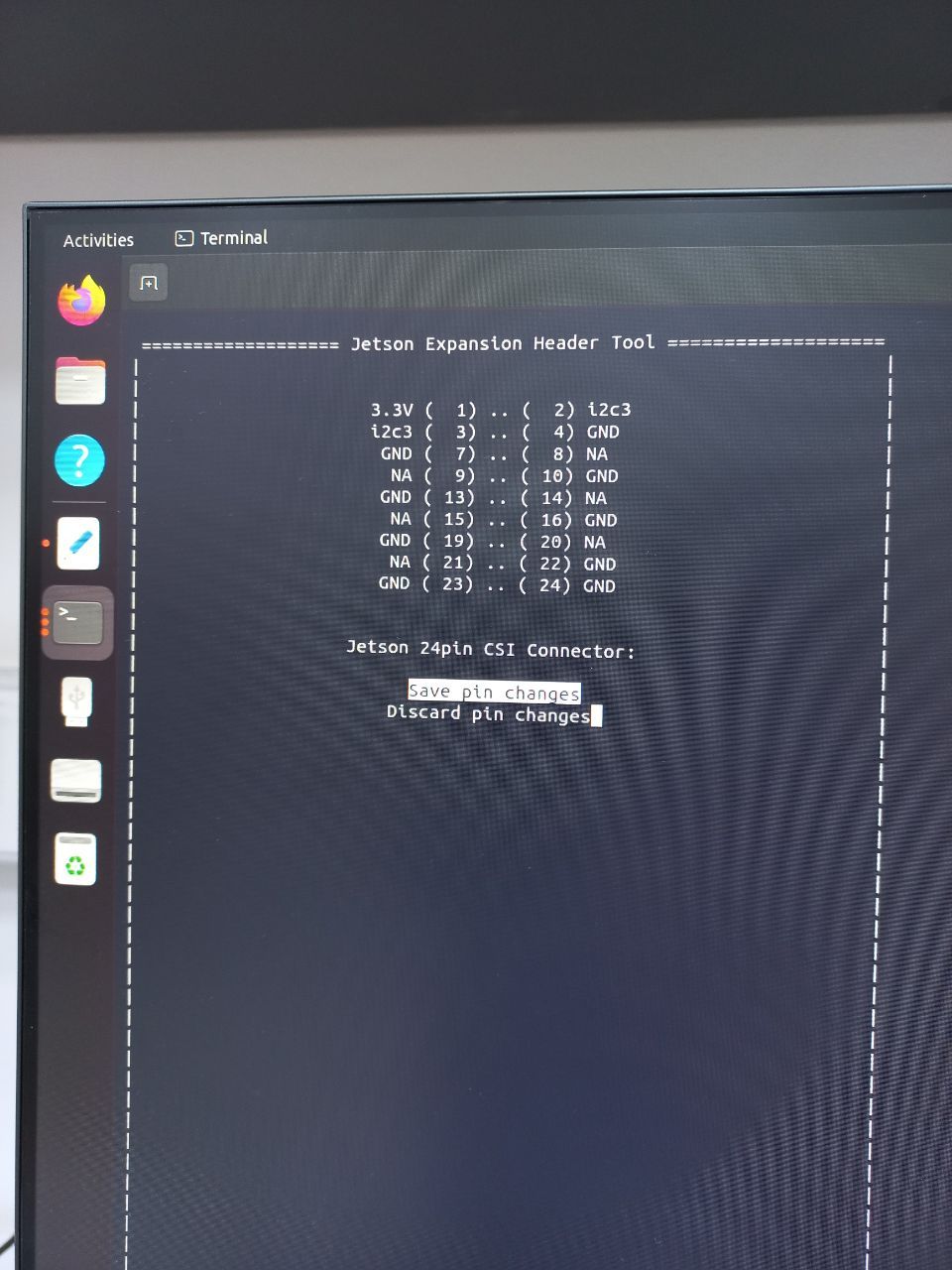
                      IMG_20240902_172515_709.jpg

                      veye_xummV 1 Reply Last reply Reply Quote 0
                      • veye_xummV Offline
                        veye_xumm @Otca
                        last edited by

                        @otca It looks like the driver is reporting an error. Suggest you don't use the jetson-io mechanism and try strictly following the steps on our wiki.

                        Questions will be answered as soon as possible, please be patient.
                        如果你使用中文,请直接用中文提问。
                        May the force be with YOU. (This is the translation of the mysterious Chinese symbol above.)

                        O 1 Reply Last reply Reply Quote 0
                        • O Offline
                          Otca @veye_xumm
                          last edited by

                          @veye_xumm well I done the whole process of jetson upgrade for MV-MIPI-IMX264M on another jetson orin nano jetpack 6 (5.15.136-tegra) and still the i2cdetect -y -r 9 and i2cdetect -y -r 10 returns the following:

                          i2cdetect -y -r 9
                               0  1  2  3  4  5  6  7  8  9  a  b  c  d  e  f
                          00:                         -- -- -- -- -- -- -- -- 
                          10: -- -- -- -- -- -- -- -- -- -- -- -- -- -- -- -- 
                          20: -- -- -- -- -- -- -- -- -- -- -- -- -- -- -- -- 
                          30: -- -- -- -- -- -- -- -- -- -- -- -- -- -- -- -- 
                          40: -- -- -- -- -- -- -- -- -- -- -- -- -- -- -- -- 
                          50: -- -- -- -- -- -- -- -- -- -- -- -- -- -- -- -- 
                          60: -- -- -- -- -- -- -- -- -- -- -- -- -- -- -- -- 
                          70: -- -- -- -- -- -- -- -- 
                          
                          i2cdetect -y -r 10
                               0  1  2  3  4  5  6  7  8  9  a  b  c  d  e  f
                          00:                         -- -- -- -- -- -- -- -- 
                          10: -- -- -- -- -- -- -- -- -- -- -- -- -- -- -- -- 
                          20: -- -- -- -- -- -- -- -- -- -- -- -- -- -- -- -- 
                          30: -- -- -- -- -- -- -- -- -- -- -- -- -- -- -- -- 
                          40: -- -- -- -- -- -- -- -- -- -- -- -- -- -- -- -- 
                          50: -- -- -- -- -- -- -- -- -- -- -- -- -- -- -- -- 
                          60: -- -- -- -- -- -- -- -- -- -- -- -- -- -- -- -- 
                          70: -- -- -- -- -- -- -- -- 
                          
                          ls /sys/firmware/devicetree/base/bus@0/cam_i2cmux/i2c@0/
                          
                          '#address-cells'   phandle              rbpcv3_mvcam_a@3b  '#size-cells'
                           name              rbpcv2_imx219_a@10   reg                 status
                          
                          ls /sys/bus/i2c/drivers/
                          
                          at24                fusb301     nxp-pca9450         sec_pmic
                          axp20x-i2c          ina3221     pca953x             simple-mfd-i2c
                          bd9571mwv           max732x     pca954x             smbus_alert
                          bq27xxx-battery     max77620    pf8x00              tpm_i2c_infineon
                          cros-ec-i2c         max8973     pfuze100-regulator  ucsi_ccg
                          cs2000-cp           mp8859      rk808               usb3503
                          dummy               mvcam       rohm-bd718x7        vc5
                          fan53555-regulator  nvvrs_pseq  rtc-ds3232


                          extLinux Config

                          LABEL imx264
                             MENU LABEL Ubuntu (MV-MIPI-IMX264)
                             LINUX /boot/Image
                             FDT /boot/dtb/kernel_tegra234-p3768-0000+p3767-0005-nv.dtb
                             INITRD /boot/initrd
                             APPEND ${cbootargs} root=PARTUUID=3354a552-d558-40fb-857c-8e1886cb2a67 rw rootwait rootfstype=ext4 mminit_loglevel=4 console=ttyTCU0,115200 firmware_class.path=/etc/firmware fbcon=map:0 net.ifnames=0 nospectre_bhb video=efifb:off console=tty0 nv-auto-config
                             OVERLAYS /boot/dtb/tegra234-p3767-camera-p3768-veye_mvcam-dual.dtbo


                          Upgarde Jetson Jetpack 6

                          My guess is that the drivers (.ko) are installed correctly but the device tree still need some works to do, because i don't detect the camera on my i2c.
                          These are the steps I have done till now:

                          sudo cp nvidia_jetson_veye_bsp/ko/$(uname -r)/downstream/i2c/* /lib/modules/$(uname -r)/updates/drivers/media/i2c/ -f
                          
                          sudo cp nvidia_jetson_veye_bsp/ko/$(uname -r)/downstream/terga-camera/tegra-camera.ko /lib/modules/$(uname -r)/updates/drivers/media/platform/tegra/camera -f
                          
                          
                          sudo cp nvidia_jetson_veye_bsp/ko/$(uname -r)/upstream/*.ko /lib/modules/$(uname -r)/kernel/drivers/media/v4l2-core/ -f
                          
                          sudo depmod


                          content of each folder is as follow:

                          ls /lib/modules/$(uname -r)/updates/drivers/media/i2c/ 
                          
                          ar1335_common.ko  lt6911uxc.ko  nv_ar0234.ko    nv_imx274.ko  nv_ov5693.ko    veye_mvcam.ko
                          cs_imx307.ko      max9295.ko    nv_hawk_owl.ko  nv_imx318.ko  pca9570.ko      veye_vbyone.ko
                          cs_sc132.ko       max9296.ko    nv_imx185.ko    nv_imx390.ko  veyecam.ko      virtual_i2c_mux.ko
                          ds90ub954.ko      max96712.ko   nv_imx219.ko    nv_imx477.ko  veye_imx335.ko
                          
                          
                          ls /lib/modules/$(uname -r)/updates/drivers/media/platform/tegra/camera 
                          
                          tegra-camera.ko
                          
                          
                          ls /lib/modules/$(uname -r)/kernel/drivers/media/v4l2-core/
                          
                          v4l2-async.ko  v4l2-dv-timings.ko  v4l2-fwnode.ko  v4l2-h264.ko  v4l2-mem2mem.ko  videodev.ko


                          I am clueless what it is wrong here.
                          Thanks

                          veye_xummV 1 Reply Last reply Reply Quote 0
                          • veye_xummV Offline
                            veye_xumm @Otca
                            last edited by

                            @otca
                            In fact, when the following pin is high, i2cdetect should be able to show 0x3b that the device is online. This has nothing to do with either ko or dtb.
                            So I'm wondering why this is the case with your board.
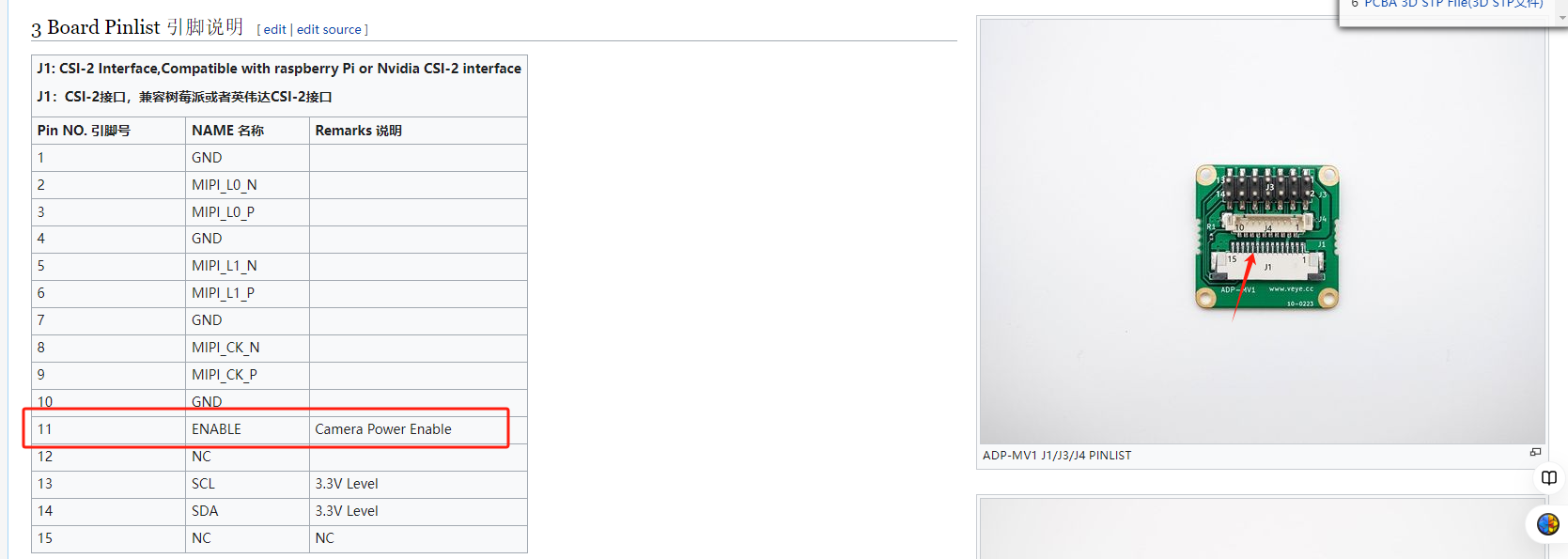
                            65a2c6b5-2454-4088-89a2-61376eb57c2d-image.png

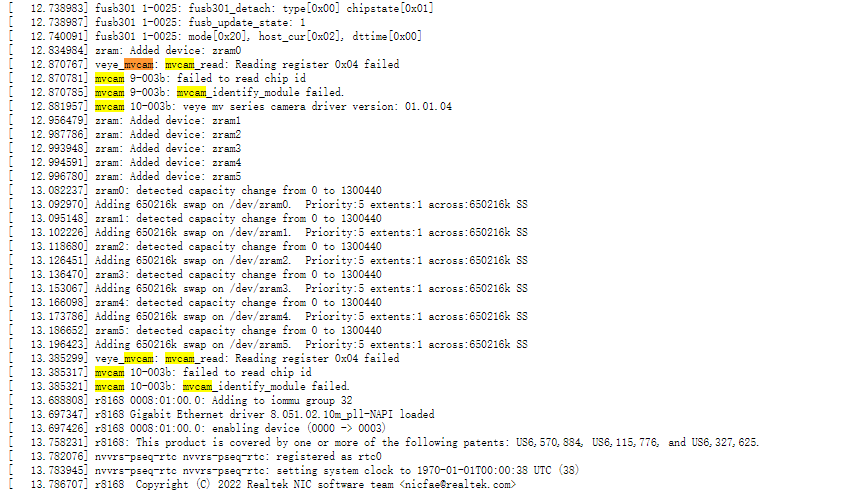
                            Also, with your current configuration, can you use sudo dmesg and send me all the outputs to look at?

                            Questions will be answered as soon as possible, please be patient.
                            如果你使用中文,请直接用中文提问。
                            May the force be with YOU. (This is the translation of the mysterious Chinese symbol above.)

                            veye_xummV O 2 Replies Last reply Reply Quote 0
                            • veye_xummV Offline
                              veye_xumm @veye_xumm
                              last edited by

                              @Otca
                              I wonder if it would be convenient for you to send me your jetson board along with a set of camera boards and we'll test them?

                              Questions will be answered as soon as possible, please be patient.
                              如果你使用中文,请直接用中文提问。
                              May the force be with YOU. (This is the translation of the mysterious Chinese symbol above.)

                              1 Reply Last reply Reply Quote 0
                              • O Offline
                                Otca @veye_xumm
                                last edited by

                                @veye_xumm
                                thanks for your guidance.
                                The dmesg log is appended.
                                MV-MIPI-IMX264.txt

                                unfortunately I'm too far away from you.I'm so sorry that it's not an option for me to send board and camera.

                                veye_xummV 1 Reply Last reply Reply Quote 0
                                • veye_xummV Offline
                                  veye_xumm @Otca
                                  last edited by

                                  @otca cb0ada8c-d4f7-4d26-9a4b-c94753011bb8-image.png
                                  All of this still suggests that i2c is not working.
                                  When I look at your other postings, they seem to say that the camera itself is fine and not broken, right?

                                  Questions will be answered as soon as possible, please be patient.
                                  如果你使用中文,请直接用中文提问。
                                  May the force be with YOU. (This is the translation of the mysterious Chinese symbol above.)

                                  O 1 Reply Last reply Reply Quote 0
                                  • O Offline
                                    Otca @veye_xumm
                                    last edited by

                                    @veye_xumm indeed the camera is fine. i can refrence you to my jetson nano b01 issue.
                                    https://forum.veye.cc/topic/634/jetson-nano-b01-mv-imx264/5

                                    Now what should i do in order to make the jetson orin nano jetpack 6 (r36.3) works with the IMX264?
                                    Thanks alot

                                    veye_xummV 1 Reply Last reply Reply Quote 0
                                    • veye_xummV Offline
                                      veye_xumm @Otca
                                      last edited by

                                      @otca
                                      I have a suggestion, you re-burn the jetson orin system and then don't do any configuration with jetson-io, follow the steps on our wiki exactly step by step.
                                      If the i2c still doesn't work, I can only suspect that your board has a damaged hardware interface to the i2c.

                                      Questions will be answered as soon as possible, please be patient.
                                      如果你使用中文,请直接用中文提问。
                                      May the force be with YOU. (This is the translation of the mysterious Chinese symbol above.)

                                      O 1 Reply Last reply Reply Quote 0
                                      • O Offline
                                        Otca @veye_xumm
                                        last edited by

                                        @veye_xumm now I have used new fresh jetpack 6.0 (R36.3) on jetson orin NX.
                                        here is dmesg log.
                                        I have detected camera and it has shown itself on i2c, but still I have some issues to get the video stream.

                                        sudo dmesg| grep -i 'mvcam'
                                        [    7.284769] mvcam 9-003b: veye mv series camera driver version: 01.01.04
                                        [    7.786350] veye_mvcam: mvcam_read: Reading register 0x04 failed
                                        [    7.786363] mvcam 9-003b: failed to read chip id
                                        [    7.786367] mvcam 9-003b: mvcam_identify_module failed.
                                        [    7.786928] mvcam 10-003b: veye mv series camera driver version: 01.01.04
                                        [    8.288616] mvcam 10-003b: camera is: MV-MIPI-IMX264M
                                        [    8.289601] mvcam 10-003b: firmware version: 0x1410206
                                        [    8.295434] tegra-camrtc-capture-vi tegra-capture-vi: subdev mvcam 10-003b bound
                                        [  354.885790] mvcam 10-003b: csi2_try format
                                        [  354.885832] mvcam 10-003b: csi2_try format
                                        [  354.885835] mvcam 10-003b: mvcam_csi2_get_fmt_idx_by_code success
                                        [  354.963253] mvcam 10-003b: camera_common_mclk_enable: no device power rail
                                        [  354.963265] mvcam 10-003b: camera_common_s_power: failed to enable mclk
                                        [  373.489937] mvcam 10-003b: camera_common_mclk_disable: no device power rail
                                        [  758.620283] mvcam 10-003b: csi2_try format
                                        [  758.620326] mvcam 10-003b: csi2_try format
                                        [  758.620332] mvcam 10-003b: mvcam_csi2_get_fmt_idx_by_code success
                                        [  758.712221] mvcam 10-003b: camera_common_mclk_enable: no device power rail
                                        [  758.712233] mvcam 10-003b: camera_common_s_power: failed to enable mclk
                                        [  766.783908] mvcam 10-003b: camera_common_mclk_disable: no device power rail
                                        
                                        Full DMESG Log:

                                        IMX264.OrinNX.txt

                                        i2cdetect -y -r 10
                                            0  1  2  3  4  5  6  7  8  9  a  b  c  d  e  f
                                        00:                         -- -- -- -- -- -- -- -- 
                                        10: -- -- -- -- -- -- -- -- -- -- -- -- -- -- -- -- 
                                        20: -- -- -- -- -- -- -- -- -- -- -- -- -- -- -- -- 
                                        30: -- -- -- -- -- -- -- -- -- -- -- UU -- -- -- -- 
                                        40: -- -- -- -- -- -- -- -- -- -- -- -- -- -- -- -- 
                                        50: -- -- -- -- -- -- -- -- -- -- -- -- -- -- -- -- 
                                        60: -- -- -- -- -- -- -- -- -- -- -- -- -- -- -- -- 
                                        70: -- -- -- -- -- -- -- -- 
                                        
                                        
                                        VLC:

                                        I closed vlc manually after 3 seconds.

                                        vlc
                                        VLC media player 3.0.16 Vetinari (revision 3.0.13-8-g41878ff4f2)
                                        [0000aaab02f4e590] main libvlc: Running vlc with the default interface. Use 'cvlc' to use vlc without interface.
                                        [0000aaab02fee350] main playlist: playlist is empty
                                        Opening in BLOCKING MODE
                                        ArgusV4L2_Open failed: No such file or directory
                                        Opening in BLOCKING MODE 
                                        [0000ffff44001150] v4l2 demux error: cannot get streaming parameters: Inappropriate ioctl for device
                                        [0000ffff4c000ca0] main input error: Invalid PCR value in ES_OUT_SET_(GROUP_)PCR !
                                        [0000ffff4c000ca0] main input error: Invalid PCR value in ES_OUT_SET_(GROUP_)PCR !
                                        [0000ffff4c000ca0] main input error: Invalid PCR value in ES_OUT_SET_(GROUP_)PCR !
                                        [0000ffff4c000ca0] main input error: Invalid PCR value in ES_OUT_SET_(GROUP_)PCR !
                                        [0000ffff4c000ca0] main input error: Invalid PCR value in ES_OUT_SET_(GROUP_)PCR !
                                        [0000ffff4c000ca0] main input error: Invalid PCR value in ES_OUT_SET_(GROUP_)PCR !
                                        [0000ffff4c000ca0] main input error: Invalid PCR value in ES_OUT_SET_(GROUP_)PCR !
                                        [0000ffff4c000ca0] main input error: Invalid PCR value in ES_OUT_SET_(GROUP_)PCR !
                                        Segmentation fault (core dumped)
                                        
                                        
                                        DTB :
                                         cat /boot/extlinux/extlinux.conf
                                        TIMEOUT 30
                                        DEFAULT imx264
                                        
                                        MENU TITLE L4T boot options
                                        
                                        LABEL primary
                                              MENU LABEL primary kernel
                                              LINUX /boot/Image
                                              INITRD /boot/initrd
                                              APPEND ${cbootargs} root=PARTUUID=a321b5a8-b267-427e-8e1b-73b06c528581 rw rootwait rootfstype=ext4 mminit_loglevel=4 console=ttyTCU0,115200 firmware_class.path=/etc/firmware fbcon=map:0 net.ifnames=0 nospectre_bhb video=efifb:off console=tty0 nv-auto-config 
                                        
                                        
                                        LABEL imx264
                                              MENU LABEL primary kernel
                                              LINUX /boot/Image
                                              FDT /boot/dtb/kernel_tegra234-p3768-0000+p3767-0000-nv.dtb
                                              INITRD /boot/initrd
                                              APPEND ${cbootargs} root=PARTUUID=a321b5a8-b267-427e-8e1b-73b06c528581 rw rootwait rootfstype=ext4 mminit_loglevel=4 console=ttyTCU0,115200 firmware_class.path=/etc/firmware fbcon=map:0 net.ifnames=0 nospectre_bhb video=efifb:off console=tty0 nv-auto-config 
                                              OVERLAYS /boot/dtb/tegra234-p3767-camera-p3768-veye_mvcam-dual.dtbo


                                        ls /sys/firmware/devicetree/base/bus@0/cam_i2cmux/i2c@0/
                                        
                                        '#address-cells'   phandle              rbpcv3_mvcam_a@3b  '#size-cells'
                                         name              rbpcv2_imx219_a@10   reg                 status
                                        
                                        
                                        ls /sys/bus/i2c/drivers/
                                        
                                        at24             dummy               max8973      pca954x             sec_pmic          vc5
                                        axp20x-i2c       fan53555-regulator  mp8859       pf8x00              simple-mfd-i2c
                                        bd9571mwv        fusb301             mvcam        pfuze100-regulator  smbus_alert
                                        bq27xxx-battery  ina3221             nvvrs_pseq   rk808               tpm_i2c_infineon
                                        cros-ec-i2c      max732x             nxp-pca9450  rohm-bd718x7        ucsi_ccg
                                        cs2000-cp        max77620            pca953x      rtc-ds3232          usb3503
                                        
                                        
                                        O veye_xummV 2 Replies Last reply Reply Quote 0
                                        • O Offline
                                          Otca @Otca
                                          last edited by

                                          @veye_xumm
                                          would u please give me the complete guide to build drivers needed for IMX264 on Orin NX 16GB?
                                          For Jetpack 6.0 R36.3, I didn't find any clear instruction on the wiki.
                                          Thanks

                                          O 1 Reply Last reply Reply Quote 0
                                          • O Offline
                                            Otca @Otca
                                            last edited by

                                            Hi,
                                            I have successfully built the drivers for downstream/i2c on the Jetson Orin NX running Jetpack 6 (r36.3). Based on my testing, it appears that the issue is likely related to v4l2 in the upstream code, or possibly the tegra-camera.ko module.

                                            Could you kindly provide me with the source code for v4l2 so I can attempt to build it myself? Alternatively, if possible, please share the pre-built .ko module.

                                            Just to clarify, the board model I'm working with is the Jetson Orin NX, though v4l2 reports it as XAVIER 10-bit. I have also attached the relevant Dmesg log for your reference.

                                            Additionally, I’ve tried both the prebuilt .ko file from your Git repository and my own built version, but both resulted in the same issue. This suggests that the problem isn’t related to the downstream/i2c modules.

                                            Thanks in advance for your support!

                                            Dmesg Logs

                                            Dmesg_01.txt

                                            v4l2-ctl --list-formats-ext
                                            ioctl: VIDIOC_ENUM_FMT
                                            	Type: Video Capture
                                            
                                            	[0]: 'GREY' (8-bit Greyscale)
                                            		Size: Discrete 1920x1080
                                            			Interval: Discrete 0.033s (30.000 fps)
                                            	[1]: 'XY10' (XAVIER 10-bit/16-bit Greyscale)
                                            		Size: Discrete 1920x1080
                                            			Interval: Discrete 0.033s (30.000 fps)
                                            	[2]: 'XY12' (XAVIER 12-bit/16-bit Greyscale)
                                            		Size: Discrete 1920x1080
                                            			Interval: Discrete 0.033s (30.000 fps)

                                            
                                            
                                            1 Reply Last reply Reply Quote 0

                                            Hello! It looks like you're interested in this conversation, but you don't have an account yet.

                                            Getting fed up of having to scroll through the same posts each visit? When you register for an account, you'll always come back to exactly where you were before, and choose to be notified of new replies (either via email, or push notification). You'll also be able to save bookmarks and upvote posts to show your appreciation to other community members.

                                            With your input, this post could be even better 💗

                                            Register Login
                                            • First post
                                              Last post