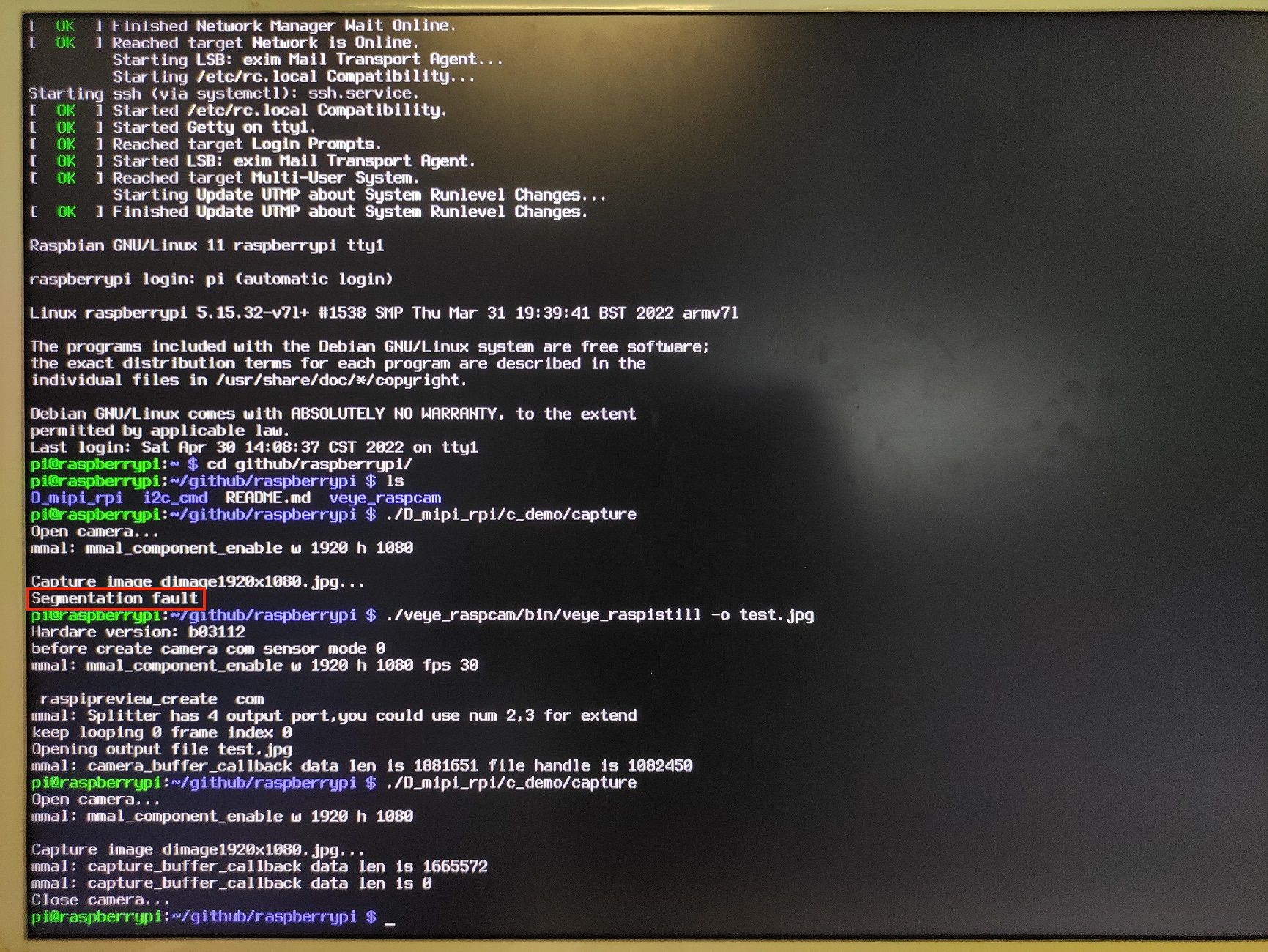
• imx462树莓派开机运行 D-SDK的 c_demo/capture 报错

    2
    1
    0 Votes
    2 Posts
    662 Views
    veye_xummV
    @123456 应该是由于没有给模组的poweron引脚拉高造成的。 先执行一下camera_i2c_config,然后再拍照即可。
  • V4l2 capture by OpenCV doesn't work for IMX462

    2
    0 Votes
    2 Posts
    1k Views
    veye_xummV
    @barbanevosa Hi, I am not very familiar with opencv, here is the command for your reference. http://wiki.veye.cc/index.php/V4L2_mode_for_Raspberry_Pi#Stream_to_OpenCV Also, I think this link below will be helpful to you. https://qengineering.eu/install-gstreamer-1.18-on-raspberry-pi-4.html
  • 0 Votes
    2 Posts
    1k Views
    veye_xummV
    非常棒,谢谢你的无私分享~
  • Load libdmipicam fail.

    3
    0 Votes
    3 Posts
    1k Views
    veye_xummV
    @barbanevosa We are very sorry that due to COVID-19, we have not been in regular office for some time recently. A long time has passed, have you made any new progress? According to your description, I think you should enable the lagency camera function on the bullseye system. But it seems that the system is missing the mmal library for logging. But strangely enough, libdmipicam.so is actually just a part of veye_raspipreview wrapped into a dynamic library, and the runtime environment requirements for both should be the same.
  • Unable to create camera on pi zero without gui

    2
    0 Votes
    2 Posts
    697 Views
    veye_xummV
    @nathan-sinclair We are very sorry that due to COVID-19, we have not been in regular office for some time recently. Based on your description, I think it is most likely due to the lack of power supply capacity of the FFC cable of the pi ZERO. Please try it with a separate 5V power supply. Looking forward to your results.
  • IMX327 V11-0319 polarity

    3
    2
    0 Votes
    3 Posts
    885 Views
    D
    @veye_xumm thank you very much!
  • Failure to run raspipreview after configuration i2c

    5
    0 Votes
    5 Posts
    1k Views
    veye_xummV
    @nathan-sinclair Okay, you're great!
  • Using veye-mipi-327 with opencv

    9
    0 Votes
    9 Posts
    2k Views
    N
    @veye_xumm I was just looking at the i2c program. Call this resolved.
  • 树梅派VEYE-MIPI-IMX462设置不同曝光时间得到图像没变化

    5
    0 Votes
    5 Posts
    1k Views
    veye_xummV
    @autot said in 树梅派VEYE-MIPI-IMX462设置不同曝光时间得到图像没变化: 在VEYE-MIPI-IMX462的datasheet中没有提到曝光可调,是不是意味着这个 VEYE-MIPI-IMX46模块的曝光不可调 可调的。 mshutter配置这两个参数应该会有不同。但是可能agc的调节(也就是增益自动调节),把亮度调到类似,让你没有注意到其差异。 你可以把agc配置为0,然后再分别配置mshutter,对比图像的差异。
  • VEYE-MIPI vs. CS-MIPI

    2
    0 Votes
    2 Posts
    1k Views
    veye_xummV
    @serene said in VEYE-MIPI vs. CS-MIPI: Hi, what's the difference between VEYE-MIPI series vs. CS-MIPI series? The two series use different isp schemes. We have used different sensors for each of the two series. In general, the CS series supports more parameters and is richer. the VEYE series supports fewer parameters.
  • How to rotate VEYE-MIPI-IMX385 camera video on Jetson Xavier NX?

    8
    0 Votes
    8 Posts
    2k Views
    M
    @veye_xumm Can't save? Oh... It's really disappointing. Anyway... Okay. Thank you. I'll close this agenda.
  • VEYE-MIPI-327 fdsrc not able to be read from.

    1
    0 Votes
    1 Posts
    584 Views
    No one has replied
  • Stream h264 from camera VEYE-MIPI-IMX327S using v4l2

    2
    0 Votes
    2 Posts
    744 Views
    D
    On the Tinker Edge T board, we get video from the camera using the command: gst-launch-1.0 v4l2src device=/dev/video0 ! "video/x-raw,format=(string)YUY2, width=(int)1920, height=(int)1080,framerate=(fraction)30/1" ! glimagesink But when trying to get the h264 stream using the command: gst-launch-1.0 v4l2src device=/dev/video0 ! "video/x-raw,format=(string)YUY2, width=(int)1920, height=(int)1080,framerate=(fraction)30/1" ! videoconvert ! x264enc ! h264parse ! rtph264pay config-interval=1 pt=96 ! rtph264depay ! rtspclientsink protocols=tcp location=rtsp://0.0.0.0:8554/live/h264 latency=1000 An error is thrown: [image: 1645528098443-photo_2022-02-22_14-07-48.jpg] How to get h264 stream?
  • 菜鸡提问:jetson nano怎么用opencv调用IMX385呀

    2
    0 Votes
    2 Posts
    566 Views
    veye_xummV
    @wqh 这个我也不是很懂,但是我们文档4.2.1章节的 Gstreamer 嵌入到 OpenCV 部分,肯定是一种实现方法,有很多客户都是这么做的。
  • imx307和imx327的驱动的帧率可以修改吗

    6
    0 Votes
    6 Posts
    1k Views
    veye_xummV
    @jdx-jdx 通过-b来指明不同的i2c bus. 请参考下面链接的 4.3.1部分 http://wiki.veye.cc/index.php/VEYE_CS_Camera_for_Jetson_TX2/zh#.E8.A7.86.E9.A2.91.E6.8E.A7.E5.88.B6.E8.BD.AF.E4.BB.B6.E5.8C.85.E7.9A.84.E4.BD.BF.E7.94.A8
  • IMX385 Jetson Xavier NX Gstreamer error!!!

    9
    0 Votes
    9 Posts
    4k Views
    M
    @veye_xumm Okay. Anyway Thank you.
  • This topic is deleted!

    1
    0 Votes
    1 Posts
    5 Views
    No one has replied
  • segmentation fault error

    2
    0 Votes
    2 Posts
    633 Views
    veye_xummV
    @meitiever Can you provide the command you executed?
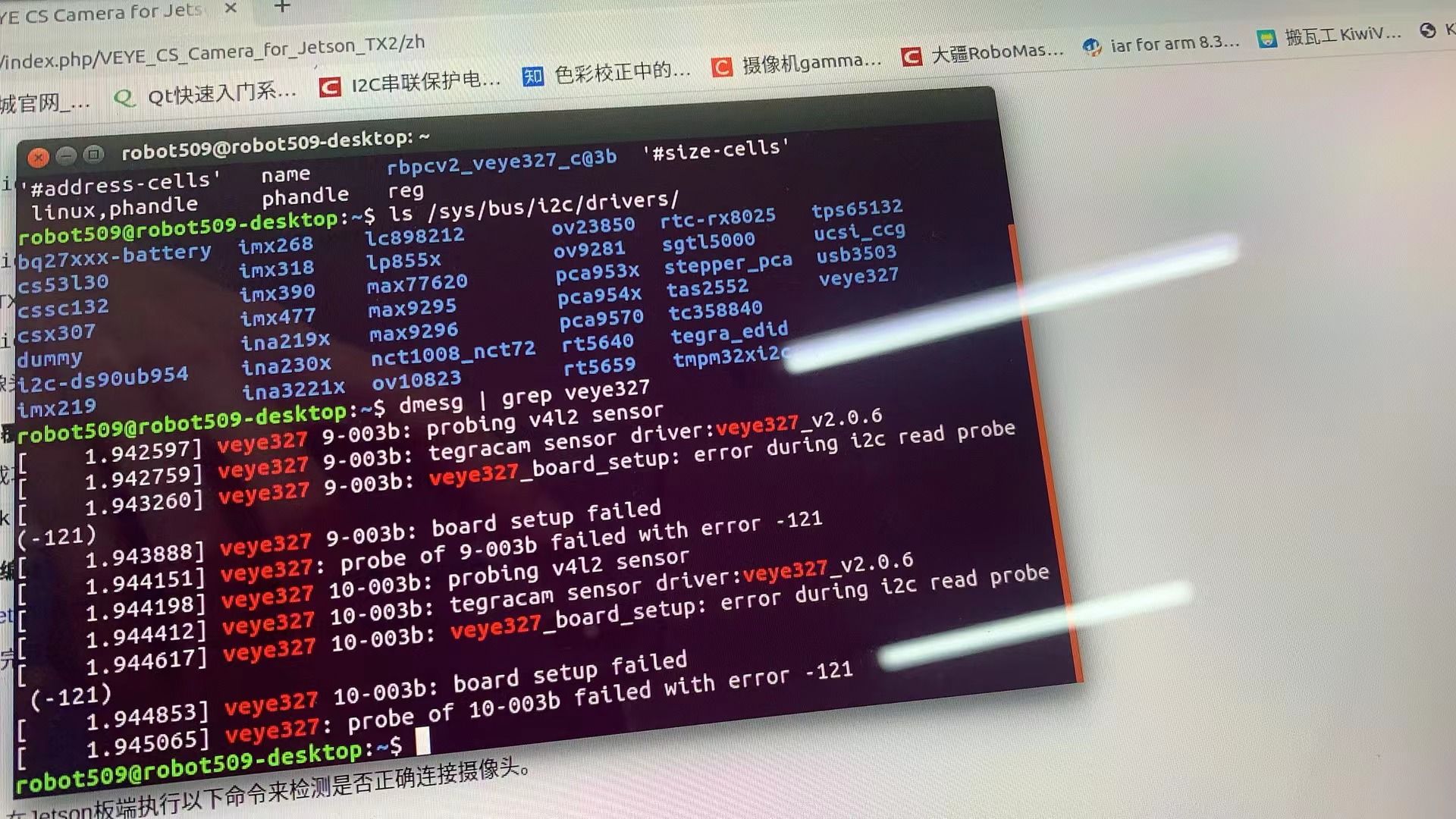
  • Nano-B01上连接IMX307提示error druing i2c read probe (-121)

    6
    1
    0 Votes
    6 Posts
    1k Views
    veye_xummV
    @daxue0116 正常情况下,插上两个,会probe到两个。 你可以看看/dev/video0 /dev/video1是否同时存在。 另外可以看看 dmesg | grep 307 的输出情况。
  • imx327 missing from raspberrypi_v4l2 ver 5.10.63-

    6
    0 Votes
    6 Posts
    2k Views
    R
    Hi, I tried the V4L2 driver with Buster which worked OK on a Pi4 4 GB then I tested Bullseye with the legacy mode and the same V4L2 driver ( veyecam2m ver 5.10.63) and that worked OK too. I was previously testing with a Pi 3A which I would like to work but that does seem to have a problem with the v4L2 driver with both OS's.